10 Best Ways to Repurpose Webinar Recordings for Maximum ROI
Discover the best ways to repurpose webinar recordings into 30+ days of content. Practical, ROI-driven strategies to save time and scale your marketing.

You've invested thousands of US dollars and countless hours into creating a high-value webinar. But what happens after the live event ends? For most B2B marketers, that expensive recording gathers digital dust—a powerful but completely underutilised asset. The potential ROI diminishes daily.
The core problem is the manual workflow. Chopping up a recording into clips, articles, and social posts is a time-consuming nightmare. It demands multiple tools, expensive freelancers, and endless reviews. This broken process wastes your most valuable content. You're left with a single asset from a 60-minute webinar when you should have enough content for 30 days.
This guide provides a clear, strategic solution. We will detail the 10 best ways to repurpose webinar recordings, transforming a single session into a month's worth of professional, on-brand marketing assets. Forget the manual grind; these are actionable, benefit-driven strategies that deliver speed, simplicity, and measurable ROI. Let's unlock the hidden potential in your archives.
1. Short-Form Video Clips (TikTok, Instagram Reels, YouTube Shorts)
One of the most potent ways to repurpose webinar recordings is by transforming them into bite-sized, vertical video clips. This strategy takes your most impactful 60-second moments—surprising statistics, powerful quotes, or quick "aha!" insights—and repackages them for social media feeds where attention is fleeting. For B2B marketers, this is a goldmine for extending the reach of high-value content far beyond the original live audience.

This approach capitalises on the powerful algorithms these platforms use to promote engaging content, introducing your brand and expertise to new, targeted audiences organically. Instead of letting an expensive webinar sit idle, you can generate a pipeline of content that fuels your social calendar for weeks. A single 60-minute webinar can easily become 10-15 high-impact clips, driving brand awareness and lead generation with minimal effort.
Why this method is effective
Short-form clips are highly shareable, mobile-native, and perfectly suited to how modern professionals consume content—on the go and in short bursts. They allow you to demonstrate authority and provide value quickly, turning passive scrollers into engaged followers and proving the ROI of your content.
Your Action Plan for Creating Short-Form Clips
- Pinpoint Key Moments: Review your recording for segments with high energy, audience reactions, or definitive statements. Aim to extract 10-15 potential clips from a single one-hour webinar.
- Format for Vertical Viewing: Crop the video to a 9:16 aspect ratio, ensuring the speaker is centred and clearly visible.
- Add Captions and Headlines: Use a bold, attention-grabbing headline. Add synchronised, burnt-in captions, as over 85% of social videos are watched without sound.
- Increase Visual Engagement: Incorporate pattern interrupts every 3-5 seconds. This can include animated text overlays, relevant emoji pop-ups, or quick zoom effects to hold viewer attention.
- Include a Clear Call-to-Action (CTA): End each clip by directing viewers to a link in your bio to watch the full webinar, generating leads from your repurposed content.
Manually creating these clips is a time-intensive process. Using a dedicated webinar clip generator automates highlight detection, transcription, and formatting, saving your team hours of manual work and eliminating the need for complex editing tools.
2. SEO-Optimised Blog Posts and Articles
One of the smartest ways to repurpose webinar recordings is to convert your valuable discussion into a comprehensive, SEO-optimised blog post. This tactic transforms the spoken content and key insights from your presentation into a long-form article that acts as an evergreen asset. It attracts continuous organic traffic by answering the specific questions your target audience is searching for, solidifying your brand's thought leadership long after the live event.
This strategy ensures the immense value packed into your webinar doesn’t disappear. For B2B marketers, this is a highly efficient way to turn a one-hour investment into a durable content pillar that generates leads and builds domain authority for months or even years. This is how you prove the long-term ROI of your webinar programme without creating new content from scratch.
Why this method is effective
A detailed blog post makes your webinar content discoverable via search engines, reaching a much broader audience that prefers reading over watching videos. It provides a permanent, in-depth reference that can be easily shared and linked to, significantly boosting your content marketing ROI and establishing your website as a go-to resource.
Your Action Plan for Creating Blog Posts
- Create an Outline from the Transcript: Start with the webinar transcript to structure your article. Use the main talking points as your H2 and H3 headings for a logical flow.
- Target Long-Tail Keywords: Identify and target longer, more specific keyword phrases (e.g., "how to integrate sales and marketing software") that have lower competition but high intent.
- Boost E-E-A-T Signals: Include a speaker bio with credentials and a headshot within the article. This adds credibility and aligns with Google's Experience, Expertise, Authoritativeness, and Trustworthiness guidelines.
- Enhance with Visuals: Embed charts, graphs, and key data visualisations from your webinar presentation directly into the post. This breaks up the text and provides scannable, high-value information.
- Optimise for Featured Snippets: Structure sections to directly answer "who, what, where, why, and how" questions. Use bullet points and numbered lists to make information easily digestible for both readers and search engines.
- Include a Clear CTA: Embed calls-to-action throughout the post, inviting readers to watch the full webinar, download a related resource, or book a demo.
Manually transcribing a webinar and drafting a blog post is incredibly time-consuming. Learning how to efficiently turn a webinar into a blog post using an automated platform can save dozens of hours, generating SEO-ready drafts in minutes instead of days.
3. Email Marketing Series and Nurture Sequences
Another of the best ways to repurpose webinar recordings is by converting the rich content into an automated email marketing series. This strategy breaks down your webinar into a sequence of value-packed emails, nurturing leads through your sales funnel long after the live event. Each email can isolate a key insight, a practical tip, or an exclusive takeaway, keeping your audience engaged and moving them towards a conversion.
This method transforms a one-off event into a powerful, automated asset that works for you around the clock. Instead of a single follow-up email, you create a multi-touchpoint journey that educates and builds trust with your prospects. This is a direct, measurable way to prove the ROI of your webinar by turning attendees into qualified leads and customers.
Why this method is effective
Email remains one of the highest ROI channels in B2B marketing, providing a direct and personalised way to communicate with your audience. A nurture sequence allows you to systematically deliver value, address pain points discussed in the webinar, and guide leads towards a purchasing decision without being overly sales-focused.
Your Action Plan for Creating Email Nurture Sequences
- Outline Your Sequence: Plan a 5-7 part email series. Start with a "thank you" and a key statistic, followed by emails that deep-dive into specific tips, and end with a clear call-to-action for a demo or related resource.
- Craft Compelling Subject Lines: Grab attention in a crowded inbox. Use engaging subject lines like, "Here's what 500+ marketers learned about [Topic]" or "Your exclusive recap: [Webinar Title]".
- Segment Your Audience: Create different sequences for those who attended the live event versus those who registered but didn't attend. Attendees can receive deeper insights, while non-attendees receive a "what you missed" summary to encourage them to watch the recording.
- Embed Social Proof: Include a powerful quote or testimonial from the webinar presenter or a key attendee to build credibility and reinforce the value of the content.
- Gate a High-Value Asset: In the final emails, offer an exclusive resource mentioned in the webinar, such as a template or checklist, behind a form to capture new lead details or further qualify existing ones.
- Space Out Your Emails: Schedule your emails to be sent 2-3 days apart. This maintains momentum without overwhelming your subscribers' inboxes.
4. Podcast Episodes and Audio Repurposing
A highly effective way to repurpose webinar recordings is by converting the audio track into standalone podcast episodes. This strategy taps into the massive and growing audience of podcast listeners, allowing you to reach busy professionals during their commute, workout, or other screen-free moments. This turns a one-off visual event into a long-lasting audio asset that builds authority and deepens audience connection.
This method lets you feed an entirely new content channel without creating anything from scratch, extending the ROI of your initial webinar investment significantly. Instead of producing a new podcast series from zero, your existing webinar library becomes an instant source of high-quality episodes, saving immense time and resources.
Why this method is effective
Podcasts foster a sense of intimacy and loyalty that is difficult to achieve with other content formats. By repurposing webinar audio, you provide in-depth, valuable content in a highly convenient format, positioning your brand as a go-to resource in your industry and capturing the attention of senior decision-makers who are often avid podcast consumers.
Your Action Plan for Creating Podcast Episodes
- Extract and Polish the Audio: Isolate the audio track from your recording. Use editing software to clean up any background noise, awkward pauses, or irrelevant chatter for a professional listening experience.
- Add Professional Branding: Record and add a standardised intro and outro with theme music. The intro should briefly explain that the audio is from a webinar and introduce the speaker and topic.
- Structure for Audio Consumption: Break the episode into logical segments. Consider adding short host commentary between sections to provide context that might have been visual in the original webinar.
- Create Comprehensive Show Notes: Publish the episode with detailed show notes that include a summary, key takeaways, speaker bios, and links to all mentioned resources and the full webinar recording. This improves both user experience and SEO.
- Promote with Audio Snippets: Extract 3-5 of the most compelling 60-90 second audio clips. Convert these into audiograms (static images with animated sound waves) to promote the full episode on social media.
Manually editing and producing a podcast from webinar audio requires technical skill and significant time. A platform like RepurposeYourContent can automatically extract the audio and generate shareable audiogram clips, streamlining your promotional workflow and helping you launch your podcast series faster.
5. LinkedIn-Native Posts and Thought Leadership Content
Transforming your webinar's core insights into native LinkedIn content is one of the best ways to repurpose webinar recordings for maximum B2B impact. Instead of just sharing a link, this method involves creating content directly on the platform, such as text posts, carousels (document shares), or short video clips. This strategy is highly effective because LinkedIn's algorithm prioritises native content, increasing its visibility in the feeds of your target decision-makers.
This approach positions your company and key speakers as accessible industry experts, fostering direct engagement and building a strong professional brand. It turns a single webinar into a powerful engine for thought leadership and lead generation, demonstrating ROI through high-quality engagement and conversations with your ideal customers.
Why this method is effective
LinkedIn is the premier platform for professional networking and B2B marketing. Native content feels more authentic and less promotional, encouraging likes, comments, and shares from a highly relevant audience. It allows you to deliver value directly in the feed, building trust and authority far more effectively than a simple link drop.
Your Action Plan for Creating LinkedIn-Native Content
- Extract Core Insights: Identify 3-5 of the most compelling arguments, statistics, or frameworks from your webinar. These will form the foundation of your posts.
- Create a Carousel Post: Format these key insights into a visually appealing slide deck (PDF) and upload it as a "Document" post. These posts consistently achieve high engagement. Start with a provocative question to hook the reader.
- Write a Text-Based Post: Distil one powerful idea into a concise, scannable text post. Use short paragraphs, emojis, and bullet points to break up the text and tag relevant speakers or companies to expand your reach.
- Post Native Video Clips: Instead of sharing a YouTube link, upload a 3-5 minute highlight clip directly to LinkedIn. This shorter format is better suited for the platform and benefits from algorithmic preference.
- Include an Actionable Takeaway: End your post with a question to encourage comments, rather than a generic CTA. Ask your audience how they would apply the insight you've shared to spark a conversation.
Manually crafting these diverse posts is a drain on your resources. You can streamline this entire workflow and create engaging LinkedIn posts from your webinar in minutes by using a platform that automatically generates optimised copy, carousels, and image quotes, eliminating the need for a separate designer and copywriter.
6. Transcripts and Written Repurposing Materials
Creating a detailed transcript is one of the most foundational ways to repurpose webinar recordings, acting as the source material for countless other content assets. This process converts the entire audio of your webinar into a time-stamped, searchable text document. A clean transcript is the first step in unlocking the full value of your investment, turning spoken words into a versatile asset for SEO, accessibility, and fast content creation.
This strategy makes your high-value webinar content discoverable by search engines, which cannot crawl video but can easily index text. Instead of your expert insights being locked away in a video file, a transcript makes every key phrase a potential entry point for new organic traffic. It’s a simple, high-ROI action that underpins all other repurposing efforts.
Why this method is effective
A transcript is the ultimate repurposing launchpad. It provides a complete, word-for-word account that your team can scan in minutes to pull quotes, identify themes for blog posts, and verify statistics without re-watching the entire video. It also vastly improves accessibility for your audience and provides a significant SEO boost.
Your Action Plan for Creating Transcripts
- Generate an AI-Powered Draft: Start with an AI transcription service to get a fast, low-cost initial draft. This is far more efficient than manual transcription from scratch.
- Budget Time for Human Review: Allocate time for a thorough human review. This step is crucial for correcting names, industry jargon, and ensuring 99%+ accuracy.
- Format for Readability: Break the text into logical sections with clear headings. Add speaker names and timestamps every few minutes to make navigation easy.
- Refine the Language: Edit out filler words like 'um', 'ah', and 'you know' to create a clean, professional document that reads smoothly.
- Publish for SEO and Audience Value: Post the full transcript on the same webpage as the webinar recording. This allows search engines to index the content and gives your audience the option to read, search, or scan the material.
Manually managing transcription and review is a tedious bottleneck. A platform like RepurposeYourContent automates this, providing a clean, accurate transcript as the foundation for all other asset creation, saving your team from the manual workload.
7. Image Quotes and Social Media Graphics
One of the quickest ways to repurpose webinar recordings is by extracting memorable quotes, powerful statistics, or key takeaways and transforming them into visually compelling social media graphics. This strategy captures the essence of your content in a static, highly shareable format, perfect for LinkedIn, Instagram, and X (formerly Twitter). It's a low-effort, high-impact method to maintain audience engagement.

This approach turns your speaker's expertise into shareable assets that reinforce your brand's authority. A single one-hour webinar can easily yield 6-16 distinct quote graphics, providing a steady stream of professional-looking content for your social media calendar without needing a graphic designer.
Why this method is effective
Image quotes are visually arresting, easily digestible, and highly shareable, stopping the endless scroll on crowded social feeds. They highlight the most potent insights from your webinar, driving traffic and reinforcing your thought leadership without requiring viewers to commit to watching a video.
Your Action Plan for Creating Social Media Graphics
- Extract Powerful Snippets: Review the webinar transcript to identify 5-10 compelling quotes, surprising data points, or concise takeaways. Focus on statements that are impactful even without their original context.
- Design with Brand Consistency: Use your company’s brand kit—colours, fonts, and logo—to create a cohesive set of templates. Create variations in both square (1:1) and vertical (9:16) formats for maximum platform compatibility.
- Attribute and Add Credibility: Always include the speaker's name, title, and company. This not only gives credit but also leverages their authority to boost the credibility of the insight.
- Incorporate a Subtle CTA: Add a non-intrusive call-to-action in your post copy, such as "Watch the full webinar for more insights" with a link, turning brand awareness into a lead generation opportunity.
- Batch and Schedule: Create all your graphics in one session and use a scheduling tool to distribute them over several weeks. This ensures consistent social media presence from a single piece of core content.
8. Webinar Highlight Compilations and Reels
Another one of the best ways to repurpose webinar recordings is to curate the most powerful moments into a polished highlight compilation. This involves stitching together the best clips, key insights, and product demos from one or multiple webinars into a dynamic 3-10 minute video. This "best of" reel acts as a powerful promotional asset, showcasing the immense value of your content and compelling viewers to register for future events.
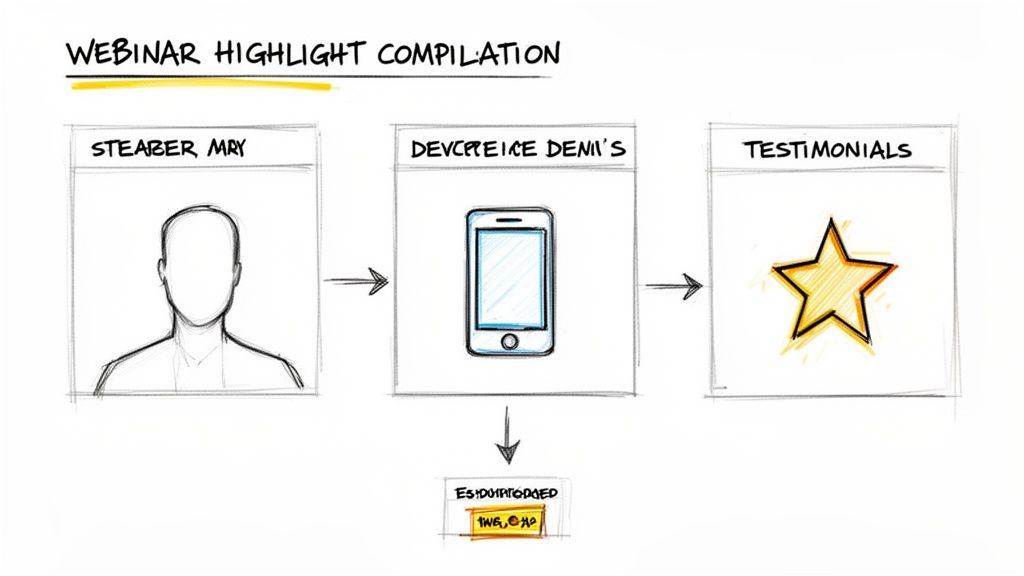
This strategy is highly effective for demonstrating speaker expertise and the tangible benefits of your products or services. By condensing hours of content into a single, high-impact asset, you create a perfect trailer for your webinar series, maximising the ROI on your original investment.
Why this method is effective
Highlight compilations serve as compelling social proof and a powerful lead magnet. They give prospects a taste of the value you provide without asking for a full hour of their time, making them far more likely to convert on a registration page for your next live session.
Your Action Plan for Creating Highlight Reels
- Identify Pillar Moments: Review your recordings and pinpoint the top 3-5 most impactful segments per webinar. Look for high-energy speaker moments, audience 'aha!' moments in the chat, or concise explanations of complex topics.
- Craft a Narrative Arc: Organise your chosen clips to tell a story. A simple and effective structure is Problem → Solution → Outcome, guiding the viewer through a logical and satisfying journey.
- Keep the Pace Energetic: Use quick cuts (every 2-4 seconds) and strategic music to maintain viewer engagement. Smooth transitions between different speakers or topics are crucial for a professional finish.
- Add Essential Overlays: Include burnt-in captions for all dialogue, as many viewers will watch on social media without sound. Use text overlays to introduce speakers or highlight key takeaways.
- End with a Strong CTA: Conclude the video with a clear call-to-action card. Direct viewers to a landing page to "Register for our next webinar" or "Watch the full sessions" to capture leads directly.
9. Knowledge Base Articles and Help Center Documentation
A practical way to repurpose webinar recordings is by converting detailed, product-focused content into structured knowledge base articles and help centre documentation. This strategy transforms your in-depth feature explanations and setup guides into evergreen support assets. For B2B SaaS companies, this is a highly efficient method for reducing support ticket volume and improving customer onboarding, turning a one-off event into a long-term resource that demonstrates clear ROI.
Instead of letting valuable product demos remain locked inside a lengthy video, you can create a library of searchable, easy-to-digest guides. These assets serve both external customers seeking self-service support and internal teams needing quick access to product information for sales enablement or customer success.
Why this method is effective
Knowledge base articles provide on-demand, scalable support that improves user satisfaction and product adoption. They create a single source of truth for product information, ensuring consistency and empowering users to solve problems independently, which builds customer confidence and loyalty.
Your Action Plan for Creating Knowledge Base Articles
- Structure for Clarity: Organise each article logically, such as: Overview → Setup Steps → Key Features Walkthrough → Troubleshooting/FAQs. This predictable structure helps users find information quickly.
- Embed Video Segments: Extract specific product demo clips from the webinar and embed them directly within the relevant sections of your articles. Visual demonstrations are often more effective than text alone.
- Annotate and Illustrate: Use screenshots taken from the webinar recording and add annotations, arrows, and callouts to highlight specific UI elements and steps.
- Maintain Product Consistency: Ensure all terminology used in the article perfectly matches the language within your product’s user interface to avoid confusion.
- Create Learning Paths: Group related articles together to form guided learning paths for new users or for those mastering a specific feature set. Include hyperlinks between relevant articles.
- Track Performance and Iterate: Monitor article views and correlate them with support ticket data. If a specific feature still generates many tickets, update the corresponding article to be clearer or more comprehensive.
10. Infographics and Data Visualisation Assets
One of the most valuable ways to repurpose webinar recordings is by extracting key data points and transforming them into compelling infographics. This method takes complex statistics or step-by-step processes presented in your webinar and translates them into a highly digestible and shareable visual format. For B2B marketers, this is an exceptional way to communicate data-driven insights and position your brand as a credible authority.
This strategy allows you to atomise dense information from an hour-long session into a powerful standalone asset that can fuel your content strategy for weeks. An infographic can be shared on social media, embedded in blog posts, and included in email newsletters, significantly extending the life and reach of your original webinar and demonstrating tangible ROI from a single event.
Why this method is effective
Infographics are powerful because the human brain processes visual information 60,000 times faster than text. They make complex data accessible and memorable, are extremely shareable on platforms like LinkedIn and X, and can boost website traffic and SEO when properly optimised and embedded.
Your Action Plan for Creating Infographics
- Isolate Key Data: Review your webinar recording to identify 2-3 core statistics, a key framework, or a multi-step process that provides significant value.
- Choose the Right Visualisation: Select a chart type that best tells the story. Use a bar chart for comparisons, a line graph for timelines or trends, and a pie chart for showing proportions.
- Design with Brand Consistency: Use a limited colour palette of 3-4 brand colours. Employ a clear visual hierarchy to guide the viewer’s eye to the most important insight first.
- Optimise for Multiple Channels: Create several versions of the infographic. A tall, vertical format (1080x1920) works for Pinterest and blog posts, a square version (1080x1080) is ideal for Instagram and LinkedIn, and a wide format (16:9) fits perfectly in presentations.
- Ensure Credibility and Usability: Always include the data source or a link back to the full webinar for credibility. Optimise the final image file size to be under 2MB for fast loading times on your website.
Top 10 Webinar Repurposing Methods — Comparison
| Item | Implementation complexity | Resource requirements | Expected outcomes | Ideal use cases | Key advantages |
|---|---|---|---|---|---|
| Short-Form Video Clips (TikTok, Reels, Shorts) | Low–Medium — quick edits, strong hooks | Simple editing tools, captions, vertical formatting; AI speeds extraction | Rapid reach & engagement; traffic back to full webinar | Social growth, teaser promotion, audience re-engagement | High organic reach; low production barrier; repurposable |
| SEO-Optimized Blog Posts and Articles | High — rewrite & structure for SEO | Skilled writers, SEO tools, time for research/optimization | Long-term organic traffic and authority (months to rank) | Evergreen topics, thought leadership, lead capture | Durable ROI; drives qualified organic traffic; backlinks |
| Email Marketing Series and Nurture Sequences | Medium — sequence planning & testing | Email platform, segmentation, copywriting, automation setup | Direct conversions and lead nurturing; measurable ROI | Post-webinar follow-up, sales enablement, long sales cycles | Highest channel ROI; direct audience access; trackable |
| Podcast Episodes and Audio Repurposing | Medium–High — audio cleanup & framing | Audio editing, hosting, intro/outro assets; 2–4 hrs/episode | Evergreen reach to engaged listeners; brand building | Commuter/passive audiences, thought leadership, interviews | Deep audience connection; long shelf life; repurposable clips |
| LinkedIn-Native Posts and Thought Leadership | Low–Medium — content design for platform | Copy, carousel/design assets, employee advocacy | Targeted B2B engagement and quality leads | Personal branding, decision‑maker outreach, webinar insights | Native algorithm boost; high decision-maker concentration |
| Transcripts and Written Repurposing Materials | Low–Medium — transcription + cleanup | Automated transcription tools + human review; storage | Foundation for SEO, accessibility, and downstream assets | All repurposing workflows; compliance; searchable archives | Essential base asset; improves discoverability and accessibility |
| Image Quotes and Social Media Graphics | Low — template-driven design | Design templates/tools, brand assets; batch creation | High social engagement and shareability | Quick social boosts, awareness campaigns, speaker highlights | Fast to produce at scale; highly shareable visual content |
| Webinar Highlight Compilations and Reels | High — multi-clip editing and narrative build | Advanced video editing, music, color correction; 2–4 hrs/video | Promotional showcase that drives registrations and credibility | Event promotion, sales demos, conference recaps | Demonstrates value quickly; persuasive storytelling |
| Knowledge Base Articles and Help Center Docs | Medium–High — structured authoring & maintenance | Technical writers, CMS/KB platform, version control | Reduced support tickets; faster onboarding; self-service adoption | Product support, onboarding, internal enablement | Lowers support load; improves customer time‑to‑value |
| Infographics and Data Visualization Assets | Medium–High — design + data verification | Designer/time, data accuracy checks; multiple formats | Highly shareable, digestible presentation of complex data | Research reports, data-driven insights, thought leadership | Makes complex info accessible; drives shares and backlinks |
Turn Your Webinar Library into a Content Engine, Instantly
You’ve invested significant time and resources into creating a valuable webinar. The strategies we’ve explored prove one critical point: your work isn't over when the live event ends. The true ROI of your webinar programme lies in its second life—its ability to be deconstructed into a month-long cascade of high-impact marketing assets. A single 60-minute webinar can become 30 days of content.
Viewing your webinar recording not as a single file but as a rich repository of raw material is a fundamental shift in content strategy. Each key insight is a potential LinkedIn post. Each compelling statistic is an infographic waiting to be designed. Every answered question from the Q&A is a future knowledge base article. This is how you move from a linear, one-and-done content calendar to a scalable, efficient content ecosystem.
The Real Barrier: Manual Execution, Not a Lack of Ideas
The challenge for most marketing teams isn't a shortage of inspiration; it’s a deficit of time and resources. The ten powerful methods detailed in this article represent the best ways to repurpose webinar recordings, but executing them manually is a logistical nightmare.
Think about the traditional workflow:
- Hiring and coordination: You need a freelance video editor for clips, a copywriter for the blog, and a graphic designer for quote images. This is expensive and slow.
- Tool-stack chaos: You're juggling a transcription service, Adobe Premiere Pro, Canva, and your social media scheduler. This creates complexity and drains efficiency.
- Time drain: The entire process can take weeks, eroding the timeliness and momentum generated by the live event.
This friction-filled process is why so many valuable webinar recordings languish in a digital archive, their potential completely unrealised. It’s an expensive problem, turning a high-cost asset into a low-return activity.
Automate the Workflow, Amplify the Impact
The solution is to build a smarter, automated system. RepurposeYourContent eliminates the manual bottlenecks, allowing your team to focus on strategy and distribution rather than tedious production. By centralising the repurposing process, you ensure brand consistency, dramatically accelerate speed to market, and finally unlock the full value trapped within your webinar library.
Adopting this mindset transforms your content engine. Instead of a 60-minute webinar yielding one recording, it now generates:
- A 2,000-word SEO-optimised article.
- 10-15 short-form video clips for social media.
- A 5-part email nurture sequence.
- 20+ branded image quotes.
- A full podcast episode transcript.
This isn’t just about creating more content. It’s about creating targeted assets that meet your audience where they are, from LinkedIn to Instagram Reels. It's how you maximise reach, engagement, and lead generation from a single piece of cornerstone content. Stop letting your best insights fade away.
Stop juggling multiple tools, freelancers, and manual processes. RepurposeYourContent is the all-in-one AI platform that automates the entire process, turning your recordings into dozens of ready-to-publish assets in minutes. Experience the fastest and simplest way to implement the best ways to repurpose webinar recordings. Visit RepurposeYourContent and start your free trial today.
Tags:




