Content Atomization: Turn One Recording Into 30 Assets
Learn content atomization step by step, with time costs, workflow examples, and a done-for-you alternative that delivers 30 assets in 72 hours.

Content atomization breaks one long-form recording into 20 to 30 smaller, channel-ready assets. Done manually, the process takes roughly 10 to 16 hours per recording before approvals or scheduling.
That gap explains why strong podcasts, interviews, keynotes, sales calls, livestreams, and courses often get published once, then abandoned. The recording contains the expertise. The problem is turning that expertise into clips, posts, graphics, and search content without consuming an entire workday.
Content atomization solves that problem by treating one recording as a source, not a finished asset. The practical question isn't whether a podcast episode can produce more content. It can. The question is whether the internal team should spend the next day producing it.
What Content Atomization Actually Is
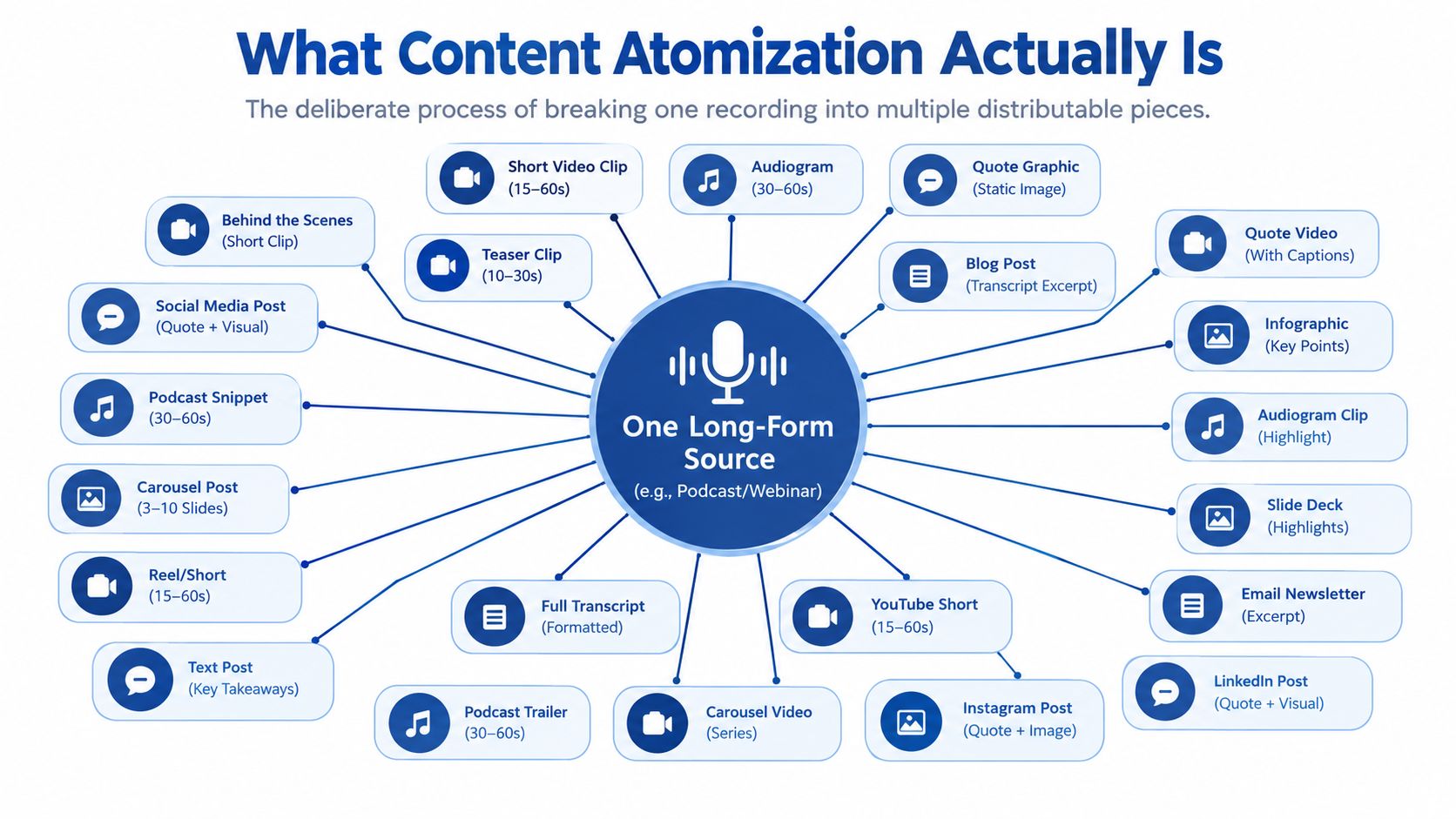
Content atomization is the deliberate process of breaking one long-form recording into smaller assets that work on specific channels. A podcast interview can become short clips, LinkedIn posts, quote graphics, audiograms, carousels, and a supporting SEO article.
Each atom should stand alone. It might be a contrarian opinion, a useful framework, a customer objection, a story, or a memorable line. The audience shouldn't need the full recording to understand the point.
The source material usually includes:
- A transcript: The searchable text makes ideas easier to find.
- Timestamps: Editors can return to the exact moment quickly.
- Speaker cues: These identify who said what and help preserve context.
- Content pillars: Predefined themes prevent random extraction.
- Brand guidance: Voice notes, visual rules, and banned phrases reduce revisions.
The outputs are equally practical. A finished atomization batch might include vertical video clips, caption files, social posts, quote graphics, image carousels, audiograms, and one search-led blog post.
The term has been used since around 2000, when Web 2.0 discussions focused on breaking information into smaller, reusable units. It later became a publishing and marketing tactic as content moved across feeds, social platforms, blogs, and email, as documented in this content atomization history.
Atomization is more than reposting
Reposting copies the same material into another channel. Atomization changes the structure, hook, length, visual treatment, and call to action for the destination.
That distinction matters. A podcast clip needs a strong opening and readable captions. A LinkedIn post needs a clear argument. A carousel needs a sequence that makes sense without audio. A blog post needs headings, evidence, and internal context.
A useful Crowbert repurposing workflow treats the source as a set of independent ideas rather than one file to duplicate. Teams can also use this complete content repurposing guide to separate simple format conversion from deeper content extraction.
By 2024, 48% of B2B marketers said they weren't repurposing or atomizing enough content to meet channel demand, according to the benchmark summarized by Rankite's content atomization strategy. The execution gap is clear. The primary need is not more recordings. It is a repeatable production workflow with a defined stopping point.
Picking the Right Recording and Setting the Goal
Not every recording deserves atomization. Weak source material creates weak derivatives, regardless of editing quality.
The strongest candidates have a clear point of view, useful tension, and several distinct ideas. A founder interview may contain a strong market opinion, a practical process, and an objection from a buyer. A keynote may contain a framework, a story, and several lines worth quoting.
Start with the source
A producer should review the recording before promising an asset count. The recording should have enough usable substance to support different formats, but length alone isn't enough. A focused 45-minute interview can outperform a longer conversation filled with repetition.
A simple qualification check works:
- Does the recording contain a clear audience problem?
- Does the speaker offer a specific opinion or method?
- Can several moments stand without heavy explanation?
- Are the audio and video clear enough for editing?
- Does the source support the channels the team uses?
A transcript-first workflow also helps. Meeting recording tools for marketers can speed up discovery, but human review remains necessary for names, terminology, claims, and context.
Set one outcome
The goal should fit into one sentence. Examples include:
- Fill one month of LinkedIn publishing.
- Build a short-form video queue.
- Support a product launch.
- Drive new email signups.
- Turn customer conversations into sales enablement content.
The target audience needs the same precision. A B2B founder on LinkedIn needs a different asset mix from a consumer creator publishing on TikTok. Channel choice should follow audience behavior, not the convenience of the editing team.
| Channel | Best-Fit Asset Formats |
|---|---|
| Short posts, quote graphics, document carousels, vertical clips | |
| YouTube Shorts | Vertical video clips, captioned explainers |
| Instagram Reels | Short video clips, quote-led videos, audiograms |
| Brief insights, transcript excerpts, links to the full article | |
| Company blog | SEO article, FAQ sections, supporting visuals |
| Podcast feed | Full episode, audiograms, episode highlights |
The team should choose the formats before clipping begins. A defined target of 20 to 30 assets creates a finish line. Without that limit, operators keep extracting weaker moments because the source still contains unused material.
The Manual Atomization Workflow Step by Step
A 45-minute recording can consume 10 to 16 hours of manual atomization work, according to this content repurposing statistics breakdown. The workflow looks manageable on paper. In practice, every stage needs a different skill, and every handoff creates another review point.
Stage 1: Transcription
Send the audio or video through a transcription service such as Descript, Rev, or Whisper. Cleaning a 45-minute episode can take 45 to 90 minutes after correcting filler words, speaker labels, obvious errors, and paragraph breaks.
The transcript becomes the working document. Keep timestamps and clear speaker identification. Automatic text is a draft, not publishable copy. Check technical terms, names, product references, and numbers before selecting material.
Stage 2: Moment selection
Read the transcript and tag 25 to 40 candidate moments. Use clear categories:
- Contrarian claims: Opinions that challenge common advice.
- Stories: Events with a problem, decision, and result.
- Statistics: Specific evidence supporting the main point.
- How-to steps: Processes an audience member can follow.
- Emotional peaks: Surprise, disagreement, urgency, or conviction.
Selection takes one to two hours, particularly when several speakers are involved or the transcript contains errors. Set a firm shortlist. More candidates create more review work without guaranteeing better assets.
Stage 3: Clipping
Cut each selected moment into a vertical video, usually between 30 and 90 seconds. Each clip needs a useful opening, readable on-screen text, captions, clean framing, and an export suited to its destination.
Clipping takes three to five hours per recording. The editor must also test whether each moment makes sense without the original question or surrounding conversation.
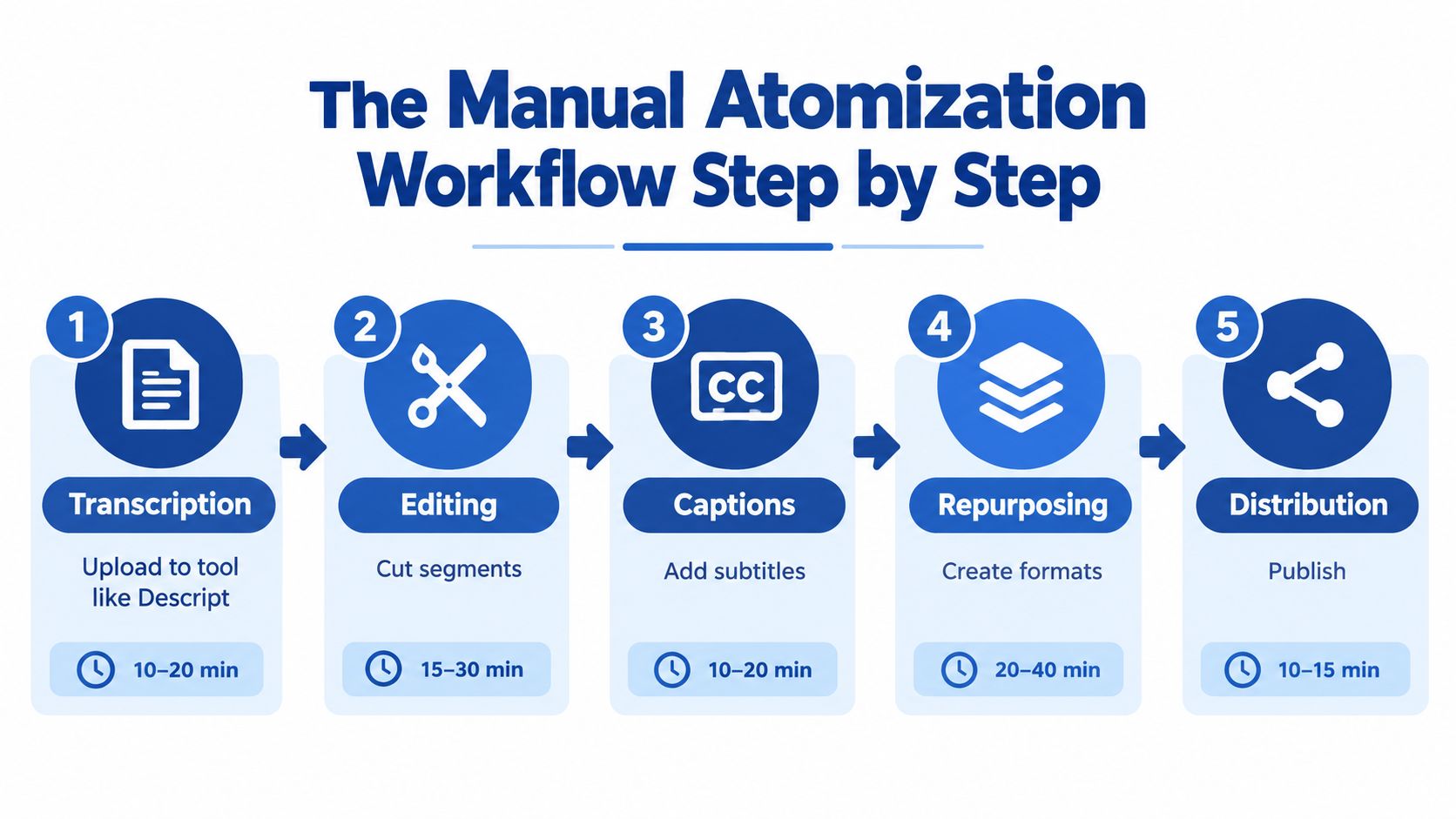
Stage 4: Derivative creation
Turn each strong idea into supporting formats. One clip may become a quote graphic, text post, carousel, or thread. The work is adaptation, not copying.
Allow another three to four hours. Rewrite the copy for each channel. Give designers the correct brand files. Ask writers to preserve the speaker's meaning while removing conversational clutter. Teams documenting podcast episodes can use tools to create interview show notes, but editorial review still decides what belongs in the final package.
Stage 5: Packaging
Build a search-led blog post from the strongest ideas. It needs clear search intent, logical headings, supporting evidence, and links to related assets.
Packaging takes roughly one to two hours. Across all stages, the manual process reaches 10 to 16 hours per recording.
Practical rule: If one recording consumes more protected production time than the team can give it in a workweek, change the workflow owner.
The content repurposing workflow for small teams offers a useful operating structure. If the schedule still breaks, reduce the asset target, assign dedicated production capacity, or choose a done-for-you service.
A Real Workflow Example From a 45 Minute Episode
A 45-minute podcast episode can produce a complete content batch when the operator starts with fixed content pillars.
The workflow begins with transcription. The operator scans the timestamped text for four categories: a contrarian take, a tactical framework, a customer objection, and a quotable line. The strongest clips come first, while the conversation remains fresh in the editor's mind.
The production order
- Transcribe and clean the recording. The operator checks speaker labels, timestamps, names, and industry terms.
- Select six to eight video clips. Each clip receives a distinct hook and a channel-native caption treatment.
- Extract quote moments. The editor sends the strongest lines to design.
- Write three LinkedIn posts. Each post develops one idea rather than summarizing the full episode.
- Draft one Twitter thread. The thread turns the tactical framework into a sequence.
- Write a 1,200-word SEO article. The article answers the main audience question and links back to the episode.
- Package the files. The team labels formats, channels, captions, and publishing order.
The time allocation below is a planning model for a 28-asset batch. Actual effort changes with audio quality, brand complexity, and revision requirements.
| Asset Type | Count | Target Channel | Avg Minutes Each |
|---|---|---|---|
| Short video clips | 8 | YouTube Shorts, LinkedIn, Instagram Reels | 20 |
| Quote graphics | 6 | LinkedIn, Instagram | 10 |
| LinkedIn posts | 3 | 20 | |
| Image carousels | 3 | LinkedIn, Instagram | 30 |
| Audiograms | 4 | LinkedIn, Instagram, podcast promotion | 15 |
| Short text snippets | 3 | Email, LinkedIn | 10 |
| SEO blog post | 1 | Company blog | 120 |
This produces 28 finished assets from one recording. The clip set gets scheduled first because it creates the fastest visible distribution. Quote graphics follow, then the written posts and carousel. The blog post anchors the cluster and gives the team a durable destination for search traffic.
The video podcast repurposing workflow offers another useful model for sequencing video, written, and visual derivatives. The important point is order. Clips establish the source themes. Posts and graphics develop them. The article organizes them.
Where DIY Atomization Breaks Down
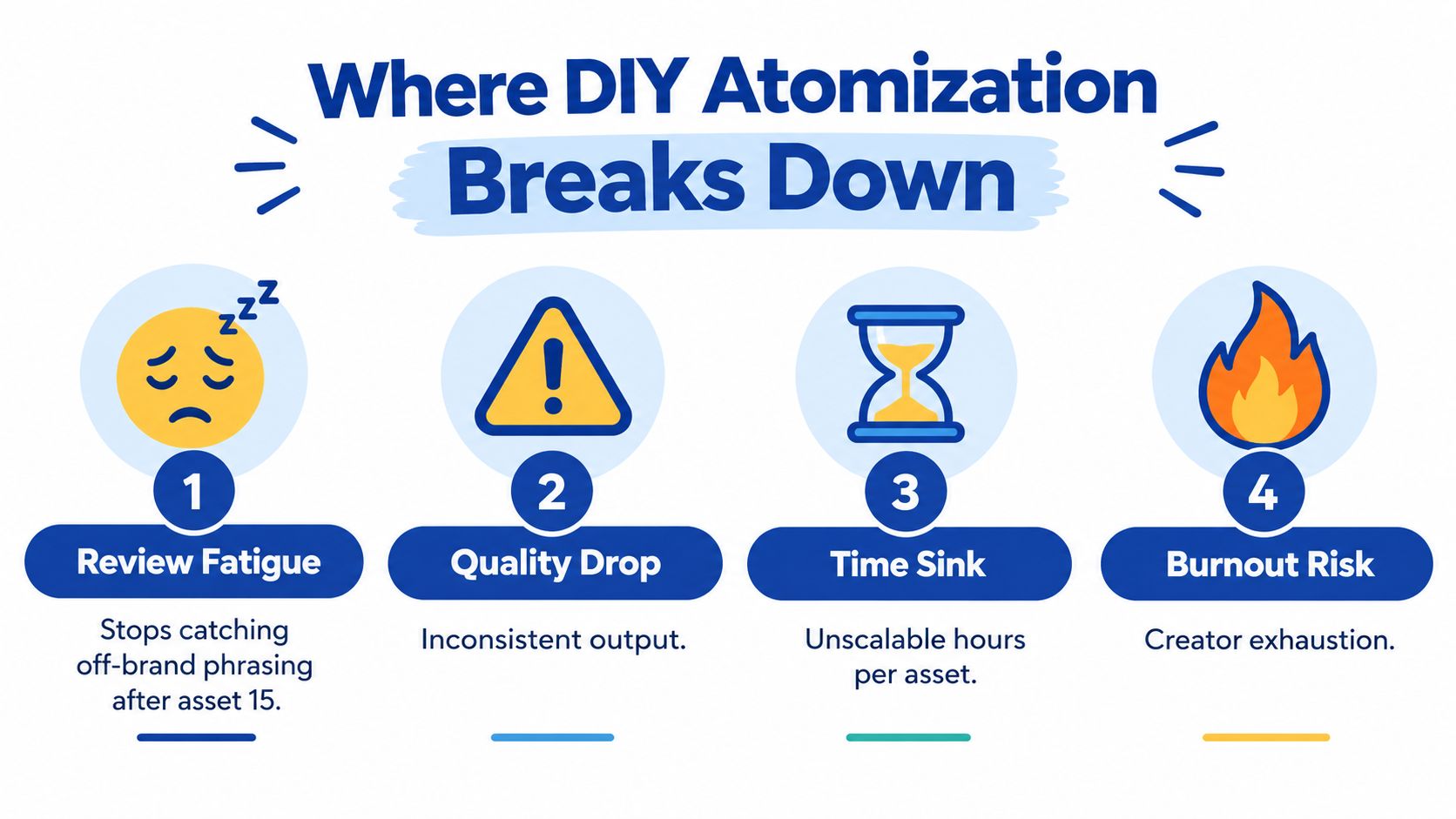
Manual atomization usually fails after the first few recordings, not the first one. The initial batch feels manageable because the team is still motivated. Repetition exposes the bottlenecks.
Four recurring failure points
- Review fatigue: Around asset 15, reviewers often stop catching off-brand phrasing and approve anything that looks usable. The later assets receive less scrutiny than the first few.
- Brand drift: Different writers interpret the speaker's voice differently. The same writer may also produce inconsistent copy across separate work sessions.
- Transcription errors: A misheard technical term or name gets copied into clips, captions, posts, graphics, and the blog. One error becomes several published errors.
- Quality drop: Quality often weakens once a team stretches one source beyond roughly 25 to 40 derivatives, according to the content repurposing workflow research.
The hidden cost is context switching. One person becomes a transcript editor, video editor, copywriter, designer, proofreader, and scheduler in the same afternoon. Each role requires a different standard, so the operator loses time rebuilding context between tasks.
Adaptation still matters
A cheap derivative isn't valuable if it doesn't fit the channel. A vertical video needs the right crop, opening, captions, and pacing. Guidance on vertical video for Reels and Stories shows why format decisions affect whether a clip feels native.
Teams also need review checkpoints. Transcription accuracy comes first. Hook quality comes next. Captioning and visual consistency follow. Channel fit comes last, before scheduling.
The agency versus DIY tools comparison frames the decision correctly. DIY isn't free. It charges the team in hours, attention, and delayed publishing. When the original estimate doubles, the operator hasn't discovered a production problem. The workflow has reached its practical limit.
DIY Versus Done For You at a Glance
Choose the workflow based on publishing capacity, not the invoice alone. DIY works when a team can protect production time, enjoys editing, and wants to build those skills in-house. Done-for-you production fits businesses that need a steady publishing cadence without assigning the work across several specialists.
| Factor | DIY In-House | Done-For-You Service |
|---|---|---|
| Total time per recording | 10 to 16 hours | About 15 minutes of client time |
| Delivery window | Depends on workload | 72 hours |
| Cost per finished asset | Internal labor cost varies | From $14 per finished asset |
| Revision process | Managed across internal roles | Included in the service workflow |
| Brand voice control | Depends on the operator | Set through voice notes and review |
| First published post | After internal production and approvals | After the delivered batch is approved |
The manual time range comes from the content repurposing statistics breakdown cited earlier. The done-for-you turnaround and client time reflect the service model described by RepurposeYourContent.com. That service takes one recording and returns finished clips, posts, graphics, carousels, audiograms, and a blog post.
The time trade-off is blunt. DIY consumes editing, writing, design, review, scheduling, and approval hours. Those hours also carry an opportunity cost when the operator should be handling other work. A service fee appears on an invoice. DIY costs are spread across calendars and salaries, which makes them easier to overlook.
If missing a publishing week costs more than the service fee, the trade has already been made.
Scale exposes the weakness faster. A 2025 B2B survey found that 37% of marketers still considered content repurposing a challenge, while only 21% of respondents in a separate survey said repurposing was extremely easy, according to CMI's 2025 B2B research. The issue is the operating system behind the formats.
Use DIY for occasional recordings and when the team has spare hours. Choose done-for-you when a recording must become a finished content batch on a fixed schedule. That is a workflow decision, not a luxury purchase.
The Done For You Alternative and Next Step
Done-for-you atomization is a workflow swap. The client sends one source recording and a short brief. A production team returns a finished content bundle inside a fixed window.
The handoff should be simple. A podcast, keynote, interview, sales call, livestream, course session, or meeting recording can serve as the source. The client provides the brand voice notes, banned phrases, channel priorities, logo files, colors, fonts, and any claims that need special review.
What the delivery should contain
A serious delivery includes more than a folder of random clips. It should contain:
- Platform-native video exports: Cropped, captioned, and formatted for each priority channel.
- Written posts: Edited for the intended platform, not copied from the transcript.
- Quote graphics and carousels: Built from approved ideas and brand assets.
- Audiograms: Useful when the audio moment carries the argument.
- An SEO-ready blog post: Structured around a clear search question.
- Timestamps and caption files: So the source remains easy to audit.
- A usage document: File names, recommended channels, publishing order, and basic context.
The client shouldn't need to reverse-engineer filenames or guess which clip belongs on LinkedIn. The provider should make the publishing sequence obvious.
A typical batch returns 20 to 30 ready-to-publish assets in 72 hours. The service described by RepurposeYourContent includes video clips, LinkedIn posts, quote graphics, carousels, audiograms, and a blog post, with unlimited revisions. Its stated pricing starts at $14 per finished asset, giving teams a clear comparison point against internal labor.
When the handoff works
Missing inputs create unnecessary revision rounds. The producer needs the brand voice, banned phrases, target audience, priority channels, preferred calls to action, and any sensitive claims before editing begins.
AI can help identify moments, but human curation decides whether a moment deserves publication. Industry guidance also recommends evaluating derivative performance after about 30 days, so teams can prioritize formats that contribute value instead of treating every asset equally, as explained in the content atomization playbook.
The next step is practical. Teams can book a 20-minute scoping call to confirm the recording type, target channels, asset mix, and turnaround. They can also request a sample atomization from one past recording at a flat fee, then judge the quality before signing a retainer.
Book the call or request the sample now. One recording already contains the ideas. A production workflow should turn them into content before the opportunity disappears.
Tags: