How to Get More Value From Webinars and Maximise Your ROI
Stop letting your webinars die after the live event. Learn how to get more value from webinars by repurposing them into a month of powerful marketing content.
To get more value from webinars, you must stop treating them as one-off events and start seeing them as powerful content engines. It’s a simple mindset shift with enormous ROI. The secret is to look beyond the live session and build a system that repurposes your recording into dozens of high-impact assets—social media clips, blog posts, and quote images—that multiply your reach and prove the value of your marketing spend.
Why Your Webinars Are an Underperforming Investment
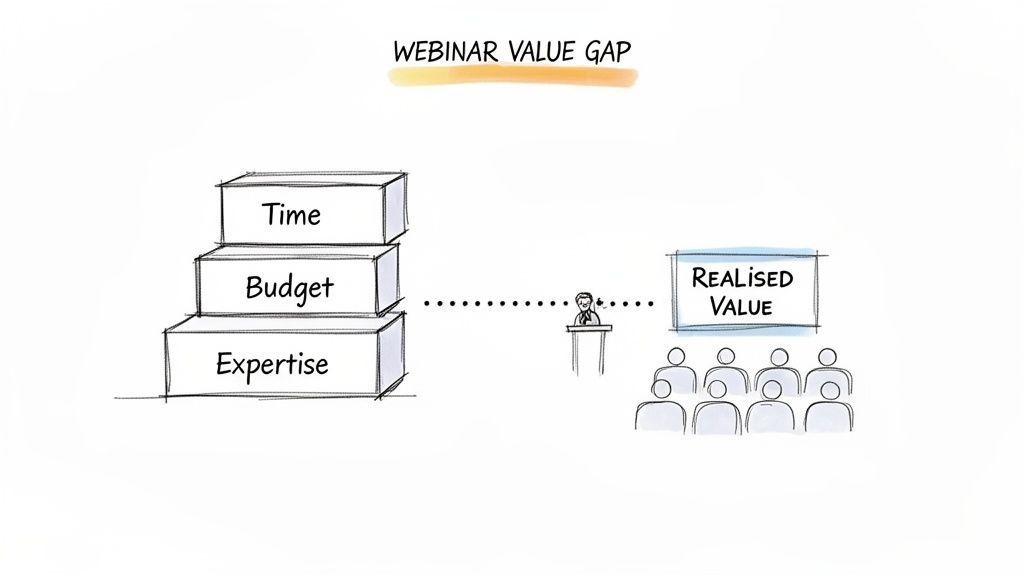
You’ve poured thousands of US dollars and countless hours into creating a high-quality webinar. You secured expert speakers, promoted the event for weeks, and delivered a session packed with valuable insights. So, what happens after the live broadcast ends? For most businesses, the answer is frustratingly simple: almost nothing.
The recording might be sent to attendees, but then it’s left to gather digital dust on a server, its value decaying daily. This common scenario creates a massive "webinar value gap," where a significant upfront investment yields a fraction of its potential return. The pressure to prove ROI is immense, yet the event's impact feels fleeting, vanishing as soon as the next marketing campaign begins.
This is a familiar pain point. You know the content is valuable, but the manual effort required to extract it is overwhelming. The typical workflow involves downloading huge files, scrubbing through an hour-long recording to find key moments, and then juggling multiple tools for video editing, transcription, and graphic design. It’s a clunky, time-consuming process that kills productivity.
The Real Cost of Neglecting Repurposing
The missed opportunity is staggering. Webinars are a cornerstone of B2B marketing, with 23.6% of businesses actively using them. But here’s the critical data point: a massive 63% of all webinar views come from on-demand replays. That effectively triples the reach of your original live event.
High-performing webinars can hit lead conversion rates of 20-40%, blowing standard email campaigns out of the water. By failing to repurpose, you’re leaving the majority of your potential audience—and your best leads—on the table.
Your webinar recording isn't just an archive; it's an untapped reservoir of expert content. Every minute contains potential social media clips, blog post sections, and powerful customer testimonials waiting to be unlocked.
The problem isn't a lack of good content; it's the lack of an efficient system. Manually turning a 60-minute webinar into a month's worth of content can take a skilled marketer over 20 hours. This time-sink makes it impossible to scale, forcing teams into a painful choice between creating new content and repurposing old assets. It’s a trade-off you should never have to make.
The Shift from One-Off Event to Content Engine
To truly get more value from webinars, you need a fundamental mindset shift. Stop thinking of a webinar as a single, time-bound event. Instead, see it as the creation of a powerful, long-term content asset that can fuel your entire marketing strategy for weeks, or even months.
An automated, strategic approach closes this value gap, eliminating the manual grind and the need to hire freelancers or agencies. This is where the contrast between old and new workflows becomes crystal clear.
The Webinar Value Gap: Manual vs Automated Repurposing
This table breaks down how different the outcomes are when you compare the traditional, manual process against an automated platform built for the job.
| Activity | Manual Process (Time & Cost) | Automated with RepurposeYourContent | Resulting Business Value |
|---|---|---|---|
| Clip Identification | 2-3 hours of scrubbing through recordings to find key moments. | 5 minutes with AI-powered highlight detection. | Frees up hours for strategic work. |
| Video Editing | 4-6 hours using complex software for trimming and formatting. | 10 minutes for automated resizing and branding. | Drastically reduces production bottlenecks. |
| Content Creation | 8-10 hours writing blog posts, social copy, and creating graphics. | Under 1 hour with AI-generated drafts and templates. | Consistent, high-quality content output. |
| Distribution | 2-3 hours of manual scheduling and posting across platforms. | 15 minutes for integrated scheduling and publishing. | Maximises reach with minimal effort. |
| Total Investment | 16-22 hours per webinar, costing hundreds of US dollars in staff time. | ~1.5 hours per webinar, at a fraction of the cost. | 10x+ ROI on time and budget. |
The difference is night and day. Automation doesn't just save time; it fundamentally changes the economics of your content marketing, eliminating the need for multiple tools and extra hires.
A single hour of recorded content instantly becomes:
- An SEO-optimised blog post to capture organic traffic.
- 6-16 engaging image quotes for LinkedIn and X.
- 4-8 short-form video clips perfect for social feeds.
This automated workflow turns a costly, one-time marketing expense into a perpetual lead-generation machine. If you're wondering where to begin, check out our guide on what to do after hosting a webinar. It's time to stop leaving money on the table and start maximising the return on your biggest content investment.
Design Your Webinar for Maximum Repurposing
The secret to getting maximum value from your webinars starts long before you hit "Go Live." Most marketers focus so much on the live event that they miss the bigger picture. The real ROI comes from treating your webinar as a core content asset right from the planning stage.
When you design for repurposing from day one, everything that comes after is faster, simpler, and far more effective.
Instead of thinking of a webinar as just a live presentation, treat it as a recording session for dozens of future marketing assets. This simple mental shift changes everything. You stop hoping for good soundbites and start scripting them intentionally. Your slides evolve from simple visual aids into standalone social media graphics. It’s all about being deliberate.
This proactive approach saves you from the painful task of sifting through an hour-long recording later, desperately hunting for moments of gold. You bake the value directly into the structure of the event itself.
Build Your Webinar with Content Blocks
The most effective way to design for repurposing is to structure your webinar in distinct, self-contained segments. Think of them as "content blocks" or chapters, rather than one long, meandering talk. Each block should tackle a specific sub-topic, answer a key question, or drive home a single powerful idea.
This modular structure is a gift to your future self. It makes finding and clipping content practically effortless. For example, you could organise a 60-minute webinar like this:
- A 5-minute intro to set the stage and hook the audience.
- Three 10-minute deep-dive segments, each solving a major pain point.
- A 10-minute expert Q&A, designed to produce punchy, quotable answers.
- A 5-minute practical demo or a quick case study walkthrough.
Each of these blocks can be instantly lifted out and transformed into a standalone video clip, a section of a blog post, or a series of social media updates. You're not just presenting; you're building a library of pre-packaged content.
Don't just plan what you're going to say. Plan what you're going to clip. Script your key takeaways as if they're destined to become standalone social media videos—because they are.
This approach also dramatically improves the live experience. It keeps the pace snappy and the content focused, holding your audience's attention far better than a monolithic, hour-long lecture.
Script for Soundbites and Design for Visuals
Once your content blocks are mapped out, it's time to engineer them for maximum impact. This means scripting for killer audio moments and designing visuals that can stand on their own.
Scripting for Soundbites
For each segment, identify the single most important takeaway and write it as a clear, concise, powerful statement. This isn't just a key point; it’s a future audiogram or the bold headline for an image quote. If you have guests, ask them provocative questions that are practically guaranteed to generate memorable one-liners.
Designing for Visuals
Your slides shouldn't just support what you're saying; they should be content. Design your key slides—especially those with statistics, frameworks, or powerful quotes—as if they were destined to be shared on LinkedIn or Instagram.
- Use big, bold fonts for key data points (e.g., "70% of total views happened after the event").
- Ensure your branding, like your logo and colours, is on every single slide.
- Keep text to a minimum. Each slide should communicate one powerful idea, instantly.
When you use a platform like RepurposeYourContent, this upfront planning pays off instantly. The AI can spot these visually distinct slides and turn them into a gallery of 6-16 image quotes without you lifting a finger.
You’ve done the strategic work in advance, so the technology handles the heavy lifting. This simple process is how you turn a 60-minute webinar into 30 days of content—all because you planned for it from the start.
Squeeze a 30-Day Content Plan From a Single Webinar
You’ve already done the hard work by designing your webinar with repurposing in mind. Now comes the payoff. This is the practical, week-by-week playbook for turning one 60-minute recording into a full month of high-performing, lead-generating content.
Forget the manual grind of downloading, trimming, and designing every single asset. This plan assumes you’re using an automated platform like RepurposeYourContent to handle the heavy lifting. This lets you focus on strategy and distribution instead of getting bogged down in production.
The goal is simple: get the maximum possible ROI from a single event with the least amount of effort. This is how you finally step off the content treadmill and start building a library of assets that works for you long after the live event ends.
Week 1: Immediate Post-Webinar Momentum
The first 72 hours after your webinar are critical. Your mission is to capitalise on the immediate interest from attendees and those who registered but couldn't make it. This week is all about speed and delivering on your promises.
Your focus is twofold: get the full replay out and publish a foundational piece of content that will work for you long-term.
- Action 1: Send the Full Replay: Get the on-demand recording to everyone who registered. Don't just send a raw link; frame it with a compelling summary of what they'll learn, reminding them of the value they either missed or can now revisit.
- Action 2: Publish an SEO-Ready Blog Post: This is your cornerstone asset. Use a tool to generate a full transcript and an AI-powered summary of your webinar. Edit this into an SEO-optimised blog post, complete with key takeaways, speaker quotes, and embedded clips. This instantly transforms your spoken content into a searchable, traffic-driving asset that lives on your site forever.
This initial push ensures you capture your high-intent audience right away. With webinars being a huge part of the UK's business events sector—which contributed a staggering £61.65 billion to the economy in 2023—their impact is undeniable. Since 63% of total views happen on-demand, this first week's content serves the largest segment of your audience, turning a one-off event into an evergreen resource. You can explore more of these compelling business events insights from VisitBritain.org.
By the end of Week 1, you've already delivered more value than most companies do in their entire post-webinar lifecycle. You have an evergreen blog post driving organic traffic and an on-demand asset for lead nurturing.
Week 2: Flood Social Media with Static Content
Now that your core assets are live, Week 2 is about blanketing your social channels with bite-sized, engaging content. The focus here is on static assets—things like image quotes and text-only posts—that are quick to consume and highly shareable, especially on platforms like LinkedIn and X (formerly Twitter).
Your webinar is packed with powerful statements and data points. But manually creating graphics for each one is a time-sucking nightmare. With an automated system, you can generate a whole library in minutes.
- Generate 8-12 Image Quotes: Let your platform automatically pull the most impactful quotes and statistics from the webinar. Because you've already set up your Brand Kit, every single graphic is perfectly branded with your logos and colours.
- Create 5-7 LinkedIn Text Posts: Pull key concepts or challenging questions straight from the transcript. Format them as text-only posts for LinkedIn and ask your audience to weigh in. This is a simple way to spark conversation and drive engagement without needing any visuals.
This process is so much easier when you've planned for it from the start.
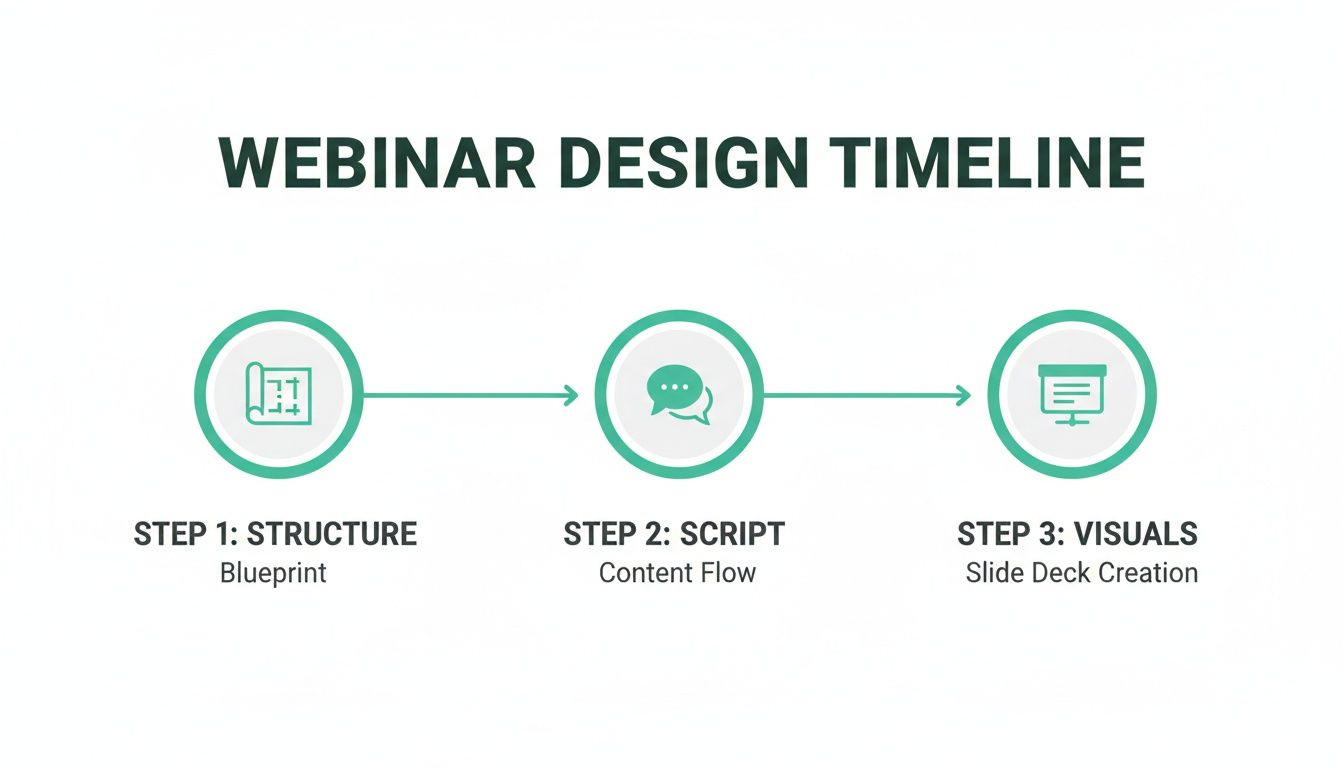
By structuring your webinar with repurposing in mind from day one, you ensure every key point is primed to become a future marketing asset.
Week 3: Dominate Feeds with Short-Form Video
Video is the undisputed king of social media engagement. Week 3 is dedicated to chopping up your webinar recording into a series of compelling, short-form video clips that are perfect for LinkedIn, Instagram Reels, and YouTube Shorts.
This is where automation becomes a real game-changer. Manually finding, trimming, captioning, and branding video clips is easily the most time-intensive part of repurposing. A platform like RepurposeYourContent does it all for you, eliminating the need for expensive video editors or agencies.
AI can identify the most engaging moments, turning a 60-minute session into a queue of ready-made social videos. Your plan for the week is straightforward:
- Select Your Clips: Review the AI-suggested clips—typically 4-8 powerful moments, each under 60 seconds.
- Apply Your Branding: With a single click, your Brand Kit adds animated, branded captions, a progress bar, and your logo.
- Schedule and Post: Distribute two to three clips throughout the week across your priority video platforms.
These clips are perfect for grabbing attention in busy feeds and driving traffic back to the full replay or your blog post. For more tactical advice, check out our guide on how to turn your webinar into engaging social media posts.
Week 4: Deepen Engagement with a High-Value Asset
In the final week, you shift from broad awareness to deep engagement. The goal is to create a high-value, downloadable asset that can be used as a powerful lead magnet. You'll consolidate the webinar's best insights into a practical guide, checklist, or playbook.
And you don't have to start from scratch. You're going to use the content you’ve already created.
- Compile the Best Insights: Take the key sections from your SEO blog post, the top-performing image quotes, and the core concepts from your video clips.
- Design a PDF Guide: Organise this information into a professionally designed PDF. This doesn't require a graphic designer; you can simply use a template and paste in the content. Give it a compelling title like, "The Ultimate Guide to [Your Webinar Topic]."
- Promote it as a Lead Magnet: Gate the PDF behind a landing page and promote it across your channels. It's the perfect asset for capturing leads who want to dive deeper into the topic.
By the end of the month, you’ve successfully transformed a single 60-minute event into over 30 distinct marketing assets. You've fuelled your content calendar, reached new audiences, captured new leads, and established your authority—all without the manual production headaches. This is how you truly get more value from every webinar you run.
Automating Your Workflow to Eliminate the Grind
That 30-day content plan is a brilliant strategy, but let’s be direct: executing it manually is a one-way ticket to burnout. The old-school process is a frustrating, inefficient grind that completely defeats the purpose of getting more value from your webinars.
First, you download a massive video file. Then you spend what feels like an eternity scrubbing through the recording, hunting for golden moments. After that, you're juggling a clunky collection of separate tools—one for video editing, another for transcription, a third for graphic design, and maybe a fourth just for captions.
Every step adds another layer of complexity, another subscription cost, and another opportunity for brand inconsistencies. This soul-crushing manual work is exactly why so many valuable webinar recordings end up collecting digital dust. It’s too slow, too expensive, and too complicated.
Hiring freelance editors or an agency can ease the pain, but that just swaps a time problem for a budget problem, often running into thousands of US dollars per event.
A Smarter, Faster Way to Work
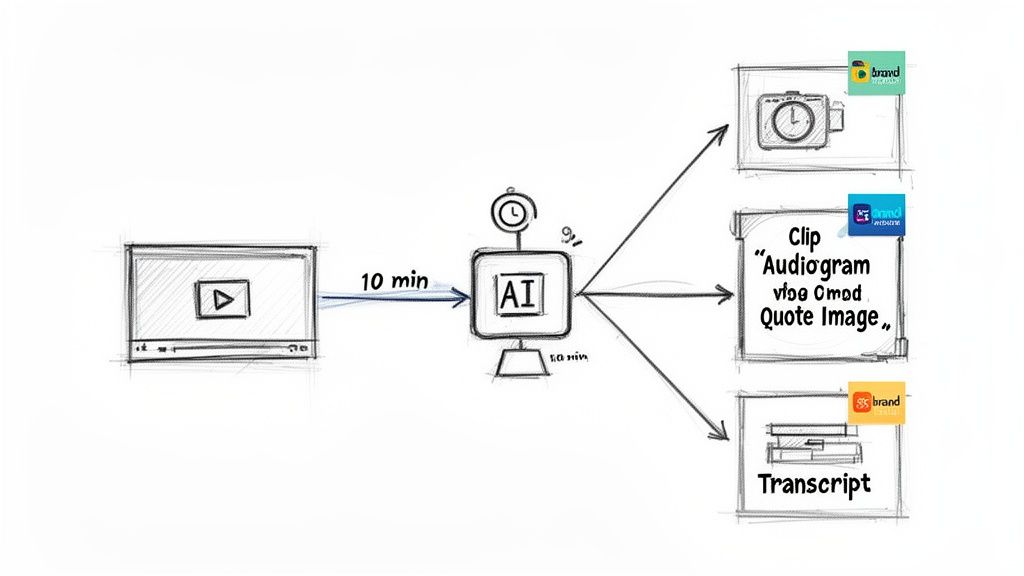
There’s a fundamentally better way. Instead of wrestling with a patchwork of tools and manual workflows, a single, AI-powered platform like RepurposeYourContent automates the entire process, turning a week-long headache into a 10-minute task.
This is where the business case for automation becomes crystal clear. Imagine this workflow instead:
- Just Upload Your Recording: Drag and drop your webinar video file into the platform. That's it.
- Let AI Do the Heavy Lifting: The AI gets to work, automatically transcribing the entire session and analysing the content to pinpoint the most compelling, quotable, and shareable moments.
- Pick Your Favourite Assets: You’re presented with a dashboard of suggested content—video clips, key takeaways, powerful quotes. You just click to select the assets you want.
- Branding is Applied Instantly: Because you've already set up your Brand Kit, every single asset is automatically stamped with your company's logos, colours, and fonts. Perfect consistency, zero effort.
What used to take a full day of tedious work is now done in the time it takes to make a cup of tea. A 60-minute webinar is processed in under 10 minutes, delivering a suite of ready-to-publish content without you ever touching an editing timeline.
The goal isn't just to work faster; it's to eliminate the work altogether. Automation lets you scale your content output without scaling your headcount or your software bill.
The Real Business Impact of Automation
The benefits of this streamlined approach go far beyond saving time. You’re fundamentally changing the economics of your content strategy.
- Massive Cost Savings: Cancel subscriptions for multiple standalone tools—your video editor, transcription service, and design software. Better yet, skip the expense of hiring freelance editors or agencies for post-production.
- Unmatched Speed to Market: Get high-quality clips and summaries out within hours of your live event, not weeks. This speed is crucial for capitalising on post-webinar buzz when audience interest is at its peak.
- Guaranteed Brand Consistency: With a centralised Brand Kit, you can say goodbye to off-brand fonts or the wrong logo. Every asset comes out looking polished and professional, reinforcing your brand identity with every single post.
- Scale Without Limits: Suddenly, one person can manage the content output that used to require a small team. This empowers you to repurpose every webinar, not just the "big" ones, creating a constant, reliable flow of high-quality content.
By removing all manual friction, you finally unlock the true potential sitting in your webinar library. You can build the content engine you’ve always wanted—one that consistently drives reach, engagement, and leads without draining your team or your budget. To see this in action, discover how a powerful webinar clip generator can become the cornerstone of your new, automated workflow.
Measuring the True ROI of Your Repurposed Content
Creating a mountain of clips from a single webinar looks impressive, but it’s a vanity metric if you can’t connect it to actual business results. If you want to get more value from your webinars, you need to stop counting clips and start measuring the tangible impact that leadership actually cares about—leads, pipeline, and revenue.
Your original webinar had an upfront cost in both time and money, often running into thousands of US dollars. Every piece of repurposed content you create either multiplies the return on that initial investment, or it's just adding to the noise online. The only way to know the difference is to track its performance properly.
This is all about shifting your focus from "How many assets did we create?" to "What business outcomes did these assets drive?" It’s the difference between telling your boss you published 15 social posts and showing them you generated 25 new leads directly from the webinar content, effectively dropping your cost per lead.
Key Metrics That Actually Matter
Forget fuzzy metrics like impressions and reach. To build a proper business case, you need to track specific Key Performance Indicators (KPIs) for each type of repurposed asset. This framework helps you draw a straight line from a simple social clip all the way back to the original webinar investment.
Here are the essential KPIs I recommend focusing on:
- Lead Generation from Blog Posts: Track how many new contacts fill out forms on your webinar-summary blog post. It's crucial to use unique tracking URLs (UTMs) here to see which promotion channels are actually sending you quality traffic.
- Engagement on Social Video Clips: Go beyond views. Look at comments, shares, and click-through rates. A high view count is nice, but a lower view count with dozens of comments from your ideal customer profiles is far more valuable for the sales team.
- Conversion Rates from CTAs: If your audiograms or video clips mention a downloadable guide (which you also created from the webinar), measure the landing page conversion rate. How many people who listened actually took the action you wanted them to?
- Pipeline Influence: For B2B marketers, this is the big one. Use your CRM to track how many leads who engaged with your repurposed content ended up in the sales pipeline. Did that webinar clip get shared with a decision-maker who then booked a demo? That’s what you want to know.
Tying Revenue Back to the Source
Attribution is the final, crucial piece of the puzzle. The goal is to be able to confidently walk into a meeting and say, "Our webinar on X, which cost $4,000, has so far generated $20,000 in pipeline because we repurposed it effectively."
The easiest way to start is by creating a unique campaign in your marketing automation platform for each webinar. Every single repurposed asset—blog posts, social clips, landing pages—should be tagged with this campaign. This allows you to build a report that rolls up all the associated activity, attributing new leads and opportunities directly back to the source event.
For example, you might find that Tuesdays drive 21% of your UK webinar registrations. But with attendance often hovering around 40-50%, the real opportunity is what happens after the event. Repurposing content can cut your production costs by up to 80% with AI, drastically improving the ROI on an average UK cost per lead of £56. When your best webinars convert 2-5% of attendees to customers, repurposing scales that potential across a much wider, on-demand audience. You can get a deeper look at the latest webinar marketing statistics on embryo.com.
Measuring ROI isn't an academic exercise; it's how you justify your budget and prove your impact. It turns a marketing 'expense' into a documented, repeatable revenue driver.
This data-backed approach completely changes your reporting. You're no longer just showing activity; you're demonstrating how a single investment is fuelling the entire marketing funnel for weeks or even months. This is how you prove that repurposing isn’t just a "nice-to-have" tactic—it's a core financial strategy for maximising marketing efficiency. And with a platform like RepurposeYourContent automating the creation, all that’s left for you to do is share the content and watch the results roll in.
Your Webinar Repurposing Questions, Answered
Alright, so you understand the strategy. Repurposing your webinars is a smart move. But how does it actually work when you're already juggling a dozen other marketing tasks? It's one thing to talk theory, another thing entirely to put it into practice.
Let's tackle the most common questions we hear from B2B marketers. No fluff, just direct answers to help you clear those final hurdles and get this done.
How Much Content Can I Realistically Get From One Webinar?
You can easily get over 30 individual content assets from a standard 60-minute webinar. That's a typical output when you have an automated system built for it.
Think about it. A single recording is effortlessly turned into:
- One full-length, SEO-friendly blog post.
- 4-6 compelling short video clips, ready for social media.
- 8-12 professionally branded image quotes highlighting key takeaways.
- A handful of text-only posts pulled straight from the transcript for LinkedIn.
When you use an AI platform like RepurposeYourContent, this entire process is automated. One hour of an expert's time can fuel a full month of high-quality content, published in minutes instead of days.
What if My Webinar Recording Isn't Perfect?
Honestly, who cares? Perfection is the enemy of progress, and it’s definitely not a requirement here. Modern AI tools are surprisingly good at cleaning up audio and generating accurate transcripts, even with a bit of background noise or the occasional speaker stumbling over their words.
And for video clips? Your audience is there for the insights, not for Hollywood-level production value. Authenticity almost always outperforms a sterile, overly polished video. With a tool like RepurposeYourContent, you can just trim out the rough bits and isolate the most powerful moments. As long as your core message is valuable, the recording is more than good enough.
Don't let the chase for perfection stop you from unlocking the value in recordings you already have. Your audience cares a lot more about what you're saying than the resolution of your webcam.
Should I Make New Content or Just Repurpose Old Webinars?
A healthy content strategy has both, but starting with what you've already got gives you the fastest and highest ROI. Simple as that. Your archive of past webinars is a goldmine of proven, expert content that’s just sitting there, delivering zero value.
Repurposing these "greatest hits" is the quickest way to fill your content calendar, spark new leads, and build authority while you're planning your next live event. It saves an incredible amount of time and resources that would otherwise go into creating brand-new content from scratch. Think of it as activating dormant assets to fuel today's marketing.
How Do I Keep All the Repurposed Content On-Brand?
This is where manual repurposing often fails. Juggling multiple tools and team members is a recipe for brand inconsistency. The solution is to use a single platform built with a centralised Brand Kit.
With RepurposeYourContent, you simply upload your company's logos, colour palette, and fonts one time. From then on, our AI automatically applies those brand elements to every single asset it creates. Every video clip, audiogram, and image quote comes out looking professional and perfectly on-brand, ready to go without any manual design work or painful review cycles.
Ready to stop wasting your most valuable content? RepurposeYourContent transforms your webinar library from a dusty archive into a non-stop content engine. Upload a recording and watch as our AI creates a month's worth of branded clips, quotes, and blog posts in minutes.
Tags:




