How to Maximize Content From One Webinar and Create a 30-Day Asset Engine
Discover how to maximize content from one webinar. Turn a single recording into a full month of high-ROI marketing assets that generate leads and save time.
Stop treating your webinar as a one-off event. Start seeing it for what it really is: a renewable content engine. A 60-minute session isn’t just a recording; it's a goldmine of 30+ days of marketing assets—video clips, image quotes, blog posts, and social media updates, all ready to be extracted in minutes.
The Real Cost of Your One-and-Done Webinars
Your latest webinar went well. You invested thousands of US dollars and countless hours into speaker prep, slide design, and promotion. The live event was a success, and now the recording is gathering dust in a folder, its value leaking away by the day. Does this sound painfully familiar?
Webinars are expensive and time-consuming. When the live broadcast ends, most marketing teams leave the incredible potential of that content completely on the table. This "one-and-done" approach isn't just inefficient—it’s an expensive mistake that wastes your initial investment.
The Hidden Financial Drain
The upfront cost of a webinar is just the beginning. The real financial hit comes from missed opportunities. Every recording left untouched represents a failure to capitalise on your investment, leaving potential leads, brand authority, and sales enablement assets behind.
Picture this: your team is scrambling to fill the content calendar again. Hours are spent brainstorming blog topics and days are lost creating social media posts from scratch. All the while, a 60-minute recording packed with expert insights sits unused. That's the hidden cost of manual, repetitive work.
This cycle of creating new content from zero is a constant drain on your resources. It forces your team into a reactive loop, always chasing the next deadline instead of strategically building on the high-value assets you already own. You've already done the hard work; failing to repurpose it means you're paying for that same effort over and over again.
The Statistical Proof of Missed ROI
The numbers make the cost of inaction even clearer. B2B webinars deliver an impressive average 213% ROI, with a cost-per-lead as low as $72. This blows alternatives like LinkedIn Ads at $420 per lead or trade shows at $840 out of the water, making webinars a strategic essential for any B2B marketer.
By not getting the most out of every webinar, you are walking away from one of the most cost-effective lead generation tools you have. You can discover more insights on webinar marketing strategy and see how to calculate this value for your own campaigns.
The solution isn't to create more webinars. It's to work smarter with the ones you already have.
By transforming a single recording into a full suite of marketing assets, you turn a one-time expense into a long-term revenue driver. With RepurposeYourContent, this transformation isn’t a manual, time-sucking chore. It’s an automated process that turns your webinar archive into a powerful, lead-generating machine, eliminating the need for extra staff or multiple, complicated tools.
Your Blueprint for Strategic Content Extraction
Before you touch an editing tool, create a plan. Don’t just dive in. Treat your webinar recording like a gold mine—you need a map to find the richest veins of content. This means doing a quick ‘content audit’ on your recording to pinpoint the most valuable moments before you extract a single clip.
This isn’t about randomly chopping up a 60-minute video. It’s about strategic extraction, where every clip, quote, and data point is chosen with a purpose. Think of it as reverse-engineering your content calendar directly from the webinar. A powerful customer story becomes a compelling video for LinkedIn, while a surprising statistic is the perfect ingredient for a bold image quote.
The visual below shows the simple flow from your initial webinar investment to a high return—a path that avoids the common pitfall of letting valuable content gather digital dust.
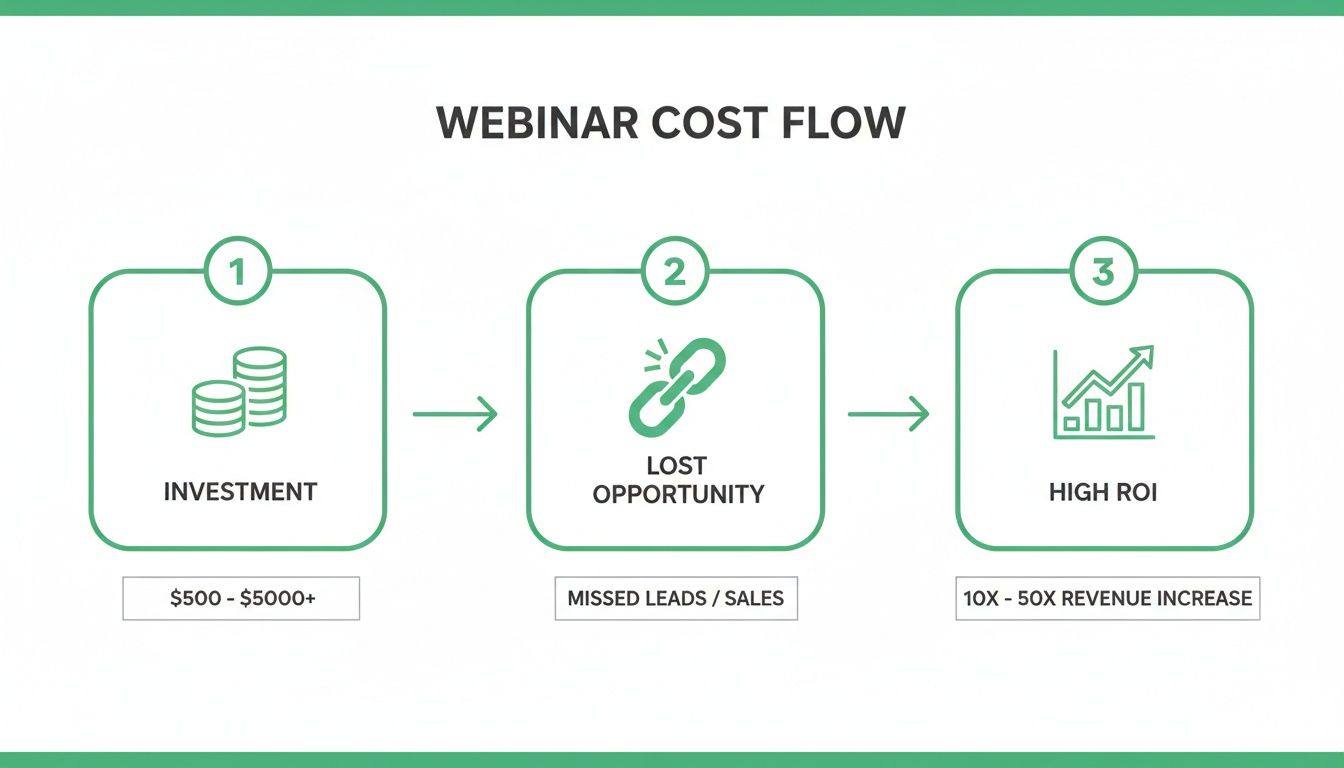
By being deliberate, you transform a one-time cost into a continuous engine for high-value marketing assets that save you time and drive ROI.
Finding Your Content Gold
How do you spot these golden moments? Watch the replay with a clear goal: to tag moments that directly support your marketing objectives. You don't need fancy software; a simple document with timestamps is enough.
Look for these key content types:
- Powerful Quotes: Isolate concise, impactful statements from your speaker. It’s not unusual to get 6-16 image quotes from one webinar.
- Key Data and Statistics: Note any numbers or data points that add weight to your message. These are perfect for infographics or bold text callouts.
- Actionable Tips or Lists: Did your speaker break down a 3-step process? Each point is a potential piece of micro-content.
- Audience Questions: The Q&A is a goldmine. Every question and answer can become a short video or part of a "You Asked, We Answered" social media series.
This process helps you map specific moments to the channels where they'll perform best. A detailed explanation is ideal for a blog post, whereas a punchy tip is perfect for a 30-second Reel. For more tactical advice, see our guide on how to extract video clips from a webinar.
Mapping Webinar Moments to High-Value Content Assets
To get tactical, connect what happened in the webinar to what you can create from it. The table below is a practical guide showing which parts of your webinar are best suited for creating specific marketing content. Use it to plan your repurposing efforts for maximum impact.
| Webinar Moment | Primary Content Asset | Target Channel | Marketing Goal |
|---|---|---|---|
| Speaker's opening hook | 15-30 second video clip | Instagram Reels, TikTok | Generate curiosity, drive webinar sign-ups |
| Key statistic or data point | Image quote or infographic | LinkedIn, Twitter | Establish authority, encourage shares |
| 3-step actionable tip | Carousel post or short video | Instagram, Facebook | Provide immediate value, increase saves |
| Customer success story | 60-second testimonial video | LinkedIn, Website | Build social proof, drive conversions |
| A compelling "Aha!" moment | Quote graphic or short clip | All social channels | Spark conversation, boost engagement |
| Detailed answer from Q&A | Short blog post or video | Blog, YouTube | Address specific pain points, improve SEO |
By mapping your assets like this, you move from a reactive "what can I post today?" mindset to a strategic, proactive content plan—all sourced from a single event.
Your Strategic Extraction Checklist
To make this process repeatable, use this simple checklist during your content audit. Before you repurpose a specific moment, ask yourself if it meets these criteria.
A great piece of repurposed content must be self-contained. It needs to deliver value and make sense on its own, without requiring the viewer to have sat through the entire 60-minute webinar.
Does the moment:
- Address a specific pain point for your target audience?
- Offer a clear, actionable takeaway they can use immediately?
- Contain a surprising statistic or a bold claim that sparks curiosity?
- Tell a relatable story or share a compelling case study?
If you can answer "yes," you’ve found a high-value nugget ready for extraction. This strategic approach ensures every piece of content you create has a clear purpose, saving you from the soul-crushing effort of manual repurposing. With a platform like RepurposeYourContent, you simply upload your recording, and our AI identifies and creates these assets for you, turning your plan into polished, on-brand content in minutes.
Turn Your Recording Into Ready-to-Publish Assets in Minutes
You’ve mapped out your content goldmines, but now comes the part that grinds marketing teams to a halt: the actual creation.
The old way is a painful, fragmented process. You’re juggling one tool for transcription, another for video editing, and a separate one for graphic design. It’s a slow, expensive grind that drains your budget and your team’s morale. This manual headache is exactly why so many valuable webinar recordings end up collecting digital dust.
Now, imagine a different workflow. You upload a single MP4 of your 60-minute webinar. You tick a few boxes: 10 image quotes, 5 short video clips, and 1 SEO-friendly blog post. You click a button, and within minutes, professional, on-brand assets are ready to publish.
This is the speed and simplicity that automation brings, helping you maximize content from one webinar without the manual slog.
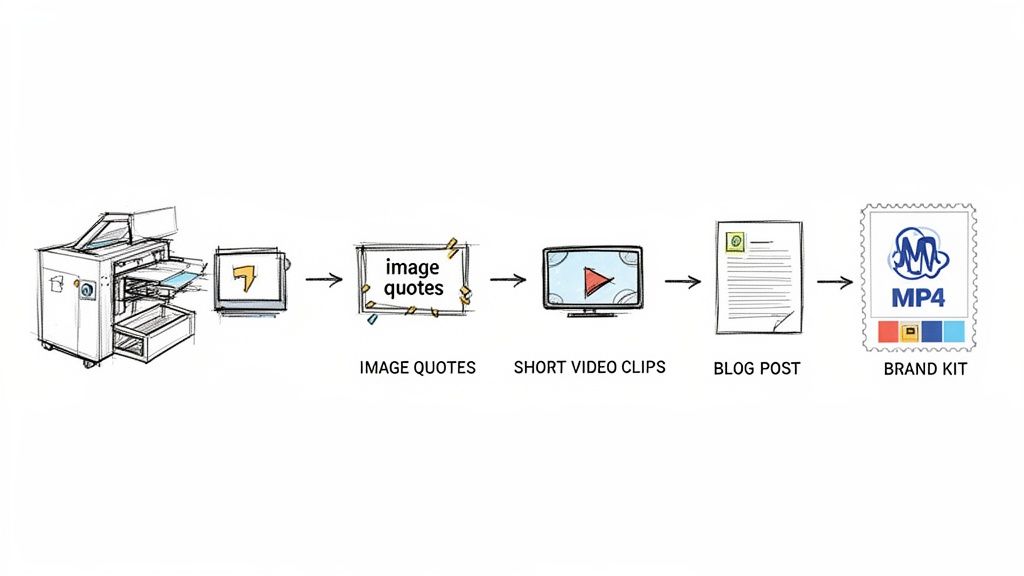
This approach immediately cuts out the need for multiple tool subscriptions and the high cost of hiring freelancers, which can easily run into hundreds or even thousands of dollars per project.
From Hours of Work to Minutes of Waiting
The game-changer is how quickly you get from a raw recording to a full suite of polished, on-brand assets. Instead of spending hours trimming clips, designing quote graphics, or drafting a blog summary, an AI-powered system does the heavy lifting for you.
With RepurposeYourContent, the entire process for a one-hour webinar takes just 5-10 minutes. The system automatically:
- Transcribes the entire session with high accuracy.
- Identifies key highlights and powerful quotes.
- Generates sharp video clips complete with animated captions.
- Designs image quotes using your predefined brand kit.
- Drafts a blog post summarising the core topics.
This isn’t just about speed; it’s about getting professional results every time. The platform applies your brand kit—logos, colours, and fonts—to every asset. That means no more off-brand visuals. Every piece is genuinely ready for publishing, straight out of the system.
The goal is to turn a 60-minute webinar into 30 days of high-quality content. With automation, a small team can achieve the output of a much larger one, consistently filling the content calendar without burnout.
This efficiency is crucial. Research shows that 63% of all webinar views happen via on-demand replays, yet most marketing teams fail to properly capitalise on this. By turning that replay into dozens of assets, you capture your audience’s attention across multiple channels long after the live event has finished.
The ROI of Automated Repurposing
By ditching the manual patchwork of tools and freelancers, you immediately see a return on investment. The time your team saves can be reinvested into strategy and promotion, rather than being lost to tedious production tasks.
Think about the financial impact. You’re no longer paying for separate subscriptions to video editors, transcription services, and design software. You also eliminate the unpredictable costs of hiring outside help. This consolidation not only saves money but also simplifies your entire content workflow.
This shift allows a one-person marketing team to execute a sophisticated, multi-channel content strategy that would typically require a whole department. If you're looking for more ways to make your workflow more efficient, read our guide on how to automate webinar repurposing. It’s about creating more impact with less effort, turning every webinar into a reliable source of marketing fuel.
The Strategic Playbook for Content Deployment
You've got a folder packed with shiny, new, perfectly branded assets. That’s a great first step, but it's only half the job. The real magic happens when you get that content out into the world, strategically placing it on the right channels to meet your audience where they are.
This isn’t about blasting the same video clip everywhere. It’s about tailoring each piece to fit the unique format of each platform, transforming your repurposed assets into a powerful, multi-channel campaign that drives real results.
The goal is to maximize content from one webinar, ensuring every blog post, image quote, and video clip pulls its weight to drive engagement and bring people back to your website or landing pages.
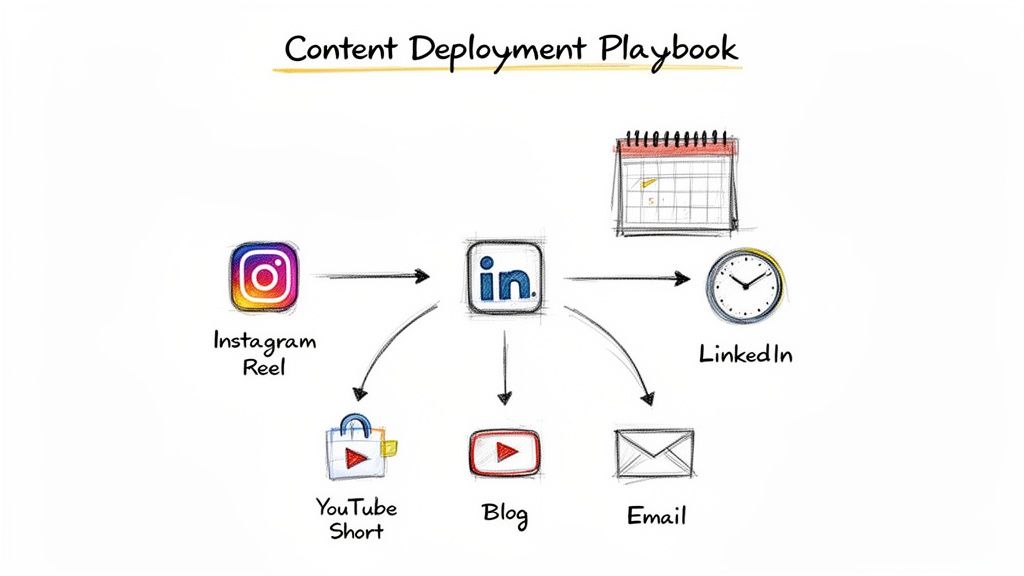
A Channel-Specific Playbook for Maximum Impact
Every social platform has its own unwritten rules. A professional, data-heavy post that performs well on LinkedIn would fall flat as an Instagram Reel. You have to play to each platform's strengths.
Here’s a practical game plan for getting your new assets live.
For Your Blog and Website
Think of the AI-generated blog post as the central hub of your campaign. Before you publish, give it a quick SEO polish. Weave your primary keyword into the title, headers, and body copy naturally. Add a few internal links to other relevant articles on your site. This post becomes the long-form destination that all your other micro-content points back to.
For LinkedIn
This is where your expert insights and sharp data points will shine.
- Image Quotes: Post your most powerful speaker quotes as clean, branded images. In the caption, expand on the idea and ask a thought-provoking question to start a conversation.
- Text Posts: Use the AI-generated text snippets as a starting point. Add your own perspective, tag the speaker or any companies mentioned, and watch the reach grow.
- Video Clips: The 60-90 second video clips are perfect for LinkedIn. Pick the ones that share a key takeaway or a compelling customer story. Always include subtitles; most people scroll with the sound off.
The name of the game on LinkedIn is starting a professional conversation. End your posts with a question like, "How has your team tackled this?" to invite comments and boost engagement.
Dominating Short-Form Video
Platforms like Instagram Reels, TikTok, and YouTube Shorts are hungry for short, valuable content. Those bite-sized video clips automatically generated from your webinar are exactly what they need.
Keep these best practices in mind:
- Keep it Punchy: Stick to clips under 60 seconds. Each one should deliver a single, clear, actionable tip. No fluff.
- Use Engaging Captions: The first three seconds are your hook, but the caption is where you add context or a call-to-action.
- Add Relevant Hashtags: Use a smart mix of broad and niche hashtags to help people find your content. Pair a popular tag like #MarketingTips with something more specific like #B2BLeadGen.
By tailoring your approach for each channel, you’re not just posting content—you’re building a content ecosystem where every asset supports the others. For a deeper look into this, check out our guide on effective content distribution strategies. With RepurposeYourContent, you get all these channel-ready assets in minutes, so you can focus on deploying your content and engaging with your audience.
Measuring the True ROI of Your Repurposing Efforts
Creating a mountain of content is one thing. Proving it was worthwhile is another.
How do you show that repurposing your last webinar wasn't just a side project, but a genuine revenue driver? The secret is connecting the dots between your new assets and tangible business results. This isn’t about vague vanity metrics; it’s about building a data-backed business case that ties your work directly back to the initial webinar investment.
The goal? Prove with hard numbers how you can maximize content from one webinar to fuel your sales pipeline for an entire quarter.
Tracking Performance Beyond Likes and Shares
To measure real ROI, you have to look at specific, meaningful metrics for each asset. This framework helps you shift the conversation from basic engagement to real business impact.
- Blog Post Performance: Don’t stop at page views. Track time-on-page to see if people are reading and the click-through rate (CTR) on your calls-to-action, like a "Book a Demo" button. That's where the real value is.
- Social Media Assets: For video clips and image quotes, look past the likes. Focus on shares, saves, and comments—these show your content is resonating. Critically, track clicks on the links that send people back to your blog or a landing page.
- Lead Generation: This is the big one. Use unique tracking links (UTMs) for every repurposed asset. This is non-negotiable. It allows you to see exactly how many demo requests or content downloads came from a specific video clip on LinkedIn or a quote you shared on Twitter.
By connecting these asset metrics to your CRM, you can draw a straight line from a single repurposed clip all the way to a closed deal. This is how you prove that repurposing isn’t a cost centre—it’s a profit generator.
Building Your Business Case
When reporting on your results, frame them in a way that matters to stakeholders. Your boss doesn't just care about views; they care about revenue.
Instead of saying, "Our video clips got 10,000 views," you can confidently state, "Our video clips generated 25 qualified leads and influenced $18,000 in new pipeline."
See the difference?
This simple shift elevates your content strategy from a creative exercise to a core business function. It demonstrates that you're not just creating content for the sake of it; you're building a scalable engine that turns your existing expertise into measurable, predictable revenue.
Platforms like RepurposeYourContent make the first half of this equation effortless by producing all your assets in minutes. This frees up your time to focus on what really moves the needle: deploying content strategically and measuring its direct impact on the bottom line.
Your Top Questions About Webinar Repurposing, Answered
The idea of turning one webinar into a month of content sounds great, but you have questions about how it works in the real world. Let’s get straight to the answers.
How Much Content Can I Realistically Get From One Webinar?
From a single 60-minute webinar, you can genuinely generate 30+ days of content. A typical haul looks something like this:
- One full-length, SEO-friendly blog post.
- 10-15 unique text posts for platforms like LinkedIn.
- 8-12 professionally designed image quotes.
- 5-7 short video clips, formatted for Reels or Shorts.
- An engaging audiogram clip to use on social feeds.
Using an automated tool like RepurposeYourContent can generate all of these assets in the time it takes to grab a coffee, eliminating the manual grind.
Do I Need a Big Team or Special Skills?
Not anymore. The old way required a video editor, a graphic designer, and a copywriter, which was slow and expensive.
Today, platforms like RepurposeYourContent bundle those roles into a single, automated workflow. If you can upload a file and click a few buttons, you have everything you need to turn one webinar into a full month of content—no new hires required.
This shift means even one-person marketing teams can produce content at a sophisticated level, saving time and money.
What If My Recording Quality Isn’t Perfect?
While a high-quality source file is always best, it's not a deal-breaker. Modern AI tools are surprisingly good at cleaning up audio and generating accurate transcripts, even from recordings that aren't pristine.
For video, the goal is to extract key moments. Minor visual flaws are less noticeable in short, punchy clips with animated captions. The real value is the expertise you're sharing, which almost always shines through.
How Do I Avoid Sounding Repetitive?
The key is tailoring the format and angle for each channel. You’re not just blasting the same message everywhere. One insight from your webinar can show up in different ways:
- A key statistic becomes a sharp image quote.
- A powerful customer story becomes a 60-second video clip.
- A detailed explanation becomes a section in your blog post.
By changing the format and context, you reinforce your core message in fresh ways that build authority and keep your audience engaged.
Ready to stop letting valuable webinar content gather dust? With RepurposeYourContent, you can turn a single recording into a month’s worth of on-brand, ready-to-publish assets in minutes.
Start your free trial today and see how easy it is to maximise your content ROI.
Tags:




