Blog Post SEO Optimization: The Done-For-You Playbook
A practical, time-tested playbook for blog post SEO optimization in 2026. Walk through keyword research, structure, on-page SEO, and promotion step by step.
Orbit Media's 2025 Blogger Survey found that the average blog post had reached 1,333 words, yet only 9% of marketers regularly published posts longer than 2,000 words. Those longer posts produced stronger results: 39% of marketers publishing 2,000-plus-word posts reported strong performance, compared with a 21% benchmark across the broader group. (Orbit Media survey data)
That gap explains why blog post SEO optimization matters. A polished draft can still disappear if it targets the wrong query, misses search intent, loads poorly, or never gets refreshed. The practical answer is to treat each post as an asset with a clear research budget, production plan, technical check, and optimization loop.
Why Most Blog Posts Never Earn Their Traffic
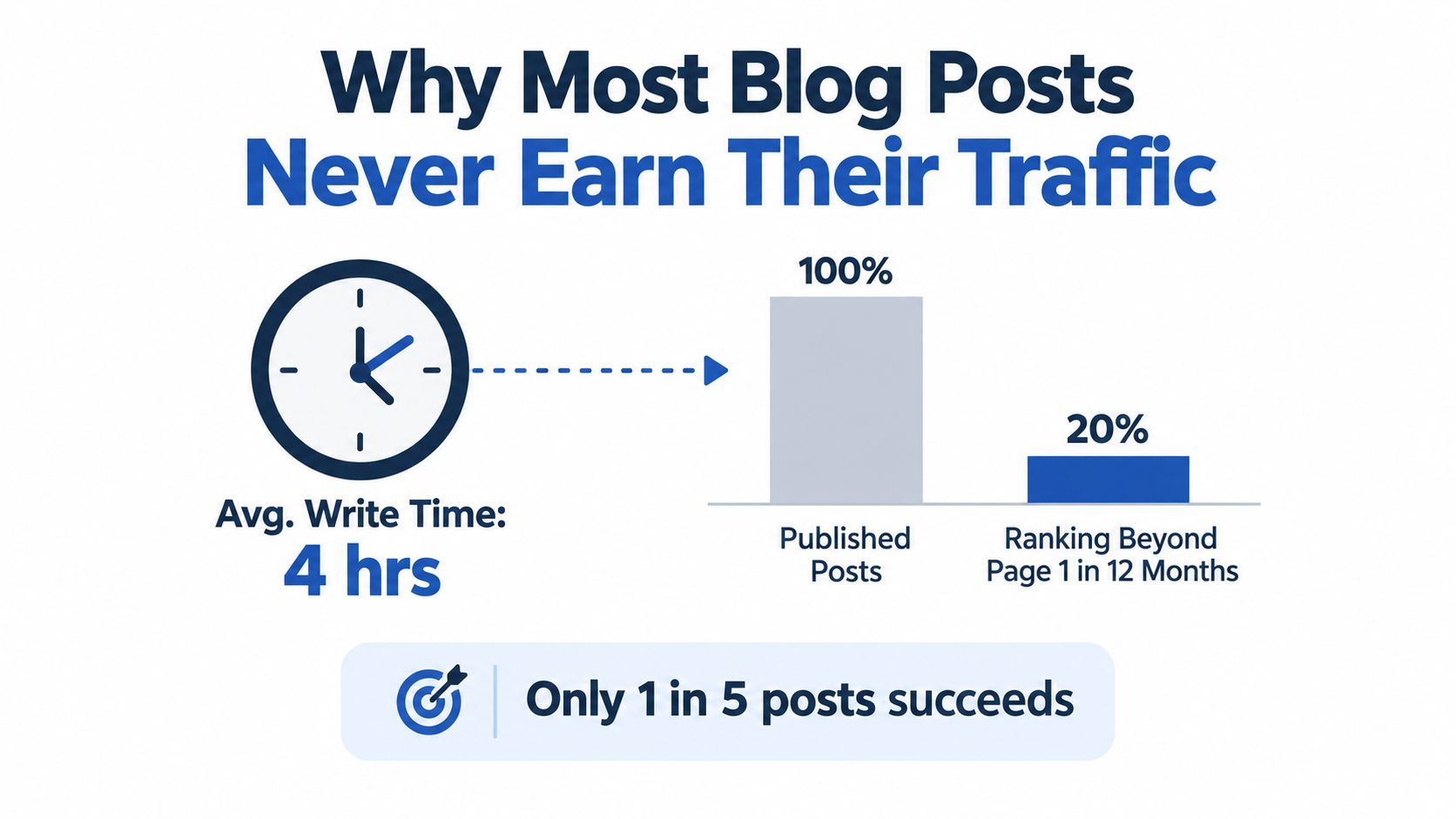
A professional may spend roughly four hours writing a 1,000-word post, but that effort doesn't guarantee visibility. The cost appears later, when the draft attracts no qualified readers, earns no links, and fails to support sales conversations.
The verified data points to a more useful conclusion. Longer, information-dense posts tend to perform better, but length alone isn't the solution. A long article with weak intent alignment is still expensive content that misses its audience.
The hidden cost of skipping fundamentals
Poor blog SEO creates three avoidable losses:
- Wasted production time: Writers polish paragraphs before confirming that the query deserves a blog post.
- Missed compounding value: Search content can build authority over time, but only when the page earns visibility and receives maintenance.
- Editorial churn: Teams keep creating new posts because older pages never become reliable traffic assets.
A practical content lifecycle process helps teams decide whether to update, consolidate, expand, or retire existing pages. This guide to content lifecycle management for marketing teams is useful for building that operating rhythm.
The next steps assign time to each decision: keyword research, intent analysis, outlining, on-page editing, technical checks, and post-publication refreshes. That makes blog post SEO optimization easier to defend internally because the work has a visible cost.
Practical rule: Don't approve a new article until someone can explain the query, the reader's intent, and the page's next business action.
For teams learning the fundamentals, this resource on how to optimize blog posts for Google offers a useful reference point. The larger lesson is operational. Execution fatigue, not a lack of ideas, causes many blogs to stall.
Picking the Keyword and Matching the Intent
Keyword research shouldn't begin with a giant export. It should begin with customer language.
A practical research sequence
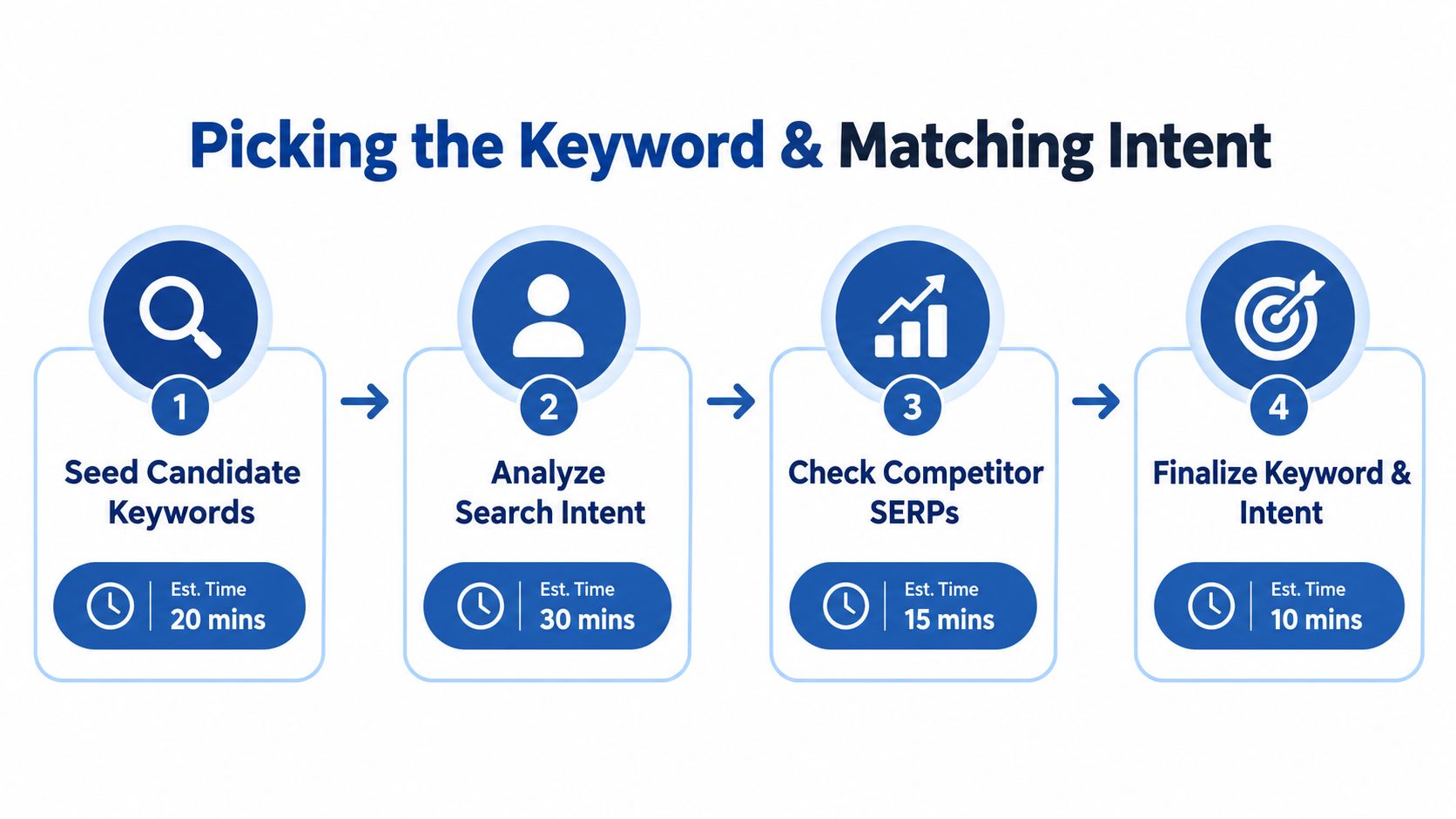
Step 1, collect seeds, 15 minutes. Review sales calls, support tickets, podcast questions, and founder conversations. Write down 5 to 10 phrases customers use naturally. “How do I improve blog traffic?” is more useful than an internal phrase such as “organic acquisition enablement.”
Step 2, validate demand and competition, 20 minutes. Check the candidates in Ahrefs or Semrush. Review search volume, ranking difficulty, current results, and related queries. Don't choose the highest-volume phrase automatically. A narrower query with clear commercial relevance often deserves priority.
Step 3, inspect intent manually, 30 minutes. Open the top results for each candidate. Classify the page as informational, commercial, or transactional. Note whether the result page favors guides, product pages, templates, marketplaces, videos, or aggregators.
Step 4, choose the target, 10 minutes. Select one primary keyword and two supporting variations. Use the primary phrase in the title, introduction, and relevant metadata. Use variations where they improve clarity.
Reject attractive but unsuitable terms
A keyword can look promising and still deserve rejection. Remove candidates when:
- The phrase has no meaningful evidence of demand: Don't build a major article around a term that customers never use.
- A featured answer fully satisfies the query: A short answer may leave little room for a long-form page to earn the click.
- The SERP is structurally incompatible: If every result is a marketplace or aggregator, a standard editorial post may not match the format.
- The query attracts the wrong buyer: Traffic without a plausible next step creates reporting noise.
The primary keyword for this article is blog post SEO optimization. Its intent is informational, but the reader also needs an execution model. That means the page must explain research, structure, publishing, maintenance, and realistic labor costs.
A keyword map prevents supporting phrases from competing with the main page. Teams can use this keyword mapping glossary to clarify which query belongs to which URL.
The workflow ends when the chosen keyword has a defensible intent match. It doesn't end when a spreadsheet contains hundreds of suggestions.
Structuring the Post So Search and Humans Both Win
A strong outline gets to the reader's first question quickly, then earns attention with useful detail. State the core answer within the first 80 words, then support it with evidence, tactics, examples, and a clear next action. This opening discipline takes little time and prevents a common failure: spending half the article on context before giving readers a usable answer.
For a post targeting “blog post SEO optimization,” the intent is straightforward. The reader wants a repeatable process for making blog content more visible and more useful, along with a practical execution model. Organize the article around the reader's decisions, not the company's org chart.
A worked outline
- Define the target: Explain what blog post SEO optimization includes.
- Choose the query: Show keyword selection and intent validation.
- Build the structure: Map headings to reader questions.
- Improve on-page elements: Cover titles, descriptions, headings, links, images, and schema.
- Verify technical basics: Check performance, mobile usability, canonicalization, and indexing.
- Refresh the asset: Create a review loop based on performance signals.
- Take the next action: Connect the article to a relevant service or resource.
Each section should resolve the decision created by the previous one. Keyword research sets the target. Intent research determines the format. The outline turns that format into a page people can scan and use.
Sample Outline for a Blog Post SEO Optimization Article
| Section | User Question Answered | Estimated Words |
|---|---|---|
| Keyword research | Which query should the post target? | 350 |
| Content structure | How should the answer be organized? | 400 |
| On-page elements | What needs optimization before publishing? | 450 |
| Technical basics | What can a marketer verify without a developer? | 350 |
| Optimization loop | What should happen after launch? | 350 |
These estimates give each topic enough room for a complete answer without padding. Orbit Media's survey found an average post length of 1,333 words, while cited SEO research summarized by industry publications places the average first-page result at about 1,447 words. (SEO statistics and ranking data)
Treat those figures as planning context, not a target to fill. A longer article helps only when every section answers a real question. Teams can use this resource to map search intent with outlines before drafting, which reduces restructuring later and gives a solo marketer a clearer writing path.
Recorded long-form content can reduce the research burden. An interview or podcast supplies raw expertise, while a webinar-to-blog workflow shows how recorded discussion can become a structured article. The same method works with keynotes, sales calls, courses, and livestreams, although editing and fact-checking still require a deliberate review.
On-Page Elements That Move the Needle
A competent marketer can complete the core on-page pass in about 30 minutes. The work isn't difficult, but skipping one field can weaken the page's relevance or reduce its appeal in search results.
The pre-publish checklist
Start with the title tag. Keep the primary keyword near the front when possible, then add a benefit or freshness cue. A common industry recommendation places title tags between 50 and 60 characters. (Title tag guidance)
A weak title might read:
Blog Post SEO Optimization
A stronger version is:
Blog Post SEO Optimization for B2B Teams
The second version identifies the audience and preserves the target phrase. A punchier alternative may move the keyword later, which can improve appeal but weakens immediate relevance. That trade-off should be tested, not treated as a universal rule.
Meta descriptions should pitch the click. Google has no fixed length limit for meta descriptions and truncates snippets based on device width. (Meta description mechanics) Ohio State University guidance recommends keeping the description under 155 characters, while the visible description area may be about 200 to 300 characters. (Ohio State SEO guidance)
On-Page SEO Element Limits and Rules of Thumb
| Element | Recommended Limit | Rule of Thumb |
|---|---|---|
| Title tag | 50 to 60 characters | Put the main phrase near the front |
| Meta description | Under 155 characters | Sell the benefit, don't summarize the article |
| H1 | One per page | Match the page promise |
| URL slug | 5 to 8 words | Use descriptive words and avoid dates |
| Headings | Based on section length | Use natural questions and topic variations |
| Internal links | One contextual link per 300 to 500 words | Link where the next resource helps |
| Image file | Under 100 KB when practical | Compress without damaging readability |
Use one H1. Organize the body with H2 and H3 headings. A heading should tell the reader what follows without requiring interpretation.
Image optimization takes roughly 10 minutes per visual when done manually. Rename the file descriptively, compress it, and write alt text for a human using a screen reader. Alt text should describe the image, not repeat the target keyword mechanically.
Schema takes longer when the CMS requires development support. Add Article schema by default where appropriate, then consider FAQ or HowTo schema when the page contains questions or instructions. Structured data should describe visible content, not manufacture extra claims.
Technical Basics Busy Marketers Still Skip
Technical SEO doesn't require a framework lecture. A marketer can verify the essentials with Google Search Console, PageSpeed Insights, and a browser, usually in under 10 minutes per check.
Check the page experience
Core Web Vitals provide concrete thresholds:
- LCP: Keep loading performance under 2.5 seconds.
- INP: Keep interaction responsiveness under 200 milliseconds.
- CLS: Keep layout movement under 0.1.
The common causes of failure are oversized hero images, delayed scripts, third-party embeds, and unstable ad or banner dimensions. PageSpeed Insights identifies the largest opportunities, but the report still needs human prioritization.
Mobile usability deserves a separate check. Open the page on a phone and test tap targets, text size, navigation, and horizontal scrolling. A page that looks acceptable on a desktop monitor can still frustrate a mobile reader.
Verify canonicalization and indexing
Every post should have a self-referencing canonical tag with an absolute URL, even when only one version exists. Check the rendered source or CMS settings. Duplicate parameters, print versions, and inconsistent protocol settings commonly create confusion.
Indexation checks take a few minutes:
- Review robots.txt for accidental blocking.
- Confirm the sitemap lists the post.
- Run URL Inspection in Google Search Console within 48 hours of publishing.
- Request indexing when the page isn't discovered naturally.
The cheapest CMS fixes often involve images. Enable lazy loading for below-the-fold media and preload the main LCP image. Those changes won't solve every performance problem, but they address common causes without redesigning the page.
A 15-minute Friday check is more sustainable than treating technical SEO as a launch blocker. The marketer verifies a small set of signals, records failures, and assigns genuine development work only when needed.
Treat Optimization as a Loop, Not a Launch
A post isn't finished when it goes live. It becomes useful after the team studies how searchers encounter it and makes targeted improvements.
A 2026 content SEO compilation reports that updating old posts can lift traffic by 56%, and that 71% of bloggers update old posts for SEO. The same source reports 21% higher CTR for posts with improved meta descriptions and a 14% CTR lift for articles using Article schema. (Content SEO statistics and refresh data)
Use triggers, not arbitrary rewriting
A refresh should respond to evidence:
- Week 1, 15 minutes: Confirm indexation and check whether crawling occurred.
- Week 4, 30 minutes: Review impressions and average position in Search Console.
- Month 3, 30 minutes: Rewrite the weakest H2 when impressions rise but clicks remain weak.
- Month 6, 30 minutes: Add a relevant FAQ block, update stale examples, and improve internal links.
A rank drop is a trigger. A competitor publishing a more complete answer is another. A new SERP feature can also justify a structural change.
Refresh the section that fails, not the entire article by default.
A simple review rubric keeps the work focused. Record rank movement, impression share, and internal-link count. If impressions increase while clicks remain flat, test the title and description. If impressions fall, inspect intent match and content coverage. If the page has neither visibility nor a credible business fit, redirect the effort elsewhere.
Teams exploring automation should distinguish editorial support from unreviewed output. This AI-driven content creation guide provides context for that discussion, but human review remains necessary for accuracy, voice, and strategic judgment.
A content flywheel can also connect one strong source to multiple distribution formats. This guide to creating a content flywheel from webinars uses webinar language, but the same principle fits podcasts, interviews, keynotes, and sales conversations.
The Done-For-You Shortcut for Time-Poor Teams
DIY blog post SEO optimization can consume 8 to 12 hours when research, outlining, drafting, editing, design, clipping, and publishing are handled separately. A founder or marketer often has the raw material already. The missing step is turning a finished recording into usable search and distribution assets.
The done-for-you workflow is straightforward:
- Book a slot: Choose the recording and target keyword.
- Send the source: Provide a podcast, interview, keynote, sales call, livestream, course, meeting, or other long-form recording.
- Receive the content pack: Finished assets arrive within 72 hours.
One 45-minute recording can become 30 assets, including video clips, LinkedIn posts, quote graphics, carousels, audiograms, and a blog post. The broader delivery includes a 2,600-plus-word SEO-optimized blog post, plus 19 to 29 derivative assets, written in the client's brand voice and supplied with unlimited revisions.
Done-For-You Content Packages at a Glance
| Tier | Core Deliverables | Turnaround | Price |
|---|---|---|---|
| Starter | Core SEO blog post | 72 hours | $297 |
| Growth | Blog post plus full asset suite | 72 hours | $497 |
| Team | Ongoing content production | Agreed schedule | Custom |
Clients spend about 15 minutes per recording. The service can include a 72-hour turnaround guarantee, or the client doesn't pay, and pricing can reach $14 per finished asset. Those figures apply to the described service packages, not to DIY production.
RepurposeYourContent turns an uploaded recording into an SEO-optimized blog post with keyword-rich titles, heading hierarchy, metadata, internal-link suggestions, and natural keyword placement.
This approach doesn't replace keyword judgment or editorial review. It removes the repetitive production burden, so the team can spend its limited time choosing the right topic, approving the angle, and distributing the finished work.
A podcast episode, customer interview, keynote, or sales conversation already contains original knowledge. Request a sample or book a call to see how one recording can become a search-ready post and a complete publishing pack within 72 hours.
Tags:




