Optimize Your Video Podcast Repurposing Workflow for 2026
Maximize your content output! This video podcast repurposing workflow transforms one 45-min episode into 30+ clips, posts, & articles in under 8 hours or even

A video podcast repurposing workflow is a system for turning one long-form video recording into 20 to 30+ smaller assets like clips, articles, and social posts. A manual in-house workflow takes 8 to 12 hours per episode. A done-for-you service takes about 15 minutes of your time.
That gap is why consistency frequently falters.
They record on Riverside, Zoom, or StreamYard. They publish one full episode. Then the backlog starts. By week three, the clips aren't cut, the LinkedIn posts aren't written, and the transcript is still sitting in a folder.
The fix isn't more discipline. It's a better system.
A strong video podcast repurposing workflow starts with one decision: record video-first. That single choice gives the team a full episode for YouTube, vertical clips for social, and audio for podcast feeds. Audio-only recording shuts off too many downstream options. Video-first keeps every format open.
The True Cost of Repurposing Your Podcast
Ten hours disappears fast after recording ends.
Teams usually budget for the edit. They miss the rest of the work. Transcript cleanup. Clip review. Titles. Show notes. Blog drafting. LinkedIn copy. Vertical exports. Captions. Uploads. QA. Scheduling. Across one weekly episode, that stack usually lands in the 8 to 12 hour range for an in-house team.
The problem is not the first week. It is the third.
Week one feels manageable because the episode is fresh and the team still has margin. Week two gets tighter. By week three, unfinished tasks start rolling into the next production cycle. The result is predictable. The full episode goes live, but the repurposed assets stall in folders, drafts, and half-finished captions.
That backlog has a real cost. Publishing slows down. Social distribution gets inconsistent. The team spends more time chasing files than producing assets. For a founder-led or lean marketing team, those hours usually come from strategy, sales, or client work.
For teams mapping output across channels, these content repurposing statistics for 2026 help frame the shift. The recording is no longer the final asset. It is the production input.
What teams are actually buying with those hours
A proper repurposing workflow creates a full content package from one recording:
- One source recording for the main episode
- One transcript for written assets and clip selection
- One review pass to flag strong moments
- One production cycle to turn those moments into clips, posts, and article drafts
- One publishing schedule to spread the assets over the next few weeks
That is the part many teams underestimate. Repurposing is not a side task after publishing. It is a second production layer.
In-house, that second layer often means 10 or more hands-on hours per episode. In a done-for-you system, the client usually spends about 15 minutes approving topics, recording, and reviewing final assets. The work still happens. The difference is who absorbs the operational load.
The Standard In-House Repurposing Workflow
A weekly video podcast rarely breaks on recording day. It breaks in the handoff chain that starts right after export.
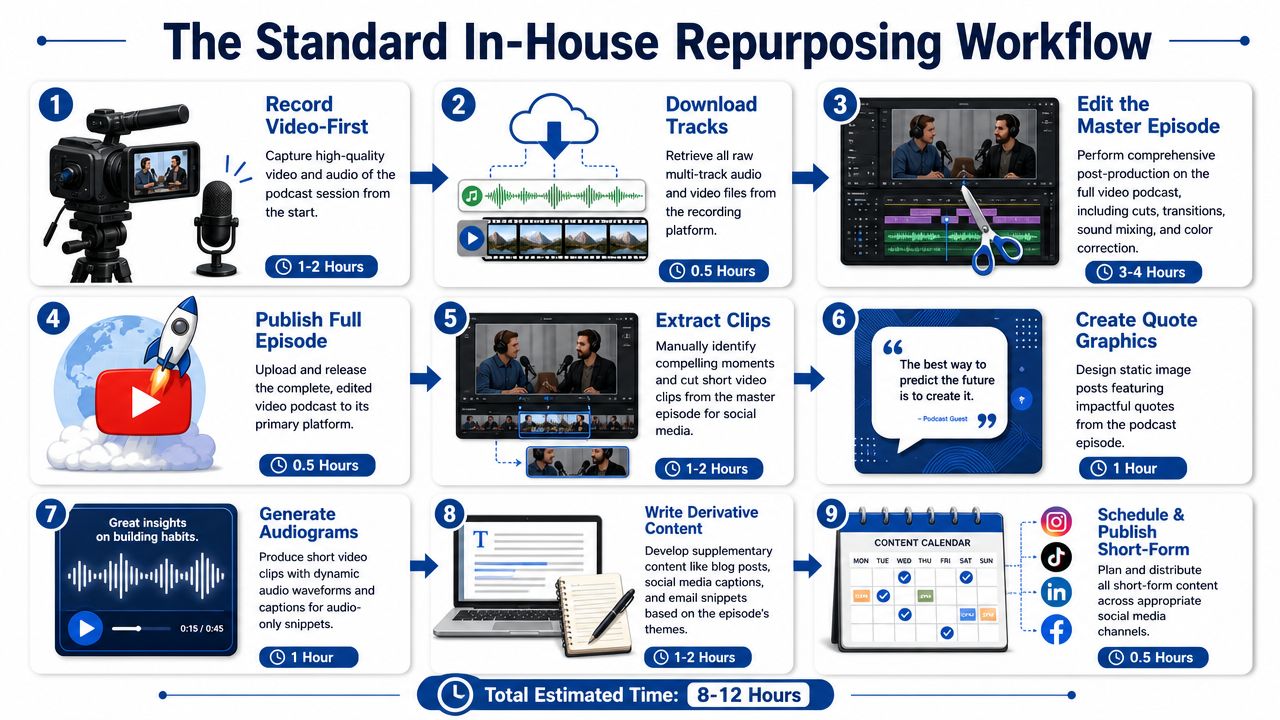
A realistic weekly workflow example
Take a team recording one interview per week on Riverside.
Step 1. Record the episode
Owner: Host and producer
Time: recording session length
This is the easy part. The calendar was blocked. Everyone showed up. The episode exists.
Step 2. Download tracks and organize files
Owner: Producer or marketing manager
Time: about 30 minutes
The team exports audio and video, labels folders, checks guest assets, and makes sure the right files are ready for editing. If file naming is sloppy here, the same team pays for it later in missed clips, duplicate exports, and version confusion.
Step 3. Edit the master episode
Owner: Video editor
Time: 2 to 3 hours
The editor trims dead space, removes rough transitions, balances audio, adds intro and outro elements, and exports the long-form version. If the editor is also handling revisions from the host, this step stretches fast.
Step 4. Publish the full episode
Owner: Marketing manager
Time: 1 hour
That hour usually includes the title, description, thumbnail, upload, show notes, links, and platform formatting. At this point, many teams feel done. They are not even halfway through the production load.
Where the workload actually piles up
Repurposing starts after the main episode is finished. That is the part small teams underestimate.
Clip identification and editing
Owner: Editor or content lead
Time: 3 to 4 hours
Someone has to review the episode, mark strong moments, cut vertical clips, add captions, and resize for each channel.Derivative content writing
Owner: Content marketer
Time: 2 to 3 hours
This includes the blog draft, LinkedIn posts, quote graphics, carousel copy, email copy, and short post variations.Scheduling and publishing short-form assets
Owner: Social media manager
Time: 1 hour
Each platform needs different formatting, captions, tags, thumbnails, and publish dates.
That puts the in-house workload at 8 to 12 hours per episode, and that number is common even before approvals slow things down.
The bigger problem is the sequence. One person finishes editing. Another waits for the final file. Then someone else waits for timestamps. Then writing starts. Then scheduling starts. A weekly show turns into a relay race with no slack.
Teams trying to tighten that process usually run into the same bottleneck outlined in this content repurposing workflow for small teams. One person ends up owning too many steps, and the whole system depends on that person having a clear afternoon.
For a podcast-specific breakdown of the asset stack, this guide on how to repurpose podcast episodes shows the full spread of outputs. The trade-off is simple. DIY gives the team control, but it also gives the team the full 10-plus-hour manual grind every week.
Why This Workflow Breaks Around Week Three
Week one feels manageable.
Week two feels busy.
Week three is where the stack starts to wobble.
The second episode needs clips while the first episode still needs posts. The next recording is already booked. The editor is late. The marketer hasn't finished the blog. Nothing is fully broken, but nothing is caught up either.
The real bottleneck is sequential work
In the standard workflow, one task blocks the next.
The transcript often waits for the edit. The clips wait for someone to review the full episode. The writing waits for the clips, because the team wants to align themes. Scheduling waits for the writing. Every delay pushes the rest of the chain.
That structure creates three problems:
Context switching
One person jumps from editing to copywriting to scheduling. Quality drops because focus breaks.Creative fatigue
Clip selection and caption writing need judgment. Those tasks get worse when done late at night between other work.Backlog compounding
One unfinished episode overlaps with the next. Then the next.
Why good intentions aren't enough
Organizations don't typically need another checklist. They require a workflow that can survive a normal workweek.
Venpro's repurposing guide describes the more sustainable model clearly. One 60-minute recording session can produce two weeks of multi-channel content, including 3 to 5 clip candidates, 3 to 5 quote candidates, blog and LinkedIn expansions, and scheduled distribution across social, email, and SEO channels. That's the operating shift that matters. The recording stops being a one-off event and becomes raw material for a content engine.
Most DIY workflows don't collapse on quality first. They collapse on consistency first.
By week three, teams start making shortcuts:
- They publish the full episode but skip clips.
- They post raw transcript text as a blog.
- They only schedule one social post.
- They delay everything until “when there's time.”
That's why batching matters. It lowers switching costs.
That's also why outsourcing works when the internal team is already full. It removes the production chain from the calendar entirely, instead of asking a busy marketer to keep stealing afternoons for post-production.
A Better Video Podcast Repurposing Workflow
The better model starts with a transcript, not a timeline.
That changes everything.
Instead of scrubbing through a full episode to find good moments, the team reads the transcript with timestamps and speaker labels. Strong moments stand out faster. Quotes are easier to verify. The writer and editor can work from the same source at the same time.
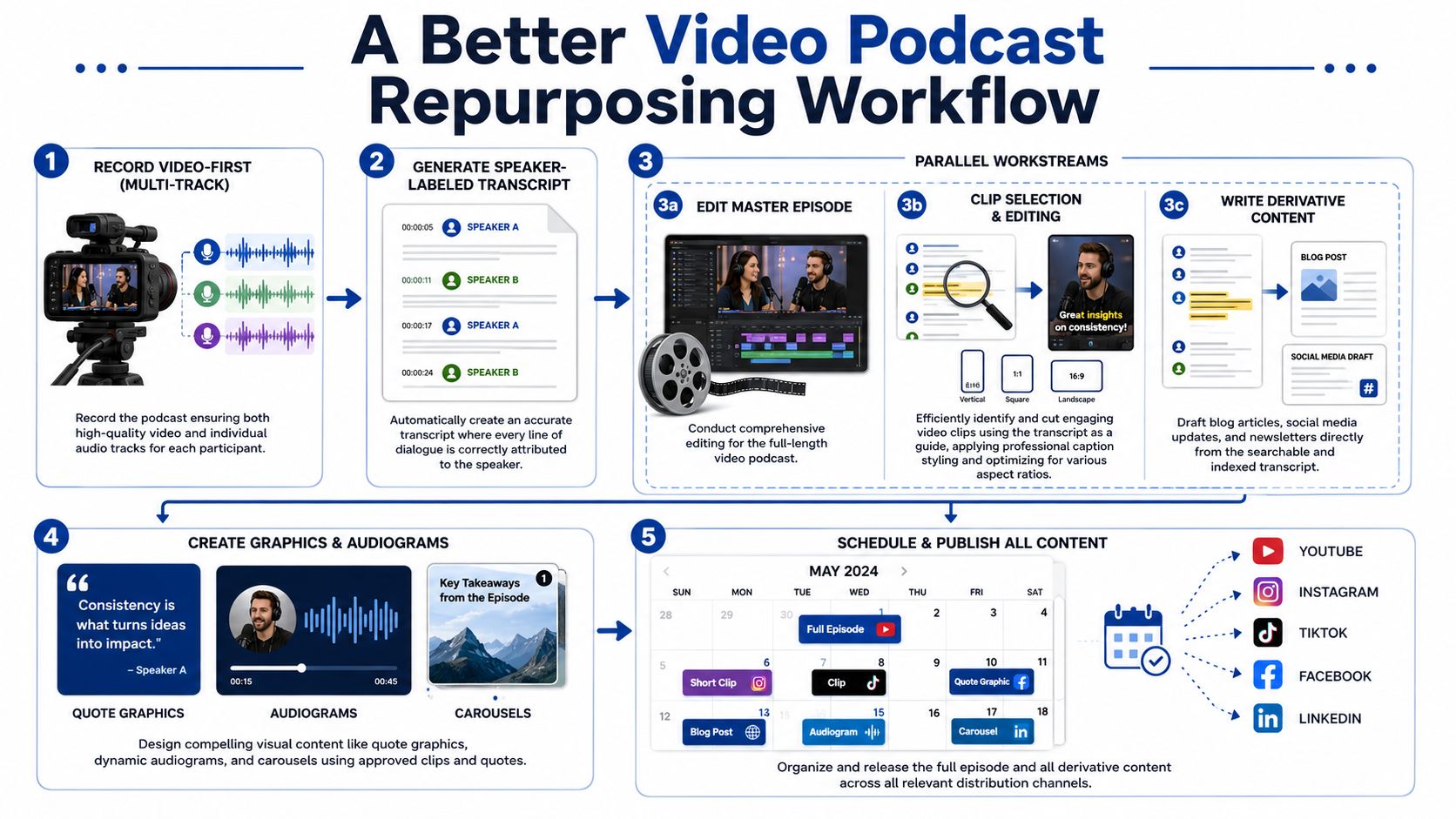
The parallel workflow that actually scales
A strong video podcast repurposing workflow looks like this:
- Record video-first in multi-track
- Generate a speaker-labeled, timestamped transcript
- Run an editorial extraction pass
- Edit the master episode and cut clips in parallel
- Draft written assets from the same transcript
- Apply brand rules and review against source
- Schedule everything into a three to four week calendar
The key change is step order.
The transcript comes early, not late. That means the workflow runs wide, not long.
A practical step-by-step example
Monday morning
The team records on Riverside or StreamYard. Separate tracks are essential. They reduce cleanup work later and make every speaker easier to isolate.
Monday midday
The recording is transcribed with timestamps and speaker labels. An editor reads the transcript and marks clip-worthy moments.
Monday afternoon
One editor starts the full-episode master cut. At the same time, another production lane starts cutting short clips from the marked timestamps.
Parallelization saves hours at this point.
A writer doesn't need to wait for finished clips. The writer can draft LinkedIn posts, blog copy, and newsletter text directly from the same transcript.
To compare recording options before the workflow starts, this Riverside vs Zoom guide for recording and repurposing helps teams choose based on post-production needs, not just call quality.
Later in the cycle, locked formatting rules keep work from getting redone. This roundup of AI video editing tools for marketers is useful background, but the main takeaway is simpler. Tools help. A system matters more.
A quick walkthrough of the workflow in motion helps make that visible:
Why this works better
Swell AI's repurposing guidance gets to the heart of it. The best workflows avoid re-editing for each platform. A timestamped transcript as the source of truth lets teams tag, adapt, and format assets systematically, so each clip or post gets created once, then adjusted efficiently.
Build one source of truth. Then branch outputs from it. Don't rebuild the episode for every channel.
That's the operational fix.
Not more effort. Better sequencing.
The Two Automation Checkpoints That Matter
Most automation advice gets this wrong.
The goal isn't to automate taste. The goal is to automate repetitive transformation work and keep human judgment where it matters.
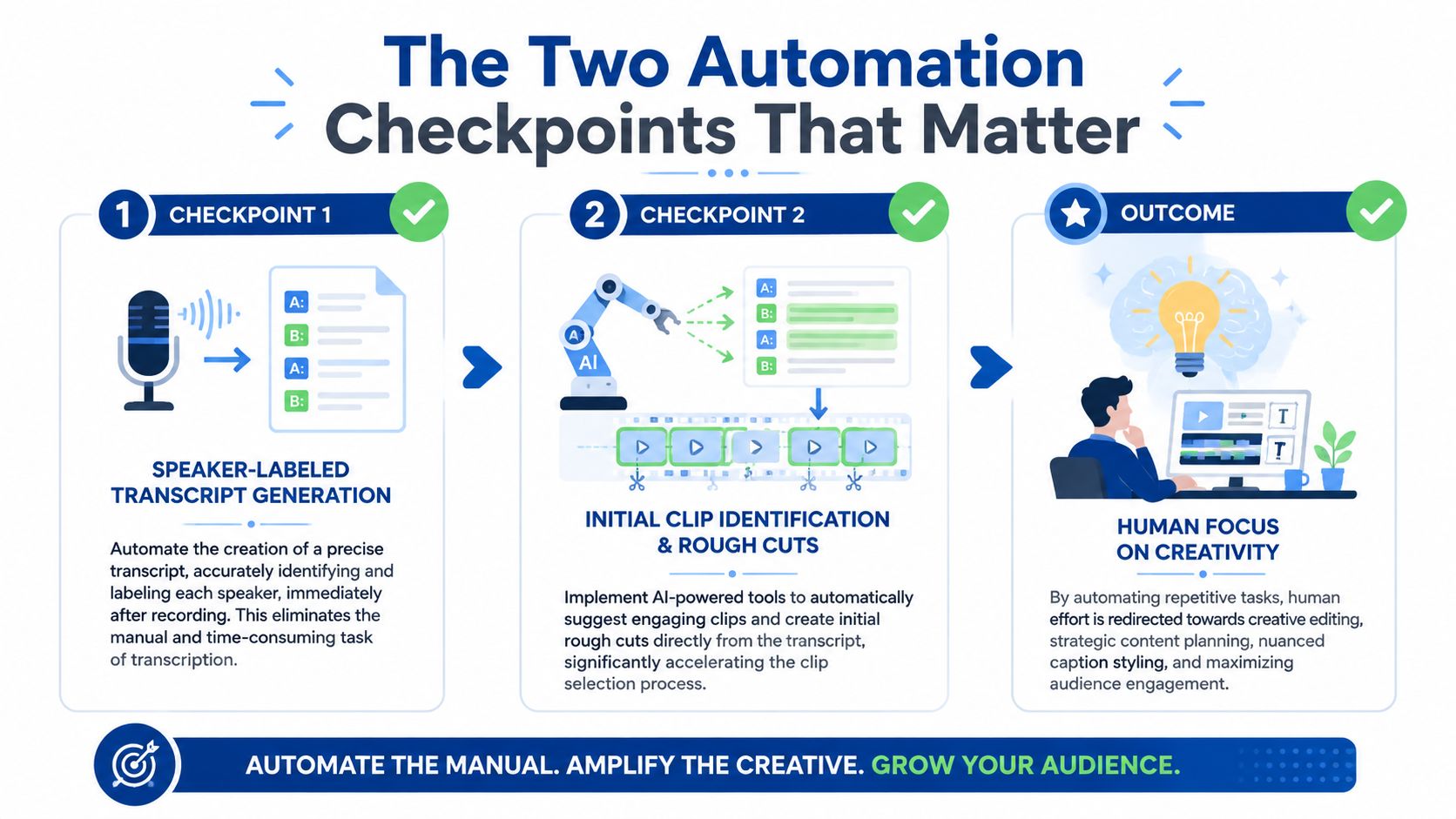
Checkpoint one is transcription
This is the keystone.
A speaker-labeled, timestamped transcript changes six downstream tasks at once. Clip selection becomes reading. Quotes become searchable. Captions start with corrected source text. Blog drafts start from actual language, not memory. Social posts stay closer to what was said. Review gets faster.
Without that transcript, every downstream task becomes slower and less reliable.
Checkpoint two is locked export presets
Every destination has formatting rules.
LinkedIn, YouTube Shorts, TikTok, email, and blog embeds all want different shapes and presentation styles. If the team decides these specs from scratch every week, it burns time on avoidable work.
Locked presets fix that:
- Aspect ratio presets keep vertical, square, and horizontal exports consistent
- Caption templates hold typography and placement steady
- Brand rules apply colors, fonts, and lower-thirds the same way each time
- Cold-open structures give clips a repeatable opening pattern
That doesn't remove judgment. It removes rework.
This overview of content workflow automation tools for 2026 is useful if a team wants to map those checkpoints into a broader editorial process.
What should never be fully automated
Moment selection still needs a person.
Voice matching still needs a person.
The loudest soundbite in a transcript often isn't the best clip. The cleanest sentence often isn't the strongest post. Judgment is what protects quality.
Fame's repurposing guidance also points out two common mistakes. Teams publish raw transcripts, and they ignore platform-specific formatting. Transcripts need editing into standalone prose. Short clips need 9:16 formatting with captions for vertical platforms, and they should go live in the same week as the full episode to keep the topic fresh.
Automate the transformation of content. Don't automate the decision about what deserves attention.
That rule keeps workflows fast without making the output generic.
The Done-for-You Alternative 12 Hours vs 15 Minutes
Once the math is clear, the choice is usually clear too.
A manual workflow takes 8 to 12 hours for each episode. That work gets spread across editing, clip extraction, writing, formatting, and scheduling. For most founders, podcasters, and B2B marketers, those hours don't exist.
The alternative is simple. Send one recording. Get the finished assets back.
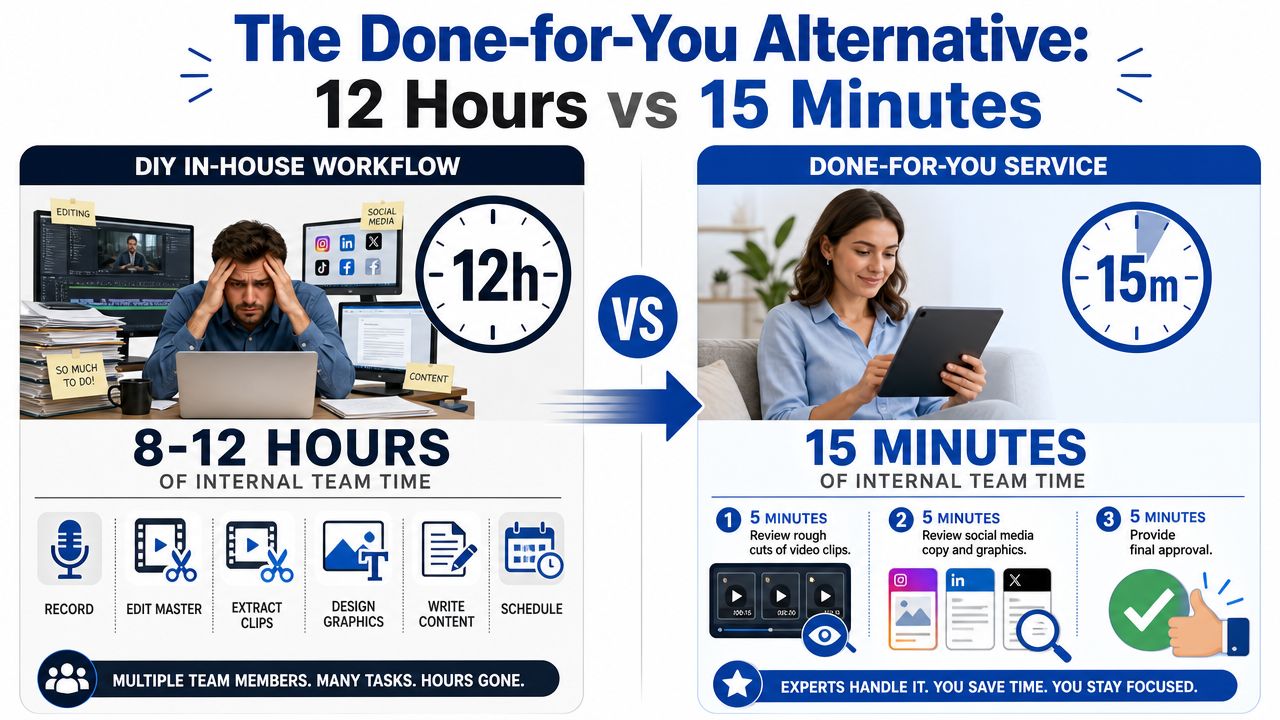
What the client actually does
The client side is short:
- About 5 minutes to send the recording
- About 10 minutes to review and approve the finished pack
That's it. Roughly 15 minutes total.
The input can be a podcast, webinar, keynote, interview, meeting recording, or livestream. It doesn't need pre-editing. It doesn't need cleanup first. The recording is the raw material.
What gets delivered instead of another backlog
Inside a 72-hour turnaround, the output becomes a full content pack:
- 20 to 30 ready-to-publish assets
- video clips
- LinkedIn posts
- quote graphics
- carousels
- audiograms
- a blog post
The service model described here also includes unlimited revisions, brand voice alignment, and a 72-hour turnaround guarantee or you don't pay. For teams that care about unit economics, pricing starts from $14 per finished asset. One 45-minute recording becomes 30 assets.
For plan details, RepurposeYourContent pricing lays out the service structure.
Why the done-for-you model works
The speed doesn't come from rushing.
It comes from specialization.
The production system handles transcription and extraction first. Clips and written assets run in parallel. Brand pass and human review happen before delivery. The client isn't managing freelancers, reviewing rough drafts in six tools, or chasing formatting fixes across channels.
That's the difference between generalist effort and a dedicated workflow.
A founder should spend time recording the conversation. A marketing lead should spend time reviewing strategy. Neither should spend half a day resizing clips or turning transcripts into publishable prose.
If the current workflow is stuck at week three, there's a cleaner way to run it. Book a call with RepurposeYourContent or request a sample pack from an existing recording.
Tags:




