10 Content Repurposing Examples That Actually Work
Explore 10 content repurposing examples for podcasts, keynotes, interviews, sales calls, and more, with workflows, costs, and practical tactics.
Content repurposing examples show how one long-form recording can become multiple audience-specific assets. A single blog post can become 8–12 different content pieces, while repurposed content can generate 60% more engagement than single-format original content.
The practical value is clear. A podcast episode can become clips, a transcript, LinkedIn posts, quote graphics, and an email issue. An interview can become an article, a carousel, and several soundbites. Strong content repurposing examples don't copy the same message everywhere. They match each source moment to the audience, funnel stage, and platform.
That matters because only 29% of marketers reportedly have a systematic repurposing process (ContentMation). The recording exists. The expertise exists. Production capacity is usually the missing piece.
A 45-minute recording can contain a strong opinion, a useful framework, a customer objection, and several quotable moments. The work involves finding those moments, editing them, writing platform-native copy, designing visuals, and publishing each asset with the right context.
Manual production can take 3 to 5 hours for one 45-minute podcast episode when the output includes a blog post, newsletter, show notes, and social content, even before a more extensive editing process (Podsuite). The examples below focus on practical outputs, strategic roles, and the actual cost of doing the work internally. For another practical perspective, see how Trendy helps repurpose content.
1. Podcast Episode to Short-Form Video Clips
A recorded podcast can supply several platform-ready assets, but the strategic role of each clip is specific. YouTube Shorts, TikTok, Instagram Reels, and LinkedIn reward a clear idea delivered quickly. Facial expressions, pauses, disagreement, and emphasis give the video more value than an audio-only excerpt.
Start with moments that can stand alone. A direct explanation of why a common growth tactic fails usually earns more attention than an episode introduction. Select claims, objections, decisions, and advice that help the viewer understand a problem without opening the full recording.
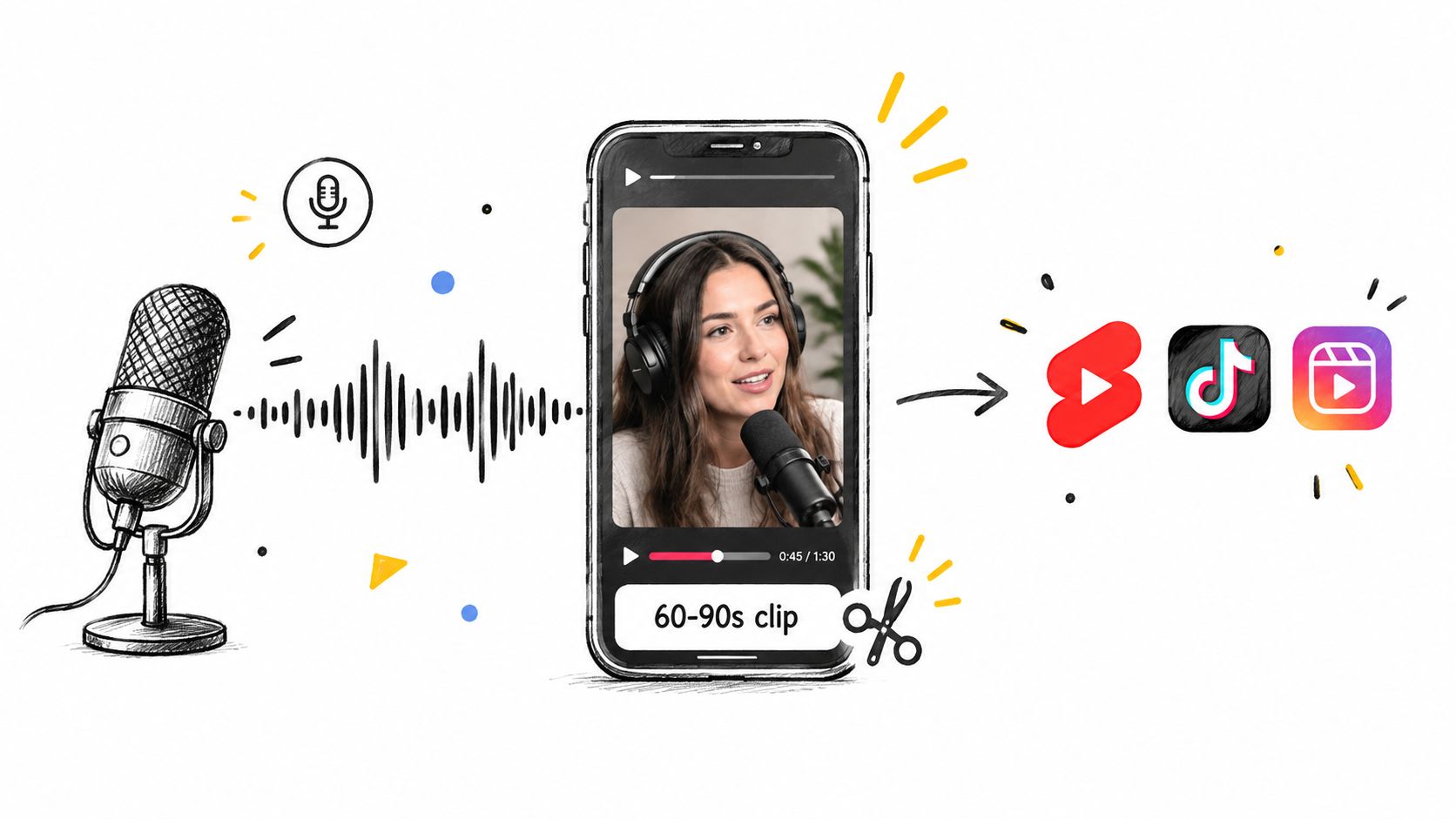
What to extract
- Strong opinions: Keep the guest's clearest position on a relevant industry issue. This supports authority and gives the audience a reason to respond.
- Practical advice: Isolate one action a founder or marketer can apply.
- Memorable phrasing: Turn a concise explanation into the opening visual or spoken hook.
- Context cues: Add the speaker's name and topic so the clip remains understandable when viewed alone.
The DIY workflow includes reviewing the recording, marking timestamps, trimming setup, editing the video, adding accurate captions, exporting platform versions, and writing descriptions. With a transcript, review and light editing can still take 45 to 90 minutes (Podsuite). Full production takes longer when the footage needs reframing, caption corrections, brand treatment, approvals, and separate exports.
Practical rule: A short clip should deliver a complete idea, not act as a trailer for an incomplete thought.
Place the full episode link in the caption or first comment after the clip has earned attention. Review further guidance on podcast clips for social media before setting the publishing workflow.
2. Interview Recording to LinkedIn Article and Quote Graphics
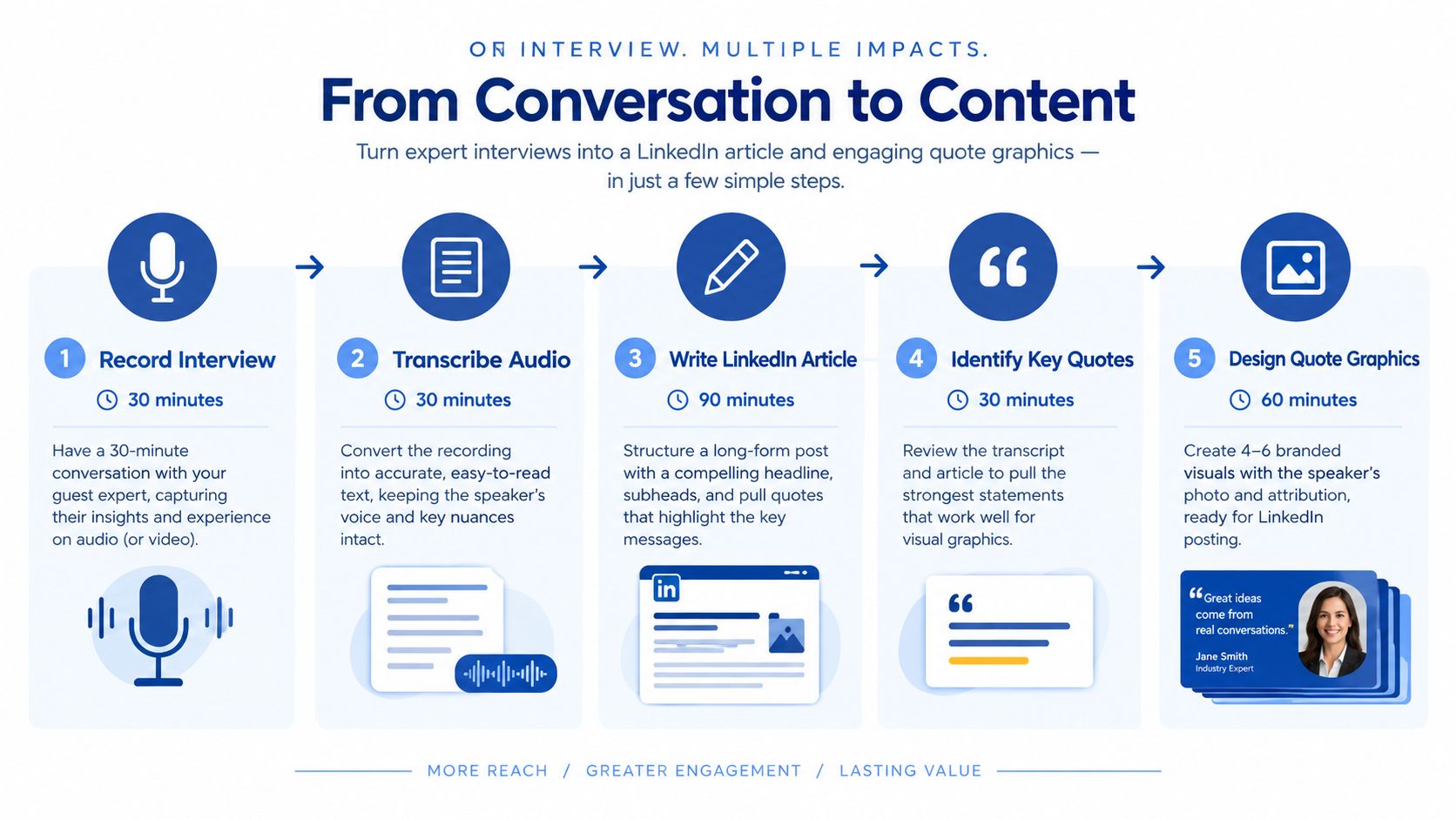
An interview creates two publishing opportunities. The company can turn the discussion into a structured LinkedIn article. The guest can share selected quote graphics with an established audience. That combination supports authority building and partner distribution, not just higher content volume.
Start with the audience's problem, then shape the article around the guest's clearest answer. Do not publish the transcript unchanged. Spoken language needs tighter sequencing, examples, and a conclusion that gives readers a practical next step.
A practical extraction workflow
Step 1: Transcribe the recording and remove repetition, filler, and unfinished sentences.
Step 2: Group answers by theme rather than following the interview's timeline.
Step 3: Select quotes that answer a defined question or address a recognisable problem.
Step 4: Build graphics around complete statements. Add the speaker's name, role, and company when permission allows.
Step 5: Write an introduction that explains why the insight matters to the intended buyer.
The manual workload covers transcription, article editing, quote selection, graphic design, approvals, and publishing. Design often sets the pace. Each quote requires consistent styling, accurate attribution, and a separate review.
An interview about hiring, pricing, or product strategy can produce a company-page thought-leadership article and quote posts for the founder's profile. Keep the central insight consistent, then change the hook for each audience. The article explains the reasoning. The graphics create quick entry points for discussion and sharing.
A quote graphic earns attention. The article earns trust by explaining the reasoning behind the quote.
Approval protects the guest and the publisher. Ask the guest to check factual claims, titles, company descriptions, and sensitive statements before publication. Use the interview repurposing workflow as a production reference, then assign clear owners for editing, design, approval, and publishing.
3. Conference Keynote to Blog Post Series and Carousels
A conference keynote can supply several assets because each major argument has its own audience question, search intent, and publishing format. Turn those arguments into a blog post series. Turn the central framework or process into a carousel.
The formats serve different jobs. Blog posts support search and owned distribution with room for assumptions, examples, limitations, and evidence. Carousels support fast scanning on LinkedIn or another visual channel. Reusing the same copy in both formats weakens each one.
Start with the recording, not the slide deck. Slides reveal the intended structure, while the recording supplies explanations, objections, examples, and useful wording. Compare both and mark:
- Core frameworks: Processes, models, or decision rules that can stand alone.
- Audience objections: Questions that show where the framework needs more explanation.
- Examples: Stories that make an abstract point easier to understand.
- Search themes: Terms buyers use when looking for the problem discussed.
The manual workload includes transcription, outlining, writing, carousel design, editing, and SEO review. It also includes editorial judgment. A persuasive stage presentation may need caveats, definitions, or supporting context before publication.
A product leader's keynote about onboarding could produce one article about activation, another about user education, and a carousel showing the recommended workflow. Each asset targets a different search or attention need while retaining the speaker's perspective.
Every post needs a distinct promise, argument, and conclusion.
Avoid splitting the transcript by timestamps. Build each article around a real audience question, then select the evidence and examples that answer it. The conference-talk repurposing guide provides a useful production reference for turning one presentation into multiple marketing assets.
4. Webinar Recording to Email Drip Campaign and Audiogram Series
A webinar recording can reach two audiences after the event: people who missed it and leads who were not ready to watch the full replay. Email turns the session into a guided sequence, while audiograms carry selected ideas into social feeds.
Start with the buyer's learning path, not the recording timeline. Identify the problem the audience needs to understand, the mistake that blocks progress, the speaker's process, and the objection that could delay action. Each email should answer one question and give the reader a clear reason to continue.
A practical sequence might open with a Problem email that explains why the issue matters. An Insight email can present one principle from the session. An Objection email should answer a concern raised during the webinar. An Application email can show how a team would use the recommendation. A Next-step email can direct qualified readers to a relevant conversation or resource.
The recording supplies the evidence. The copy supplies the context.
Audiograms serve a different purpose. Each should feature one speaker, one idea, readable captions, clear waveform visuals, and enough background for someone who never attended. A strong excerpt can create interest, but it should not carry the full argument alone.
Use the webinar for depth. Use the audiogram to earn the next view.
Production takes more than exporting clips. The team must review the transcript, write and edit the sequence, select usable audio, create waveform graphics, check accessibility, configure the emails, and segment recipients by topic or buyer stage. Sending one version to every contact weakens relevance and increases manual revision later.
The webinar follow-up drip campaign strategy offers a useful structure for this workflow. The same approach works for workshops, product demonstrations, and customer education sessions, with the sequence adapted to each audience's questions and buying context.
5. Sales Call Recording to Customer Case Study and Social Proof Assets
Sales calls reveal the objections, desired outcomes, decision criteria, and language buyers use to describe their problems. A customer success call adds implementation detail and evidence. With permission, both conversations can produce a case study, testimonial clips, and social proof graphics.
Start the case study with the customer's decision process. Explain the initial problem, why the customer searched for a solution, what changed, and which evidence supports the result. A clear narrative carries more weight than a page of promotional statements.
Preserve the customer's language. Edited proof should sound specific, not scripted.
Trust controls the production schedule. Secure written approval before publishing a customer's name, logo, quote, result, or recording excerpt. The approval may require internal permission on the customer's side, so build that review into the workflow before design or distribution begins.
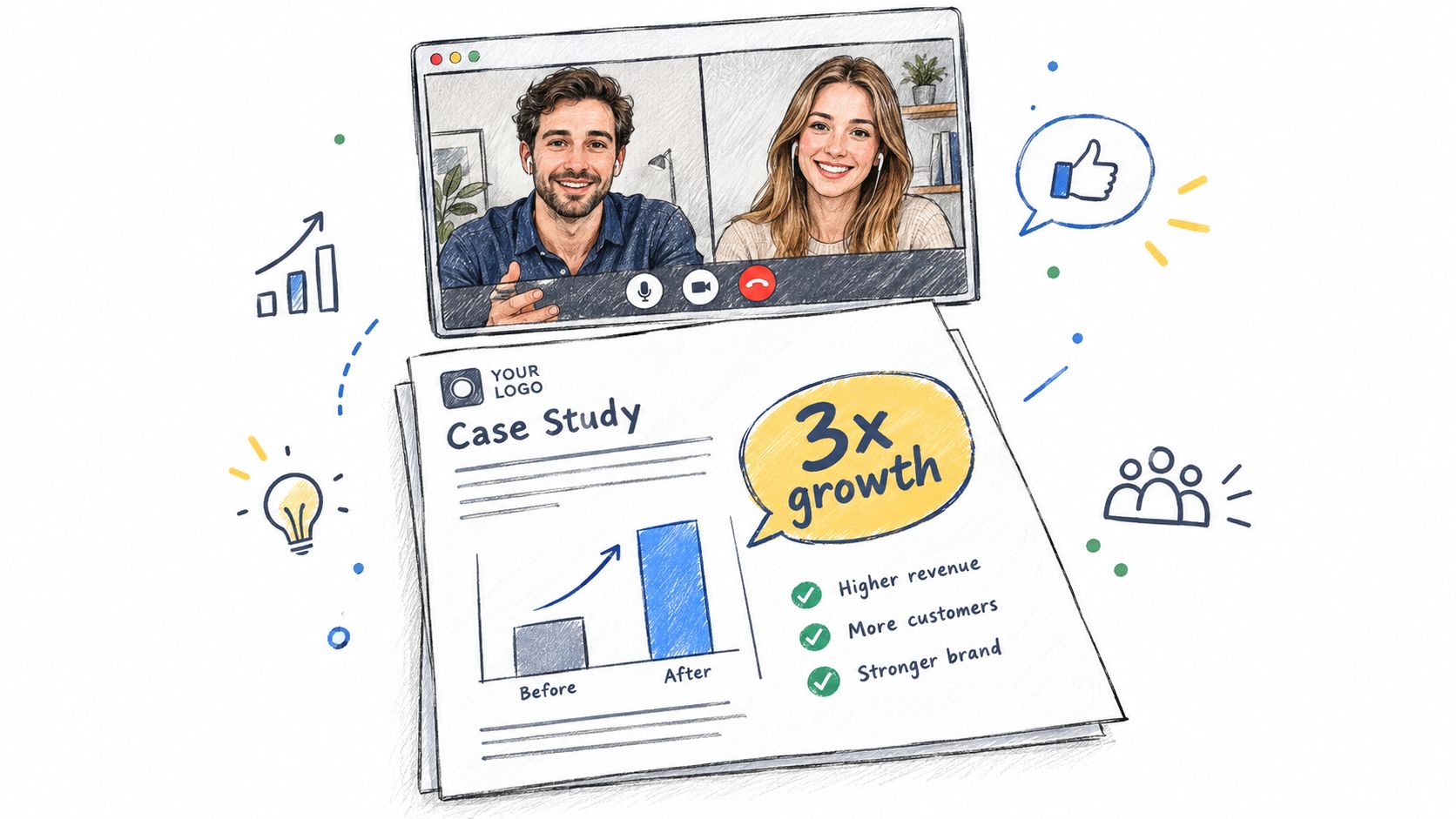
One conversation can support several buyer needs. A Case study gives the website and sales team a detailed customer story. A Testimonial clip answers a specific buying concern in the customer's own voice. A Quote graphic gives LinkedIn or a sales presentation a concise proof point. An Objection post addresses a concern raised during the call in written form.
Manual production includes transcription, case study writing, clip editing, graphic design, legal review, and customer approval. Each asset also needs a separate angle, format, and publishing decision. Reusing the same statement everywhere reduces relevance.
A B2B software company might turn an implementation call into a website case study, a short clip about time saved, and a LinkedIn post about onboarding risk. Each asset supports a different stage of the buyer journey.
Keep the customer's context intact. Rewriting every sentence into brand copy makes the result sound like advertising. Specific details, careful consent, and a clear narrative create more credible social proof.
6. Livestream Replay to Highlight Compilation and Event Recap Post
A livestream has energy that a polished edit may remove. The production task is to preserve the strongest exchanges while making the material easier to watch after the event ends.
A highlight compilation should include a clear opening, strong transitions, and enough context to explain each moment. It can combine a host's explanation, a guest's response, audience questions, and visible reactions. The recap post should serve a different purpose. It can summarise the main lessons, link to the replay, and give absent viewers a reason to attend the next event.
A workable replay workflow
Step 1: Review the livestream and mark moments with clear audience value.
Step 2: Separate teaching, debate, reaction, and announcement clips.
Step 3: Build a short compilation around a theme instead of arranging moments randomly.
Step 4: Write a recap using the main questions and answers as the structure.
Step 5: Add captions, speaker names, and links to the replay or next event.
The manual cost includes reviewing the full recording, selecting highlights, editing transitions, checking captions, writing the recap, and collecting approval from speakers. A long livestream can also contain dead air, technical issues, repeated questions, and off-topic discussion. Those sections need removal without damaging the narrative.
A product launch livestream might produce a highlight video focused on customer reactions and a recap post focused on the product's main use cases. The two assets reach different viewers. One sells the event experience. The other explains the business value.
7. Podcast Transcript to Searchable Blog Post with Internal Linking
Audio builds a relationship with listeners. A transcript makes the episode's ideas searchable and reusable. The finished post should read like an editorial asset shaped by the conversation, not a record of spoken words.
Start with the strongest reader question, not the episode's opening remarks. A detailed episode may support one topic-led article, while a broader conversation can produce an episode summary or several related posts. The format should match the subject's depth and the search intent behind it.
Turn conversation into a useful article
Edit for readers who will scan, compare options, and look for an answer. Remove filler words, repeated explanations, tangents, and references that only make sense to listeners. Group related answers under headings that describe the reader's problem.
Build the working document through five decisions: Transcription creates a searchable source. Extraction marks claims, examples, definitions, and useful questions. Structure arranges those points around reader intent. Editing turns conversational answers into clear prose. SEO review refines the title, headings, description, and internal links.
Internal links can connect the article to related episodes, service pages, research, and supporting articles. Each link should extend the reader's research or clarify how the topic fits the site's broader subject coverage. Avoid adding links just to increase the count.
The manual cost can reach several hours once transcription, keyword research, editing, formatting, link selection, and review are included. The main production risk is a transcript with too much dialogue and too little editorial judgment.
A product management podcast could become an article on prioritisation, with links to episodes about research, roadmaps, and stakeholder communication. Add context around the guest's answer, explain why it matters, and publish a useful article rather than treating the audio as the finished product.
8. Training Video Recording to Microlearning Modules and Checklists
Training recordings often fail because the format demands sustained attention. The source may be useful, but a busy employee needs a clear lesson, an action, and a reference they can use later.
A training recording can become short learning modules, checklists, worksheets, and manager discussion prompts. The content should be divided at natural teaching transitions. A topic change, worked example, summary, or exercise usually creates a better boundary than an arbitrary time interval.
Match the asset to the learning task
A microlearning module should answer one question or teach one action. A checklist should help someone perform the action without replaying the entire recording. A worksheet should guide decisions that require reflection or input from a team.
For example, a sales training recording could become modules on discovery questions, objection handling, call preparation, and follow-up. A checklist could help representatives prepare for a call. A manager worksheet could support review sessions.
Manual production involves reviewing the recording, marking teaching transitions, editing clips, writing module descriptions, designing checklists, packaging files, and checking instructional accuracy. The editor should also verify that repeated introductions and references to the live session don't confuse later viewers.
A useful module opens with the learning objective and closes with the key action. Visual consistency matters too. Module thumbnails, checklist pages, and course navigation should use the same terminology and brand treatment.
The source recording supplies the expertise. The repurposing process supplies the structure that makes the expertise easier to complete and apply.
9. Panel Discussion Recording to Expert Roundup Post and Soundbite Compilation
A panel recording can produce two distinct assets: an expert roundup that preserves the discussion, and a soundbite compilation that gives each speaker a focused shareable moment. Its strategic value comes from contrast. Readers can see where experts agree, where they differ, and which assumptions shape their recommendations.
Start with the central question, then group the transcript around the subquestions that matter to the audience. Keep each panelist's position intact. Add accurate attribution, the speaker's title, and enough context for the answer to stand alone.
A useful roundup preserves disagreement instead of forcing every answer into one company position.
The article's Opening argument should lead with the most useful tension or surprising disagreement. Follow with concise Expert sections, each built around an edited response rather than a full transcript. Extract Soundbites that contain a complete idea and work without the moderator's question. For Distribution copy, write an introduction for each panelist and tag the relevant speaker.
Manual production requires transcription, speaker identification, fact checking, editing, audio extraction, noise cleanup, captions, approvals, and distribution. Multi-speaker recordings take longer because names, voices, titles, and positions must remain accurate across every asset.
A panel about AI adoption could become a company blog roundup, a LinkedIn soundbite series, and an internal sales reference. The blog supports authority. The clips extend reach through the speakers' networks. The sales reference helps representatives answer recurring questions without replaying the discussion.
The strongest soundbites state a clear position or useful recommendation. They give the audience a reason to listen, share, or read further.
10. Founder Q&A Recording to FAQ Page and Social Media Question Series
A founder Q&A contains the questions prospects, customers, employees, or community members already care about. Those questions can become an evergreen FAQ page, while individual answers can become social posts.
The FAQ should group questions by topic. Product capabilities, pricing, implementation, company direction, hiring, and customer fit may each need their own section. Each answer should be concise enough to scan but specific enough to reduce uncertainty.
Turn live answers into durable content
The editor should remove live-event references, repeated greetings, and answers that depend on missing visual context. A social post can use one complete answer, framed by a short question that reflects the audience's concern.
A founder Q&A for a B2B service might produce posts about who the service suits, what the first engagement involves, how revisions work, and what clients own after delivery. The FAQ can answer the same questions in a more permanent format.
Manual production includes transcription, question curation, answer editing, social copywriting, graphic design, page publishing, and founder review. The founder's voice should remain recognisable, but spoken answers may need tighter wording for public use.
A useful social post doesn't hide the question behind a vague hook. It states the concern directly, answers it, and gives readers a reason to explore the company further. The AMA content repurposing guide offers a practical approach to organising audience questions into publishable assets.
10 Content Repurposing Examples Compared
| Content repurpose | Implementation complexity | Resource requirements | Expected outcomes | Ideal use cases | Key advantages |
|---|---|---|---|---|---|
| Podcast Episode to Short-Form Video Clips | Medium, precise editing, captioning, format variants | 3–4 hrs per 45‑min; video editor, captioning tools, audio cleanup | 8–12 vertical 60–90s clips; increased discoverability and traffic to full episode | Podcasts seeking social reach and audience acquisition | Repurposes recorded audio cheaply; high social discoverability |
| Interview to LinkedIn Article and Quote Graphics | Medium, editorial writing + design work | 3.5–4.5 hrs per 30‑min; transcription, copywriter, designer | 1 long-form article + 4–6 quote graphics; thought leadership and profile views | B2B thought leadership, LinkedIn audience growth | Boosts LinkedIn visibility; shareable branded quotes |
| Conference Keynote to Blog Post Series and Carousels | High, multi-post SEO + carousel design | 4–6 hrs per 60‑min; transcription, SEO, writer, designer | 3–5 blog posts + 2–4 carousels; sustained organic traffic over months | Events needing evergreen content and SEO impact | Ranks in search, extends event lifespan, multi-channel assets |
| Webinar Recording to Email Drip Campaign and Audiogram Series | Medium, email strategy + audio editing | 3–4 hrs per 45‑min; transcription, email copywriter, audio editor, platform setup | 5–7 email sequence + 4–6 audiograms; lead nurture and social engagement | Demand gen, webinar follow-up, lead nurturing workflows | High open rates; audiograms boost social engagement and recall |
| Sales Call Recording to Case Study and Social Proof Assets | High, legal, storytelling, and design coordination | 4.5–5.5 hrs per 30–40‑min; transcription, writer, legal review, editor, designer | 1 case study + 2–3 testimonial clips + 3–4 graphics; higher conversions and faster closes | Sales enablement, B2B proof points, enterprise buying cycles | Credible customer proof that improves conversion and trust |
| Livestream Replay to Highlight Compilation and Event Recap Post | High, long footage review and creative editing | 4.5–5.5 hrs per 90‑min; editor, music/licensing, copywriter | 1 highlight reel (3–5 min) + 1 recap post; higher engagement than full replay | Post-event promotion, sustaining livestream momentum | Short, attention-grabbing content; social algorithm boost |
| Podcast Transcript to Searchable Blog Post with Internal Linking | Low–Medium, editing and SEO optimization | 2.5–3 hrs per 45‑min; transcription, editor/SEO specialist | 1 SEO-optimized blog post (1.5–2k words); 5–10x more organic traffic vs audio | SEO-first podcast strategy, accessibility, archival content | Indexed by search engines; long-term discoverability |
| Training Video to Microlearning Modules and Checklists | Medium–High, instructional design + LMS integration | 3.5–4.5 hrs per 45‑min; instructional designer, editor, designer, LMS setup | 8–10 micromodules + 2–3 checklists; higher completion and retention | Corporate training, course repackaging, certification programs | Better completion rates; reusable lead magnets and LMS-ready assets |
| Panel Discussion to Expert Roundup Post and Soundbite Compilation | High, multi-speaker editing and permissions | 4–5 hrs per 60‑min; transcription, writer, audio editor, permissions coordination | 1 roundup post + 4–6 short soundbites; increased shares and cross-audience reach | Conferences and multi-expert events seeking amplification | Multiple authoritative voices increase credibility and shareability |
| Founder Q&A Recording to FAQ Page and Social Media Question Series | Medium, content curation and page setup | 3–3.5 hrs per 45‑min; transcription, editor, designer, web publisher | 1 FAQ page (8–12 Qs) + 8–12 social posts; reduced sales friction and founder visibility | Early-stage/product questions, PR, customer education | Reduces support volume; generates many social assets from one session |
Turn Your Next Recording Into a Content Engine
The ten workflows serve different business goals.
Discovery comes from short-form clips, soundbites, audiograms, and social question posts. These assets meet people before they know the full recording exists. They need strong hooks and enough context to stand alone.
Authority comes from blog series, interview articles, expert roundups, and founder-led explanations. These formats create a more complete record of the company's thinking. They also give sales teams and prospects something substantive to share.
Nurture comes from email sequences and educational follow-ups. A recording becomes more useful when the audience can consume one idea at a time rather than commit to the full session.
Conversion comes from case studies, FAQs, and objection-led content. These formats answer the questions that slow a buying decision. They work best when the source includes real customer language and specific operational detail.
Retention comes from training modules, checklists, and searchable reference content. The same recording can support people after the original event, call, or course session ends.
A repeatable workflow keeps the work focused:
- Choose one recording: Select a podcast, interview, keynote, sales call, livestream, course, or meeting recording with a clear audience.
- Mark audience-specific moments: Identify advice for prospects, proof for buyers, explanations for customers, and opinions for broader discovery.
- Assign each moment to a format: Use clips for strong spoken moments, articles for complex ideas, graphics for concise claims, and email for sequential education.
- Draft platform-native copy: Adapt the hook, length, context, and call to action for each channel. Don't paste the same paragraph everywhere.
- Publish and measure: Track clicks, replies, completion, qualified conversations, and the questions that continue appearing.
DIY production can consume a workday. One manual podcast workflow estimates 8 to 11 hours across transcription cleanup, writing, clip editing, social copy, graphics, and scheduling (RepurposeYourContent). That cost includes coordination, not just editing.
A done-for-you service changes the allocation of that work. RepurposeYourContent accepts one podcast, interview, keynote, sales call, livestream, course, or meeting recording and returns 20–30 ready-to-publish assets in 72 hours. The delivery includes video clips, LinkedIn posts, quote graphics, carousels, audiograms, and a blog post, written in the client's brand voice with unlimited revisions.
The client's time is about 15 minutes. The service states a 72-hour turnaround guarantee, or the client doesn't pay, with pricing from $14 per finished asset. One 45-minute recording can become 30 assets. Those figures are service claims, so teams should request a sample and confirm the current terms before starting.
Teams comparing content workflows can also review AI tools for YouTubers, but software still leaves selection, editing, brand review, and publishing decisions with the internal team. A done-for-you process handles those production steps for the client.
Book a call with RepurposeYourContent or request a sample from one existing recording. A podcast episode, customer interview, keynote, or meeting can show exactly how the service would turn recorded expertise into publishable content.
Tags:




