10 LinkedIn Post Ideas for More Content
Use these 10 LinkedIn post ideas for podcasts, founder content, sales calls, and B2B marketing, with practical cadence and repurposing tips.
The strongest LinkedIn post ideas come from recordings already sitting in your archive, including podcasts, interviews, keynotes, sales calls, and livestreams. One 45-minute recording can become 20 to 30 ready-to-publish assets, giving a business an entire month of useful content.
A major 2026 benchmark of 1.3 million LinkedIn posts across 16,645 business pages found an average engagement rate of 5.20%, up 8% year over year (Socialinsider's LinkedIn benchmark). Native document posts led all formats at 7.00% engagement, followed by video at 6.00%, images at 5.30%, and text at 4.50%. Post format changes distribution, so publishing the same recording as one text update wastes its potential.
Many B2B teams record valuable conversations, publish them once, then move on. The list below gives 10 LinkedIn post ideas built from long-form recordings, plus a practical cadence for keeping each asset useful. Manual clipping, editing, writing, design, formatting, and scheduling can consume 7 to 10 hours per recording. Businesses exploring adjacent brand distribution can also review this guide to social media for luxury brands.
1. The One Recording, 30 Assets Breakdown Post
Most podcasters publish one episode and forget it. A stronger LinkedIn post shows the exact content inventory hidden inside that episode.
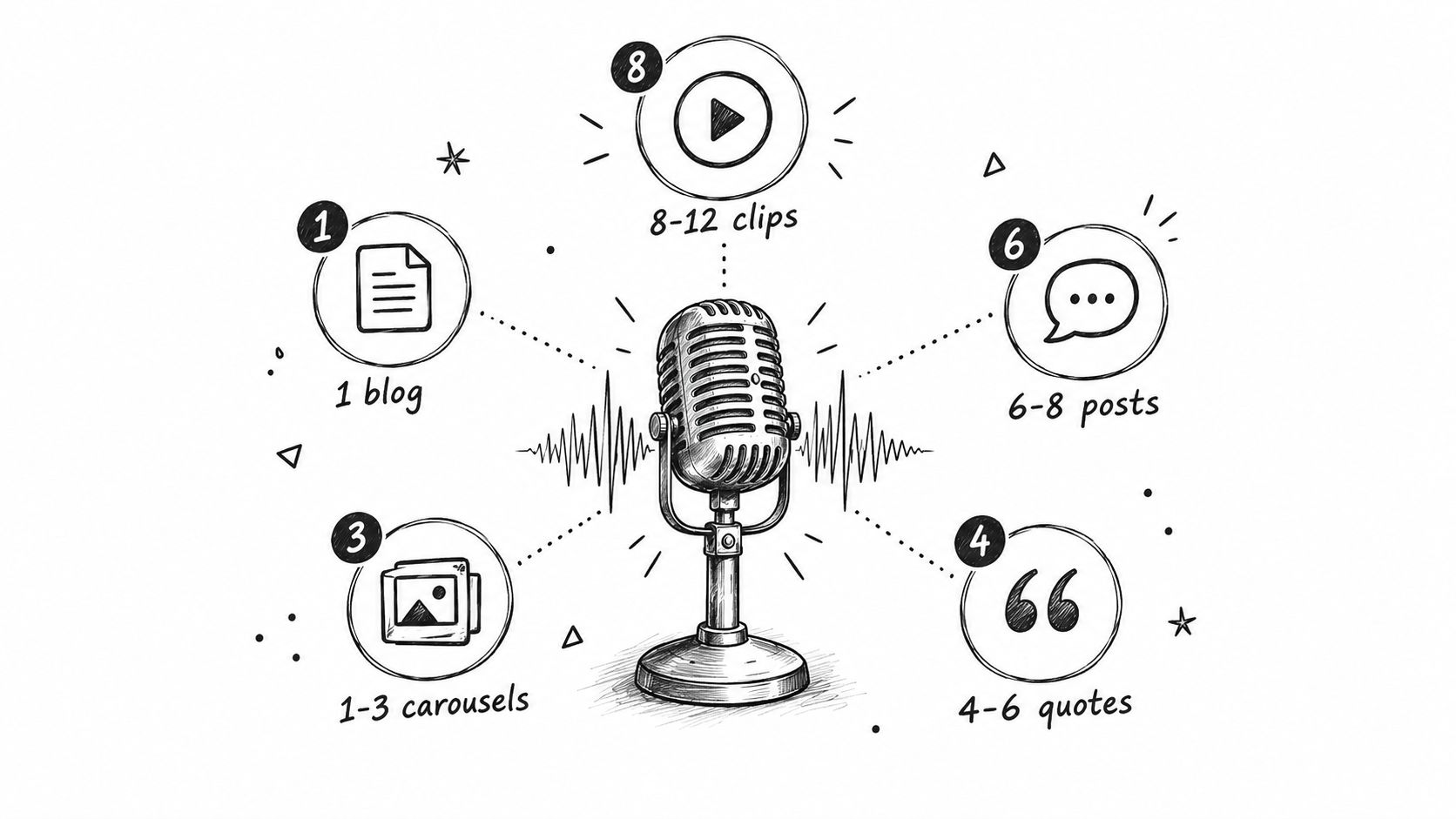
Use a 45-minute podcast, interview, keynote, or livestream as the source. Present the output as a simple breakdown:
- 8 to 12 video clips
- 6 to 8 LinkedIn posts
- 4 to 6 quote graphics
- 1 to 3 carousels
- 1 blog post
A representative post could read: “One podcast episode became 8 clips, 6 posts, 4 quote graphics, 3 carousels, and 1 blog post.” That specificity makes the idea credible for busy B2B marketers and podcasters. It also gives the audience a clear picture of what content production can look like.
The manual alternative carries a real time cost. Clipping alone can take 12 to 15 hours per episode, especially when someone must find strong moments, remove pauses, add captions, format videos, write hooks, and check branding.
A simple publishing workflow
- Record Tuesday: Capture the podcast or interview.
- Extract Wednesday: Identify clips, insights, quotes, and carousel themes.
- Deliver Thursday: Review the finished assets.
- Publish Friday onward: Release one asset every 2 to 3 days through the following month.
The difference is clear. One recording overlooked becomes one forgotten post. One recording repurposed becomes a 30-day content system. Teams can use this content repurposing workflow to map one source into multiple formats.
Practical rule: Show the asset count, not vague promises about “more content.”
The done-for-you version takes about 15 minutes from the client. The client sends the recording and brand guidance. The production team handles the rest, with delivery available within 48 hours and plans starting from $14 per finished asset. A related perspective on content repurposing strategy can help teams compare approaches.
The video version works best when the opening clip proves the claim. A short screen recording can show the source episode on one side and the finished content stack on the other.
2. The 73% of B2B Teams Have No System Stat Post
A strong LinkedIn post can expose the gap between recording content and using it properly.
The supplied benchmark says 73% of B2B marketers identify recordings as their number-one source of quality leads, while only 1 in 3 teams have a scalable repurposing system (RepurposeYourContent's publisher data). That contrast creates a sharp post because it describes a familiar operational problem. Teams know recordings contain valuable expertise, but the files often remain in YouTube libraries, shared drives, or meeting archives.
The post should follow the statistic with a concrete scenario:
“A product demo team spends 8 hours recording. The demo goes live once. Then nobody turns the objections, explanations, or customer questions into content.”
A demand generation team may record a sales call and leave the insight with the attending representative. A company may run a quarterly event and turn it into one email campaign. In each case, the production effort ends before distribution begins.
Turn the gap into a useful question
The most effective angle isn't “post more.” It's “What would change if every recording worked for 30 days instead of 30 minutes?”
That question opens several follow-up posts:
- Product demo: Extract a feature explanation, an objection response, and a buyer FAQ.
- Sales call: Turn customer language into a problem-aware LinkedIn post.
- Keynote: Pull the strongest opinion into a document carousel.
- Interview: Publish the guest's best lesson as a native video clip.
The claim should stay specific and defensible. Avoid saying a recording automatically creates revenue. The better argument is that a repeatable system gives useful ideas more opportunities to reach the right audience.
Comments matter here. LinkedIn's own ranking guidance identifies dwell time, likes, comments, and shares as distribution signals, alongside information about the post and viewer (LinkedIn's post-ranking guidance). End with a question that invites operational answers, such as: “Where do valuable recordings disappear inside your team?”
3. The DIY Repurposing Time Audit Post
Repurposing looks free when the editing software costs nothing. The labour still has to happen.
A time-audit post should list every step required to turn one recording into publishable content:
- Clipping: 2 to 3 hours finding moments and selecting usable sections.
- Editing: 1 to 2 hours adding captions, cuts, framing, and sound adjustments.
- Graphics: 1 hour creating quote cards or visual summaries.
- Copywriting: 1 to 2 hours writing hooks, captions, and calls to action.
- Formatting: 1 hour adapting content for LinkedIn and other channels.
- Uploading: 30 minutes checking files, captions, thumbnails, and scheduling.
The total reaches 7 to 10 hours per recording. That estimate reflects a complete workflow, not just the time spent pressing export. It excludes the interruption cost when a founder or marketer switches between editing, writing, design, and publishing.
A founder recording a 45-minute podcast alone might spend an entire workday converting it into clips and posts. A two-person marketing team might lose a week of capacity after a major recording. A keynote speaker may hire freelancers, wait for revisions, and still need to write the LinkedIn copy.
The opportunity-cost angle
The post can translate time into money when the audience already uses an internal hourly rate. At $50 per hour, 7 to 10 hours represents $350 to $500 per recording. That calculation is only an internal planning device. It doesn't claim every business values its time at the same rate.
DIY production also requires editing judgment. A technically clean clip can still lack a clear point, a useful opening, or enough context. The risk isn't only wasted time. It's publishing content that sounds generic or fails to represent the speaker well.
A done-for-you service handles clipping, writing, design, formatting, and review. The client spends about 15 minutes sending the recording and guidance. Delivery can arrive within 48 hours, with revisions handled after review.
4. The Post Once, Publish Everywhere Content Calendar Post
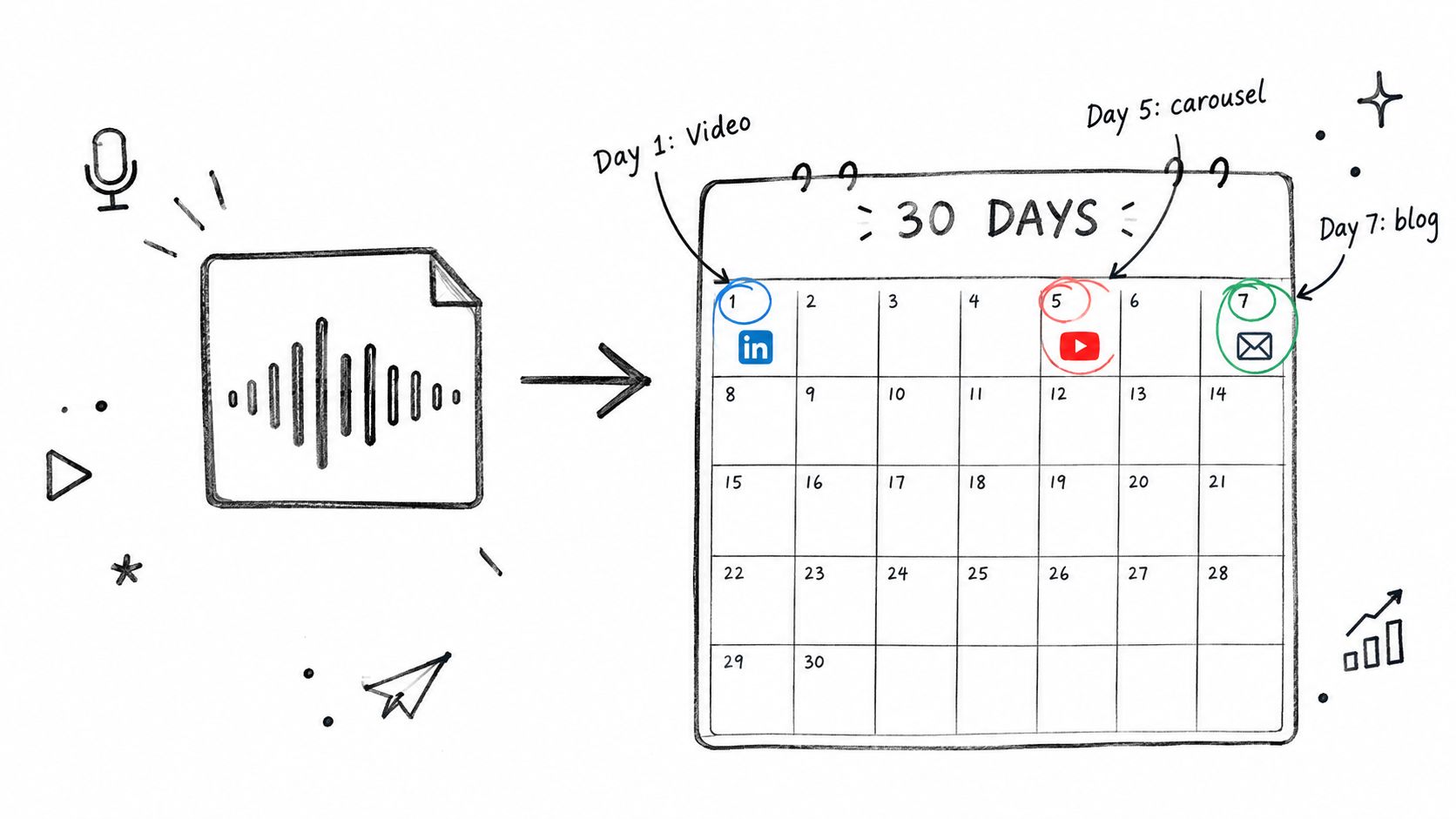
A 45-minute podcast episode can support a 30-day content calendar across LinkedIn, YouTube, email, and a blog, provided each asset has a separate job.
Start with the recording, then map its strongest moments to the audience's next question. A guest's opinion can become a LinkedIn clip. A process can become a carousel. A failure can open a text post. A practical framework can support a blog article and email summary.
Use a publishing rhythm like this:
- Day 1: Native LinkedIn video clip introducing the main idea
- Day 3: Quote graphic from the guest
- Day 5: Document carousel explaining the framework
- Day 7: Blog post built from the conversation
- Day 9: Short-form video with a contrarian insight
- Day 12: LinkedIn text post with three takeaways
- Day 15: Email summary linking to the full episode
- Day 18: Second video clip focused on a buyer problem
- Day 21: Audience question based on the recording
- Day 24: Visual recap of the strongest lessons
- Day 27: Final LinkedIn post showing a practical application
Posts can go out every 2 to 3 days. That spacing keeps the episode active without presenting the same point repeatedly.
Give every asset a clear job
A clip builds familiarity with the speaker. A carousel makes a framework easy to save. A blog post addresses search intent. An email gives subscribers a reason to revisit the recording.
The creator records once, approves the angles, and follows a publishing playbook. Teams building the workflow themselves can use this guide to create a B2B content calendar.
Manual production still takes time. Someone must review the recording, select moments, write copy, design assets, format each channel, and schedule the posts. A done-for-you workflow turns those tasks into one approval cycle, while the calendar keeps the source recording connected to LinkedIn, YouTube, email, and the blog.
Every asset needs a distinct hook and purpose. Repeating the episode title with different images creates more files, not a useful content system.
5. The Personal Brand Visibility Through Recording Repurposing Post
A founder can build personal brand visibility from one well-chosen recording instead of writing every day. The source needs enough specific material to support repeated, useful points.
A 45-minute keynote, training session, podcast interview, or livestream often contains stronger LinkedIn material than a blank-page update. It includes decisions, stories, explanations, opinions, and audience questions. Each element can reinforce the founder's positioning and give the audience a reason to remember it.
Choose the recording based on the audience and the point of view you want to strengthen:
- A keynote: Adapt leadership opinions, audience questions, and memorable explanations for founders or executives.
- A training talk: Turn each lesson into a practical post for people learning the process.
- A podcast interview: Use clear answers as expert commentary for buyers comparing approaches.
- A livestream: Cut reactions and real-time explanations into native clips for an active professional audience.
The workflow should preserve the speaker's actual voice. Keep familiar vocabulary, direct opinions, and useful imperfections. Remove repetition, tangents, and context that the LinkedIn audience does not need.
Build visibility around one positioning theme
One recording should support a clear publishing angle. A consultant known for operational strategy should select moments about process, execution, and decision-making, rather than adding unrelated motivational clips. That focus makes the personal brand easier to associate with a specific problem.
A practical cadence is 6 to 8 LinkedIn posts across 30 days, with a different angle for every post. Publish a strong opinion early, follow with a teaching point, then use a short clip, a quote graphic, and a carousel that organizes the recording's framework. The audience sees the same expertise through different formats without receiving the same post repeatedly.
Manual repurposing still requires review, clipping, writing, design, formatting, and scheduling. A team handling the work itself should estimate that time before committing to a monthly cadence. RepurposeYourContent can handle the production workflow, leaving the founder to approve angles and protect the original voice. Founders with several recordings can book a call to map them into a longer publishing plan.
6. The Podcast to Lead Generation Engine Post
A podcast episode can answer several buyer questions. B2B teams should turn those answers into a connected lead-generation workflow, rather than treating the episode as a single broadcast announcement.
One episode may address a problem, challenge an assumption, explain a category, or show how a customer evaluates options. Each moment can support a blog post, LinkedIn clip, quote graphic, email, or document carousel. The recording becomes a month of useful touchpoints for a defined audience.
Assign each format a clear job:
- Blog post: Captures search intent around the episode topic.
- Native video clip: Builds familiarity with the host or guest.
- LinkedIn post: Frames one lesson for a professional audience.
- Quote graphic: Presents a memorable insight in a shareable format.
- Carousel: Organizes a framework into a document people can save.
- Email: Brings subscribers back to the full conversation.
A B2B SaaS episode about reducing operational risk could become a search-focused article, eight LinkedIn clips, several quote graphics, and an email sequence. That example does not promise a specific number of leads. It shows how repeated exposure gives qualified buyers several ways to find and evaluate the company.
Make the episode specific to buyers
Generic episode summaries rarely give LinkedIn readers a reason to stop. Build each post around one buyer tension:
- Why a team's current process breaks during growth.
- Which objection appears repeatedly in sales conversations.
- What an expert misunderstood before changing approach.
- How a customer evaluates risk before buying.
Publish the main lesson natively, then direct interested readers to the episode. LinkedIn's format analysis found external-link posts averaged 3.25% engagement, below native formats in the same analysis (Socialinsider's format benchmark). Readers should receive a useful idea before being asked to leave the platform.
A practical monthly workflow is 6 to 8 LinkedIn posts from one recording, scheduled across 30 days. Manual production still includes reviewing footage, selecting clips, writing copy, designing graphics, formatting carousels, and scheduling each asset. Count that time before committing to the cadence. RepurposeYourContent can handle those production steps while the host approves angles and protects the original voice. Teams with an existing episode library can map past episodes to a lead-generation workflow.
7. The Sales Call Insights as Marketing Multiplier Post
Sales calls already contain buyer research. Recorded conversations reveal the words prospects use for problems, objections, buying criteria, and internal pressure. With permission and review, one approved call can inform case-study angles, FAQs, quote graphics, product education, and LinkedIn posts.
Start with the moment that shows buyer intent. A discovery call may reveal a phrase for landing-page copy. A product demo can become a YouTube clip plus a LinkedIn explanation. A customer-success interview can supply proof-oriented visuals, if the customer approves the final use.
For a LinkedIn post, choose one clear angle:
- Objection post: Explain how buyers evaluate a recurring concern.
- FAQ article: Answer a question raised during the call.
- Case-study angle: Show the customer's situation and decision process.
- Quote graphic: Use approved language that captures the business problem.
- Product clip: Connect a feature to a documented use case.
Customer conversations contain the language buyers already use. Marketing should preserve that language instead of replacing it with corporate phrasing.
The audience determines the edit. Sales leaders may want objection patterns. Product marketers may want feature context. Founders may want a concise lesson from a real buying conversation. Publish the useful point natively, then invite interested readers to explore the longer recording or related resource.
A monthly cadence of 6 to 8 LinkedIn posts from one approved recording can support regular distribution across 30 days. The manual workload includes reviewing footage, finding usable moments, writing copy, designing graphics, formatting carousels, and scheduling each asset. That production time can exceed the time spent recording the call, especially when every post needs separate review.
Privacy controls come first. Remove or anonymize names, company details, sensitive information, and confidential product discussions. The client should approve every asset before publication. A private conversation is not public content by default.
Use this sales-call recording repurposing process to define consent and approval before production. RepurposeYourContent can turn an approved call into a case-study angle, 3 quote graphics, and 1 objection-handling post, provided those usable moments are present. The team keeps editorial control while avoiding the full manual workflow.
8. The Evergreen Content ROI Clips That Work for Months Post
Evergreen clips earn repeat distribution because the underlying problem stays relevant after the original recording leaves the feed.
Start with a long-form recording that has durable value: a podcast interview about recurring customer objections, a keynote explaining a principle, or a course lesson answering a common question. Extract clips that stand alone, then tag each one by theme:
- Objection: a concern buyers raise repeatedly.
- Framework: a process the audience can apply.
- Mistake: a costly error the speaker can help prevent.
- Lesson: a concise answer from the recording.
The tag controls the resurfacing schedule. Publish the strongest clips first, then review performance after the initial cycle. Reschedule the top 20% every 90 days, using a new opening sentence and a different audience angle. A sales audience might get the objection framing. Founders may respond better to the decision behind it. This schedule differs from a one-month launch calendar because it gives durable ideas time to return with fresh context.
Native video deserves testing. In a 12,988-post analysis, native LinkedIn video made up 26.3% of the top-performing decile but only 10.1% of the bottom half. The same study reported a median video post with 181 reactions and 27 comments, compared with 122 reactions and 12 comments for the full cohort (Linkpost's LinkedIn algorithm study). Treat those findings as a reason to test native clips, not a promise that every video will perform.
A useful workflow takes manual time. Someone must review the recording, mark timestamps, remove sensitive details, write each hook, add captions, schedule the post, and record the last publication date. Repeat that work across several recordings and the archive becomes difficult to maintain.
RepurposeYourContent can handle the approved production workflow, while the marketing team controls themes, approvals, and publishing priorities. Use this guide to plan evergreen B2B content, then keep a simple log of each clip's theme, hook, audience, and next eligible resurfacing date. The result is an archive that stays useful without recycling identical copy.
9. The Done-for-You Versus Hiring a Content Team Cost Post
Most marketing leaders compare outsourcing with hiring people. The comparison should include the full production team required to maintain a recording-led content engine.
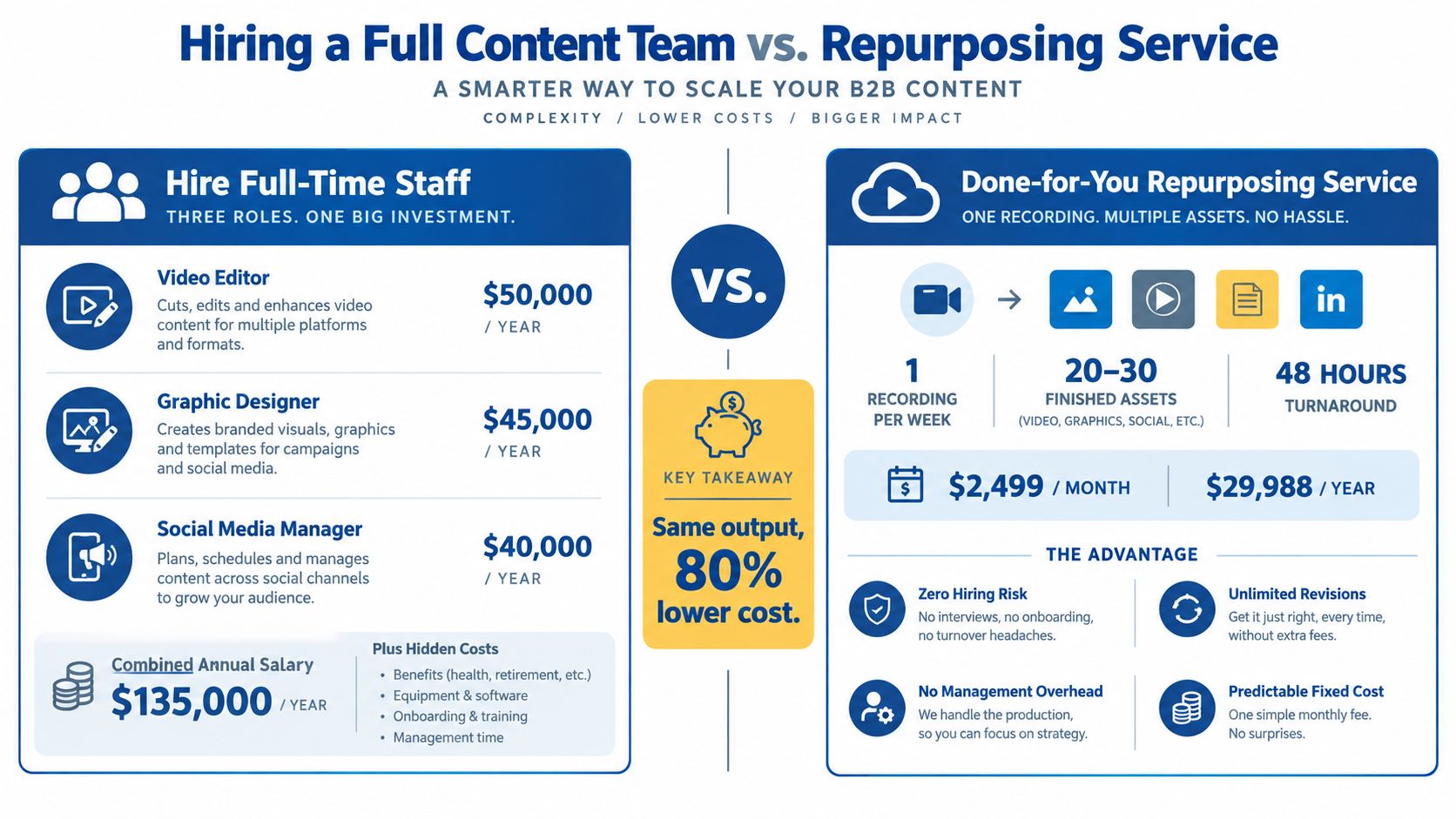
The supplied cost model uses $50,000 per year for a full-time video editor, $45,000 for a designer, and $40,000 for a social media manager. Together, that equals $135,000 per year before benefits, equipment, onboarding, management, and recruitment costs.
A done-for-you alternative can be framed around one recording per week. The stated plan costs $2,499 per month, or $29,988 per year, and returns 20 to 30 assets within 48 hours for each recording. That includes video clips, social posts, graphics, carousels, and written content.
The comparison isn't perfect for every company. A full-time team can support projects beyond repurposing, attend meetings, build campaigns, and manage broader creative work. A specialist service is narrower, but it avoids hiring and gives the client a defined production output.
Compare output and management burden
A decision-maker should ask four questions:
- What volume is required: Does the business need one recording processed each week?
- What skills are missing: Does the internal team need editing, design, copywriting, or all three?
- What turnaround matters: Can the company wait for internal scheduling and approvals?
- Who owns revisions: Is someone accountable for checking every asset?
The stated comparison positions the service as 80% lower cost than the listed salary model, with unlimited revisions and no management overhead. That claim depends on the specific cost assumptions, so teams should calculate their own internal costs before choosing.
A useful comparison guide for content repurposing agencies versus DIY tools can help marketing leaders assess the trade-off. The decision should follow content volume and capacity, not a blanket preference for outsourcing.
10. Your Last 10 Recordings Are Worth Thousands in Content Post
A company's archive often contains more usable publishing material than its current calendar can support. Audit that archive before commissioning new recordings.
Start with a simple three-column review:
| Recording Title | Durable Topics | Update Needed |
|---|---|---|
| Founder podcast, customer acquisition episode | Referral strategy, buyer objections, onboarding lessons | Replace outdated product references |
Review each podcast episode, interview, keynote, sales call, or livestream. Mark ideas that remain useful, such as frameworks, strong opinions, recurring buyer questions, and practical advice. Then flag claims tied to old products, pricing, campaigns, or market conditions.
Use the audit to rank recordings by production readiness:
- Ready now: The core advice remains accurate. Send it into the clipping and writing workflow.
- Needs a light update: Refresh examples, terminology, or product references before publishing.
- Archive only: The recording depends too heavily on outdated information.
A founder with 8 podcast episodes can prioritize the episodes with durable expertise instead of processing the entire archive. A speaker with 5 recorded keynotes can identify which themes still match the audience. A B2B company with 12 recordings can assign owners to update dated claims before design and distribution begin.
This approach protects publishing quality while reducing wasted editing time. It also gives marketers a clear pilot: select one recording, mark its durable topics, update the weak sections, and measure how many usable posts emerge.
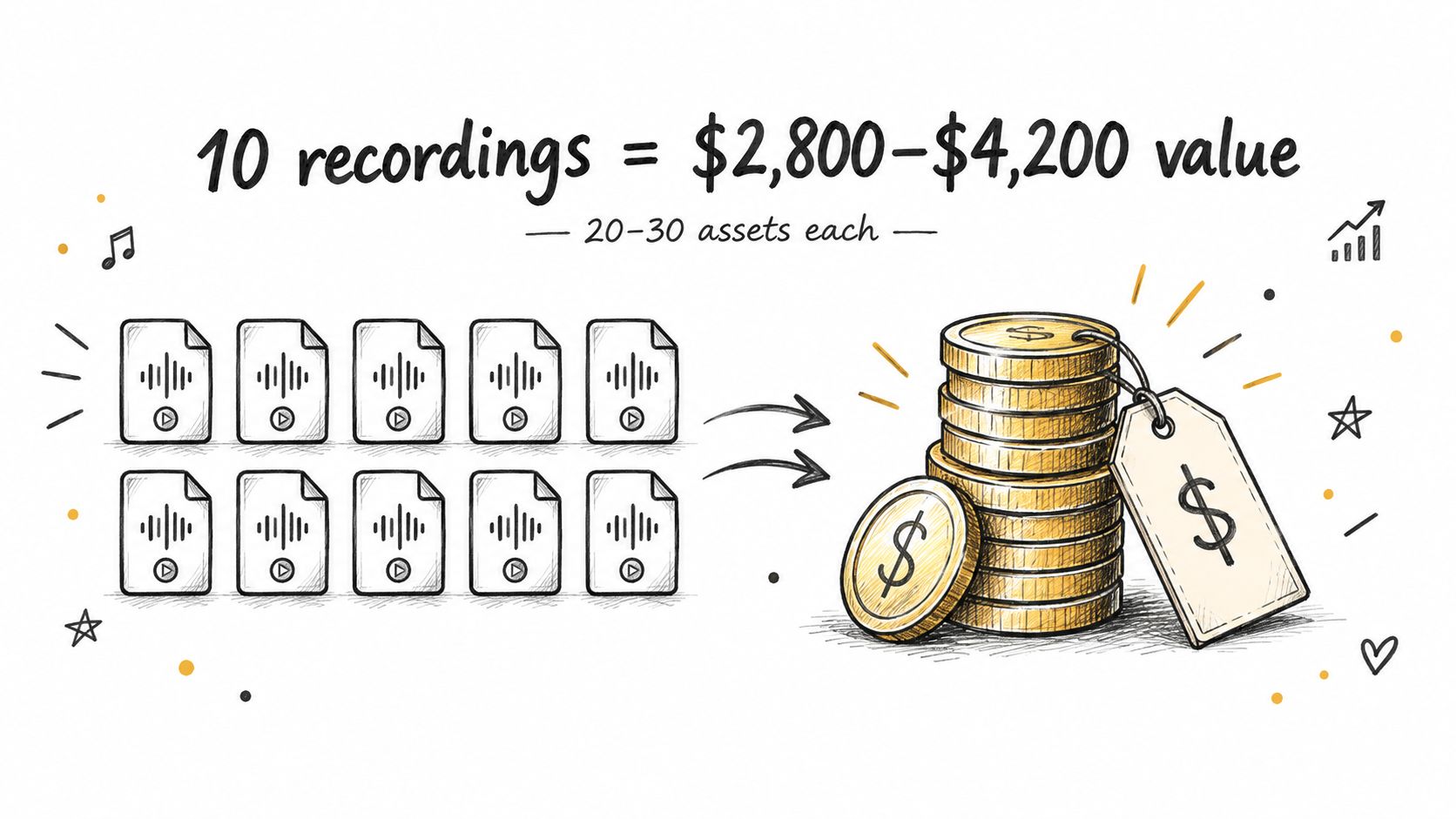
A done-for-you workflow can then turn the selected recording into clips, LinkedIn posts, quote graphics, carousels, audiograms, and a blog post. Request a sample from one recorded talk first. Approve the tone and update process before assigning the wider archive.
10 LinkedIn Post Ideas Comparison
| Item | Implementation complexity | Resource requirements | Expected outcomes | Ideal use cases | Key advantages |
|---|---|---|---|---|---|
| The "One Recording, 30 Assets" Breakdown Post | Moderate, requires visual design and asset-count proofing | One recording, editing/clipping, design templates, quick turnaround workflow | 20–30 finished pieces from one session; immediate shareable roadmap | Busy B2B marketers and podcasters needing quick repurposing playbook | Specific counts make it actionable and credible |
| The "73% of B2B Teams Have No System" Stat Post | Low, data presentation and attribution needed | Credible survey/source, clean infographic layout | Raises urgency and executive buy-in; highlights systemic gap | Marketing leaders and demand-gen teams | Establishes credibility and "you're not alone" resonance |
| The "DIY Repurposing Time Audit" Post | Low, time breakdown and examples | Accurate task timing data, candid tone, simple visuals | Demonstrates 7–10 hour true cost per recording; supports outsourcing case | Solopreneurs and small teams burning out on DIY work | Makes the opportunity cost tangible and shareable |
| The "Post Once, Publish Everywhere" Content Calendar Post | Moderate, cross-platform mapping and scheduling visuals | Content calendar template, channel cadence knowledge, assets mapped to dates | One recording mapped to a 30-day publishing schedule and playbook | Creators who want consistent multi-channel presence without planning overhead | Removes planning friction and delivers predictable cadence |
| The "Personal Brand Visibility" Post | Low–Moderate, quote extraction and positioning | Compelling talk/keynote, clipping and quote design, publishing plan | Month of visible thought-leadership posts with minimal founder effort | Solopreneurs, speakers, founders focused on authority | Scales visibility without daily content creation |
| The "Podcast to Lead Generation Engine" Post | Moderate, requires conversion math and SEO planning | Podcast episode, SEO blog post, clips, tracking for leads/CAC | Shows lead multiplier from repurposed assets and measurable ROI | Podcast hosts and B2B marketers focused on lead gen | Frames podcast as a measurable demand-generation channel |
| The "Sales Call Insights as Marketing Multiplier" Post | Moderate–High, consent, redaction, and careful editing required | Recorded sales/customer calls, compliance/approval workflow, editors | Authentic case studies, objection-handling content, sales enablement assets | Sales-led B2B teams sitting on recorded customer conversations | Turns existing conversations into high-trust marketing assets |
| The "Evergreen Content ROI: Clips That Work for Months" Post | Low–Moderate, needs performance timeline and patience | Clip production, consistent distribution, long-term tracking | Compounding views and discovery over months; long shelf-life assets | Teams aiming for sustainable organic discovery, less frequent recording | Demonstrates long-term compounding returns and reduced content pressure |
| The "Done-for-You vs. Hiring a Content Team" Cost Post | Low, straightforward financial comparison and visuals | Salary estimates, service pricing examples, total-cost analysis | Clear cost-savings example (e.g., 80% reduction) to inform hiring decisions | Marketing leaders evaluating headcount vs. outsourcing | Concrete financial argument and lower operational risk |
| The "Your Last 10 Recordings Are Worth $X in Content" Post | Low, inventory audit and simple valuation math | Archive of recordings, per-asset pricing, example calculations | Quantifies dormant content value (e.g., $2.8K–$4.2K for 10 recordings) | Creators with unused archives who need activation motivation | Turns dormant recordings into a clear, monetary call-to-action |
Turn One Recording Into Your Next Month of Posts
The practical system is simple. Send one podcast, interview, keynote, sales call, livestream, course, or meeting recording. Select the strongest LinkedIn angles. Publish the finished assets every 2 to 3 days. Track impressions, engagement, leads, and conversions, then use those observations to improve the next recording's content mix.
A clear workflow keeps the process manageable:
- Send the source: Provide the recording and brand guidance in about 15 minutes.
- Extract the ideas: RepurposeYourContent identifies clips, LinkedIn posts, quote graphics, carousels, audiograms, and a blog post.
- Review the delivery: Approve the assets or request unlimited revisions.
- Follow the playbook: Publish the recommended formats across the next 30 days.
- Measure business signals: Track attention first, then connect useful posts to lead and conversion activity.
Format selection should follow the goal. Native documents are useful for frameworks and summaries. Native video suits demonstrations, personal stories, and strong opinions. Text posts can carry detailed analysis when the writing earns attention. A LinkedIn benchmark across 1,207,853 posts found image and carousel posts tied for the highest median likes at 34, video followed at 33, and plain text earned 16. It also reported that posts over 400 words earned 147% more likes than posts under 25 words (MagicPost's LinkedIn benchmark analysis).
The content engine works best when every asset has a job. A clip builds familiarity. A carousel teaches. A quote graphic reinforces positioning. A blog post captures deeper interest. An audiogram gives podcast audiences another way to consume the idea. Cross-posting can also extend the useful life of short-form video through this guide to adapting TikToks for other channels.
With the done-for-you alternative, clients send one recording and receive 20 to 30 ready-to-publish assets in 72 hours. The package can include video clips, LinkedIn posts, quote graphics, carousels, audiograms, and a blog post, all written and designed in the brand voice. The service includes a 72-hour turnaround guarantee, or the client doesn't pay, from $14 per finished asset, with unlimited revisions.
Book a call with RepurposeYourContent or request a sample from one recorded podcast, interview, keynote, sales call, livestream, course, or meeting. The team can show what that recording could become before the archive grows any larger.
Tags:




