How to Turn Product Demos Into Marketing Content
Stop letting demo recordings die. Learn a step-by-step framework to turn product demos into marketing content that fills your pipeline for weeks.

Teams that record demos already have more product marketing material than they use. The gap is not raw footage. The gap is turning one strong, deliberate demo into a repeatable content system that helps buyers evaluate the product before they book a call.
The method is simple. Record a single golden demo, clip the strongest 30 to 60 second moments, then turn those moments into short videos, carousels, GIFs, tutorials, email assets, and sales follow-up content. When the demo is built for reuse from the start, one recording can supply weeks of distribution across the funnel.
Many B2B SaaS teams still let that footage die after the meeting. An AE explains the same workflow problem five times in a week, gives a clear product walkthrough, answers the same objections, and then the recording sits in Gong, Zoom, or a folder nobody revisits.
That is expensive.
In the current market, buyers want to see the product solving a real problem on their own time. If the only meaningful product experience sits behind a live sales call, self-serve buyers will move to a competitor with better proof.
The practical shift is to stop treating demo repurposing as generic content recycling. The better approach is problem-first clipping. Pull the moments where the product resolves a painful job, removes a bottleneck, or answers a high-intent objection. That is what earns attention from skeptical B2B buyers and gives marketing, sales, and customer success one shared source of truth.
Done well, a single golden demo becomes a full-funnel sequence. Done manually, it also becomes a time sink for AEs, marketers, and editors. That trade-off is why many teams start with a DIY process, then move to a done-for-you service once they see how much speed they gain from having the clips, formats, and messaging handled for them.
The Hidden Cost of One-Off Demos
Recorded content has become a core part of B2B pipeline generation, yet a lot of demo footage still dies inside Zoom folders, Gong libraries, and rep notes. One external benchmark from CloudPresent's guide to content repurposing makes the gap clear. Teams get strong lead value from recorded content, but far fewer have a repeatable way to turn that footage into distribution.
That gap shows up in budget waste before it shows up in reporting.
Why repeated demos create hidden waste
In SaaS teams with active outbound, weekly demos, or founder-led sales, the same workflow usually gets explained again and again to different prospects. The buyer asks how the product handles onboarding, reporting, approvals, handoffs, or migration. The rep gives a solid answer. Then the explanation disappears into a call recording nobody clips, tags, or reuses.
The company pays for that work every time.
A one-off demo looks cheap because the meeting had to happen anyway. The hidden cost sits behind the meeting:
- AEs spend time re-explaining the same proof. Strong answers stay trapped in one call instead of helping the next 50 buyers.
- Marketing misses real buying language. The exact phrasing prospects use around pain points and objections never reaches landing pages, ads, or nurture sequences.
- Content teams build from scratch. Instead of editing a proven walkthrough, they brief a writer, script a video, wait on design, and chase approvals.
- Self-serve buyers get less evidence. They can read claims, but they cannot watch the product solve the job they care about.
That is the significant penalty of one-off demos. The team keeps producing proof, but not in a format the market can consume at scale.
The better move is a golden demo
The fix is not recording more calls. The fix is creating one reusable demo on purpose.
A golden demo gives sales a clean walkthrough and gives marketing source material that can be turned into problem-led clips, email assets, sales follow-ups, help content, and retargeting creative. For B2B SaaS, that matters because buyers rarely want a full feature tour first. They want to see one painful job get handled clearly and fast.
That is why the strongest demo asset is usually narrower than the average sales call. It focuses on a handful of high-intent workflows, keeps the sequence tight, and explains the steps in plain language. If your team wants to scale that output without adding more manual editing work, this breakdown of how AI content repurposing works is a useful next layer.
A golden demo also creates cleaner trade-offs. The team spends more time upfront planning the recording, then saves hours across sales, content, and post-production for weeks after.
What one-off demos miss
Teams that rely on live-call recordings usually run into the same problems. The rep references earlier conversation context. Tabs are messy. The story jumps between use cases. Key objections get answered, but not in a way a cold viewer can follow.
That footage is still useful for research. It is rarely strong source material for a full-funnel sequence.
A planned golden demo produces much better downstream assets:
| Demo choice | What happens after recording |
|---|---|
| Planned workflow order | Editors can cut clean segments without rebuilding the story |
| Clean screen setup | Short clips hold attention better on LinkedIn, email, and paid social |
| Problem-first narration | Cold audiences understand why the feature matters before they see the UI |
| Separate tasks by use case | Marketing can package clips for different personas and funnel stages |
This is the operational difference. One-off demos create isolated sales moments. A golden demo becomes a shared content system that helps sales close, helps marketing distribute proof, and helps self-serve buyers evaluate the product without waiting for a call.
How to Turn Product Demos Into Marketing Content
B2B teams usually underestimate the labor here. A reusable demo is not just a recording. It is a content production job that starts before anyone hits record and keeps going through clipping, scripting, design, QA, and distribution.
That is why DIY repurposing often dies after a few assets. The raw material looks promising. The calendar says otherwise.
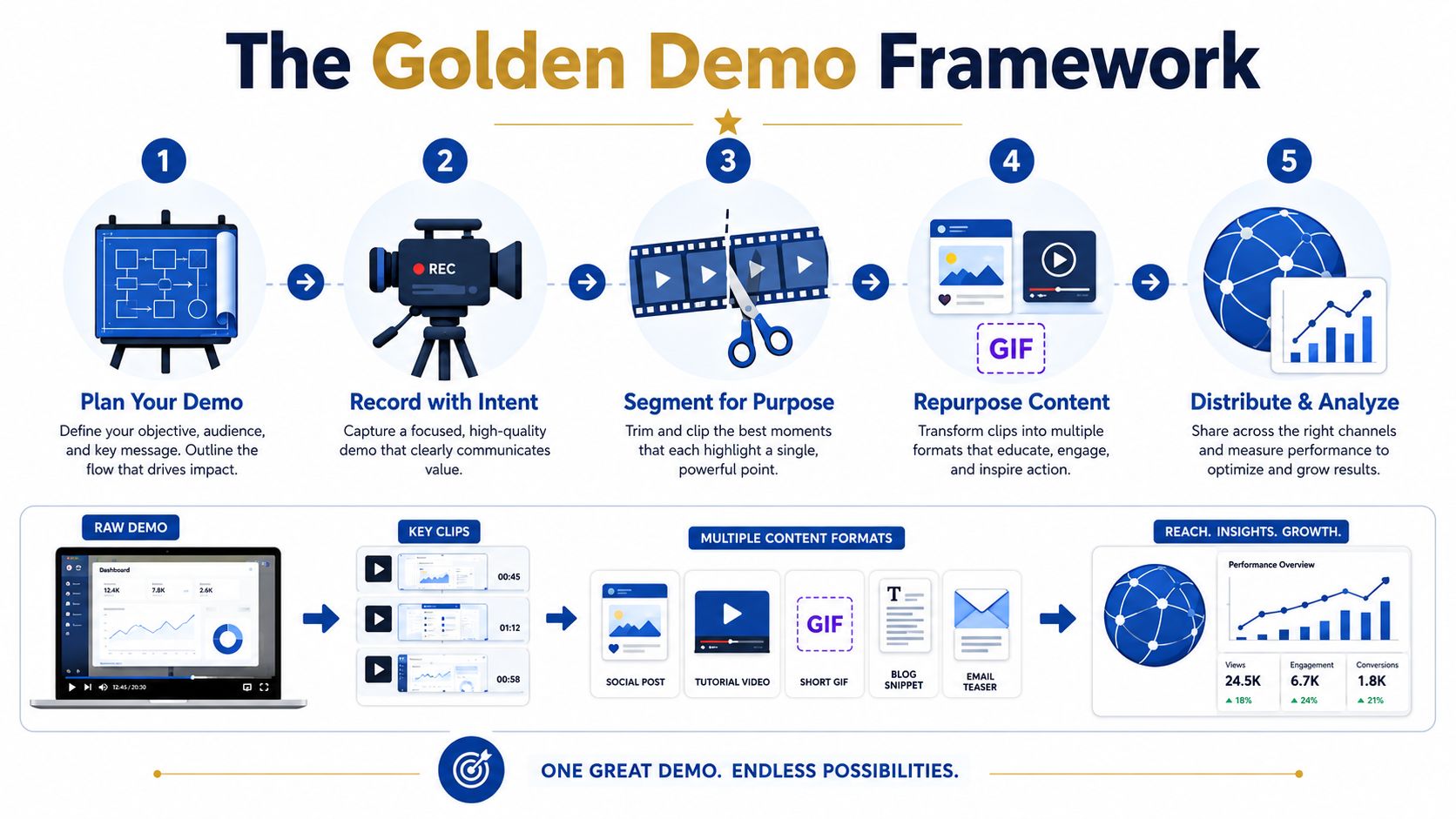
Step 1 Record the demo with reuse in mind
Start with a planned demo built for cold viewers, not a live sales call built for one prospect. The goal is a single golden recording you can cut into problem-first assets across the funnel.
A clear, step-by-step walkthrough usually gives editors more usable material than a loose feature tour. It creates cleaner clip boundaries, clearer narration, and fewer moments that depend on missing call context, as noted earlier.
Use a simple recording structure:
- Choose three to five repeatable workflows. Pick the jobs buyers ask about on almost every sales call.
- Record one workflow at a time. Keep the screen clean and the path direct.
- Write transitions before recording. Short phrases between sections create natural clip starts and stops.
- Close each workflow with an outcome. Editors need a clean ending if that segment will stand alone in social, email, or paid.
A product marketer can do this internally. It just takes more coordination than teams expect. Someone has to align sales on the right use cases, prep the environment, coach the presenter, and review takes before post-production even starts.
Step 2 Review and segment the recording
Segmentation is where raw footage either becomes a system or stays a file in a drive.
The review process is slower than it looks because the editor is making content strategy decisions, not just trimming dead air. They have to identify the moment that earns attention, the setup a cold viewer needs, the objection worth keeping, and the proof point sales can reuse later.
For teams mapping that workflow manually, this guide to how AI content repurposing works explains the production steps behind turning one source asset into multiple outputs.
A useful filter is simple. If a clip needs the viewer to know what happened five minutes earlier, it is not ready for distribution.
Step 3 Edit, caption, and package the assets
Production is where DIY timelines expand fast.
After clips are selected, someone still has to tighten the opening hook, remove filler language, add captions, highlight the UI action, and write post copy that makes the segment relevant to a specific persona. Then the team usually needs matching stills, thumbnails, carousel slides, sales follow-up versions, and a text angle for the blog.
This is the trade-off. In-house teams keep control, but they spend hours coordinating people who already have full-time jobs. A done-for-you service costs more cash and far less team time.
Step 4 Turn segments into multiple formats
One strong demo segment can do much more than fill a social calendar. It can support the self-serve buyer at several stages if each asset is packaged around a specific problem.
A single workflow clip can become:
- A short video for LinkedIn, paid social, or outbound email
- A carousel that shows the before, process, and result in still frames
- A help article or tutorial post for buyers validating fit on their own
- A GIF for sales follow-up, support replies, or docs
- A blog subsection that explains the workflow in plain language
The mistake is stopping at clipping. Strong repurposing turns one golden demo into a coordinated sequence that helps buyers discover the problem, understand the workflow, and evaluate the product without waiting for a live call.
From Feature Tour to Problem-Solving Clips
The biggest mistake is clipping by screen, not by problem.
Teams take a full demo and cut it into pieces like “dashboard overview,” “reporting tab,” or “automation builder.” Those clips might help someone already deep in evaluation. They don't work well for cold distribution because they assume the viewer already knows why that screen matters.
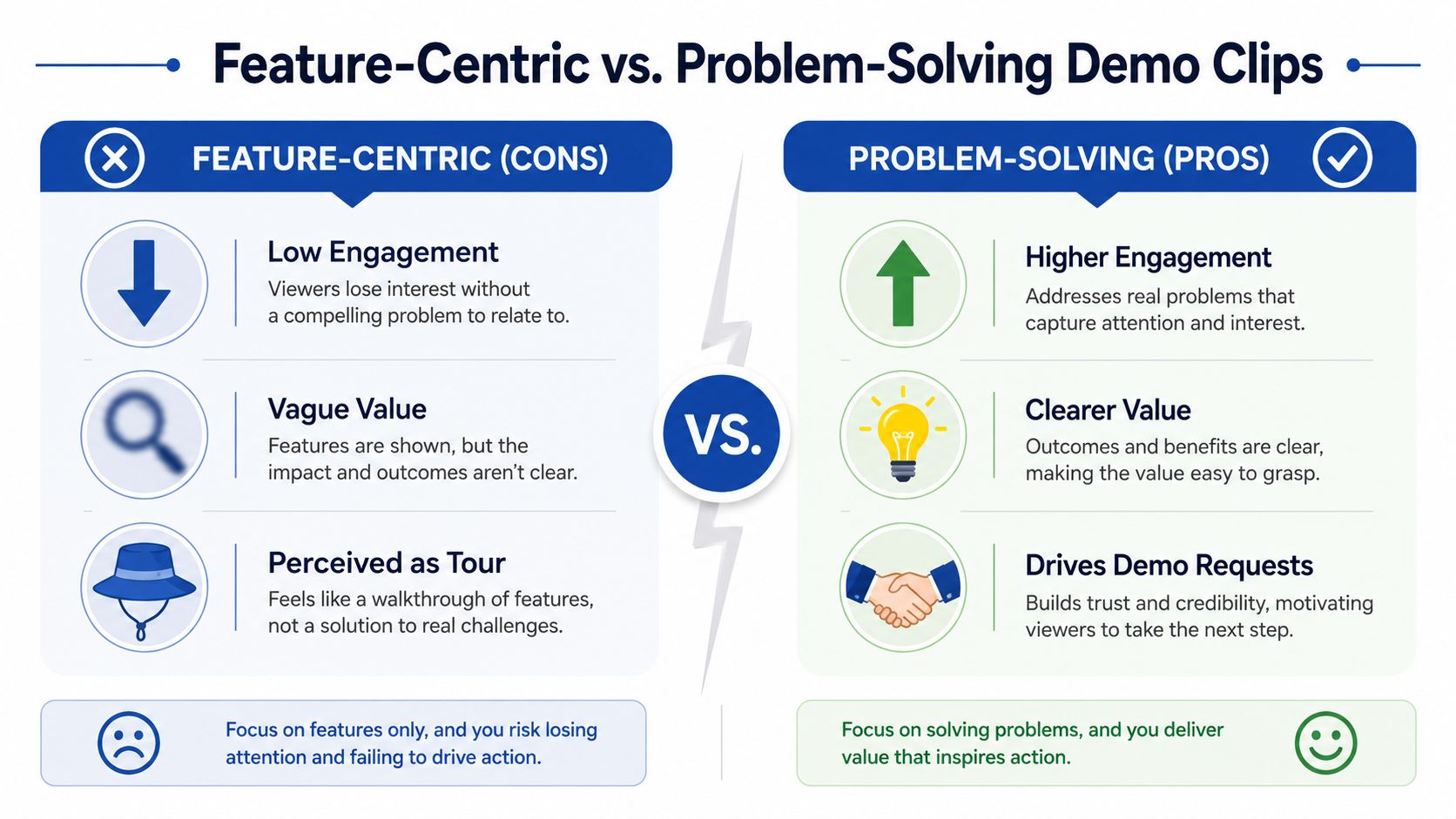
Clip by job to be done
The better cut starts with the buyer's task.
Not “here's our dashboard.”
Instead, “here's how a sales manager spots a stalled deal in seconds.”
That shift matters because the market still has a gap between feature tours and story-driven marketing assets. Demos should target specific personas with customized aha moments, yet teams rarely slice them that way, as argued in this discussion of interactive demo strategy.
A useful test for every clip is simple:
| Weak clip | Strong clip |
|---|---|
| Names a feature | Names a painful task |
| Needs prior context | Stands alone in-feed |
| Explains everything | Shows one useful outcome |
| Sounds like training | Feels like fast proof |
Teams that want a stronger process for this can borrow ideas from repurposing long-form video into short clips. The principle is the same. The cut point is where a new problem starts or gets solved.
The easiest clip boundaries to find
Most golden demos already contain natural edit points. Watch for:
- A new task begins: The rep moves from one workflow to another.
- The wording shifts to action: “So the way you'd do that is…” is often a clean boundary.
- An objection gets answered: These moments work well because they remove friction.
- A speed contrast appears: The viewer sees the old way versus the faster way.
The segment that drives requests isn't usually the feature tour. It's the moment the buyer sees how much faster the work gets done.
That's why side-by-side effort contrasts outperform generic walkthroughs. People book calls when they recognize their own weekly pain inside the clip.
Annotation that helps instead of cluttering
Bad annotation turns a promising clip into a chaotic tutorial. The viewer doesn't know where to look, and the edit feels heavier than it needs to.
A cleaner style works better:
- Start with a short burned-in hook: Something like “Still doing this manually?”
- Use one purposeful highlight: One arrow, one box, or one spotlight is enough.
- Add captions throughout: Demo clips are often watched sound-off.
- Use subtle cursor emphasis or zoom: Guide attention to the single action that matters.
The rule is restraint. Annotation should direct attention, not explain every screen state. The clip's job is to earn the next click, not replace the full demo.
Building a Full Funnel from One Demo Recording
A single strong demo can supply weeks of marketing content if the team builds around buyer questions instead of chopping the recording into random highlights.
That distinction matters. Random repurposing creates a pile of clips. A full-funnel sequence gives self-serve buyers the exact proof they need at each stage, from first problem recognition to shortlist evaluation. For B2B SaaS, the goal is not to show every feature. The goal is to turn one golden demo into a sequence that makes the painful job, the faster workflow, and the buying case obvious.
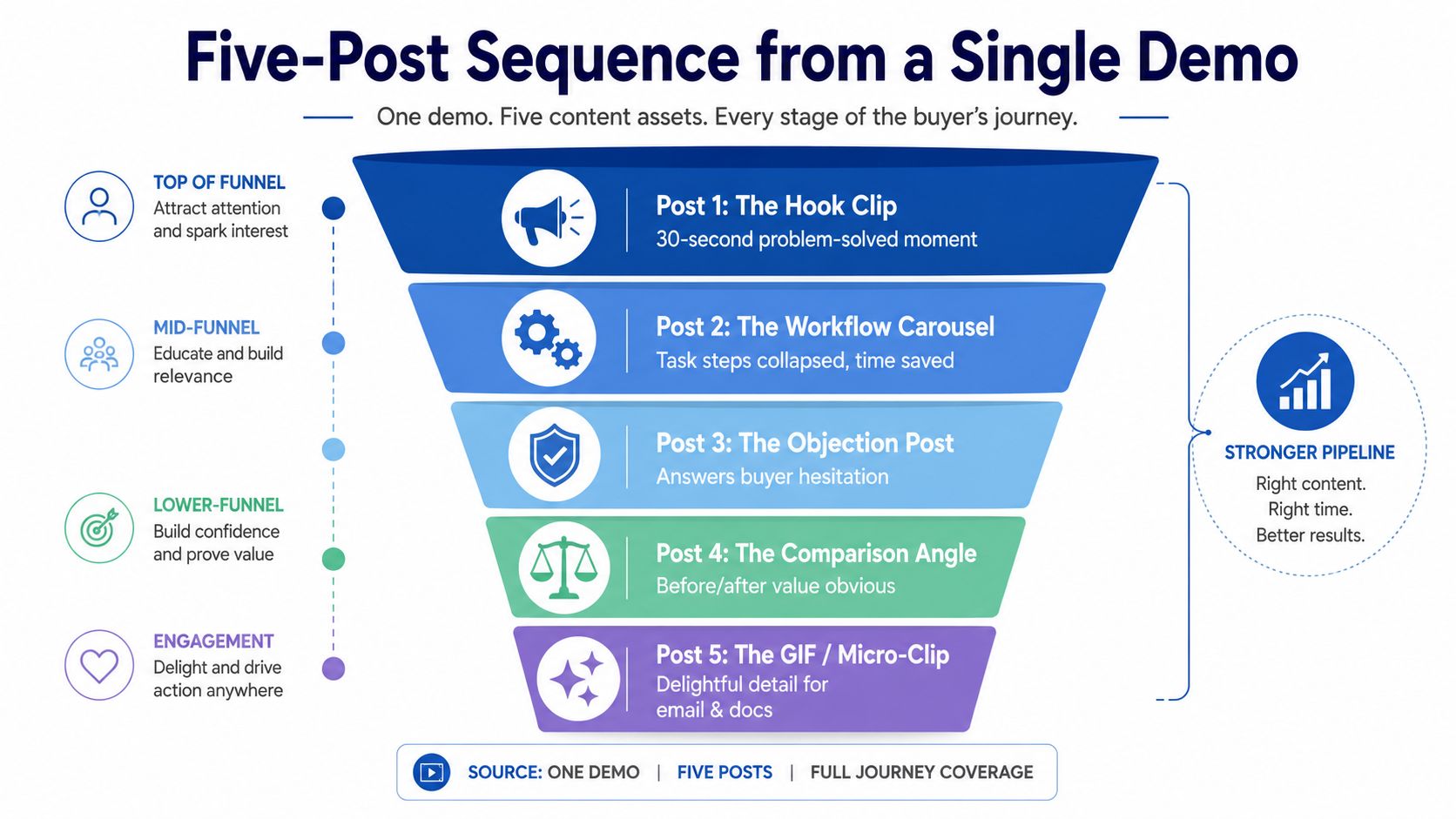
A repeatable five-post sequence
Use one recorded demo to answer five different buyer questions.
The hook clip
Start with the cleanest problem-to-outcome moment. A buyer should understand the pain, the action, and the result in under 30 seconds.The workflow carousel
Turn one use case into a step-by-step visual post. Show how the task gets done and where your product removes effort.The objection clip
Pull a moment that answers a real concern, such as setup time, adoption friction, or whether the workflow fits a messy edge case.The comparison post
Show the old way beside the new way. This format works because it makes the cost of staying with the current process visible.The micro-asset
Cut a short GIF or clip for email nurture, sales follow-up, help docs, or onboarding.
This is the core sequence I recommend because each asset has a job. Awareness content gets attention. Mid-funnel content explains the workflow. Evaluation content reduces doubt. Post-click assets help sales and customer success keep momentum. Teams that want a more systematic version can use a content multiplication framework for turning one source asset into multiple formats.
Here is how that usually maps:
| Asset | Best use |
|---|---|
| Hook clip | Social awareness |
| Workflow carousel | Mid-funnel education |
| Objection clip | Retargeting and sales follow-up |
| Comparison post | Evaluation stage |
| GIF | Email, docs, and onboarding |
Where the extra value comes from
The most effective teams do not stop at social distribution. They use the same demo footage across owned assets where buyers are actively trying to verify fit.
That includes:
- Tutorials and help content built from one workflow segment
- GIFs for documentation that show the exact click path
- Comparison pages that use real product footage instead of generic copy
- Sales follow-up pages with the exact clip tied to the buyer's use case
Comparison pages deserve special attention. Buyers at that stage are not looking for inspiration. They are checking whether your product solves the job better than the alternative they already know. Real screens and real workflow footage do that faster than broad positioning copy.
A visual example helps here:
This is also where DIY starts to get expensive. Cutting the clips is only part of the work. Someone still has to identify the right moments, map them to funnel stages, write hooks, add captions, create carousels, format GIFs, and distribute each asset to the right channel. The footage came from one demo, but the production load quickly turns into a real content operation.
That is why one golden demo is so valuable when handled well. It can feed demand generation, evaluation content, sales enablement, and customer education from a single recording. It can also sit untouched in a drive for months if nobody has time to build the sequence.
To Gate or Not to Gate Your Demo Content
Most SaaS teams still act as if product footage is too valuable to publish. So they hide nearly everything behind “book a demo.”
That approach worked better when buyers relied on sales to understand the product. It works worse when buyers prefer to evaluate on their own first.
Eighty-three percent of B2B buyers now self-serve and evaluate products independently before talking to sales, according to Navattic's interactive demo analysis. If product visibility is blocked, those buyers don't wait politely. They move on.
Why open demo content wins
Ungated demo content doesn't replace sales. It improves who reaches sales.
Short clips, workflows, and comparison footage let buyers pre-qualify themselves. They can decide whether the product fits before a rep spends time on the call. That usually produces better conversations because the buyer already understands the core use case.
The best public footage acts like an appetizer. It shows enough of the product to build confidence, but not so much that it turns into a full implementation session.
Buyers don't need to see everything. They need to see the painful task they care about get resolved.
What should stay open and what can stay gated
A simple split works well:
- Keep open: Problem-first clips, workflow previews, before-and-after comparisons, lightweight tutorials, and GIFs.
- Gate selectively: Deep custom walkthroughs, account-specific scenarios, advanced implementation detail, and live Q&A.
That gives buyers a real look at the product without forcing them into a call too early.
Teams that want a fuller argument for publishing more openly should read this ungated content strategy for B2B webinar marketing. The same logic applies to demo footage. The goal is to win the self-serve evaluation before the prospect ever fills out a form.
The Done-for-You Alternative
DIY demo repurposing usually fails for one reason. The recording is easy to create. The editing, story selection, copywriting, design, approvals, and channel packaging are not.
That work lands on a marketer who already owns launches, email, sales enablement, and pipeline targets. So the demo sits in a folder, the team records another one next week, and none of that product proof reaches self-serve buyers.
What the service model changes
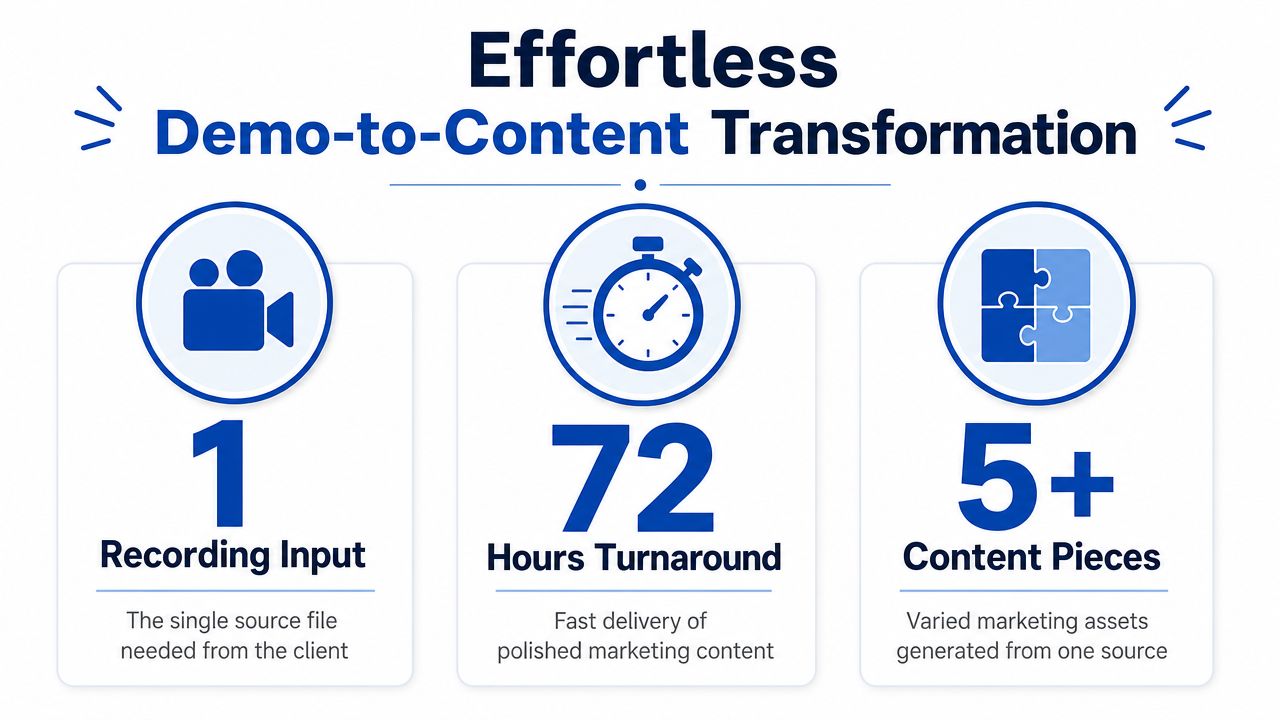
A done-for-you model removes the production bottleneck. The team sends one strong recording, usually a clear product demo with real objections, real use cases, and real outcomes. In return, they get finished assets built for distribution, not raw clips that still need internal cleanup.
That source recording can be a product demo, sales call, webinar, customer interview, podcast, keynote, livestream, or meeting recording. What matters is that it contains the right moments. Pain point. Workflow. Proof. Differentiation.
This is the practical shift. Instead of treating repurposing as generic content recycling, the work starts with one golden demo and breaks it into problem-first assets for each stage of evaluation. A short clip for LinkedIn might show how the product removes a manual reporting step. A carousel can isolate one workflow. A blog post can frame the same demo around the buying problem the clip introduced. That sequence helps self-serve buyers understand the product before they talk to sales.
What busy teams need from a vendor
The service has to save real time, not create a new review process.
A strong done-for-you offer should cover the full chain:
- Input: one recording
- Effort from the client: about 15 minutes to submit context and priorities
- Output: 20 to 30 ready-to-publish assets from a single 45-minute source
- Formats: video clips, LinkedIn posts, quote graphics, carousels, audiograms, and a blog post
- Turnaround: as fast as 48 to 72 hours
- Revisions: included, so the team does not have to accept rough first drafts
- Economics: lower cost per asset than assigning the work across salaried marketers and freelancers
That matters because the alternative is rarely one person doing the whole job well. It is usually a patchwork of partial ownership. One marketer pulls timestamps. A freelancer edits video. Someone else writes social copy from scratch. Design gets looped in late. The assets miss the original buying context, and the demo turns back into a feature tour.
Why this beats internal patchwork
Good demo repurposing needs editorial judgment first. The team has to identify the moment where a buyer says, "That is my problem." Then it needs production discipline to turn that moment into multiple assets without losing the thread.
Internal teams can do this. Many just cannot do it consistently while shipping everything else.
The gap shows up fast:
| DIY reality | Done-for-you reality |
|---|---|
| Demo recordings pile up in backlog | Finished assets arrive on a schedule |
| Marketing rewrites the story from memory | The recording becomes the source of truth |
| Clips focus on features in isolation | Assets frame the problem, workflow, and outcome |
| Output depends on spare time | Output follows a repeatable system |
Consistency is another advantage. The content comes back in the same voice, with the same design treatment, and with packaging suited to each channel. That makes it easier to build a full-funnel sequence from one demo instead of publishing random fragments.
If your team is already running the same demo every week, the raw material already exists. The faster option is to book a demo to see how one recording turns into ready-to-publish assets and decide whether you want to keep spending internal hours on post-production.
Tags:




