Content Repurposing Matrix: A One-Page System That Works
Build a content repurposing matrix that turns one recording into 20-30 ready-to-publish assets. Includes the framework, template, and real mapping.

A content repurposing matrix is a one-page operating system for long-form content. It tells you what to turn a podcast, keynote, interview, sales call, livestream, or course lesson into, and what each asset needs before it leaves production. Without it, every new recording becomes a fresh debate, and teams burn time making the same decisions again.
Why Most Repurposing Programs Quietly Stall
Most repurposing programs fail for a simple reason. The team keeps deciding per piece instead of per system.
That sounds harmless until the second or third recording. Then someone has to decide again what counts as a clip, which lines become quotes, whether the post should be a carousel or a text post, and where each asset should go. The work is not hard because the content is bad. It is hard because the decision load keeps restarting.
A content repurposing matrix removes that drag. One framework source describes turning a single pillar asset, such as a 30 to 60 minute video, 3,000 to 5,000 word article, 60 to 90 minute podcast, or 20 to 30 minute livestream into 3 to 5 standalone clips, 2 to 3 longer clips, 3 to 5 major ideas, and 15 to 20 quotes. Another guide says one flagship blog post can generate at least 10 distinct assets. That is the operating logic behind the standard create once, distribute everywhere model.
The practical shift is bigger than format recycling. Practitioner frameworks now describe the workflow as Audit, Atomize, Reformat, or Pillar, Atomise, Distribute. One B2B guide recommends 5 to 15 atoms per source asset, distribution across 2 to 3 priority channels, and release windows stretched over 4 to 6 weeks in this repurposing matrix model. That is not a creative exercise. It is a standing operating procedure.
Practical rule: Decide the matrix once, then run it on every recording. If the team renegotiates every cell each week, repurposing will always feel expensive.
The hidden cost of ad hoc repurposing is not editing. It is indecision. A matrix gives the team one set of answers, so each new asset becomes execution rather than invention. For a broader view of the operational side, see this content operations playbook for B2B teams.
The Grid That Turns One Recording Into Twenty
A useful matrix fits on one page. It has two axes. Source formats run down the left. Output formats run across the top.
The rows should mirror the raw material a team already produces, not an idealized plan built on wishful thinking. For most B2B teams, that means podcast, webinar, keynote, interview, sales call, livestream, course lesson, blog post, and whitepaper. The columns should match the destinations the team ships into, such as short-form video clips, LinkedIn text posts, carousels, quote graphics, audiograms, blog articles, and newsletter snippets.
Fill each cell with production data, not a vibe. List the expected output count, the typical length or cut size, the channel it ships to, and the level of editing it needs. If a team cannot estimate those fields from past recordings, the cell is still too vague to use. That is the difference between a planning sheet and a production spec.
The cells should be populated from prior work, not from theory. Pull the last few assets from each source type, note what performed, and map the repeatable pattern into the grid. A framework only becomes useful when it reflects your own inventory, editing costs, and channel mix. For a fuller model of that mapping logic, use a content multiplication framework.
Source Format by Output Format Matrix
| Source Format | Clips | Text Posts | Carousels | Quote Graphics | Audiograms | Blog | Newsletter |
|---|---|---|---|---|---|---|---|
| Podcast | Strong fit for audio and video highlights | Good for pull quotes and takeaways | Good for frameworks | Strong fit | Strong fit | Strong fit | Strong fit |
| Webinar | Strong fit for speaker moments | Strong fit for recap posts | Strong fit for step-by-step ideas | Strong fit | Good fit | Strong fit | Strong fit |
| Keynote | Strong fit for keynote peaks | Strong fit for authority posts | Good fit for core ideas | Strong fit | Good fit | Good fit | Good fit |
| Interview | Strong fit for concise answers | Strong fit for perspective posts | Good fit for themes | Strong fit | Strong fit | Strong fit | Strong fit |
| Sales Call | Good fit for problem and objection clips | Good fit for insight posts | Limited unless the call has structure | Good fit for sharp lines | Limited | Limited | Good fit for summary |
| Livestream | Strong fit for live moments | Good fit for live recap posts | Good fit for visual breakdowns | Strong fit | Strong fit | Good fit | Good fit |
| Course Lesson | Good fit for teaching clips | Strong fit for lesson snippets | Strong fit for modular learning | Good fit | Limited | Strong fit | Good fit |
| Blog Post | Limited unless paired with voiceover | Strong fit | Strong fit | Good fit | Limited | Strong fit | Strong fit |
| Whitepaper | Limited unless narrated | Strong fit | Strong fit | Good fit | Limited | Strong fit | Strong fit |
The pattern is easy to read once the team uses real inputs. Podcast to clips, keynote to quote graphics, webinar to carousels, and whitepaper to newsletter snippets usually give the best return because the source already has a clear spine. Low-friction combinations come from clean language and short answer formats, especially interviews to text posts and course lessons to clips.
Cells also carry different production costs. A clip from a webinar may take one edit pass and a caption file. A carousel from a sales call can take much longer if the call has no structure and the message has to be rebuilt slide by slide. A whitepaper can feed a newsletter fast, but only after someone extracts the angle and trims the language for a narrower audience.
That is the point of the grid. It turns repurposing into a repeatable operating choice, not a weekly creative debate. Once the team agrees on the row and column logic, every recording can be judged against the same set of rules, and the output becomes easier to forecast, assign, and ship.
A Webinar Worked Example You Can Copy
A solid example makes the matrix easier to use than any theory. One 45 to 60 minute webinar becomes a clean delivery row when it is broken into specific cells. The output is not random. It is scheduled, assigned, and matched to channel intent.
Start with the strongest discovery assets first. That webinar can map to 8 to 12 vertical video clips with captions, 6 to 8 text posts with visuals, 4 to 6 quote graphics from the sharpest lines, 1 to 3 carousels built from one framework, and 1 SEO-ready blog post. A newsletter issue fits naturally beside that set, especially when the webinar has a clear point of view. Used as a delivery spec, that row creates a working set of 20 to 30 assets from one recording.
The funnel overlay is what stops the team from overproducing the wrong formats. Clips belong in discovery because they are the fastest entry point. Articles and carousels belong in consideration because they give the audience more to evaluate. That division matters. A clip that should have been a carousel wastes attention. A carousel that should have been a clip slows reach.
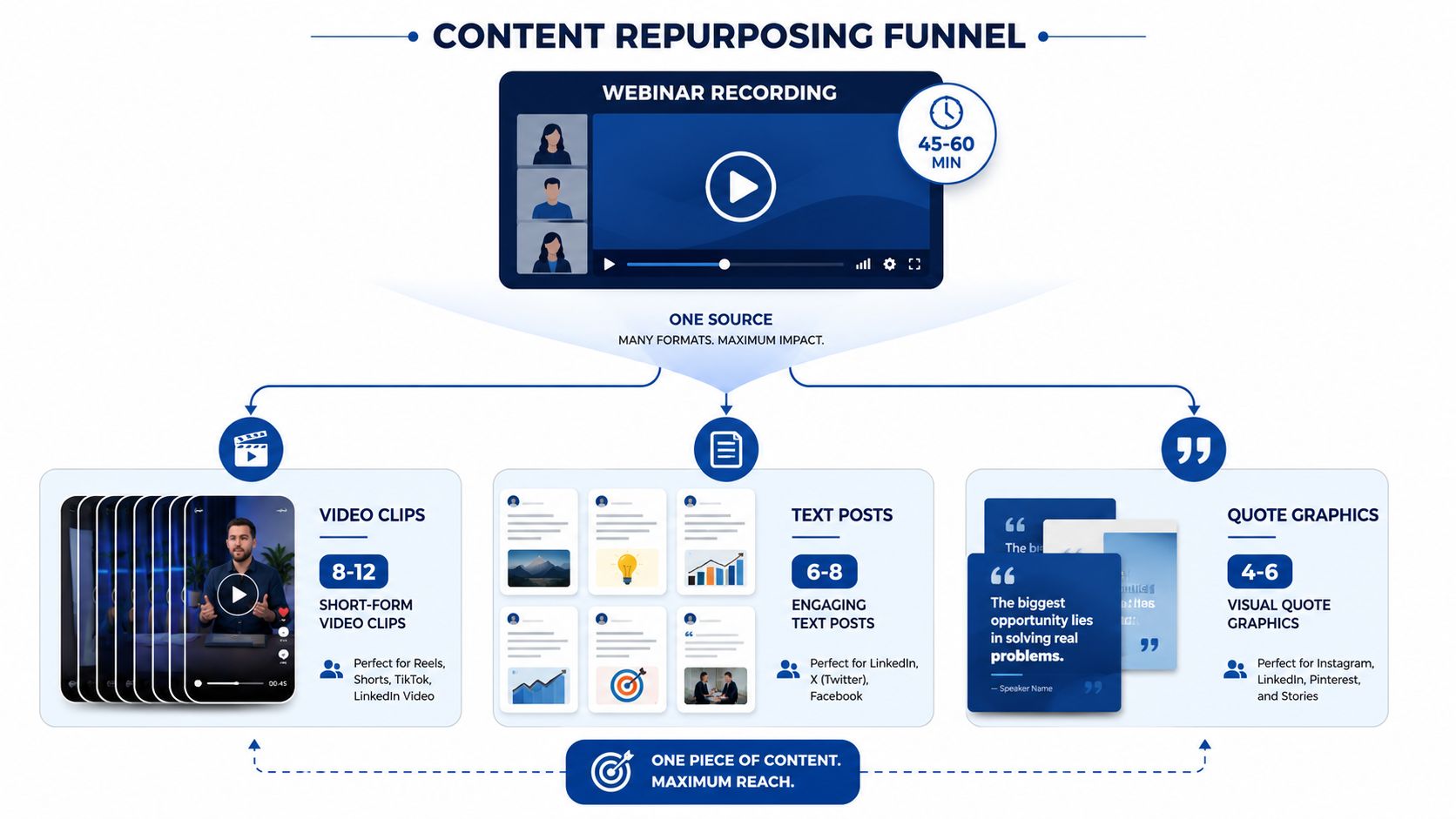
The effort-to-impact overlay is the second filter. Text posts are cheap to produce and can keep compounding if the message is strong. Carousels take longer, but they often earn more saves because they package one idea into a structured read. The matrix should reflect that trade-off, not pretend every cell costs the same.
The best rows do not maximize volume. They maximize the mix of discovery, consideration, and reuse.
For a real production reference, one webinar row can be paired with a B2B webinar content strategy example. The same logic applies to interviews, sales calls, and keynotes. The source changes. The row discipline does not.
Three Variables Every Cell Has to Hold
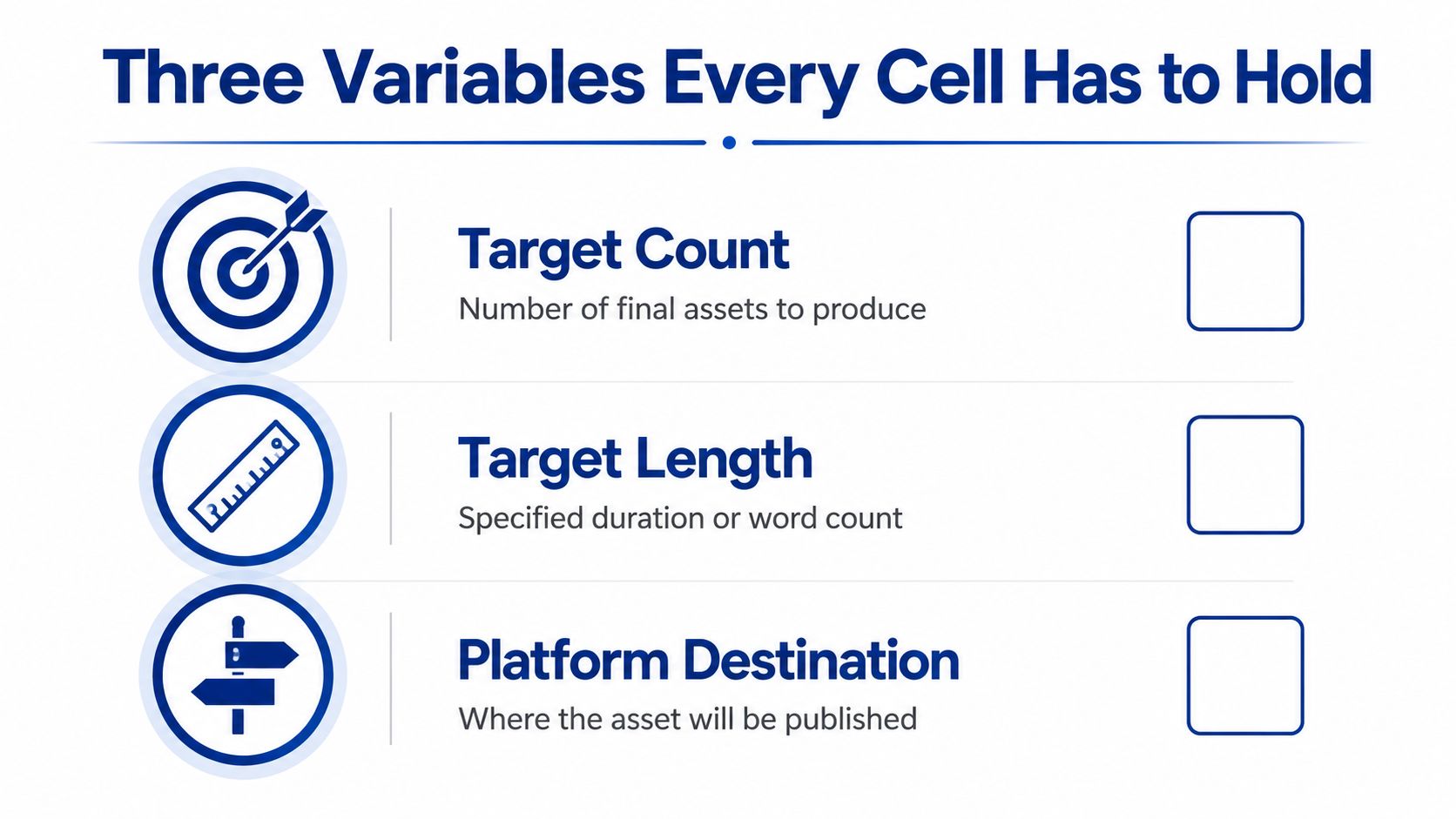
A matrix only works when each cell carries production detail, not just a format label. Every cell needs target count, target length, and platform destination. Without those three, the team is making assets with nowhere to publish.
The destination rule is simple. Each output column should map to one primary platform and one fallback. That avoids the classic failure where a team makes a good asset, then discovers it was designed for a channel nobody owns well. A clip with no destination becomes a file. A carousel with no channel becomes design debt.
What each cell should specify
- Target Count: How many finished assets that cell should produce.
- Target Length: The exact runtime, word count, or slide range.
- Platform Destination: The primary place it will be published, plus the fallback if needed.
Production cost shows up fast in DIY. Clipping takes 2 to 3 hours per recording, and captions take another hour. A carousel often takes 60 to 90 minutes each because the copy, layout, and image treatment all need to be aligned. Those estimates come before scheduling, approvals, or revisions. Once those are added, the calendar starts to look different.
The measurement layer matters too. Use UTM standards and naming conventions so the team can trace which derivative came from which pillar. That makes reporting possible across channels, which is the only way to know whether a cell earns its place. One technical B2B repurposing workflow emphasizes the same idea, because attribution gets messy fast once assets spread across multiple formats.
A good matrix cell sounds boring on purpose. It should read like a shipping ticket, not a brainstorm. That is how production stays repeatable.
How to Roll the Matrix Out as a Standing Operating Procedure
The rollout should be plain, because plain is what teams can run without constant supervision. The owner keeps the matrix from turning into a shared file with no enforcement.
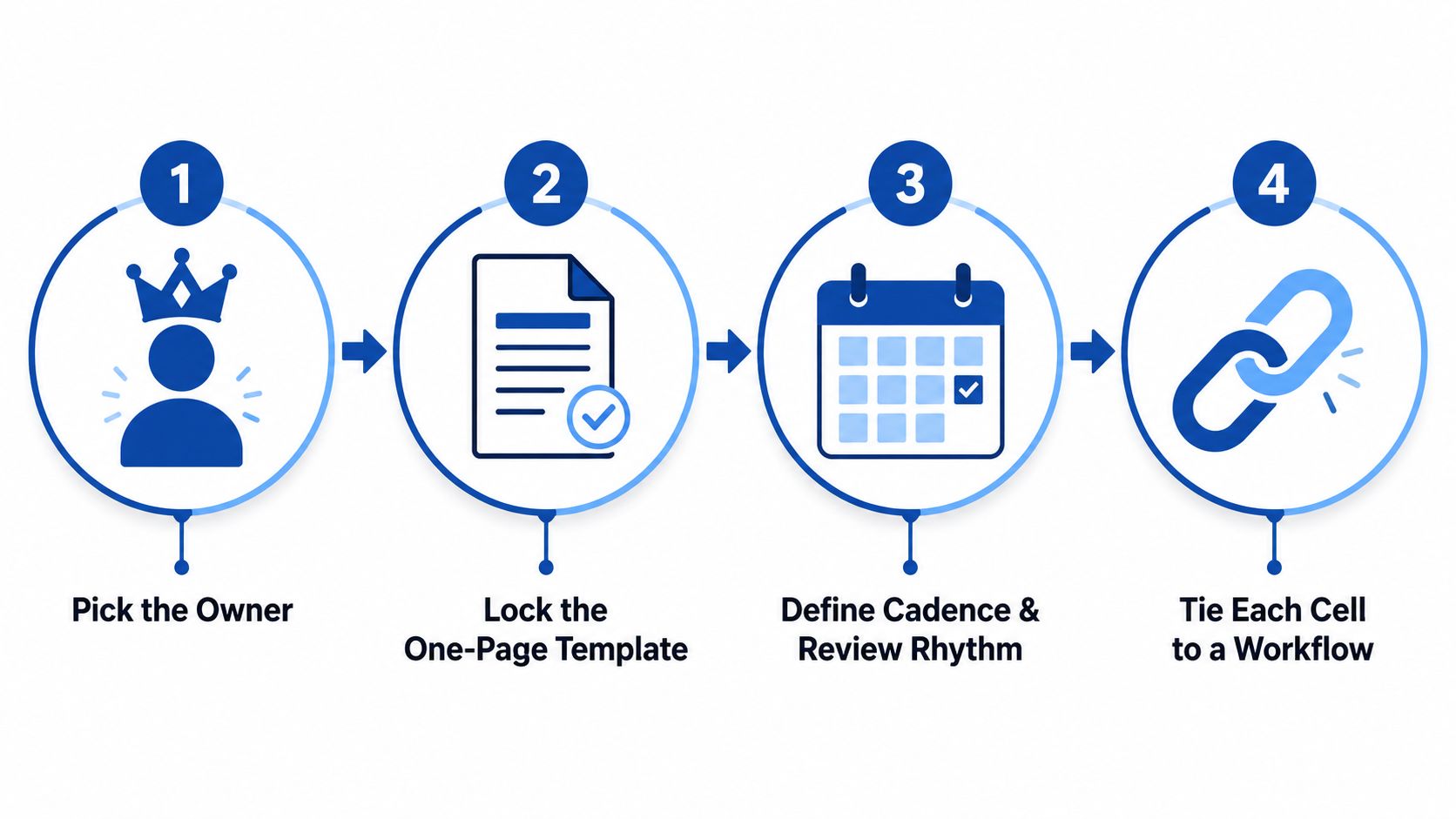
Step 1, assign one owner
One person owns the grid, the rules, and the weekly follow-through. That person does not need to write every asset. They need to protect the spec, reject ad hoc changes, and make sure the cells that are approved get produced. When ownership is vague, the matrix becomes a shared document nobody updates.
Step 2, lock the one-page template
Keep the matrix to one page. Not two, not a living slide deck. One page forces hard choices and stops the team from adding cells that never ship. The workflow diagram template helps teams map the handoff without turning the operating system into a presentation project.
Step 3, set cadence and review rhythm
Use one full delivery per recording as the default. Weekly slots should be reserved for publishing the previous batch, not for debating new ideas. Then hold a quarterly review and compare the cells against what shipped. Ask which derivatives drove traffic, engagement, and conversions back to the pillar, then cut the cells that keep consuming time without returning anything useful. The matrix should reward the formats that earn their place and drop the ones that do not.
Step 4, tie each cell to a workflow
Every cell needs a named path. Who drafts it, who reviews it, who publishes it, and where it lands. That removes handoff confusion and keeps the content calendar from drifting into guesswork. It also keeps the production map clear for teams that need a visual reference while they build the system.
Keep the matrix small enough that someone opens it during production. If nobody uses it, it is decoration.
This is the operational difference between a repurposing idea and a repurposing system. The first depends on memory. The second survives handoffs, vacations, and new hires.
When Not to Repurpose and How to Keep the Matrix Alive
The strongest repurposing teams are selective. They do not atomize weak material just because they can.
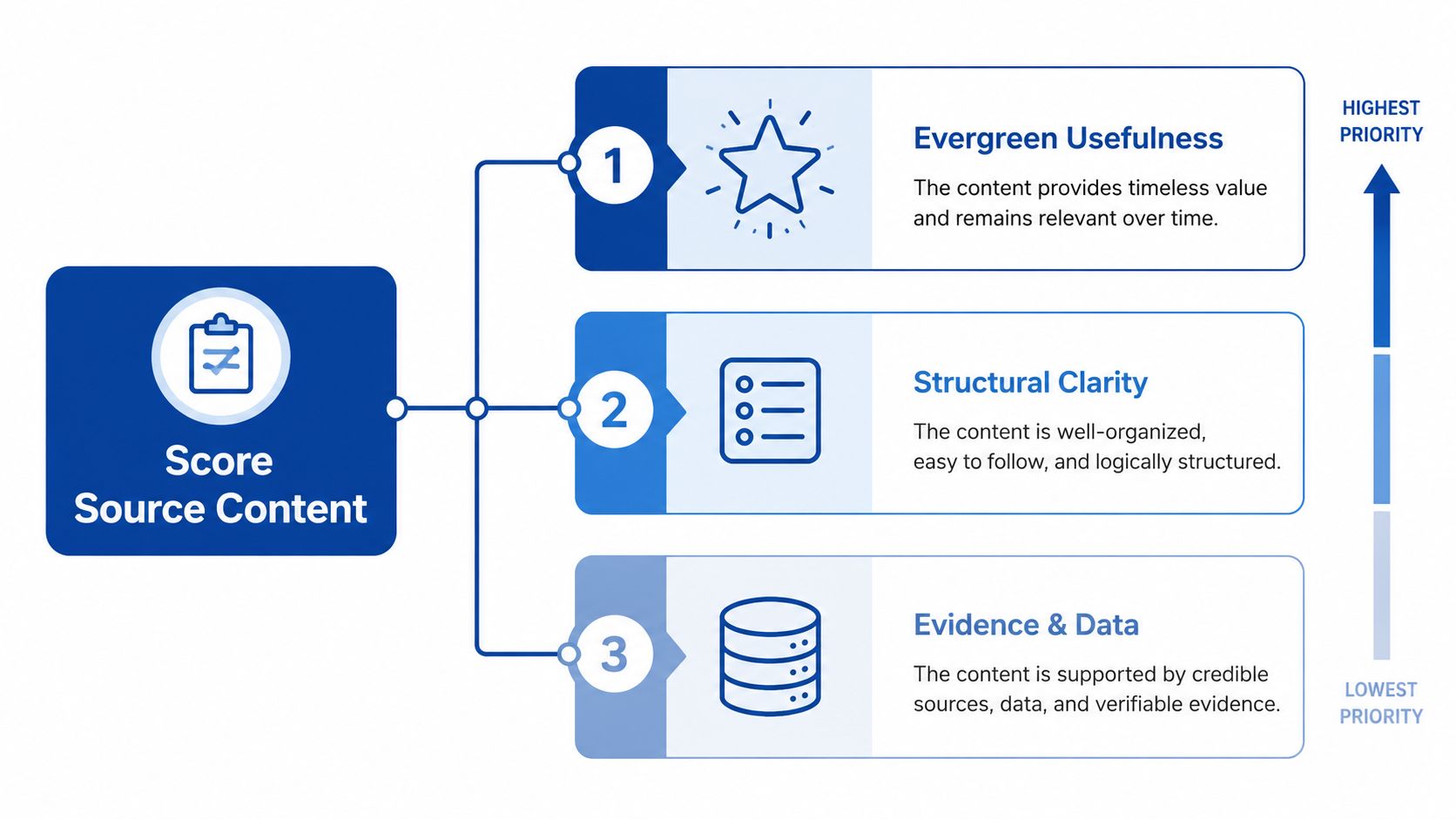
A better starting filter is a scorecard. Rank source content by evergreen usefulness, structural clarity, evidence of traction, and reusable media. That means strong ideas, clear sections, visible audience response, and source material that can be sliced into useful assets. If a recording lacks those traits, it is usually better as a single publishable item than as a full repurposing project.
A simple pruning rule
- Evergreen usefulness: The idea still matters after the launch window.
- Structural clarity: The source has clean sections, strong transitions, or clear teaching moments.
- Evidence of traction: The original content already showed signs that people cared.
- Reusable media: The recording contains enough visual or verbal material to extract clean assets.
This selective approach matters because many teams waste time atomizing weak content. They create volume from material that never had enough value to multiply. Independent guidance on repurposing strategy points toward the same selective logic, even if many guides skip the pruning method.
The matrix also needs maintenance. Review it quarterly. Pilot any new format on two or three recordings, then compare it against existing cells. If the new format earns reach or conversions the current cells do not, add it as a standing column. Retire weak cells the same way. The matrix should act like a production spec, not a poster on the wall.
That keeps the system alive without making it bloated. New formats earn their place. Old ones get cut when they stop pulling their weight.
The Done-for-You Alternative and What It Costs
DIY repurposing looks cheap until the labor shows up. Clipping takes 2 to 3 hours per recording, captions take another hour, and carousels can take 60 to 90 minutes each. Add blog drafting, design polish, approvals, and the posting calendar, and the work starts to eat the week.
The alternative is straightforward. Send one recording, then get 20 to 30 ready-to-publish assets back in 72 hours, in your brand voice, with unlimited revisions. That bundle can include video clips, LinkedIn posts, quote graphics, carousels, audiograms, and a blog post. The client time is about 15 minutes. The model is built for teams that would rather publish than manage post-production. The cost breakdown makes the comparison even clearer.
A practical workflow example looks like this.
- Send one recording. It can be a podcast, webinar, keynote, interview, or meeting recording.
- Approve the direction. The team reviews the source, the angles, and the delivery focus.
- Receive the assets. The finished set comes back ready to schedule.
If the matrix is already set, the bottleneck is rarely strategy. It is production time.
The numbers matter. One 45 minute recording becomes 30 assets in the standard delivery model. Pricing starts from $14 per finished asset. The productized service removes the editing backlog and gives the team a repeatable output machine, without turning the in-house team into full-time post-production staff.
Book a call or request a sample if a real recording should be turned into a real delivery. A live sample makes the matrix easier to judge than any slide deck ever will.
Tags:


