Content Version Control for Marketing Teams
Master content version control to track edits and manage approvals. Compare CMS and Git workflows and scale your repurposing engine.
A recording finishes, then the file chaos starts. One editor exports a clip, another rewrites the caption, and a third asks whether the approved logo is still valid. Soon, nobody knows which video, post, or quote graphic is safe to publish.
Content version control solves that problem by preserving the source asset, every meaningful revision, reviewer decision, approval state, and usage rule. It turns repurposing from a folder exercise into a governed publishing workflow. The value isn't only rollback. It's knowing which version is publishable, who approved it, what changed, and which derived assets came from the source.
The Real Cost of Losing Your Source of Truth
A marketing team can produce excellent content and still lose control of it. A founder approves a podcast clip in Slack. The editor saves a revised caption in Google Drive. A designer uses an older brand template. The final asset appears in a scheduling tool with no clear record of its origin.
That creates version drift. The team may publish a claim that legal rejected, use an expired image license, or distribute a clip that no longer matches the approved positioning. The problem usually appears late, when changing it costs more than reviewing it would have.
Content version control is the system that preserves a content asset's history and decision trail. A useful workflow records revisions, reviewers, approval states, timestamps, and reasons for change. It lets a team compare versions, revert changes, and reconstruct who changed what and when. Those principles come from formal revision tracking, which predates modern collaboration software. IBM's OS/360 IEBUPDTE tool dates to 1962, while SCCS began at Bell Labs in 1972, with its manual published on December 4, 1975. The historical foundation is documented in the overview of version control history.
The file is not the record
A filename such as final_final_v7 doesn't prove approval. It only proves that someone saved another copy.
Enterprise content control should keep one controlled asset with metadata for draft, QA, and approved states. The record should also retain:
- Revision history: What changed between each meaningful version?
- Decision provenance: Which reviewer approved the change?
- Usage rights: Where and until when may the asset be used?
- Release state: Is it draft, in QA, approved, published, or retired?
- Source relationship: Which recording or master asset created this variant?
Practical rule: If a team can't identify the approved version without opening several folders, the workflow isn't controlled.
This matters most when one recording becomes clips, posts, graphics, carousels, and blog copy. Content lifecycle management for marketing teams provides the broader operating context. Version control is one part of that lifecycle, but it carries the evidence needed when someone challenges a published asset.
Governance replaces guesswork
The right question isn't “Where did the file go?” It's “Can the team prove why this file was published?”
That distinction changes the operating model. A backup protects against loss. Governance protects the organization from uncertainty. Marketing teams need both, but only the second creates a reliable source of truth across channels.
Comparing CMS History and Git Workflows
Marketing teams usually encounter three approaches. Each preserves change history differently, and each creates a different review experience.
| Approach | Best For | Main Limitation |
|---|---|---|
| Native CMS history | Website pages, blog posts, structured editorial content | Often weak for off-site assets and visual review |
| Git-like version control | Code, Markdown, configuration, large web estates | Technical workflows can frustrate non-developers |
| Headless content platforms | Structured content distributed across channels | Requires strong metadata, permissions, and governance design |
Native CMS history
A conventional CMS works well when the content lives inside the website. Editors can save drafts, compare revisions, restore earlier copy, and publish through familiar screens. This suits blog posts and landing pages where the CMS controls the complete release path.
The limitation appears when a single source feeds several formats. The CMS may track the article, while the video clip, social caption, thumbnail, and translated version sit elsewhere. The website history remains intact, but the wider content family becomes fragmented.
Native CMS history also varies in depth. Some systems retain only copy changes. Others track editorial states, permissions, and audit events. Teams should test whether the system records enough detail for compliance and brand review.
Git-like workflows
Git excels at structured files, branching, merging, and precise diffs. Developers can work in parallel, review proposed changes, and restore a known state. Teams managing large websites may benefit from structured Git workflows for big web estates, especially when content and code need coordinated releases.
The trade-off is usability. A marketer usually needs a visual preview, a clear approval button, and a simple comment trail. Branches, pull requests, merge conflicts, and command-line conventions add friction when the work involves video, design, rights, or platform-specific formatting.
Git can support marketing content, but it shouldn't force every marketer to think like a software engineer. A content operations playbook for B2B teams can help define responsibilities before technical decisions lock in the workflow.
Headless content platforms
Headless systems separate structured content from presentation. That makes them useful when one approved source needs to reach websites, applications, email, and other channels.
They also expose the central governance challenge. A headless model can distribute content efficiently, but it won't decide whether a localized caption inherits the master approval or requires a new review. Taxonomy, metadata, access controls, and visual previews must carry that responsibility.
The best choice depends on the assets, not the trend. CMS history suits site-first publishing. Git suits technical estates. Headless platforms suit structured multi-channel distribution, provided the team designs governance before scaling variants.
Version Control Mechanics and Governance Rules
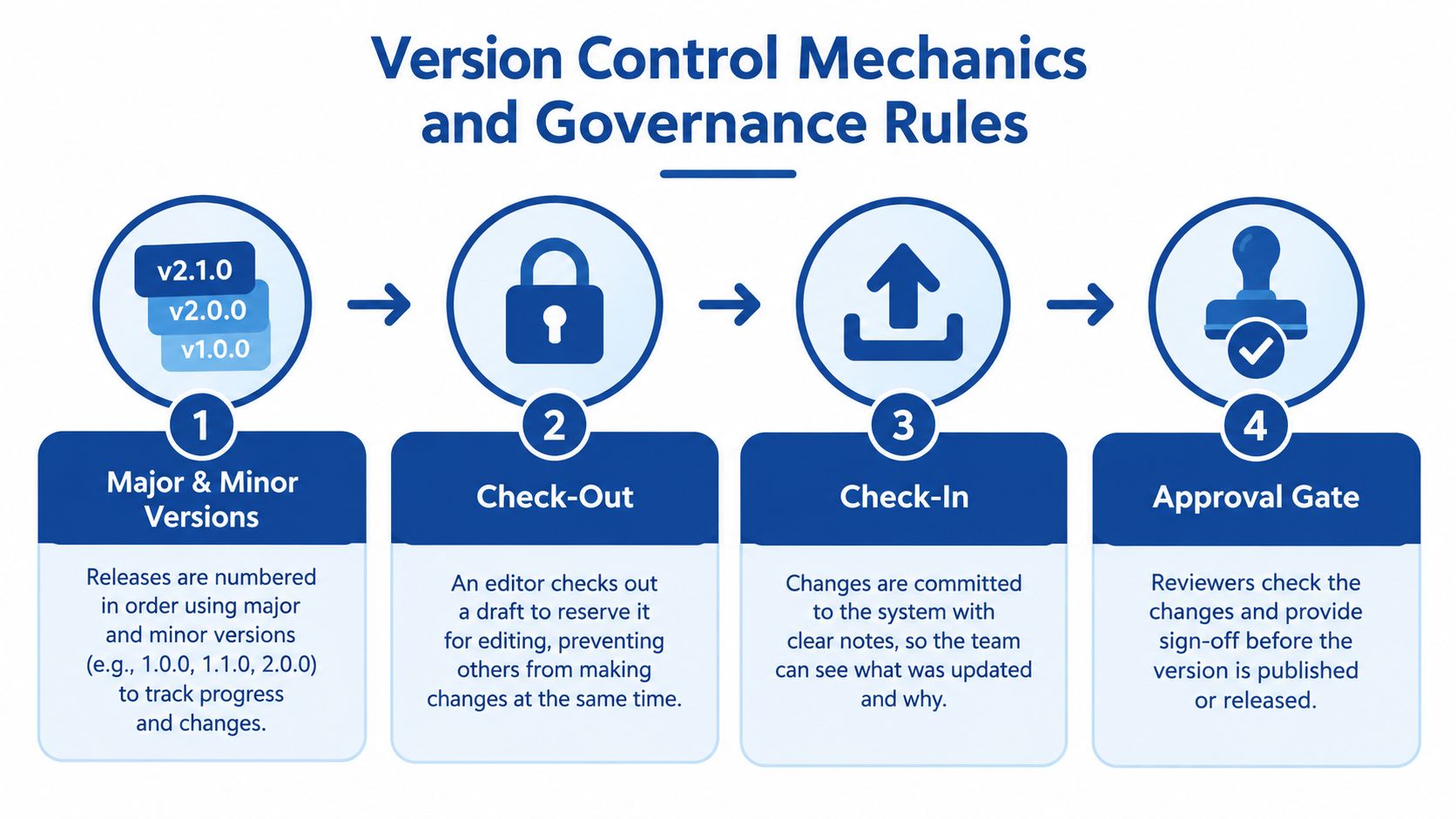
A reliable workflow gives each revision a clear place in the release sequence. Microsoft SharePoint documents major and minor numbering such as 1.0, 1.1, 1.2, 2.0, and 2.1, with check-out and check-in controlling when a tracked revision is created. The mechanics matter because a version number should communicate release status, not decorate a filename.
Use ordered versions
Treat a minor version as an internal revision and a major version as an approved release. For example, a social caption might move from 1.0 to 1.1 after an editor fixes wording, then to 2.0 after legal approves a substantive claim change.
The numbering only works when the team defines it in writing. Otherwise, one editor may treat 1.2 as ready to publish while another sees it as an unfinished draft.
Reserve the asset before editing
Check-out prevents two people from overwriting the same working version without knowing. The editor reserves the asset, makes controlled changes, and returns it with a note describing the revision.
That note should answer three questions:
- What changed?
- Why did it change?
- Which related assets need review?
A useful comment might record that a product claim changed, a subtitle was corrected, and the linked LinkedIn post requires a matching update. The note creates context that a visual diff can't provide.
Separate approval from publication
Approval status should be explicit. A practical sequence is Draft, QA, Approved, Published, and Retired. Each status needs an owner and a permitted action.
Usage rights belong beside approval. Frontify's DAM guidance covers permissions, versions, approval statuses, usage rights, and expiration dates, while Adobe describes asset management practices for preserving source files alongside localized or reformatted variants in its digital asset management guidance.
For teams comparing implementation details, this overview of DAM version control is useful context. The core principle remains simple: preserve the master, connect every adaptation to it, and don't let approval disappear during export.
A governed content supply chain needs these relationships documented, especially when assets move between people, systems, and channels. The content supply chain glossary gives that operating model a useful vocabulary.
The Hidden Time Cost of Manual Repurposing
Manual repurposing looks affordable because each task seems small. A team clips a recording, writes a caption, creates a graphic, and saves the results. The hours become visible only after the team tracks every handoff and revision.
For one 45-minute recording, a realistic internal workflow can look like this:
- Review and timestamping: A producer watches the recording, marks usable moments, and writes notes. This takes about 1 to 2 hours.
- Clipping and captioning: An editor selects excerpts, trims them, adds subtitles, and exports platform variants. This takes about 2 to 3 hours.
- Copywriting: A marketer turns the recording into posts, hooks, descriptions, and article notes. This takes about 2 to 4 hours.
- Design production: A designer creates quote graphics, carousels, thumbnails, and audiograms. This takes about 2 to 4 hours.
- Version tracking: Someone names files, updates a spreadsheet, records approvals, and checks that revisions match across channels. This takes about 1 to 2 hours.
- Review and scheduling: The team checks brand details, rights, links, dimensions, and publishing queues. This takes about 1 to 2 hours.
That is roughly 9 to 17 hours of work, before a substantial rewrite or extra review cycle. These are planning estimates, not universal benchmarks. The exact cost depends on recording quality, editorial standards, asset count, and team experience.
Why spreadsheets fail under pressure
A spreadsheet can record a status. It can't reliably preserve the relationship between a master recording, a clip, a revised subtitle file, a translated version, and a final social export. Shared folders create the same weakness. They store objects, but they rarely explain the decision path.
The team then spends time searching instead of producing. Editors duplicate work. Designers use inconsistent templates. Marketers publish a corrected caption beside an outdated video.
Guides such as Feather's content repurposing strategies for 2025 can help teams plan formats, but strategy doesn't remove the production burden. The operating question is whether each derived asset remains tied to the source and its approval state.
A detailed cost framework for how much content repurposing costs should include this tracking overhead. Ignoring it makes DIY production look cheaper than it is.
Managing Multi-Channel Variants at Scale
The difficult problem isn't tracking drafts. It's managing platform-specific variants without losing the source of truth.
A single interview may produce a vertical clip, a square clip, a LinkedIn post, a quote graphic, a carousel, an audiogram, and a blog passage. Each version may need different length, formatting, wording, subtitles, or legal treatment. The team needs to know which master created each asset and whether the derivative remains covered by the original approval.
Build the asset relationship first
Every derivative should carry structured metadata. At minimum, record:
- Source ID: The recording or master asset that originated the derivative.
- Content theme: The topic, campaign, product, or audience segment.
- Format and channel: Video clip, post, carousel, blog content, or audio asset.
- Locale: The language and market for which the variant was created.
- Approval state: The current review status and approving person.
- Rights window: Any usage restriction, expiration, or licensing condition.
- Change reason: Why the variant differs from its source.
Taxonomy is what makes those fields useful. A human can search by campaign or topic. An AI system can retrieve approved assets only when the metadata is consistent enough to distinguish a master from a derivative.
Decide when a variant becomes a master
A reformat usually remains a derivative. A major editorial change may create a new master for that channel or campaign.
For example, resizing a clip doesn't create a new source. Rewriting its central claim for a different market may require separate approval and a new parent record. The team should record that relationship rather than overwrite the original.
This approach protects brand consistency without blocking adaptation. Frontify's guidance supports preserving source files while creating localized or reformatted versions for markets and channels. The governance decision is practical: adapt the asset, preserve the source, and document the reason.
Recent DAM coverage identifies AI-generated asset volume, rights ambiguity, and compliance as growing governance pressures. One 2026 industry report says 8 out of 10 vendors see exponential asset growth and AI-generated content volume as the main pressure reshaping DAM, while 6 to 7 out of 10 flag governance, rights management, or compliance risk as increasing concerns. Those figures appear in the Content Versioning Software Market report.
The implication is clear. Version control is becoming an orchestration and provenance problem, not a folder problem.
The Done-for-You Alternative
A governed workflow doesn't require every marketing team to build an elaborate internal production department. A done-for-you service can handle the transformation while preserving a clear source relationship for every deliverable.
The client sends one recording, such as a podcast, interview, keynote, sales call, livestream, course, or meeting recording. The production team returns 20 to 30 ready-to-publish assets in 72 hours, including video clips, LinkedIn posts, quote graphics, carousels, audiograms, and an SEO-ready blog post.
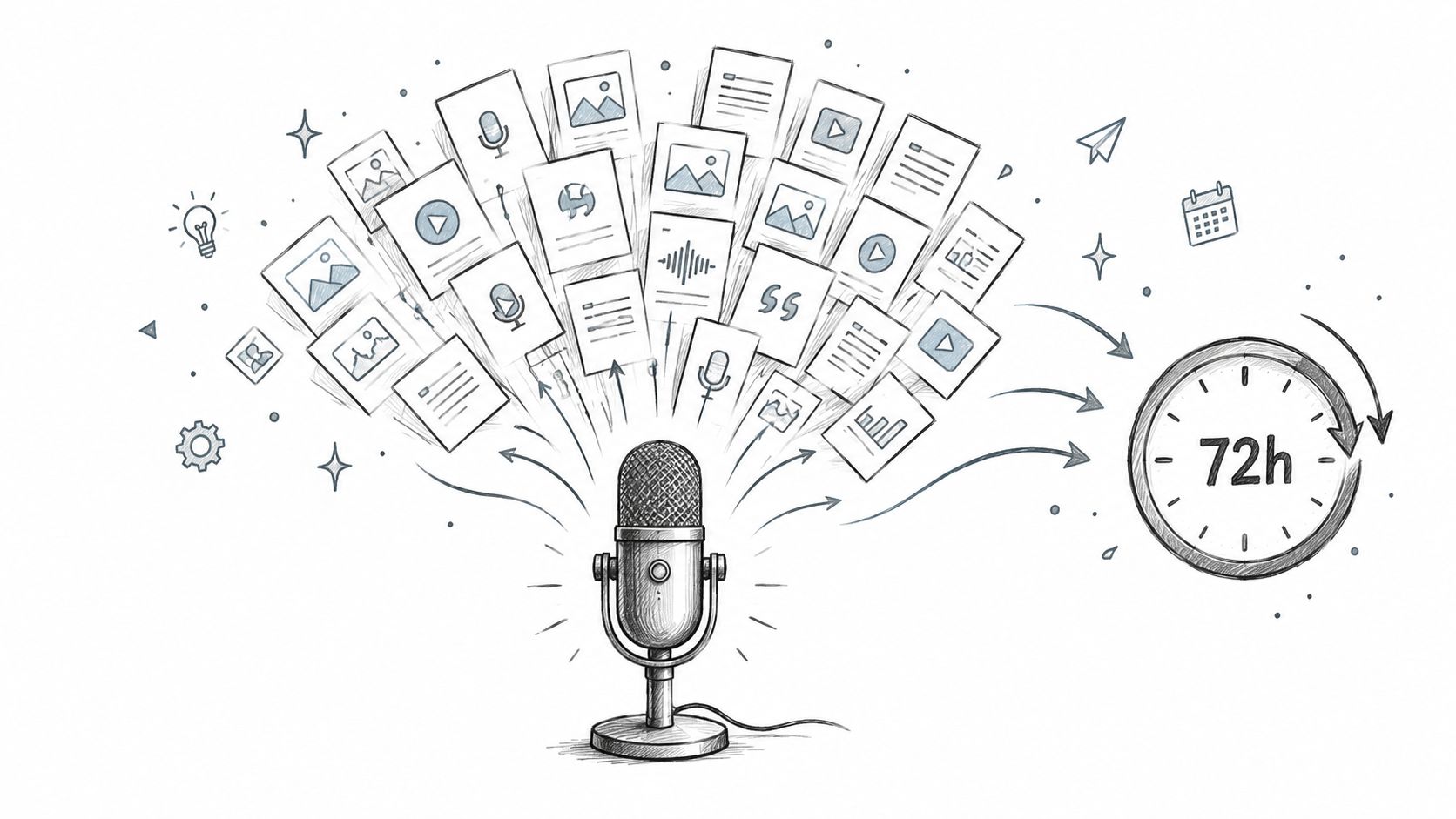
The important distinction is control. Each asset should come from the same source recording, follow the same brand voice, and pass human review before delivery. That reduces the risk of a clip saying one thing while the post and article say another.
The client's workload can stay near 15 minutes for a recording. That time covers sending the source, brand guidance, and feedback. The service handles selection, editing, copywriting, design, formatting, and revision management.
A practical delivery workflow
- Source review: The production team logs the recording and identifies usable themes.
- Editorial selection: Producers select moments that can support different channels.
- Asset creation: Editors, writers, and designers create the required formats from the same source.
- Brand review: A human checks tone, visual identity, captions, claims, and consistency.
- Client review: The client requests changes or approves the set.
- Final delivery: The team sends finished assets with publishing guidance.
The economics can also be easier to evaluate than internal production. The service is offered from $14 per finished asset, and a 45-minute recording can become 30 assets. The stated 72-hour turnaround guarantee means the client doesn't pay if delivery misses the promised window.
The broader case for outsourcing content repurposing is explained in this guide to outsourcing content repurposing.
A short visual overview of the workflow appears below.
This model doesn't remove the need for governance. It makes governance easier by keeping production tied to one approved source and one review path.
Migration Steps and Final Recommendations
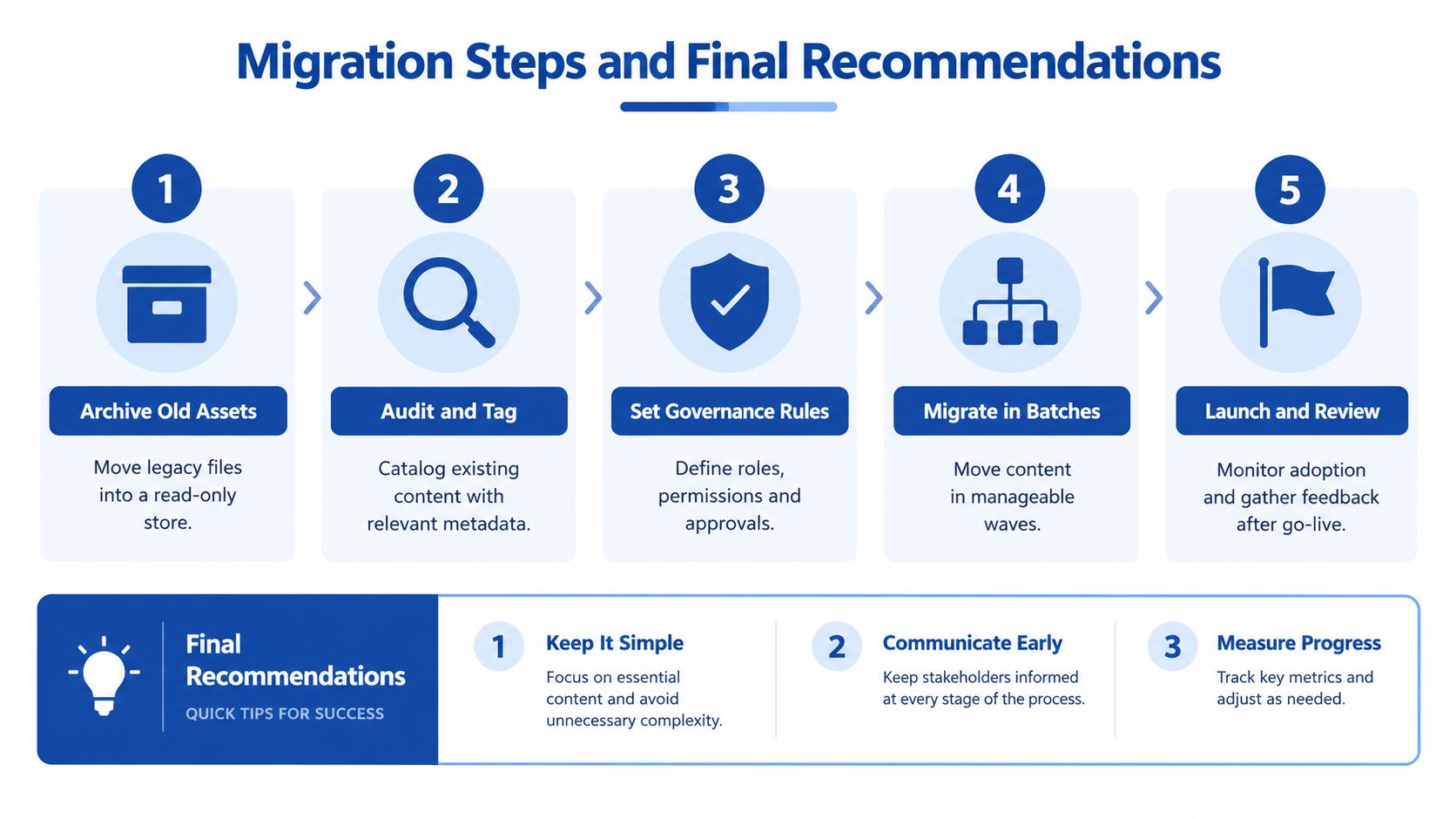
A content migration should preserve evidence, not merely move files. Start with a read-only archive for legacy material, then separate active assets from retired ones.
Use this sequence:
- Archive old assets: Preserve legacy files in a read-only location.
- Audit and tag: Record source, owner, topic, format, rights, and status.
- Set governance rules: Define editors, reviewers, approvers, and publishing permissions.
- Migrate in batches: Move related campaigns or content families together.
- Launch and review: Monitor adoption, missing metadata, and approval exceptions.
Keep reason-for-change logs with meaningful revisions. Define archival scope before migration begins. Store templates and reusable components separately from finished content, so a template update doesn't obscure the history of published assets.
The final recommendations are straightforward. Keep one source of truth. Make approval and rights visible. Link every derivative back to its source.
Teams that regularly record podcasts, interviews, keynotes, sales calls, or livestreams can avoid the manual production burden without sacrificing control. Book a strategy call with RepurposeYourContent and request a sample delivery to see how one recording can become brand-safe, provenance-aware content within the guaranteed 72-hour turnaround.
Tags:




