How to Reduce Production Costs Without Cutting Quality
Learn how to reduce production costs across content and marketing workflows with practical strategies, real time estimates, and a done-for-you alternative.

Reducing production costs starts with the biggest hidden leak. Manual repurposing of one long-form recording usually takes 10 to 16 hours before approvals, scheduling, and revisions, and a 60-minute source commonly takes 5 to 8 hours even in lean workflows when teams turn it into social posts, clips, and articles (manual repurposing time breakdown, independent estimate for a 60-minute source).
They still budget for the recording. They don't budget for what happens after the camera stops.
Hidden Production Costs Teams Miss
Manufacturing advice on cost reduction often points to labor, procurement, scrap, and throughput. That frame is useful, but it misses where many B2B marketing teams lose money. After the recording ends, a second production process starts. For teams publishing clips, posts, carousels, and articles from one source file, that process is usually the more expensive one.
I have seen teams approve a shoot budget in one meeting, then spend the next week burning far more time in editing, rewriting, formatting, and review cycles without ever naming it as production cost.
The work starts after capture
A recorded webinar, podcast, interview, or customer conversation rarely ships as one asset. It turns into many small deliverables, each with its own handling cost.
A common post-recording workflow looks like this:
- Review and mark usable moments: 1 to 2 hours (repurposing workflow breakdown)
- Clip and edit video: 3 to 4 hours
- Write posts and captions: 2 to 3 hours
- Create graphics or carousels: 2 to 4 hours
- Draft a search-led article from the transcript: 2 to 3 hours
That is already a full workday or more. It also excludes internal reviews, approval delays, and the small formatting tasks that pile up across LinkedIn, email, YouTube, and short-form video channels.
| Task | Hours | Cost @ $65/hr |
|---|---|---|
| Review and mark moments | 1 to 2 | $65 to $130 |
| Clip and edit video | 3 to 4 | $195 to $260 |
| Write posts and captions | 2 to 3 | $130 to $195 |
| Create graphics or carousels | 2 to 4 | $130 to $260 |
| Draft blog from transcript | 2 to 3 | $130 to $195 |
At that rate, one recording can create $650 to $1,040 in downstream labor before distribution and revision rounds. For an in-house team, that cost often hides inside salaries. For an agency or freelance bench, it shows up as fragmented invoices. Either way, the money is real.
Practical rule: If you only track what it cost to plan and record the session, you are tracking capture cost, not production cost.
Why cost cutting usually misses the expensive part
The expensive part is rarely the camera, the mic, or the editor's hourly rate in isolation. It is the friction between tasks.
In content operations, that friction usually looks like this: a strategist picks clips without a clear angle, an editor exports three versions because the brief changed, a writer rewrites social copy from scratch because transcript notes were weak, and someone on the team reformats the same idea for four channels by hand. None of those steps looks dramatic on its own. Together they add hours to every recording.
That is the hidden factory floor for B2B marketers and creators. Not the recording day. The 10 to 16 hours spent turning one source file into a month of usable assets.
Traditional operations advice points to rework, delays, and handoff failures for a reason. Content teams have the same problem in a different format. If you want lower production cost, start by reducing those repeat tasks and approval loops. Then measure whether the output justifies the labor with a clear content marketing ROI measurement framework.
Audit Your Production Pipeline Before You Cut Anything
A useful audit can be run in one week. No new software required. A spreadsheet works.
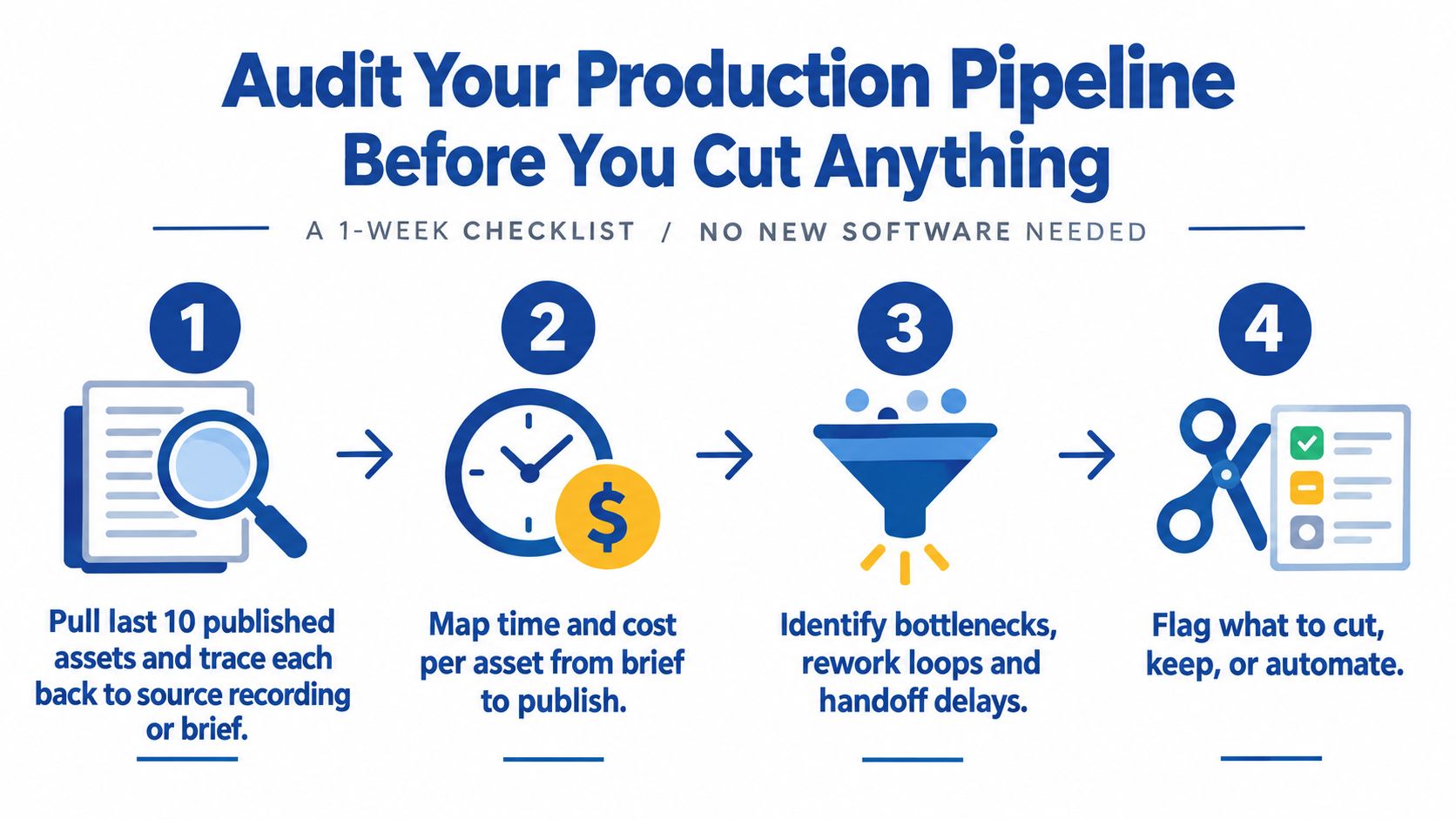
Step 1 Track the last 10 published assets
Pull the last 10 things that went live. LinkedIn posts, clips, carousels, podcast promos, blog articles, email content. Then trace each one back to its source.
Use two labels only:
- Original creation
- Repurposed from a recording
This usually reveals a messy truth. Teams often think they're repurposing consistently, but most published assets were still created from scratch.
Step 2 Time track the next three recordings
Set up a simple sheet and track the next three recordings from raw file to published assets. Budget about 90 minutes to set it up, then check it across the week.
Use columns like these:
- Transcription
- Editing
- Caption writing
- Blog drafting
- Distribution formatting
- Approvals
- Revisions
Don't estimate from memory. Start a timer. The point is to catch friction in real time.
A lot of teams find their “editing” number is hiding five different tasks. That's useful. It means one bloated bucket needs to be split before it can be improved.
Step 3 Score friction, not just time
Time alone won't tell the full story. Score each step from 1 to 5 on these three factors:
- Skill required
- Repetition
- Error cost
For example, trimming dead air might be repetitive and low risk. Writing a founder-led LinkedIn post in the right voice is less repetitive and carries higher brand risk.
Any step with a high score on repetition plus skill is a strong candidate for automation, templating, or reassignment.
Teams that cut the wrong step usually create rework. They don't create savings.
Step 4 Calculate the real cost per asset
Now total the hours and multiply by the team's true hourly cost. Don't use salary alone if the business tracks loaded internal cost differently. Use the number finance would recognize.
Then divide by the number of assets that shipped.
That gives the only cost metric that matters here. Cost per published asset.
A strong companion to this audit is a documented ops process. This content operations playbook for B2B teams is useful because it frames production as a repeatable system, not a pile of one-off tasks.
Quick Wins That Cut Hours From Every Recording
Teams usually do not need a new production system first. They need to stop wasting the same 10 to 16 hidden repurposing hours after every recording.
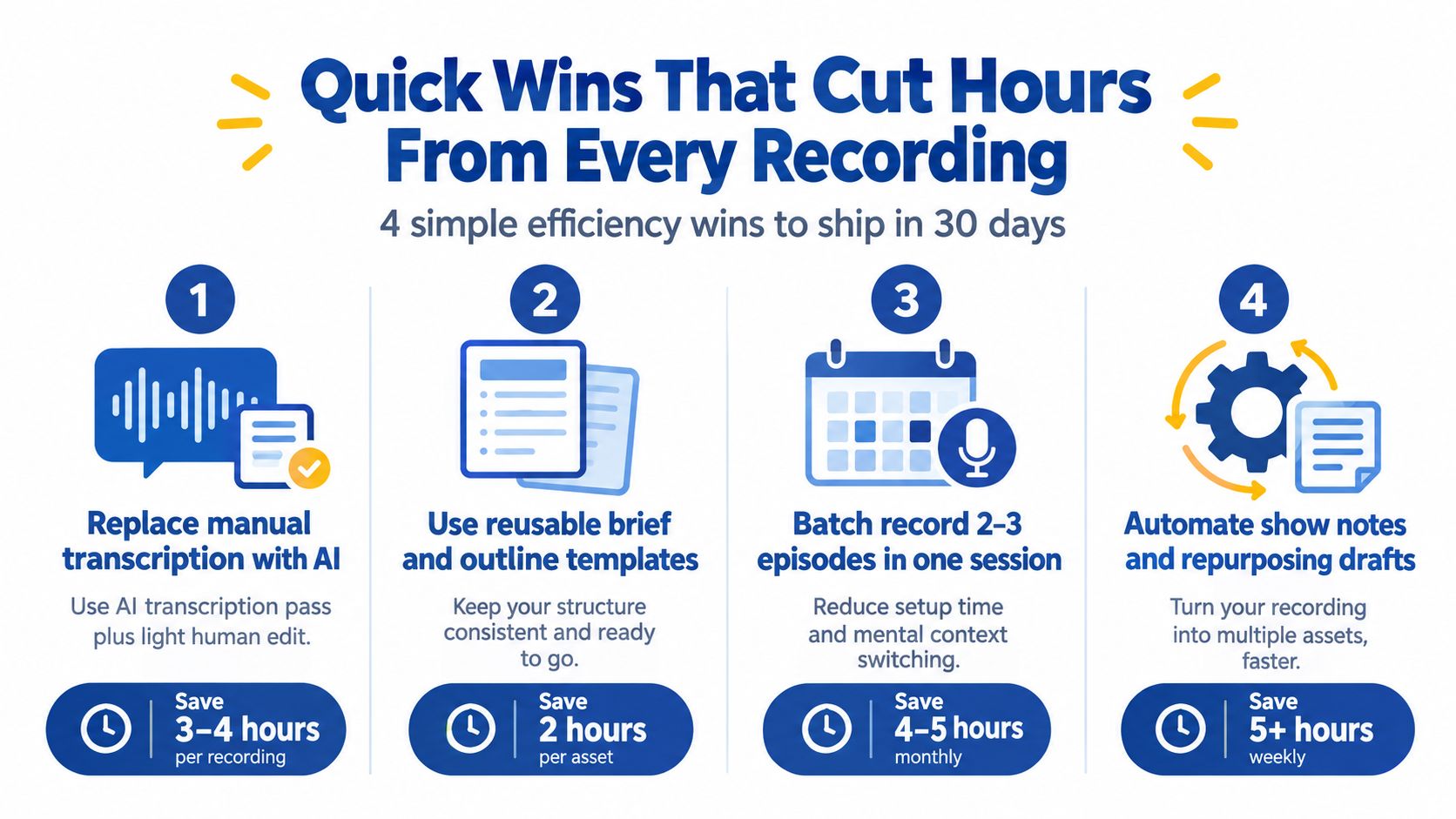
Clean up transcription first
I start here because it is usually the cheapest fix with the fastest payback. If a strategist, editor, or founder is scrubbing through raw audio just to find usable moments, the team is spending skilled time on admin work.
Use AI to generate the first transcript. Then assign one person to do a single cleanup pass for names, jargon, and obvious errors. In practice, that often removes an hour or more from the post-recording workflow without hurting accuracy.
The trade-off is simple. A raw AI transcript is fast but messy. A human-only transcript is cleaner but too expensive for routine content production. One cleanup pass is the middle ground that holds up.
Stop choosing clips from a blank page
Clip selection gets slow when every editor uses instinct alone. A simple rubric fixes that.
Score potential clips against a short list of proven formats:
- Contrarian take
- Number-led point
- Customer story
- Common mistake
- Simple framework
- Sharp opinion
- FAQ answer
This sounds basic because it is. It also works. Once the team agrees on what a usable short-form clip looks like, review time drops and fewer strong moments get missed.
A related fix helps even more. Protect focused editing blocks and reduce tool switching. These practical work productivity hacks are useful for that exact problem.
Template copy by channel
Writing social copy from scratch for every asset burns hours fast, especially after creative work is already done in the recording itself. Build three to five post templates per channel and treat them as production tools, not creative shortcuts.
For example:
- LinkedIn: strong hook, one insight, one example, one CTA
- X: short tension line, punchy takeaway, link or prompt
- Newsletter intro: what happened, why it matters, where to watch or read
Good templates do not flatten the brand voice. They remove repeat decisions about structure, length, and formatting so the writer can spend time on the actual message.
Teams repurposing webinars, demos, and interview footage can borrow a lot from this guide on how to edit webinar recordings for marketing. The editing decisions are usually the same even when the source recording is a podcast or virtual event.
A quick visual example helps here.
Batch the ugly last mile
Publishing work is where production costs hide. One finished recording turns into square clips, vertical clips, show notes, captions, thumbnails, links, titles, and uploads. None of that is hard. All of it takes time.
Batch those tasks into one weekly block with one owner and one checklist. Do not let editors handle formatting one asset at a time between creative tasks. That pattern kills momentum and creates handoff mistakes.
A recording only becomes cost-efficient when publishing is routine. That is how one hour of source content turns into a month of assets without burning another half day in cleanup.
Tooling Versus Outsourcing Versus Done For You
There are three real options. Build a DIY stack. Hire freelancers. Hand the whole workflow to a service. The right answer depends on time, skill, and tolerance for operational mess.
Same decision yardstick for each option
| Criteria | Tooling (DIY) | Outsourcing (Freelancers) | Done-For-You Service |
|---|---|---|---|
| Team time | Lower than fully manual, but still requires active management and review | Less hands-on production, more coordination time | Minimal internal production time |
| Skill required | Moderate to high | Moderate, mostly in briefing and quality control | Low, mostly source delivery and review |
| Cost per finished piece | Variable. Often low on paper, higher after team time is counted | Variable across editors, writers, and designers | Predictable if scope is fixed |
| Operational risk | Workflow breaks if one owner is busy or lacks editing judgment | Quality and tone vary by contractor | Depends on service process and revision model |
Tooling works, if someone owns the mess
A stack like Descript, Opus Clip, ChatGPT, and Canva can absolutely reduce effort. It can also create a false sense of speed. Software handles pieces of the work. It doesn't own judgment, voice, sequencing, or approvals.
Teams exploring that route should compare options carefully. This roundup of best automated video editors is useful because it shows how much the tooling category has matured, but software still needs a workflow owner.
Freelancers reduce labor, not management
Freelancers can work well when the process is already tight. They struggle when the brief is fuzzy. Then the content lead becomes a part-time producer, editor, and QA manager.
Common failure points show up fast:
- Voice drift: copy sounds generic
- Asset mismatch: clips don't fit channel goals
- Revision loops: the team gives feedback in fragments
- Fragmented ownership: one person edits, another writes, another designs
That overhead doesn't show up on the invoice. It shows up on the calendar.
A useful decision lens is this comparison of content repurposing agency vs DIY tools. It frames the trade clearly: software can assist production, but it doesn't replace a managed pipeline.
Done-for-you fits teams that value consistency
Done-for-you works when the business already has source recordings and needs finished assets without babysitting the process. It's usually the cleanest option for founders, podcasters, and lean B2B teams who can't afford production drag.
The trade-off is simple. You pay for execution, process ownership, and consistency. In return, the internal team keeps its attention on strategy and distribution.
Why One Recording Should Become a Month of Content
The cheapest content is usually the content that's already been recorded.
That doesn't mean posting filler. It means extracting the full value from source material that already contains the ideas, stories, objections, examples, and phrasing the audience responds to.
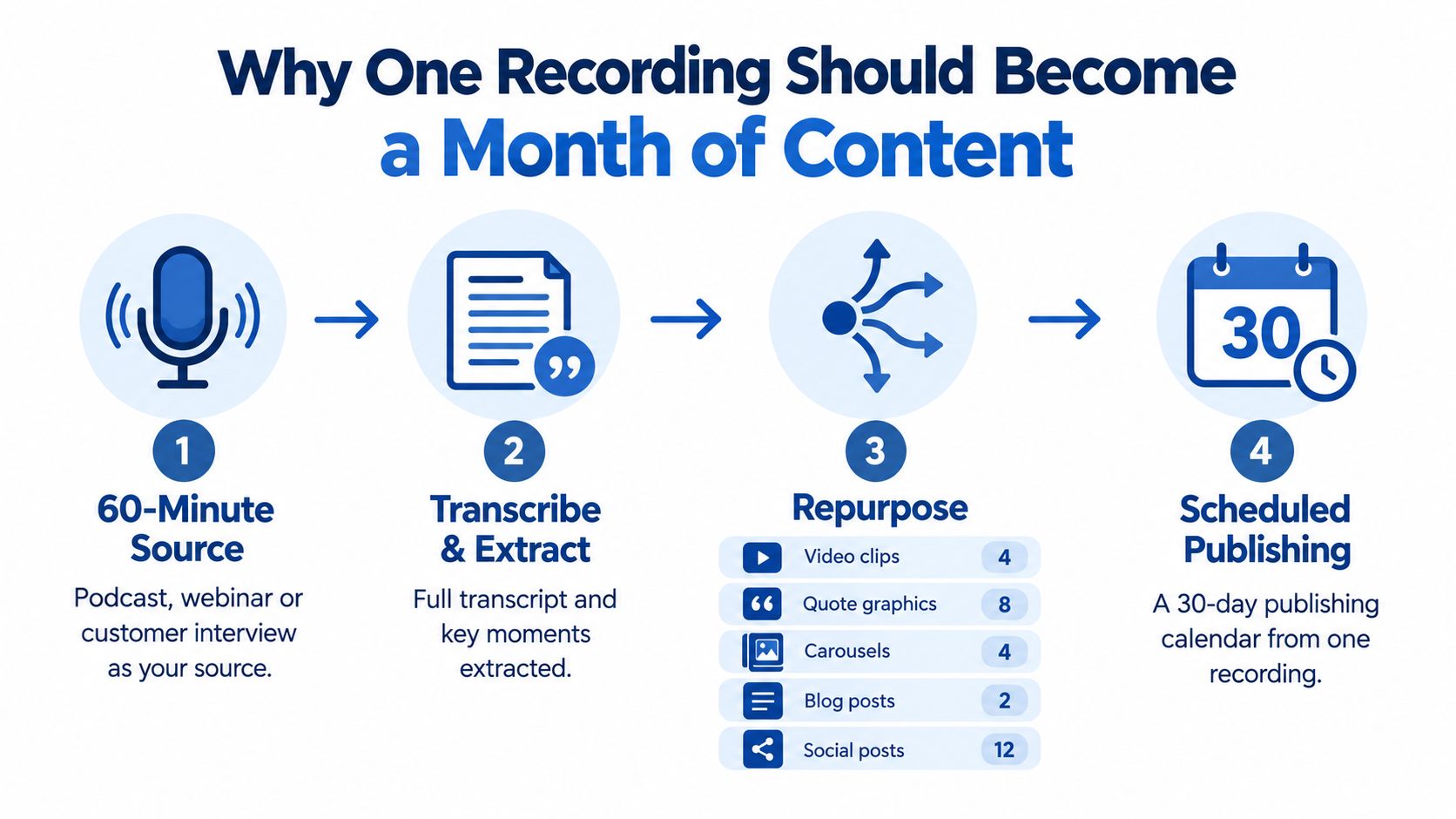
One source, many usable outputs
A strong recording usually contains:
- Opinion clips for short video
- Clean quotes for graphics
- Structured explanations for carousels
- Expanded answers for blog drafts
- Tighter takes for LinkedIn and X
- Summary insights for email
A content strategy requires more than just publishing the full episode and maybe one article. That's underuse of an expensive asset.
A simple workflow example
A lean production workflow can look like this:
- Record one founder interview, customer conversation, keynote, sales call, or podcast episode
- Pull the strongest moments from the transcript
- Group those moments by format, such as clips, written posts, quote graphics, and email angles
- Build a 30-day publishing calendar from that source
- Review once for voice and compliance
- Schedule and publish
That model works because the source does the heavy lifting. Every extra asset costs less than creating a new asset from zero.
The goal isn't more content. The goal is lower cost per useful idea published.
This is also where the learning curve matters. An EPA publication on learning in production states that with every doubling of cumulative output, unit costs typically fall to about 81% to 82% of the prior level, or roughly an 18% to 19% drop each time output doubles (EPA learning curve publication). In plain terms, repetition, standardization, and volume tend to lower unit cost.
That principle applies cleanly to content repurposing. The more standardized the recording-to-asset pipeline becomes, the cheaper each finished piece gets.
For teams building this model deliberately, a content multiplication framework helps turn one recording into a planned publishing system instead of random reuse.
KPIs That Prove Your New System Is Working
If the system is better, the numbers should get cleaner fast. Not vanity metrics. Production metrics.
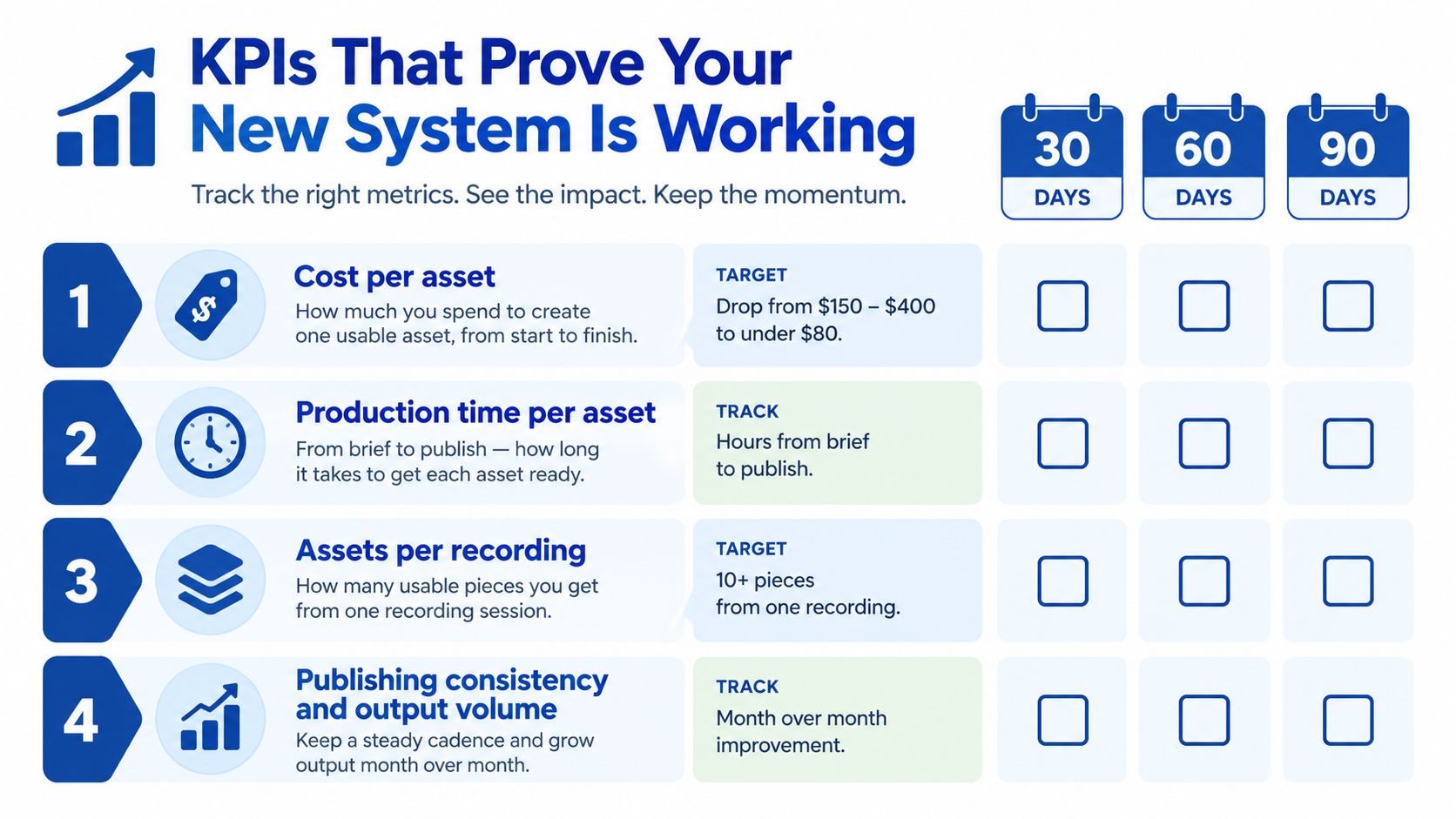
Track these every cycle
Use a short scorecard after each recording cycle:
- Cost per asset: calculate total labor or vendor cost divided by published assets
- Hours per recording: track total internal time from raw file to ready-to-publish output
- Asset yield per recording: count how many pieces made it into the calendar
- Turnaround speed: measure time from recording to first approved asset
- Revision load: count how many rounds were needed before approval
This scorecard matters because structural costs may keep rising elsewhere. Deloitte's manufacturing outlook notes that manufacturers expect continued pressure from raw materials, labor, and energy, and it also points out that some sectors project a 10% rise in initial capital costs over the next few years (manufacturing cost pressure outlook). The lesson for content teams is similar. Not every cost is equally controllable, so the workflow must focus on the parts that are.
Guardrails matter too
Don't chase speed at the expense of message quality. Set a few essential requirements.
- Human review stays in place
- Brand voice gets checked before publishing
- Claims and quotes get verified
- Every asset has a channel-specific purpose
A faster pipeline that produces weak content isn't lean. It's just quicker waste.
What healthy progress looks like
A stronger system usually shows up in three ways:
- The team publishes more consistently.
- Fewer assets get stuck in review.
- Source recordings generate multiple usable outputs instead of one.
Those are the signs the production model is improving, not just getting busier.
The Done For You Alternative For Time Poor Teams
Some teams shouldn't build this in-house. That's not laziness. It's economics.
If the team already has recordings but keeps losing a week to post-production, the cheaper move may be to hand off the asset factory and keep internal attention on messaging, distribution, and pipeline.
What the model looks like
The core version is simple. Send one recording, such as a podcast, webinar, keynote, interview, or meeting recording, and get back 20 to 30 ready-to-publish assets in 72 hours, including video clips, LinkedIn posts, quote graphics, carousels, audiograms, and a blog post. The client time is about 15 minutes. Revisions are unlimited. The turnaround is guaranteed, or the client doesn't pay.
One common benchmark also helps frame the trade. One 45-minute recording becomes 30 assets, and pricing can start from $14 per finished asset.
DIY versus a managed service
| Factor | DIY Internal Team | Done For You Service |
|---|---|---|
| Internal time required | High. The team owns review, edits, copy, and publishing prep | Low. The team mainly sends the recording and reviews outputs |
| Workflow complexity | Split across writers, editors, and social staff | Centralized under one process |
| Output consistency | Depends on whoever has time that week | More stable if the service uses fixed production standards |
| Cost predictability | Harder to forecast because revisions and delays pile up | Easier to forecast when scoped by recording and asset pack |
| Risk | Bottlenecks form when one person gets overloaded | Main risk shifts to vendor fit and voice accuracy |
A managed service can fit. RepurposeYourContent is one example. Clients send one long-form recording and receive a month of on-brand finished assets back, typically within 72 hours, with 20 to 30 assets, unlimited revisions, and pricing that can work out to as little as $14 per finished asset based on plan structure.
For teams exploring the broader operating model first, this guide to AI-assisted content scaling is useful because it distinguishes between AI-assisted drafting and fully managed execution.
What this looks like in practice
A realistic workflow is short:
- Send the recording
- Share brand voice notes or past examples
- Review the first batch
- Approve or request revisions
- Publish across the month
That setup is attractive because it cuts coordination, not just editing time.
The teams that benefit most are usually the ones already recording valuable material but failing to extract enough from it. They don't need more brainstorming. They need production converted into a service.
If the goal is how to reduce production costs without cutting quality, start with the hidden repurposing hours after every recording. Then decide whether the team should fix that workflow internally or hand it off. To see what one recording could become, book a call or request a sample.
Tags:




