LinkedIn Content Calendar: A Practical, Hands-Free Guide
Streamline your social media with a LinkedIn content calendar. Learn how to plan, schedule, and automate posts so your strategy runs on autopilot in 2026.
Only 3% of LinkedIn users post more than once per week, according to a 2026 industry benchmark cited by ConnectSafely's LinkedIn statistics report. That gap creates an opportunity, but most founders approach a LinkedIn content calendar backwards. They start with empty dates instead of source material.
A practical LinkedIn content calendar should begin with a podcast, interview, keynote, sales call, livestream, course, or other long-form recording. From one 45-minute recording, a content team can build clips, posts, quote graphics, carousels, audiograms, and a blog post. The calendar then becomes the distribution layer, not the creative burden.
Why Most LinkedIn Content Calendars Fail Before They Start
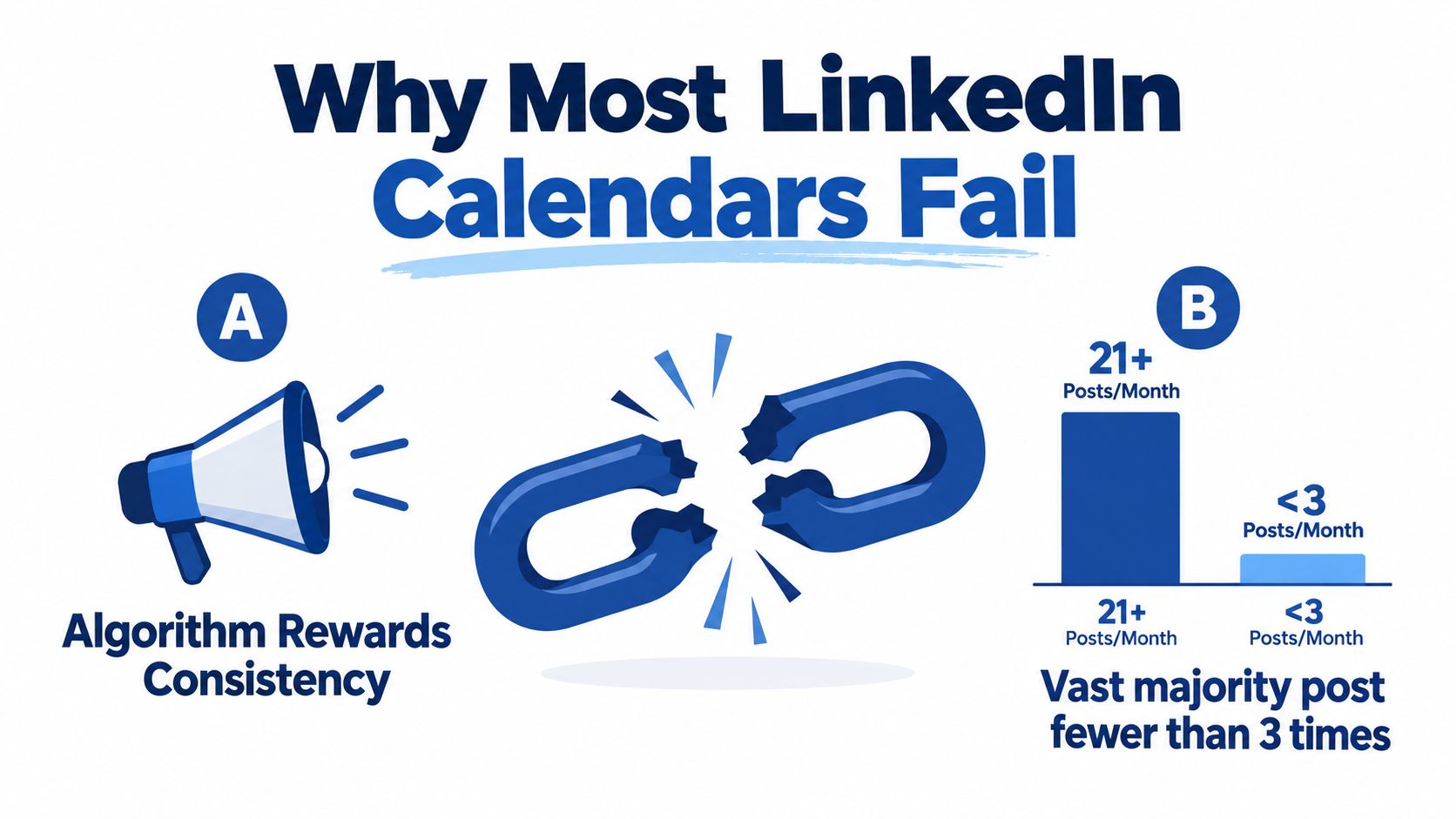
Only a small share of LinkedIn users publishes consistently, so the opportunity is real. The harder problem is the workload behind each scheduled post. A founder who owns the process must research an angle, write a hook, shape an argument, produce the asset, schedule it, and stay available for replies.
The spreadsheet is only the control surface. It cannot supply customer evidence, a point of view, usable footage, or the editing decisions that turn a long-form conversation into publishable material.
A calendar often looks healthy in its first month because the founder still has ideas to spend. By the second month, the source material is exhausted. Without recordings, customer conversations, internal expertise, or documented lessons, every post demands fresh ideation. That pressure makes consistency expensive, especially for a founder also responsible for sales and delivery.
The hidden weekly workload
A solo founder running the process manually usually handles six separate jobs:
- Topic planning: Choosing angles tied to business priorities and audience problems.
- Drafting: Writing strong openings, useful explanations, and clear conclusions.
- Visual production: Designing carousels, quote graphics, and supporting images.
- Video editing: Finding moments, trimming clips, adding captions, and checking exports.
- Scheduling: Uploading assets, assigning dates, and reviewing formatting.
- Engagement: Replying to comments and continuing relevant conversations.
A fully manual process can consume six to ten hours per week as a qualitative planning estimate. The actual burden changes with writing speed, design skill, recording quality, and publishing volume. A done-for-you repurposing workflow shifts much of that work to a content team, while the founder supplies the recording and approves the finished assets.
Practical rule: Build the calendar around a reliable source engine, not a recurring demand for brand-new ideas.
An editorial calendar template for marketing teams can organize owners, assets, statuses, and deadlines. It cannot create the source material. RedactAI's content calendar guide can help teams define goals, formats, and publishing structure, but those decisions still need a repeatable input.
The stronger model is straightforward: record once, extract the best arguments and moments, create several assets, then place them across the calendar. The calendar becomes a repurposing engine. It protects consistency without asking the founder to invent a new topic every morning.
Set Your Frequency, Pillars, and Format Mix
A LinkedIn calendar works better when it starts with source material rather than empty dates. Set frequency, pillars, and format mix around the recordings, customer conversations, and internal notes your team can reliably produce.
For most B2B accounts, three to five posts per week is a practical balance between visibility and production capacity, according to SocialNexis's LinkedIn cadence data. The same source reports that daily publishing reduced average reach per post by 26% compared with posting two to four times per week, with the deficit reaching 45% over time.
Daily publishing can work for a team with enough source material and editing capacity. A busy founder usually needs a cadence that leaves time for recording, review, and client work. The LinkedIn posting frequency guide for 2026 offers more context for choosing a rhythm the team can maintain.
Choose three or four pillars, then test whether your recordings can supply each one:
- Customer wins: implementation lessons and recurring buyer problems.
- Build process: decisions, trade-offs, experiments, and behind-the-scenes work.
- Contrarian industry takes: assumptions prospects hear repeatedly and your evidence against them.
- Founder lessons: leadership, hiring, sales, mistakes, and personal operating principles.
Keep the pillars roughly balanced across monthly output. That prevents the calendar from turning into a product brochure or a stream of disconnected personal updates. It also gives an editor clear places to file useful moments from a podcast or founder interview.
Formats should follow the material. A strong argument often needs text. A process with several stages can become a carousel. A memorable podcast explanation may work as a short video clip. A buyer-preference question can become a poll.
| Pillar | Share of Monthly Posts | Best Formats | Example Hook Angle |
|---|---|---|---|
| Customer wins | Roughly equal | Carousel, text, quote graphic | “The customer didn't need more features. They needed a simpler decision.” |
| Build process | Roughly equal | Short video, text, carousel | “The internal process changed after one uncomfortable sales call.” |
| Contrarian industry takes | Roughly equal | Text, video, document | “Most B2B teams don't have a content problem. They have a source problem.” |
| Founder lessons | Roughly equal | Text, quote graphic, short video | “The hiring mistake looked efficient until the work reached customers.” |
A 2026 benchmark covering 50,000+ company pages reported that posting two to five times weekly generated about twice the engagement per post compared with daily posting. Engagement dropped 30% beyond five posts weekly, according to Neil Patel's B2B content interaction data. Treat those figures as planning context, not a quota. The useful target protects quality, spacing, and variation while giving each recording multiple ways to enter the calendar.
A Real Week Built Around Your Calendar
A four-post week can keep a B2B founder visible without turning LinkedIn into a second full-time job. The calendar works best as a repurposing engine: one recording, documented customer story, or founder reflection supplies the raw material, while each publishing slot gives that material a different job.
| Day | Time | Format | Pillar | Example Hook |
|---|---|---|---|---|
| Monday | Morning | Text-only post | Contrarian industry take | “Most content calendars fail because they begin with dates, not source material.” |
| Wednesday | Midday | Five-slide carousel | Customer win | “A recent customer result exposed five steps other teams skip.” |
| Friday | Morning | Short video clip | Build process | “This podcast answer explains why the original workflow had to change.” |
| Saturday | Morning | Text post | Founder lesson | “The lesson from an uncomfortable customer conversation still shapes the business.” |
Monday opens with an argument that can come from a recorded interview answer. Wednesday turns a documented customer story into a structured explanation. Friday uses the founder's voice, usually through a podcast clip. Saturday gives a personal lesson enough space to sound human rather than polished by committee.
The formats should follow the source. A strong opinion may need a text post, while a process with several stages deserves a carousel. A memorable explanation can become video, and a founder's written reflection may need no visual treatment at all.
What the week costs to produce
A DIY version usually involves more manual work than the calendar suggests. Start by selecting one recording and marking the moments that map to the four pillars. Allow roughly 20 minutes to review and label the source, then another 30 to 45 minutes to choose usable arguments, stories, and examples.
Cutting one short clip can take 30 to 60 minutes, depending on the recording and editing standard. Drafting four distinct hooks and captions may take another 45 to 60 minutes. Building a five-slide carousel, checking context, and scheduling the posts adds further production time. Replies still require a separate block after publication.
A done-for-you workflow shifts those tasks to a content team. The founder supplies the recording and reviews the selected ideas, while the team handles extraction, editing, writing, design, and scheduling. That costs more in budget, but preserves the founder's time for client work and live conversations.
Use a LinkedIn video content calendar template to map each source moment to a format, pillar, and publishing slot. The goal is a week with a clear purpose for every post, not four unrelated ideas forced into empty dates.
Turn One Recording Into a Month of Calendar Posts
A 45-minute recording can supply 30 assets when it contains distinct ideas and each asset is adapted to its format. That is a repurposing engine, not a blank calendar waiting for new ideas.
A podcast episode, interview, keynote, sales call, or livestream may hold a strong opinion, customer objection, process explanation, personal story, and several quotable lines. The hard part is selecting moments that carry a complete argument. Random highlights create volume without giving the audience a reason to care.
Start with the source, then build the calendar
A practical DIY workflow looks like this:
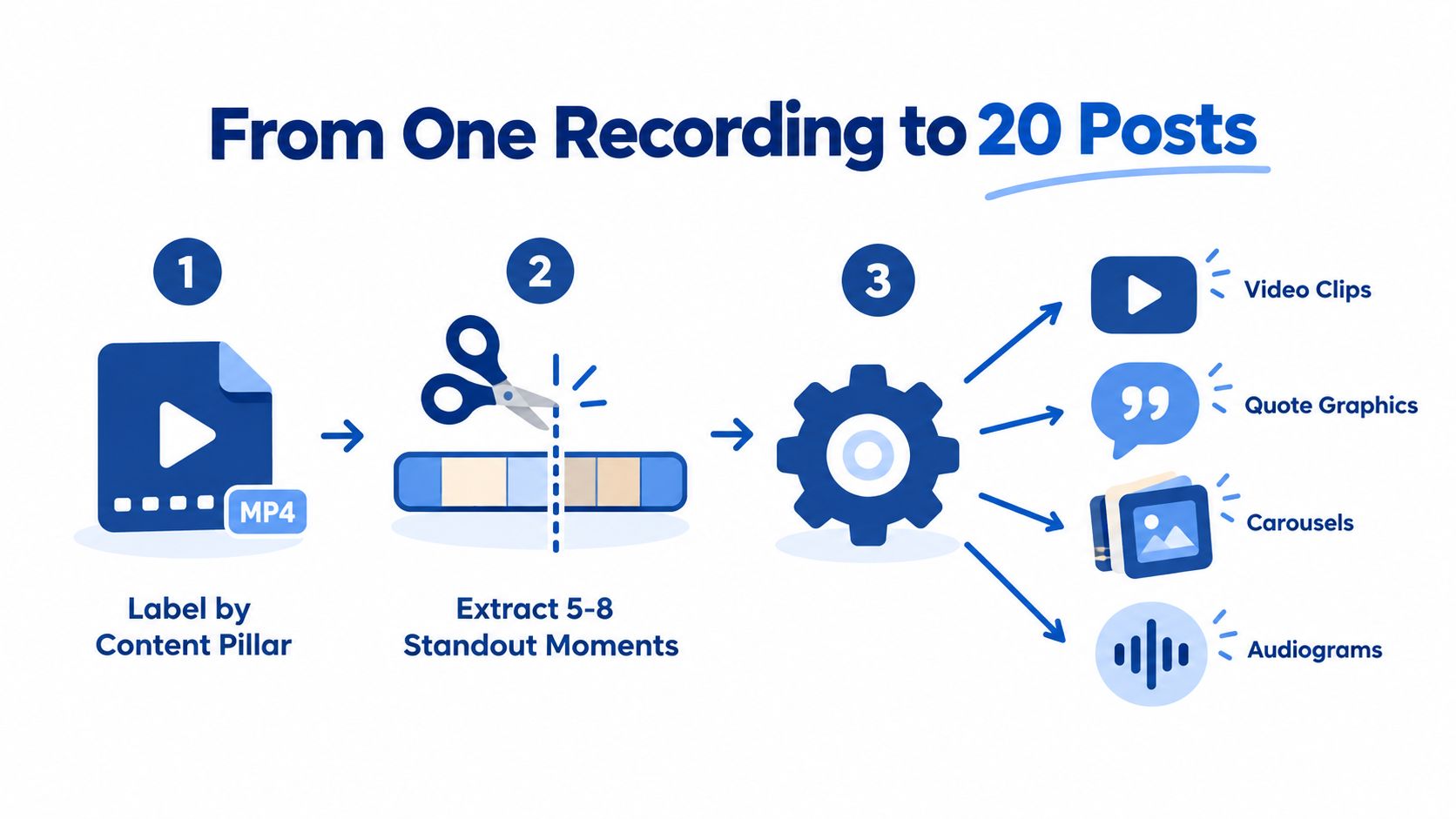
- Label the recording: Mark the primary pillar and secondary themes. Allow about 20 minutes.
- Extract standout moments: Select five to eight sections with a clear idea. Human review filters out comments that sound interesting but teach little.
- Cut the clips: Produce 30 to 90-second video or audio clips. Manual clipping takes about 60 to 90 minutes, depending on the recording and editing standard.
- Write captions: Draft a distinct hook and caption for each asset. With the moments selected, this takes about 45 minutes.
- Schedule the posts: Place the finished assets across the next four weeks. Manual scheduling takes about 20 minutes.
The calendar can then include video clips, LinkedIn posts, quote graphics, carousels, audiograms, and a blog post. One interview may cover roughly half a month of LinkedIn publishing without forcing the founder to invent new topics.
Automation and AI can speed up transcription, search, rough clipping, and first-draft captions. Human editing still determines whether the opening makes sense, the speaker's meaning stays intact, and the post sounds like the founder.
Use this content multiplication framework to map one source across formats and channels without publishing the same post everywhere. For caption ideation and first drafts, the Writingmate social media generator can reduce writing time. It should not replace source review or voice editing.
The DIY version still demands focused labor across review, selection, editing, writing, design, and scheduling. A done-for-you team handles those production tasks while the founder supplies the recording and approves the ideas. The budget is higher, but the founder keeps that time for client work and live conversations.
Schedule Cadence, Time Slots, and the Algorithm
Frequency and timing should work together. A calendar that publishes strong content during low-attention periods may underperform, while a calendar that posts at ideal times but lacks useful formats won't hold attention.
Sprout Social's 2026 LinkedIn study identifies Tuesday from 11 a.m. to 5 p.m. as the strongest single day-and-time window. It also lists Wednesday from 11 a.m. to 4 p.m. and Thursday from 11 a.m. to 5 p.m. as strong periods, with Monday, Friday, and weekends weaker by comparison, according to Sprout Social's LinkedIn timing study.
Buffer's analysis of 4.8 million LinkedIn posts found that weekday publishing from 3 p.m. to 8 p.m. generally performed best, with Wednesday at 4 p.m. as the strongest overall slot, as reported in Buffer's LinkedIn timing analysis. These windows conflict because audiences differ. A founder should test them against the account's own audience timezone and purpose.
| Day | Format | Pillar | Time | Hook Style |
|---|---|---|---|---|
| Monday | Short clip | Build process | Morning | Fast lesson from a recording |
| Tuesday | Carousel | Customer win | 11 a.m. to 5 p.m. | Structured breakdown |
| Wednesday | Text essay | Contrarian take | 4 p.m. | Strong opinion with reasoning |
| Thursday | Video | Founder lesson | 11 a.m. to 5 p.m. | Personal explanation |
| Friday | Poll or quote | Audience question | Secondary slot | Low-friction conversation starter |
Queueing options include Buffer, Hypefury, and LinkedIn's native scheduler. Native scheduling can hold a small reach edge, but consistency matters more than obsessing over the publishing mechanism. Teams should also avoid publishing two posts within four hours, since closely spaced posts can compete for early attention.
Scheduling rule: Pillar on Monday, teaching in the middle of the week, founder voice on Friday, and no two posts within four hours.
Organizations with more resources can test higher frequency. One analysis of 22,000 active B2B company pages reported an optimal cadence of six to eight posts per week, with 58% higher average engagement per post than brands posting four to five times weekly, according to Amra and Elma's B2B social media benchmarks. That result shouldn't override a calendar the team can't sustain.
For mechanics, SleekPost's guide to scheduling LinkedIn posts offers practical scheduling context. Teams assessing distribution should also review LinkedIn algorithm guidance for B2B marketers.
DIY Versus Done-For-You: The Actual Time Cost
A LinkedIn content calendar can look inexpensive when scheduling is the only visible task. The larger cost sits in turning one long-form recording into ideas, posts, clips, graphics, revisions, and replies.
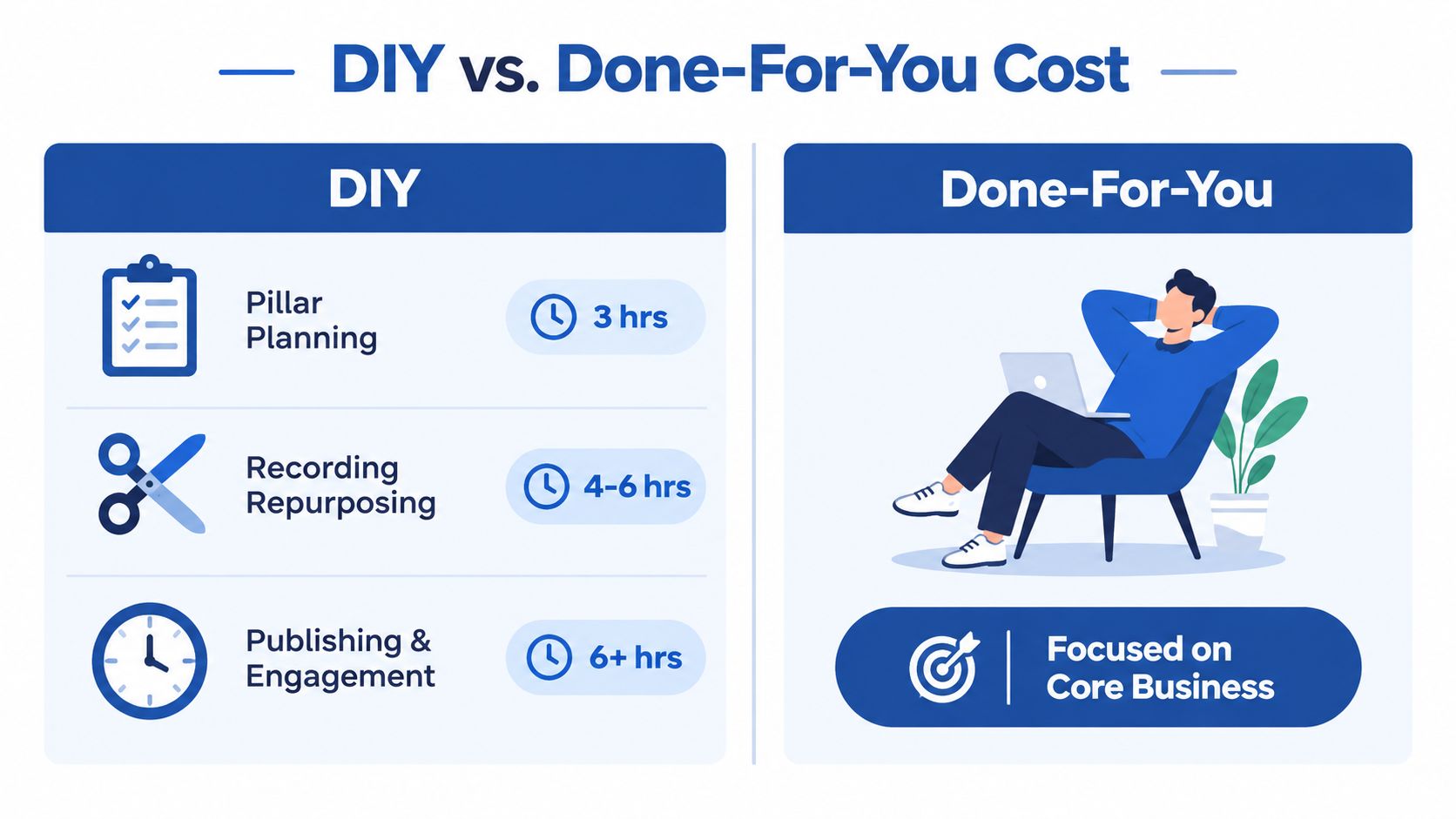
A solo founder may spend three hours monthly setting pillars and topics. Repurposing one recording can require four to six hours, depending on clip volume, captions, graphics, and revisions. Caption writing may take two hours weekly, with scheduling and queueing adding another one hour weekly.
Engagement creates the widest variable. Replying to comments, continuing conversations, and reviewing performance can take three to five hours weekly. Combined, the workload can reach roughly 12 to 15 hours per week, depending on the publishing system and asset requirements.
What the trade-off includes
DIY avoids a service fee, while the founder pays with attention and calendar space. Building a repurposing engine also draws on several different skills:
- Editorial judgment: Selecting useful ideas instead of collecting interesting fragments.
- Copywriting: Turning spoken explanations into concise LinkedIn posts.
- Video editing: Creating clean clips with captions and suitable openings.
- Design: Building carousels and graphics that match the brand.
- Distribution: Scheduling, spacing, and adapting formats across the week.
A done-for-you service changes the client's role. The client sends a podcast, webinar, keynote, interview, sales call, or meeting recording. The production team returns 20 to 30 ready-to-publish assets in 72 hours, including video clips, LinkedIn posts, quote graphics, carousels, audiograms, and a blog post.
Client review takes about 15 minutes. The service can include a 72-hour turnaround guarantee, or the client doesn't pay, pricing from $14 per finished asset, one 45-minute recording turned into 30 assets, and unlimited revisions.
RepurposeYourContent is one example of this model. Clients send a recording, and the service returns finished content in the client's brand voice. The trade is direct: DIY preserves cash but consumes a half workday or more. Done-for-you production costs roughly the price of one contractor while returning 10 or more hours weekly to the founder.
The useful question is whether the founder's time belongs in post-production.
Book a Sample and Skip the Build
A useful sample should replace part of the current weekly workload, not add another strategy document to the founder's inbox.
The commitment is small. The client spends about 15 minutes recording an introductory session or sharing existing long-form material. No preparation deck is required. The source can be a podcast episode, Zoom call, keynote, interview, sales call, livestream, course session, or meeting recording.
Within 72 hours, the service delivers a drafted calendar week with captions, visuals, and a repurposing map. The sample can include:
- Scheduled LinkedIn posts: A complete week with formats, hooks, captions, and suggested publishing slots.
- Pillar-to-format matrix: A clear view of how the first month's themes become text posts, clips, carousels, and graphics.
- Clip-to-asset pipeline: A production outline showing how the existing recordings can supply future calendar posts.
- Finished content assets: Video clips, LinkedIn posts, quote graphics, carousels, audiograms, and a blog post.
A single Zoom call or podcast episode can provide enough material for a sample week. The client doesn't need to invent new topics, prepare a polished brief, or edit the source file. The service replaces the repetitive work of reviewing recordings, writing captions, formatting assets, and batching posts.
There are no promises of virality. The useful outcome is more practical: a consistent LinkedIn presence built from expertise the business has already recorded. That gives founders and marketing teams more time for sales, delivery, product work, and customer conversations.
Book a sample call to see how one existing recording could become a finished LinkedIn content calendar. Alternatively, send a past recording and request a draft calendar back, with the 72-hour turnaround and revision process explained before production begins.
Book a call today and bring one podcast, interview, keynote, sales call, livestream, course, or meeting recording. The team will show the exact path from raw conversation to ready-to-publish LinkedIn assets.
Tags:




