How to Create Short Clips for Videos from Long Recordings
Learn how to create short clips for videos from long recordings. See the exact workflow, time costs, and the done-for-you alternative for busy teams.
Short clips for videos aren't optional anymore. A 2026 industry summary reports that short-form video takes 58% of social media time and videos under 60 seconds can drive roughly 2.5x more engagement than long-form video across major platforms, which is why clipping now sits at the center of discovery and conversion work for content teams (Vidico short-form video statistics).
That creates a simple question with an expensive answer. Yes, you should turn long recordings into short clips. No, most busy founders and B2B teams shouldn't do the clipping manually unless they have real editing capacity.
Why Short Clips for Videos Drive Real Engagement
The demand side is already settled. Buyers want shorter content when they're researching, comparing, and learning. In 2026 reporting, 73% of consumers said they prefer short-form videos when searching for products or services, and 57% of Gen Z reportedly prefer short videos for learning about products and services (Yaguara short-form video statistics).
That matters if the source material is a podcast, interview, keynote, sales call, livestream, or course lesson. The long recording holds the depth. The short clip gets the first click.
The distribution shift is already here
Short-form video isn't a side format anymore. It's the front door.
A separate 2026 report says videos under 60 seconds generate 2.5x more engagement per impression than other content types, with short-form engagement at 8.4% versus 5.2% for mid-length video and 3.8% for long-form video (Digital Applied video marketing statistics).
For B2B teams, that changes how content should be built. The recording is no longer the final asset. It's the raw material.
Practical rule: If a founder records for 45 minutes and only publishes the full video once, most of the content value stays trapped in the timeline.
There's also a search angle that many teams miss. Recent coverage shows short clips increasingly work as a search and discovery layer, not just an entertainment format. Educational answers, quick explainers, and objection-handling clips now sit alongside trend-driven cuts, especially for intent-led content workflows (search-first Shorts workflow).
That lines up with what B2B teams already need. They don't need random highlight reels. They need clips that answer buying questions.
The bottleneck isn't demand. It's production.
Many teams know they need short clips for videos. The problem is that clipping sounds easy until someone has to do it well.
A decent clip needs a strong opening line, clean cuts, vertical framing, readable captions, paced text animation, balanced audio, and packaging that fits the destination channel. Then it needs a post caption, a thumbnail decision, and review.
That's why many internal workflows break after the second or third recording. The demand grows faster than the team's editing capacity.
For a B2B-specific planning model, this short-form video strategy for B2B is a useful reference point. The core lesson is simple. Short clips win attention, but only when the workflow is realistic enough to repeat.
The Manual Workflow for Extracting Video Clips
A 45-minute recording can become strong short clips for videos. It can also eat half a workday before a single asset is ready to publish.
This is the part most founders underestimate. The hard part isn't pressing export. It's reviewing, judging, tightening, reframing, checking, and packaging each moment so it holds attention.
A simple visual helps show the full chain of work.
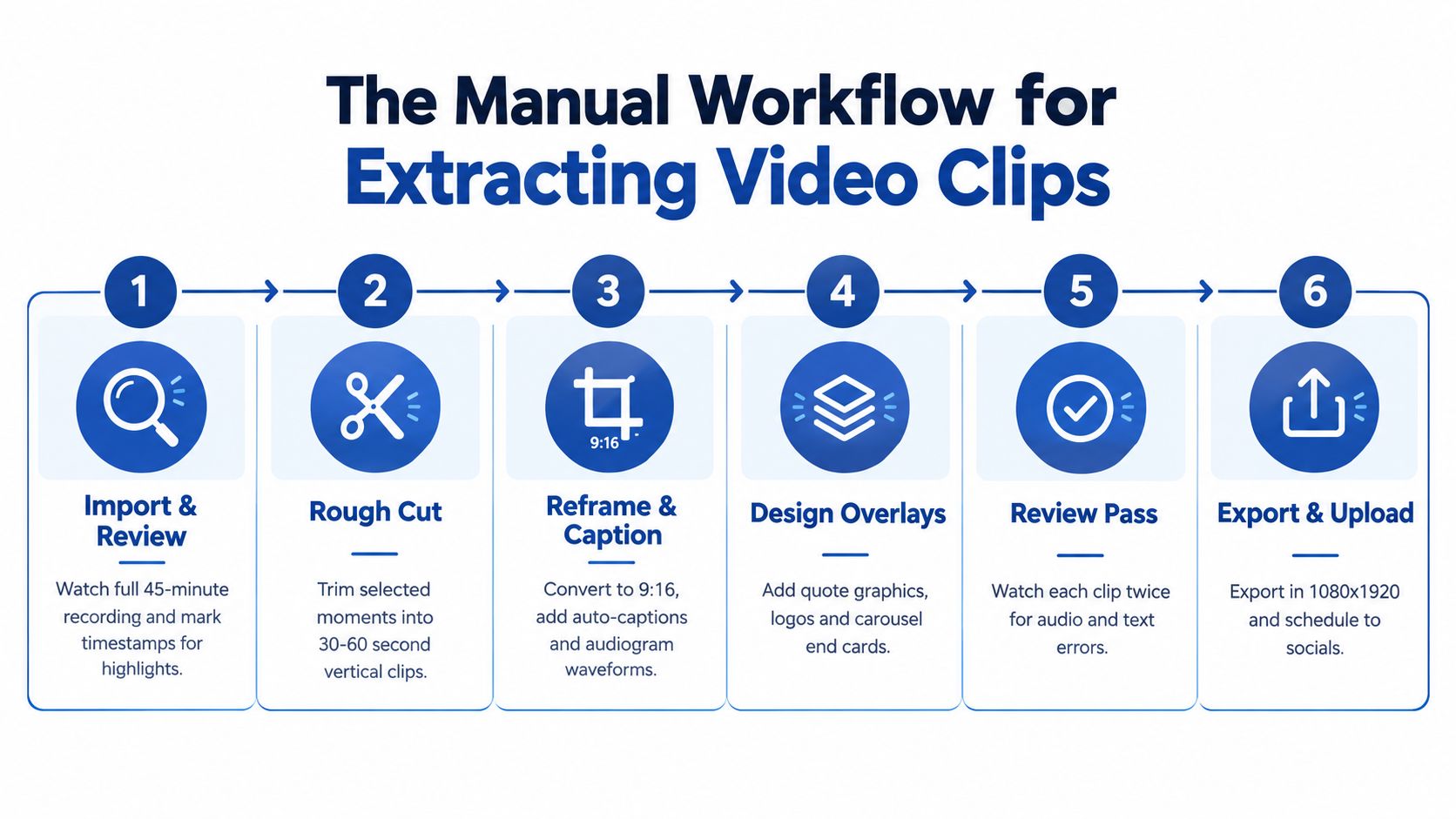
What the manual process actually looks like
A typical manual workflow looks like this:
Watch the full recording A 45-minute podcast still takes about 45 to 60 minutes to review properly. Someone has to note timestamps, spot usable answers, and ignore dead air.
Identify clip candidates This usually takes another 45 to 60 minutes. Good clips need one clear point, one audience, and one strong opening. Most decent moments still won't work as standalone content.
Cut rough versions Expect 30 to 45 minutes to build a first pass for several candidate clips. This includes trimming starts, tightening pauses, and removing side comments that make sense in the full episode but drag in a clip.
After rough cuts, the hidden work starts.
The editing work is where time disappears
Once the raw moment is selected, every clip needs finishing work:
- Vertical reframing: The speaker has to stay centered in 9:16. Screen shares, wide shots, and multi-person interviews make this slower.
- Captions: Auto-captions help, but they still need manual correction. Brand-safe line breaks matter.
- Pacing: A clip often needs micro-cuts every few seconds to keep rhythm tight.
- Audio cleanup: Volume swings, room noise, and harsh breaths reduce perceived quality fast.
- Visual packaging: Logos, lower thirds, waveform overlays, progress bars, and end cards all take time.
A realistic estimate is 2 to 3 hours per recording just for clipping and edit decisions before distribution packaging. If the source footage is messy, it takes longer.
Most DIY clipping fails for one reason. The team budgets time for cutting. They don't budget time for judgment.
A real workflow example from one 45-minute recording
For a founder interview, the manual process often goes like this:
- Step 1: Pull the transcript and skim for buyer-intent moments such as objections, mistakes, pricing logic, or contrarian opinions.
- Step 2: Mark 8 to 12 timestamps, then shortlist the 4 to 6 moments that make sense without the full conversation.
- Step 3: Edit those into different lengths. One shorter cut for feed engagement. One slightly longer cut if the idea needs context.
- Step 4: Add captions, tighten framing, and create a simple end card that points to the next action.
- Step 5: Watch each clip twice. First for pacing. Second for text mistakes and audio issues.
Skill matters. A good editor doesn't just cut. That person knows when a sentence starts too slowly, when a caption breaks at the wrong word, and when a clip should end one beat earlier.
Anyone building this in-house should also review a more detailed post-production process like this guide on how to edit webinar recordings for marketing. The same production friction shows up across podcasts, interviews, keynotes, and demos.
Formatting and Packaging Clips for Every Platform
Editing the clip is only half the work. Packaging decides whether people stop scrolling.
A short clip that works on YouTube Shorts often needs a different wrapper for Reels or LinkedIn. The hook can stay. The presentation usually can't.
Hard limits shape the edit
Platform specs force decisions early. YouTube Shorts is capped at 3 minutes, and Instagram Reels has a 90-second Reels-shelf limit in current social video specs (social video size guide).
That means a single master export won't cover every use case cleanly. Teams usually need at least two versions when the original point runs long.
Here are the practical implications:
| Platform | What usually matters most | Packaging note |
|---|---|---|
| YouTube Shorts | Search intent and clear explanation | Title and spoken query matter more |
| Instagram Reels | Fast visual retention | Captions and motion need to feel tighter |
| Clarity and authority | Cleaner framing and less visual noise usually works better |
Captions, safe zones, and copy do more than the cut
Captions aren't decoration. They're part of retention.
Good caption styling keeps lines short, avoids blocking the speaker's mouth, and leaves room for interface elements. Reels and Shorts both punish bad text placement because UI overlays can cover the bottom and sides.
For format-specific sizing and visual constraints, this Instagram formatting guide is a practical reference. It helps when a team needs to sanity-check dimensions and feed placements before exporting a batch.
A few packaging rules tend to hold up:
- Keep one message per clip: If the clip answers two questions, split it.
- Write the post around the clip's job: A search-first clip needs a descriptive caption. A thought-leadership clip needs a sharper opinion.
- Design for silent viewing: Many viewers read before they listen.
- End with the next step: Continue the idea in the caption, comments, landing page, or longer episode.
A clip doesn't fail because the insight was weak. It often fails because the format asked the viewer to work too hard.
LinkedIn needs a different treatment
Many repurposing workflows break. Teams publish the same clip everywhere and call it distribution.
LinkedIn usually responds better when the clip opens with a business tension, a lesson, or a direct claim. Trend-led editing, crowded overlays, and hyperactive captions can make a solid idea feel cheap in that context.
Captions still matter, but restraint matters too. For teams fixing that part of the workflow, this guide on how to add captions to video clips is useful.
The Done-for-You Alternative for Busy Teams
Most founders don't need another editing task. They need the output.
The practical alternative is simple. Send one recording, then get the finished package back without tying up internal time.
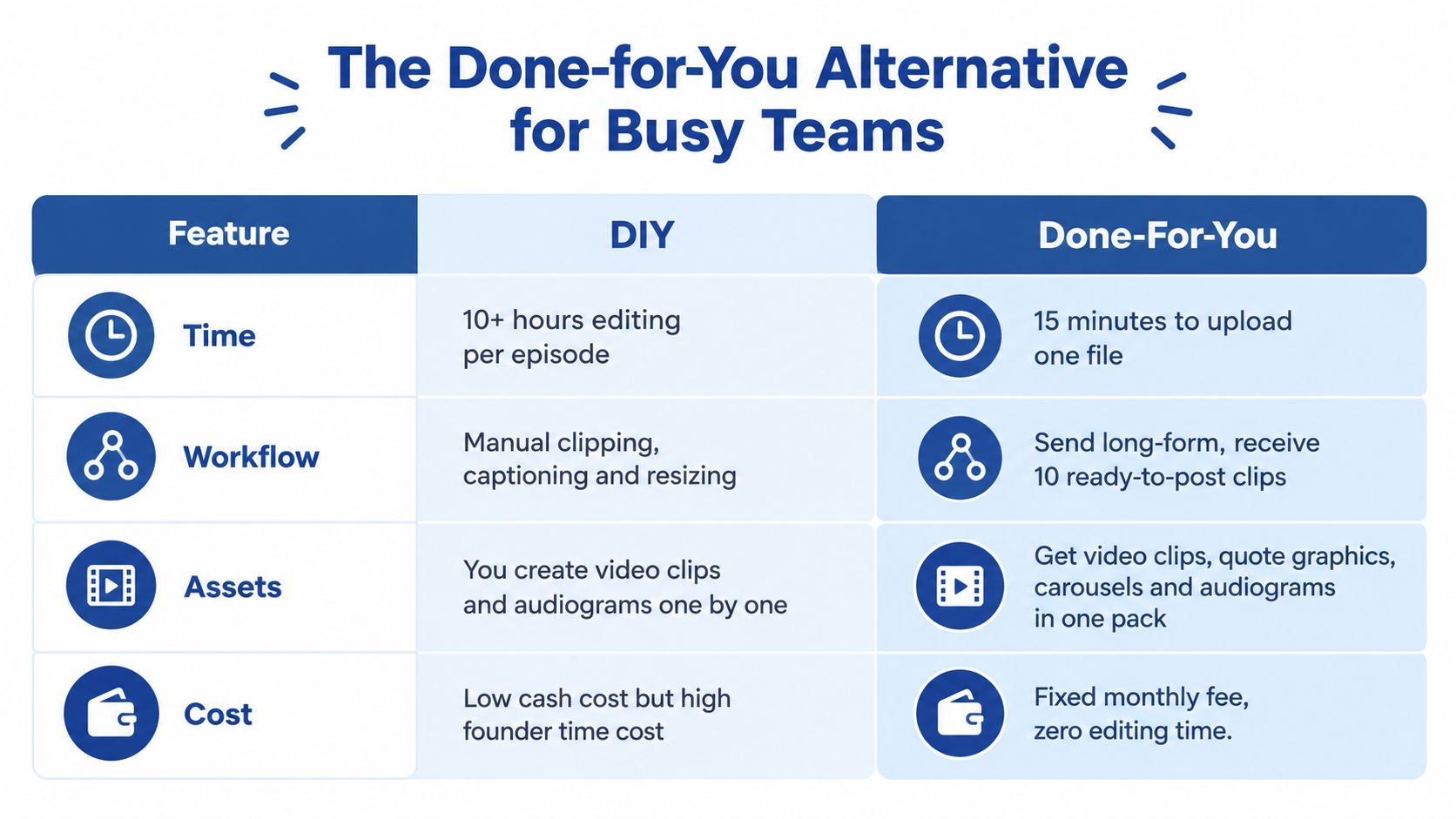
What a productized service changes
Instead of assigning someone to review footage, cut moments, caption clips, write posts, design graphics, and export files, the team sends the source recording once.
The return should be a ready-to-publish asset pack. That usually includes:
- Video clips: Multiple short clips cut for social distribution
- Written assets: LinkedIn posts or supporting copy drafted from the same source material
- Visual extras: Quote graphics, carousels, and audiograms built from the same recording
- Blog content: A publishable article derived from the original conversation
A service model works because it removes context switching. The founder doesn't have to brief an editor, then rewrite the captions, then chase design revisions.
The ROI isn't just editing time
A done-for-you model is really a decision about opportunity cost.
If a founder spends hours inside Premiere Pro, Descript, CapCut, or Riverside polishing clips, that's time not spent on sales, product, hiring, or customer calls. DIY can be fine when the team has spare capacity and strong post-production skill. Most don't.
There are lightweight automation options in the market, including niche workflows like automated clip creation for Twitch. Those can help with volume. They don't remove the editorial problem of choosing the right moments and shaping them for the right audience.
More clips isn't the same as better clips. High-volume repurposing gets noisy fast when every cut sounds generic.
One done-for-you option in this category is video repurposing services, including RepurposeYourContent, which takes one long-form recording and returns a package of finished assets. The practical offer is straightforward: send one podcast, webinar, keynote, interview, or meeting recording and get 20 to 30 ready-to-publish assets in 72 hours. That includes video clips, LinkedIn posts, quote graphics, carousels, audiograms, and a blog post, all in the client's brand voice, with unlimited revisions. Client time is about 15 minutes. There is also a 72-hour turnaround guarantee or you don't pay, pricing starts from $14 per finished asset, and one 45-minute recording becomes 30 assets.
Where this model fits best
This works especially well for:
- Podcasters who already record consistently but publish too little between episodes
- Founders who appear on interviews, customer calls, or livestreams and need authority content
- B2B marketers who need a repeatable content engine from existing recordings
- Speakers and educators sitting on keynotes, course sessions, and panel appearances
The main advantage isn't convenience. It's consistency without adding headcount.
Distribution Best Practices and Next Steps
Publishing the assets well matters almost as much as making them.
When teams treat one recording like a campaign, not a one-off post, they get better results. A strong 45-minute conversation can support weeks of distribution if each asset has a different job.
Turn one recording into a sequence
A practical sequence often looks like this:
Lead with the strongest clip first Pick the moment with the clearest tension or question. Publish that early to test positioning.
Follow with supporting angles Use the next clips to answer objections, expand one claim, or isolate one tactical lesson.
Pair clips with written posts Some people will watch. Others will scan text first. Give both options.
Use email and the blog to deepen the idea The short clip earns attention. The longer asset captures intent.
That approach creates repetition without feeling repetitive. Each asset points back to the same core recording, but from a different angle.
Match the channel to the clip's job
Not every clip belongs everywhere.
Use YouTube Shorts for searchable, question-led clips. Use LinkedIn for sharper business points, founder perspective, and practical lessons. Use email to send the strongest clip with a short setup and one clear next action.
For teams building a fuller publishing system, these content distribution strategies are a useful next step.
Publish fewer weak clips. Publish more clips with a clear job.
The biggest mistake is waiting for the perfect editing workflow. Short clips for videos work when the process is repeatable. If the internal process takes too long, it won't last.
If the team already has recordings but not the time to turn them into finished content, book a call or request a sample. One 45-minute recording can become 30 assets without burning a week on editing.
Tags:




