Video Repurposing Services: Get 30 Assets from 1 Recording
Searching for video repurposing services? Learn how to turn one recording into 30+ ready-to-publish assets. We handle the editing, writing, and design for you.

B2B teams already record more usable content than they publish. The waste shows up in payroll, not creativity.
A single podcast, webinar, interview, sales call, or keynote can produce weeks of distribution if the team has a real repurposing system. Without one, expensive source material gets posted once, clipped once, then buried. If your team wants a practical model, this guide on repurposing long-form video into short clips shows the basic mechanics.
Video repurposing services exist to solve that operating problem. They turn one long-form recording into a package of publishable assets such as short video clips, written posts, graphics, and blog content built for specific channels.
The buying decision should be framed around total cost of ownership. DIY repurposing looks cheap until you price the hours. If a marketer spends 4 to 6 hours pulling clips, writing captions, resizing formats, drafting posts, and managing approvals from one recording, the actual cost is labor, delay, and missed distribution. A done-for-you service compresses that workload into a predictable output and frees your team to focus on strategy, publishing, and pipeline.
There is also a category mistake that wastes budget. Video editing produces a polished asset. Content repurposing produces a distribution system. Teams buying the second service should expect far more than one clean cut. They should expect a month of channel-ready content from a single recording.
Your Best Content Is Already Recorded
Teams that publish consistently do not start with more ideas. They start with more footage they already own and a faster way to turn it into assets.
The raw material is sitting in recordings your team already made. Podcast episodes. Webinar sessions. Customer interviews. Sales calls. Conference talks. Internal subject matter expert interviews. In many companies, that material contains the clearest opinions, strongest stories, and most credible proof points the brand will produce all quarter.
Yet it still gets used once.
A founder records a strong interview. Marketing posts the full video. Someone pulls one clip if time allows. Then the file disappears into a drive while the team goes back to asking, "What should we post this week?" That is not a creativity problem. It is a content operations failure.
What video repurposing services actually are
A real repurposing service turns one long-form recording into a distribution package. That package usually includes short clips, social captions, written posts, quote graphics, and a blog draft built from the same source material.
That is different from basic editing.
Editing improves one asset. Repurposing multiplies one asset into channel-ready outputs your team can publish across the month. If you want the mechanics, this guide on repurposing long-form video into short clips covers the process.
Here is the standard I recommend. If a 30 to 60 minute recording produces only one published asset, your team is wasting a high-value content source.
One good interview can support LinkedIn, Shorts, Reels, email nurture, sales follow-up, and the blog. The expertise is already in the transcript. The examples are already in the conversation. The sharp phrasing is already on tape. Repurposing gets that value out of the file and into formats people will see.
Why this matters for time-poor teams
The hidden cost of DIY is not software. It is labor.
A marketing manager does not just "clip the video." Someone has to review the recording, find usable moments, trim each segment, resize formats, write captions, draft posts, route approvals, revise copy, export files, and schedule distribution. That work can easily consume half a day or more from one solid recording, and it repeats every week.
That is the wrong place to spend senior marketing time.
Done well, repurposing reduces total cost of ownership. You trade scattered internal hours for a predictable output package. Your team gets finished assets instead of another item on the backlog. Strategy gets protected. Publishing cadence improves. Recordings stop dying after a single post.
Recorded content is already your best source material. The primary buying question is simple. Do you want your team spending hours extracting it, or do you want those hours back?
Editing vs Repurposing What Services Should Deliver
A lot of buyers make the same mistake. They hire a video editor when they need a repurposing partner.
An editor makes footage cleaner, tighter, and more watchable. Useful work. But it usually ends with one finished video.
A repurposing service does something else. It turns footage into a publishing system.
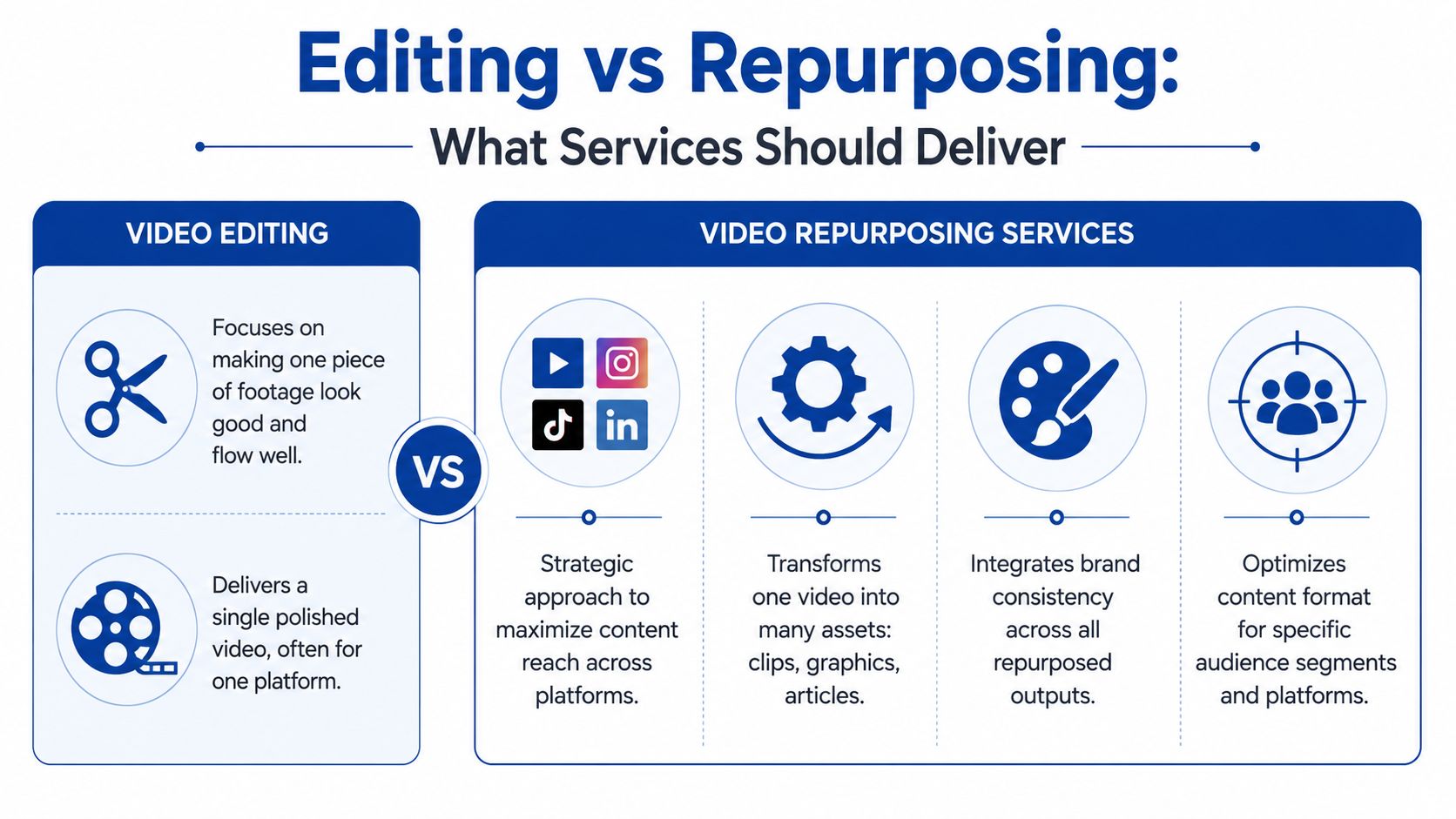
What editing gives you
Editing is a production purchase.
The brief usually sounds like this:
- Cut pauses
- Add music
- Improve pacing
- Add captions
- Export for one or two channels
That can help a podcast episode, keynote reel, or customer story look more polished. But it still leaves the marketing team holding the bag on distribution. Someone still needs to choose the best moments, write the posts, build graphics, format variations, and create the written assets.
What repurposing should give you
Repurposing is a content operations purchase.
From one recording, a solid service should deliver a package like this:
- Short clips: Usually 8 to 12 short video or audio clips with branded captions
- Written social posts: Usually 6 to 8 posts optimized for channels like LinkedIn
- Quote graphics: Usually 4 to 6 static image assets
- Carousels: Usually 1 to 3 swipe assets built from the same themes
- Blog content: 1 SEO blog post based on the recording
- Format variations: Vertical, square, and horizontal versions where needed
- Posting guidance: A simple playbook for what to publish and when
That written layer is where most editors stop. And that's where most of the strategic value sits.
Editors make footage look good. Repurposing services turn footage into a content calendar.
The quality markers that matter
Buyers should judge portfolios on details, not flashy transitions.
Look for three things first:
| Quality marker | What to check |
|---|---|
| Caption accuracy | Are the captions clean, readable, and actually correct |
| Hook selection | Do clips start at strong moments, or do they feel randomly cut |
| Brand consistency | Do the clips, graphics, and posts look like one brand produced them |
A weak vendor chops content into fixed intervals. A strong vendor chooses moments with tension, novelty, or a sharp opinion.
A weak vendor adds generic captions. A strong vendor preserves the speaker's voice.
A weak vendor sends clips only. A strong vendor includes the missing written assets that help a team publish consistently.
This explainer on how AI content repurposing work is useful because it highlights the production side. But buyers shouldn't stop at automation. The standard should still be human-reviewed, on-brand, platform-ready content.
For teams that only need short-form edits, a focused video clips service can make sense. But if the goal is channel coverage and consistency, clips alone aren't enough.
The True Cost of Repurposing Video Content
DIY looks cheap until the marketing leader counts the hours realistically.
That's the mistake. Many teams compare sticker prices. They should compare total cost of ownership.
If a team uses internal time to repurpose one long recording, the actual cost isn't just software. It's the hours burned by someone whose job already has a backlog.
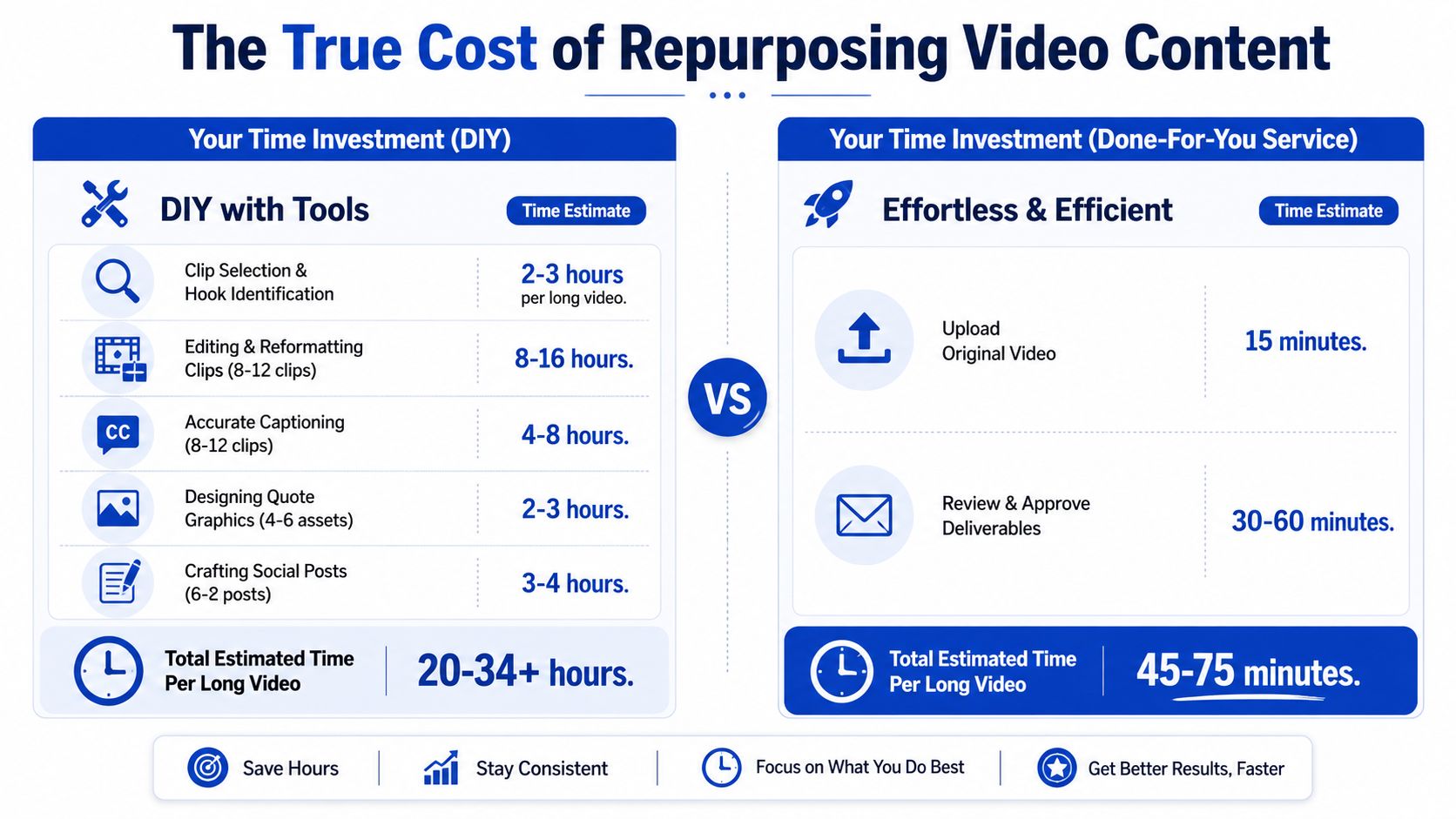
What DIY actually involves
Here's a realistic manual workflow for one recording.
Watch and mark usable moments
Finding strong sections, hooks, objections, and quotable lines usually takes 2 to 3 hours.Cut and reformat clips
Trimming, pacing, vertical reframes, exports, and visual cleanup usually takes 2 to 3 hours per recording for basic output. If the team wants a full set of clips, this often stretches much further.Caption the clips properly
Accurate captions still need cleanup. Expect another 1 to 2 hours.Write the posts
Turning clips into usable LinkedIn posts, captions, or teaser copy takes 1 to 2 hours.Create graphics and a carousel
Pull quotes, brand styling, image selection, and layout add more time.Write the blog article This is the step teams often skip because it's another full task on top of editing.
The result is predictable. DIY doesn't fail because the team lacks intent. DIY fails because the process eats half a day or more every time a new recording lands.
Cheap software doesn't create spare hours. Someone still has to do the work.
The three buying options
Once the team accepts that repurposing is a production system, not a side task, the options become clearer.
| Option | Typical pricing | What buyers usually get | What buyers still handle |
|---|---|---|---|
| Freelance editors | Roughly $50 to $300 per video | Clip editing and sometimes captions | Strategy, copy, graphics, review management |
| Video agencies | Roughly $2,000 to $8,000 per month | Higher-touch editing and account management | Often still the written layer, plus slower feedback loops |
| Productized repurposing services | From $999 per month including written assets | Clips, posts, graphics, blog content, repeatable workflow | Light review and approval |
This is why “editing” and “repurposing” are different purchases. Freelance editors can be fine for one-off projects. Agencies can work for larger brands that want broad production support. But teams that want repeatable output from existing recordings usually need the middle ground. A service built for throughput, not custom production theatre.
Why TCO is the right lens
If a founder, marketer, or content lead spends hours managing repurposing internally, that time comes from higher-value work. Messaging. Demand gen. Sales enablement. Pipeline reviews. Team management.
That's the actual cost.
The better question is not “What does the service cost?” It's “What does it cost to keep repurposing stuck on the internal to-do list?”
This article on outsource content repurposing is worth reading because it frames the operational tradeoff clearly. Many teams don't need another subscription. They need the work off their plate.
For a broader comparison of service models, this guide to content repurposing services helps clarify where video-specific support fits.
A Repurposing Workflow That Takes 15 Minutes
Most buyers assume a service will add process. The good ones remove it.
The workflow should be simple enough that a founder, podcaster, or B2B marketer can hand off a recording in minutes and get back to work.
A clean model looks like this.
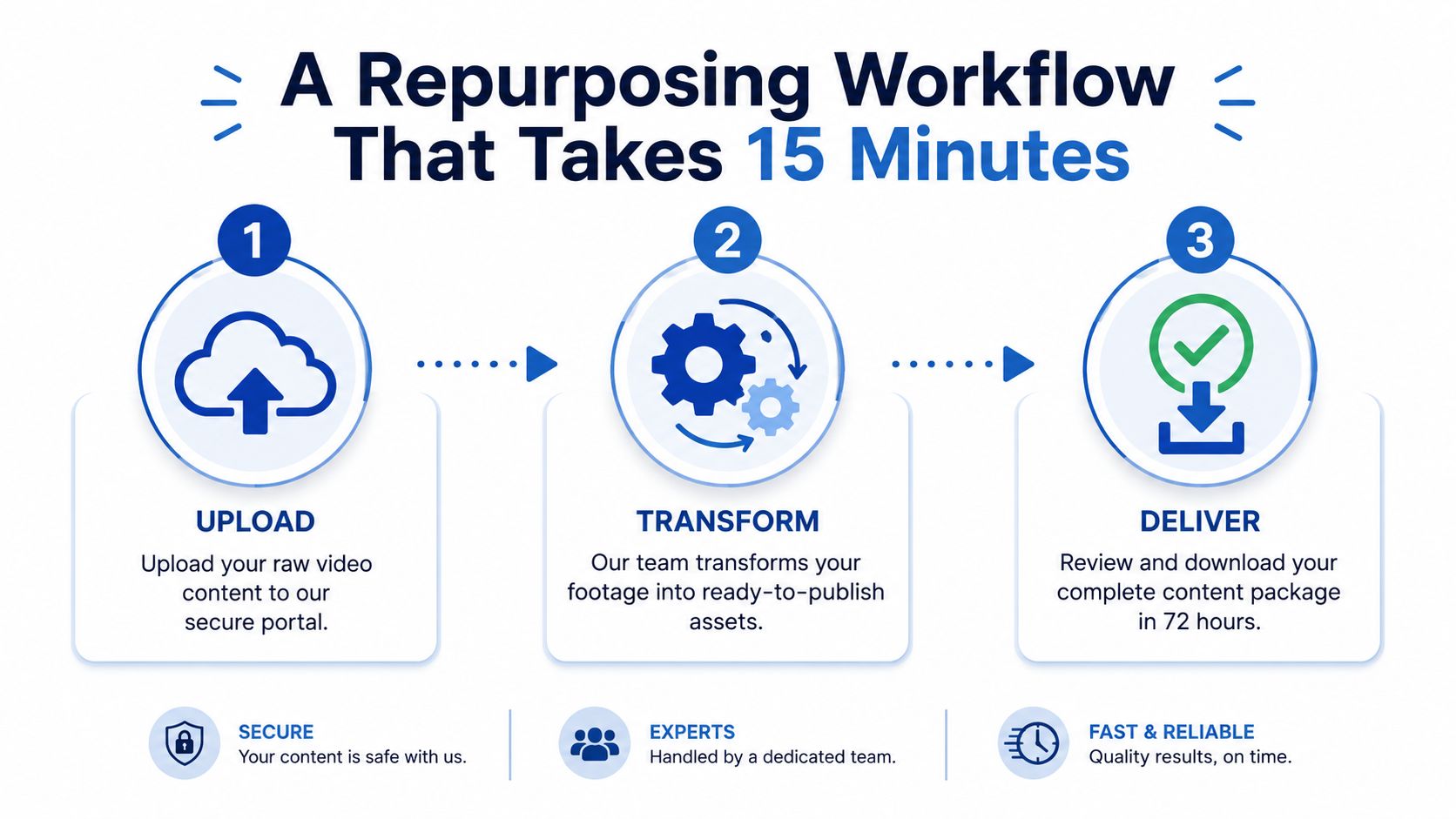
Step 1 Send the recording
The client sends a Zoom link, YouTube link, Vimeo link, or raw file.
This part should take about 5 minutes. No editing. No prep deck. No complicated handoff.
Step 2 The team builds the asset pack
A real service, by its very nature, separates itself from an editor.
The team doesn't just cut clips. It creates the full asset set in the brand's voice and design system. That includes short clips, written posts, quote graphics, carousels, and a blog article from the same footage.
A useful workflow for one recording looks like this:
- Pull the strongest moments from the source file
- Edit and format clips for vertical, square, or horizontal use
- Write the supporting layer so each clip has posts, graphics, and article content around it
This operational guide to a content repurposing workflow for small teams gets the principle right. The system matters more than the software.
A short walkthrough helps show how little client effort this should take:
Step 3 Review and approve
Within 48 to 72 hours, the client should receive a complete batch for review. Approval should be simple. One click to approve, or clear revision requests if something needs adjusting.
A service only saves time if the handoff and review process are faster than doing the work internally.
The client time across this workflow should be about 15 minutes. That's the benchmark that matters. Not how many buttons the process has. How little internal effort it requires.
How to Choose a Vendor and Avoid Red Flags
Most portfolios look fine at a glance. That's not enough.
Buyers should evaluate vendors the same way they evaluate any outsourced content function. Check the output. Check the process. Check the terms. Then check what still lands back on the internal team.
What good vendors show upfront
A solid vendor can show real samples from real recordings. Not mockups. Not vague promises.
The portfolio should make three things obvious:
- Strong moment selection: Clips begin where attention starts, not at arbitrary timestamps
- Clean brand execution: Colors, fonts, layouts, and tone stay consistent across formats
- Publishing readiness: Assets feel ready to post, not half-finished or dependent on extra internal work
Buyers should also ask whether captions are human-reviewed. Auto-generated captions are fine as a starting point. They're not fine as the final product if names, terminology, and phrasing are wrong.
Red flags that should kill the deal
Some problems show up immediately.
- No real samples: If a vendor can't show work from actual source recordings, that's a problem
- Fixed-interval clips: If every cut feels mechanical, the vendor is clipping by formula
- Generic captions: If every post sounds like a bland AI summary, the brand voice is gone
- Watermarked or gated assets: The client should own the deliverables outright
- Vague turnaround promises: “Fast” means nothing without a clear delivery window
- Revision limits or surprise fees: That creates friction right where the team needs speed
Buyers shouldn't pay extra just to ask for basic changes on content built from their own recordings.
Questions worth asking on the call
A short checklist works better than a long one.
| Ask this | Good answer sounds like |
|---|---|
| How do clips get selected? | Based on hooks, sharp opinions, and platform fit |
| Who writes the posts and blog article? | A human reviewer or writing team, not raw automation |
| How is brand consistency handled? | Built from a brand kit and previous content examples |
| What happens if revisions are needed? | Clear process, no punishment for feedback |
| What exactly gets delivered? | A specific asset list, not vague “repurposed content” |
This guide on choosing a content repurposing agency is useful because it puts the focus where it belongs. Buyers aren't purchasing edits. They're purchasing reliable output.
The Done-For-You Alternative That Just Works
A senior marketer can burn half a day turning one recording into a few usable posts. A done-for-you repurposing service should cut that internal time to minutes and return a full publishing package.
That is the right buying lens. Total cost of ownership decides this category, not the hourly rate on an editing quote.
A useful service does more than trim footage. Editing produces cleaner video. Repurposing produces distribution-ready assets across channels, with copy, design, formatting, and packaging handled for your team. If a vendor only hands back clips, you still own the hard part. Someone on your team still has to review cuts, write captions, build graphics, schedule posts, and keep the brand voice consistent.
The better model is simple. You send one source recording. The vendor returns a full content set your team can publish.
That source file can be a podcast episode, webinar, customer interview, keynote, sales call, livestream, course lesson, or internal discussion. The point is not the format. The point is getting ongoing output from content you already paid to record.
What a strong done-for-you service should deliver
Buyers should expect a package that looks like this:
- A single recording turned into a full batch of assets
- A defined turnaround window
- Short-form clips, social posts, visuals, and a written article built from the same source
- Brand voice applied across every asset
- A revision process that does not create friction
- Minimal client lift after the initial upload
That standard gives you a real comparison point. It keeps the decision focused on output, speed, and internal time cost.
The financial case is straightforward. If your marketing lead, social manager, designer, and editor each touch the same recording, DIY gets expensive fast. Even a modest internal workflow can eat hours across review, rewriting, resizing, and approvals. A done-for-you service wins when it removes coordination work, not just editing work.
Why this model beats DIY for busy teams
DIY works for teams with spare capacity and a tightly managed in-house workflow. That is a small group.
For everyone else, recordings pile up. The backlog grows. Publishing slips because no one owns the repurposing layer end to end.
That is the gap a real repurposing service should close. It should take one finished recording and return a usable content package without turning your team into producers, copy editors, and project managers.
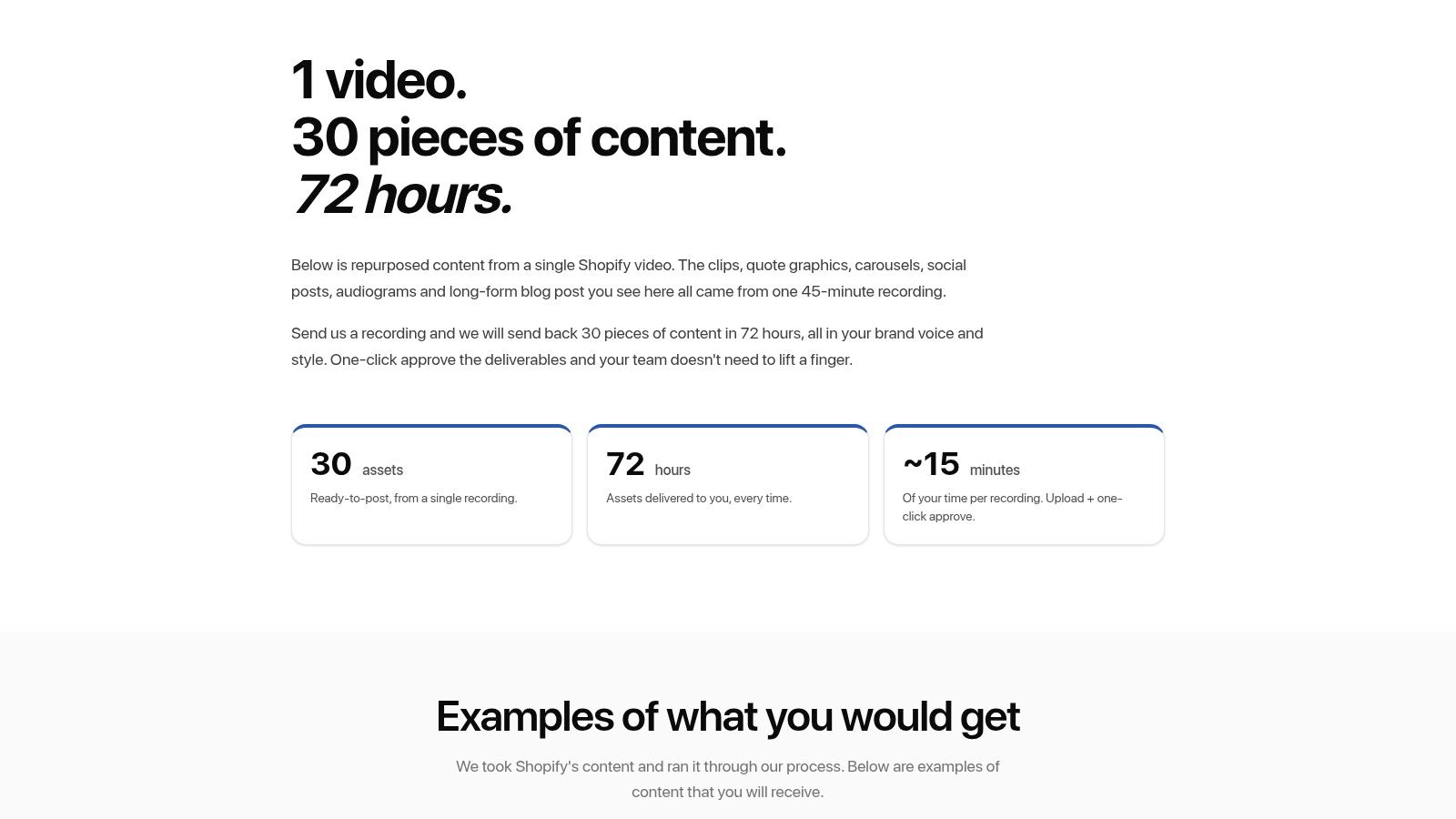
For a concrete benchmark, review this Shopify repurposing example. It shows the difference between isolated edits and a coordinated content set built from a real brand recording.
The recommendation
Choose a done-for-you repurposing service when leadership time is expensive, your team already has recorded content, and consistency matters more than one-off edits.
Choose editing support when you only need cleaner video.
Choose repurposing when you need publishing assets, channel-ready copy, and a workflow your team can run in minutes instead of hours.
Tags:




