Video Content Creation: A Practical Guide for 2026
A practical video content creation guide for podcasters, founders, and B2B teams. Covers formats, workflow, equipment, distribution, and short-form vs long-form
A founder records one 45-minute podcast conversation on Friday. By Monday, the plan is simple: publish a LinkedIn clip, share a few quotes, and send the episode to the email list. Instead, Monday disappears into transcript cleanup, clip selection, captions, resizing, exports, and scheduling.
That is the problem with video content creation in 2026. Recording is only the beginning. The work continues through editing, captioning, platform formatting, publishing, and repurposing. Businesses have recognized the value of video. 91% of businesses use video for marketing in 2026, compared with 86% in 2024, and 93% of marketers report positive ROI (Digital Applied video marketing data).
The practical question isn't whether a team should create video. It's how to turn existing recordings into useful content without making a founder or marketer spend the entire week in post-production.
What Video Content Creation Actually Means in 2026
A recorded interview can be finished in an hour and still consume several days of marketing time. The recording is only the source. Someone must find the useful moments, remove dead air, add captions, create platform-ready versions, write copy, and schedule each asset.
Video content creation is therefore a workflow, not a camera purchase. It covers the full path from an idea to published and repurposed content:
- Planning: Select the audience, topic, format, and action the viewer should take.
- Recording: Capture a podcast, interview, keynote, sales call, course lesson, livestream, or product demonstration.
- Editing: Tighten pacing, remove dead air, choose clips, and produce the main version.
- Packaging: Add captions, titles, thumbnails, quote graphics, and calls to action.
- Formatting: Prepare vertical, square, and horizontal versions for different placements.
- Publishing: Write descriptions and captions, schedule posts, and place videos on owned channels.
- Repurposing: Turn one recording into clips, social posts, carousels, audiograms, and written content.
The camera is rarely the main constraint for B2B teams. A quiet room, clear audio, and a current phone or laptop camera can produce usable footage. Post-production is where the hours go. Editors must judge which moments deserve attention, then adapt each asset to its destination without weakening the original message.
Practical rule: A recording is raw material, not a content strategy.
The market supports several formats at once. Global online video audiences are estimated at roughly 3.48 billion viewers in 2026, according to Wix online video statistics. That reach can support short clips, educational videos, livestreams, testimonials, and episodic shows, but each format requires different editing and distribution work.
The commercial trade-off also matters. Short-form content can create repeated exposure and reach new viewers, while long-form content has more room for context, trust, and revenue-focused calls to action. Treating every recording as a collection of short clips can improve reach while removing the detail that supports a serious buying decision.
A practical B2B video marketing strategy assigns each recording a job before editing begins. Decide what stays long-form, what becomes short-form, and which post-production steps require a specialist. The B2B video marketing strategy guide offers a framework for making those choices before the source file disappears into a folder.
The Main Types of Video Content Worth Making
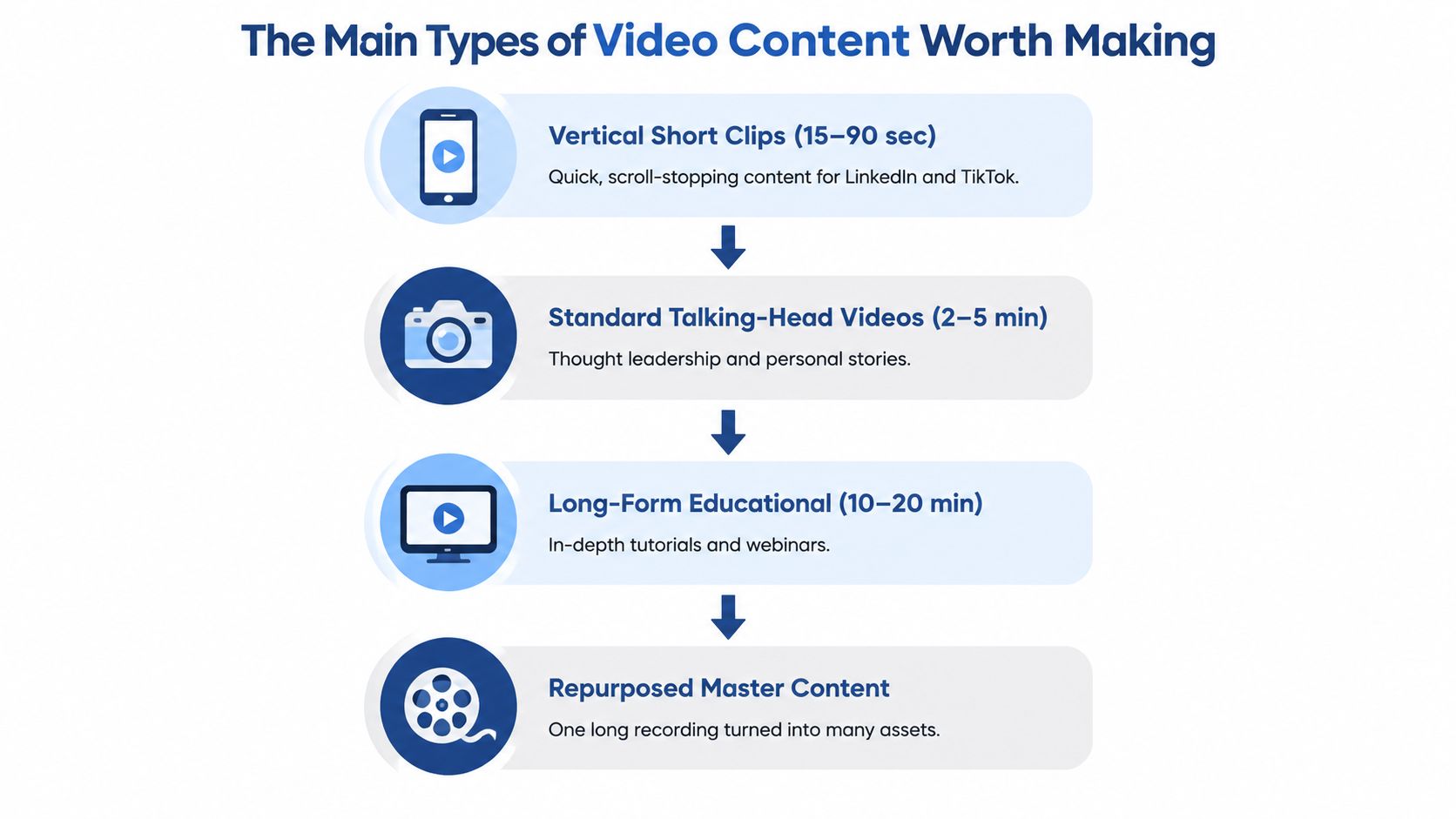
The right format depends on the job the content must perform. Short clips create repeated exposure. Longer videos build context. Repurposed content gives both formats a common source.
Vertical short clips
Vertical clips usually run from 15 to 90 seconds. They fit LinkedIn, Instagram Reels, TikTok, and YouTube Shorts. A strong clip makes one point quickly, such as a founder explaining why a familiar sales process fails.
Short-form retention is highly sensitive to runtime. Benchmarks place average retention at 60% or more for clips under 15 seconds, about 50% for 15 to 30 seconds, and roughly 40% for 30 to 60 seconds (Kinovela short-form retention benchmarks). That doesn't mean every clip should be cut to seven seconds. It means each clip needs one clear idea, a fast opening, and a clean resolution.
Standard talking-head videos
Talking-head videos often run from 2 to 5 minutes. They work well for personal stories, opinions, product explanations, and thought leadership. A marketing director can answer one customer question without building a full production.
Mid-form explainers and demonstrations
A 2 to 8 minute explainer gives the speaker room to show a process, explain a product, or address an objection. A screen recording can demonstrate a workflow more clearly than a short quote.
Long-form educational content
Long-form videos include podcast episodes, interviews, courses, livestreams, webinars, and YouTube programming. They preserve nuance and let viewers understand a complicated subject. A 45-minute interview may contain the source material for an entire month of distribution, but only after someone reviews and packages it.
Trust-building recordings
Customer interviews, keynote presentations, sales calls, behind-the-scenes discussions, and founder conversations serve a different purpose. They capture proof, language, objections, and personality. Those elements often become stronger social content than heavily scripted promotional copy.
The production decision should follow the channel being fed. Teams publishing short clips need strong hooks and tight edits. Teams building authority need longer explanations. Teams with limited time should record once, then assign each useful moment to the format that suits it. This B2B video content formats guide for LinkedIn provides additional context for that choice.
Production Versus Repurposing Workflows
DIY video production and DIY repurposing look different, but both consume serious time. Production begins before the camera turns on. Repurposing begins after the recording already exists.
A non-specialist creating one short-form asset may spend time on the brief, recording setup, lighting, audio cleanup, editing, titles, thumbnails, scheduling, and publishing. The total can reach 6 to 12 hours for one short-form asset, based on the workflow described in the production plan for this article. That estimate includes the hidden preparation and publishing work, not just time spent moving clips on a timeline.
Repurposing one long-form source changes the output, not the labor. The operator still needs to create a transcript, identify hooks, select clips, write captions, add subtitles, reframe footage, export several versions, and schedule each asset. A long-form source can take 8 to 15 hours to repurpose manually when the work includes multiple short clips and platform formatting.
| Workflow Stage | DIY Production (hrs) | DIY Repurposing (hrs) |
|---|---|---|
| Brief and content selection | 1 to 2 | 1 to 2 |
| Recording or transcript review | 1 to 2 | 1 to 3 |
| Main edit or hook selection | 2 to 4 | 2 to 4 |
| Captions and visual packaging | 1 to 2 | 1 to 3 |
| Formatting and exports | 0.5 to 1 | 1 to 2 |
| Scheduling and publishing | 0.5 to 1 | 1 to 2 |
| Approximate total | 6 to 12 | 8 to 15 |
The point isn't that manual work has no value. A specialist may need to preserve a speaker's tone, check technical accuracy, or protect sensitive information. The point is that a solo founder usually becomes the editor, copywriter, designer, scheduler, and quality reviewer at once.
A workable manual sequence
- Record the source: Reserve time for the conversation, setup, sound check, and file management.
- Create a transcript: Review the transcript for complete ideas, not isolated sentences.
- Mark candidates: Select six to twelve moments with a clear hook, useful detail, or strong opinion.
- Build the clips: Tighten pauses, add captions, and keep each clip focused.
- Format versions: Prepare vertical, square, and horizontal exports where the source supports them.
- Write distribution copy: Create platform-specific captions, titles, descriptions, and calls to action.
- Schedule and review: Check every export on a phone before publication.
A separate adaptation may be necessary for presentation-heavy material. Teams turning slides into training content can review this resource on turning slides into learning videos. For long-form video repurposing, the same principle applies. The source should be treated as a library of ideas, not as one finished post. A detailed long-form video clipping workflow can help teams define that process.
Equipment and Editing Decisions That Matter
Equipment decisions matter, but they shouldn't become a shopping project. The first priority is clear audio. A $200 lavalier microphone and a quiet room can improve perceived quality more than a camera upgrade, because viewers tolerate ordinary visuals more readily than muffled speech or room echo.
A simple talking-head setup needs consistent framing, controlled light, and enough separation from the background. Natural window light can work for a founder update. Product demonstrations need a clean view of the screen, device, or physical object. Smartphones from the last three years are generally sufficient for most B2B work when the room and framing are handled well.
| Use Case | Audio Priority | Visual Setup | Editing Approach |
|---|---|---|---|
| Founder thought leadership | Clear lav or close microphone | Stable eye-level framing | Tight pauses and restrained captions |
| Customer interview | Consistent voices on both sides | Two-person or split-screen layout | Remove repetition without flattening personality |
| Product demonstration | Voice clarity plus system audio | Screen capture with readable detail | Cut errors and emphasize key actions |
| Podcast video | Balanced microphones | Two-camera or single-camera composition | Switch angles only when it supports pacing |
| Keynote or livestream | Room sound control | Wide shot plus speaker detail | Preserve narrative while removing technical gaps |
Editing choices should support comprehension. Jump cuts can remove dead space. Captions should match the spoken words and remain readable on small screens. Background music should sit below speech, not compete with it. Over-produced motion graphics often distract from a strong speaker, especially in expert-led B2B content.
Choose the editing approach by source
A timeline editor such as Premiere Pro suits complex footage, multiple camera angles, detailed sound work, and advanced graphics. Transcript-led editors such as Descript or CapCut suit faster assembly from spoken recordings, but speed still depends on editorial judgment and platform knowledge. The software doesn't choose the best hook, verify a claim, or decide whether a point belongs in a clip.
Export settings also affect the final result. A practical social workflow crops to the native aspect ratio first, then exports at 1080p with a bitrate slightly above the platform target. Platforms commonly transcode 1080p delivery to roughly 2 to 4 Mbps, so pre-compressed or incorrectly scaled files can suffer more artifacts during the second pass (Wild and Free Tools export guidance). Marketers comparing editing options can review this guide to AI video editing tools for marketers, while keeping the core decision focused on workflow capacity.
Short-Form Reach Versus Long-Form Revenue
Short-form and long-form video serve different economic roles. Short clips can generate broad discovery, but long-form content usually carries stronger monetization, deeper intent, and more room for a conversion path.
Current creator-economy reporting estimates YouTube Shorts at about 200 billion daily views, with Shorts RPM around $0.03 to $0.06, compared with roughly $1 to $10 for long-form video (Creator Economy Reports). Those ranges imply a 100 to 300 times revenue gap per view between the cited Shorts and long-form RPM ranges. The gap exists because short-form feeds offer less ad placement and less viewing depth, while long-form gives advertisers more room and often attracts higher-intent audiences.
The figures shouldn't be treated as a universal forecast. Audience location, subject, sponsorship, distribution, and conversion quality all affect revenue. The strategic lesson remains useful: reach and revenue aren't the same metric.
| Format | RPM Range (USD) | Typical Length | Funnel Role |
|---|---|---|---|
| Short-form clips | $0.03 to $0.06 | Under 60 seconds | Discovery and top-of-funnel reach |
| Long-form video | $1 to $10 | 8 minutes or longer | Authority, education, and monetization |
| Sponsored or highly monetized long-form | Varies by deal | 8 minutes or longer | Commercial intent and conversion |
Decide what deserves a clip
Clip material when it is quotable, visual, surprising, or provocative. A founder's explanation of a failed hiring assumption can become a 30-second discovery asset. A customer interview answer with a specific objection and resolution can attract qualified attention.
Keep material intact when the value depends on sequence. Tactical instruction, technical demonstrations, product walkthroughs, and narrative interviews often need 8 to 20 minutes to build trust and move a viewer toward action.
Short-form should feed long-form, not replace it. Teams should also review YouTube Shorts best practices before building a clip series, especially when the objective is discovery that leads viewers to a deeper recording.
Distribution and Optimization Across Platforms
A finished edit can still fail at distribution. Each platform asks viewers to make a slightly different decision, so the packaging must change with the destination.
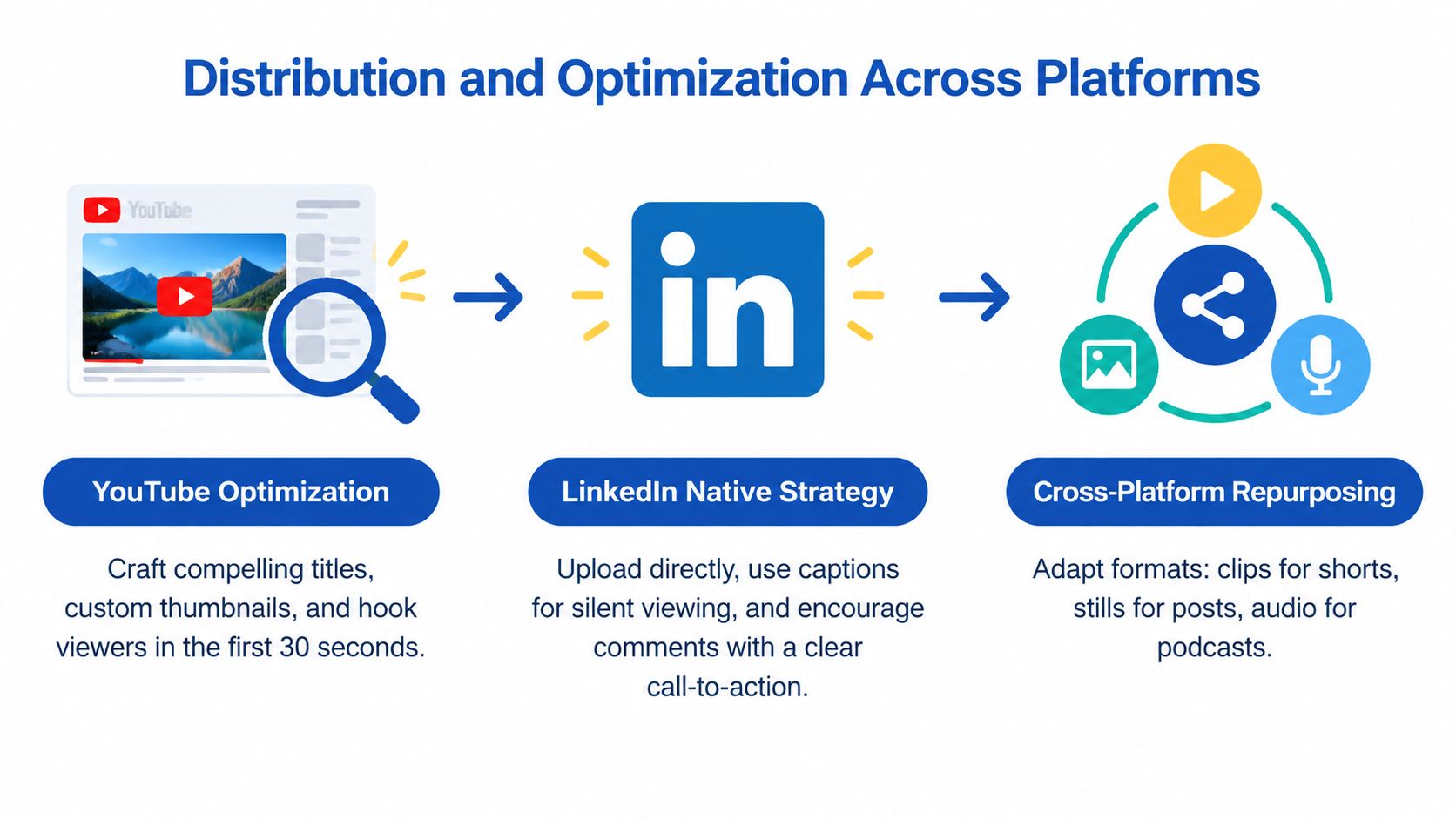
YouTube needs a clear title, a compelling thumbnail, and a strong opening. The first 30 seconds must establish the problem and promise quickly. LinkedIn depends more heavily on the written hook, context around the video, and a question that encourages useful discussion. TikTok benefits from edits that feel native to the feed rather than recycled television segments. Owned properties, such as a product page or email newsletter, should place the video beside a relevant next action.
Match the export to the destination
- Vertical feeds: Use 9:16 for short-form placements.
- LinkedIn and Instagram grids: Use 1:1 when the composition benefits from a square frame.
- YouTube: Use 16:9 for standard long-form videos.
- Resolution: Export at 1080p as the practical baseline. Use 4K only when the destination supports it and the source justifies it.
- Captions: Add readable captions for silent viewing and accessibility.
- Upload method: Upload natively instead of relying on an external link when the platform supports direct video.
The most common silent quality problem is forcing horizontal footage into a vertical frame. Upscaling and aggressive cropping can blur text, cut off speakers, and leave an awkward composition. The editor should choose the crop before export, then position the speaker and supporting visuals intentionally.
Distribution rule: Don't publish one master file everywhere. Publish one idea in the format each channel can display well.
A recording can create a distribution cascade. The long-form episode becomes the authority asset. Selected moments become vertical clips. A strong quote becomes a graphic. A structured explanation becomes a LinkedIn post or carousel. The transcript can support a blog post, while the audio becomes a podcast version. Each asset should point toward the next useful action, rather than repeating the same caption across every channel.
The Done-For-You Alternative
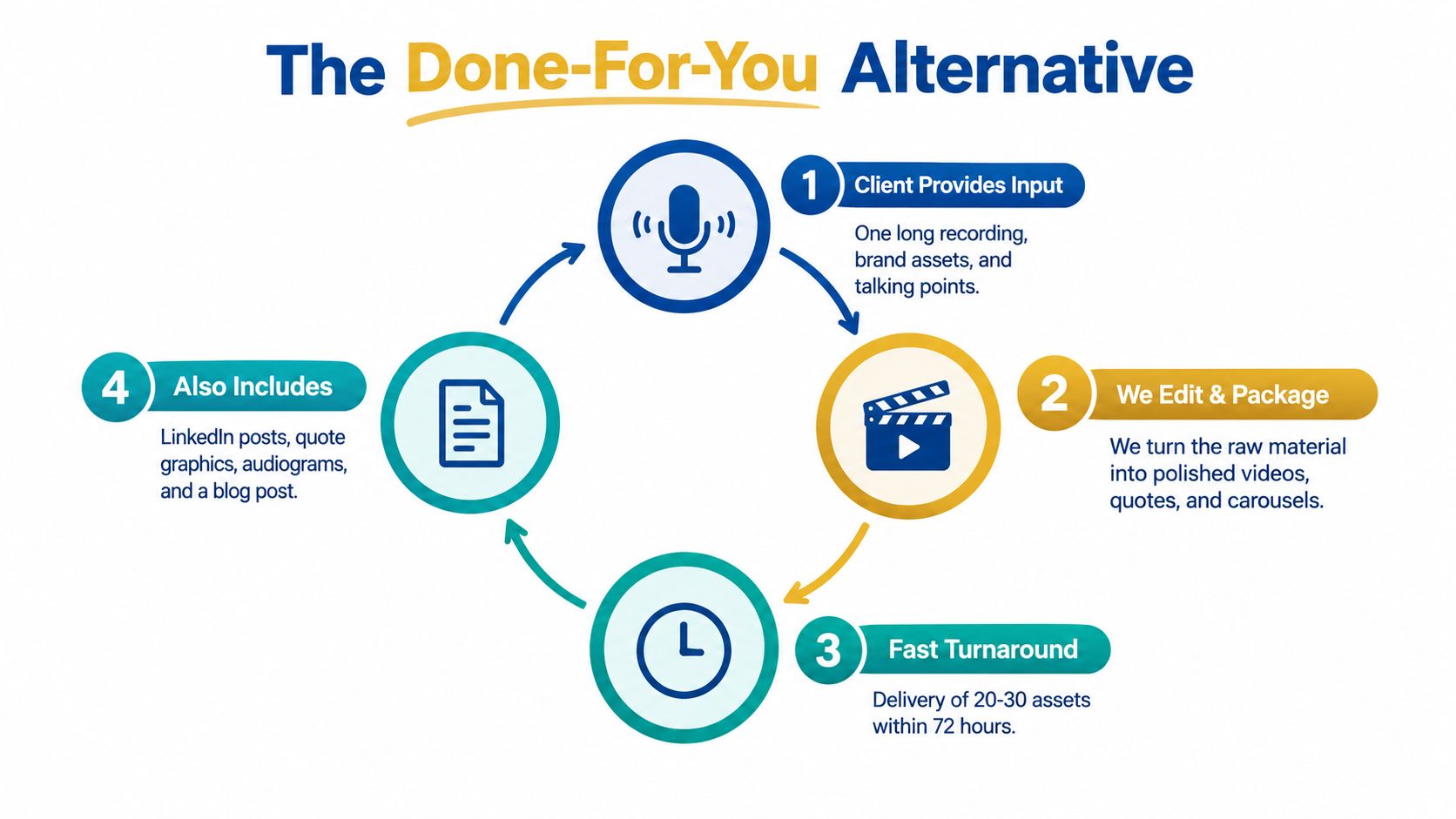
A done-for-you service works best when the recording already exists and the internal team lacks post-production capacity. The client provides one podcast, keynote, interview, sales call, livestream, course recording, or meeting recording, along with brand assets and key talking points.
The production partner then reviews the source, identifies usable moments, edits the footage, writes supporting copy, formats the assets, and prepares the delivery. With RepurposeYourContent, a client sends one recording and receives 20 to 30 ready-to-publish assets in 72 hours, including video clips, LinkedIn posts, quote graphics, carousels, audiograms, and a blog post. The client's time is about 15 minutes, and the service includes unlimited revisions.
The workflow in practice
- The client sends the source: A 45-minute recording, brand kit, and any required messaging notes.
- The editor reviews the material: Strong hooks, complete ideas, customer language, and visual moments are marked.
- The team packages the content: Clips, captions, graphics, carousels, audiograms, posts, and the blog draft are created.
- The client reviews the delivery: Feedback is collected through approval stages, with revisions available.
- The client publishes: Finished assets arrive in the correct formats, with ownership remaining with the client.
The value is not a mysterious automation layer. It's the removal of repetitive labor from the founder's calendar. A manual workflow can consume 8 to 15 hours per long-form source, while a structured service keeps the client focused on recording and approval. Pricing can also be evaluated per asset. Some providers advertise rates from $14 per finished asset, depending on the package and output volume.
Outsourcing shouldn't mean losing control. A responsible provider should show the selected source moments, preserve the raw files, explain approval stages, and hand over finished assets without watermarks. Teams comparing providers can use this guide on how to choose a production provider to assess communication, turnaround, ownership, and editing quality.
Done-for-you video content creation isn't a full creative agency that scripts every idea or sends a camera crew. It's a post-production partnership for teams that already have expertise captured in recordings. For businesses evaluating video repurposing services, the central question is simple: how much finished content can one recording produce without pulling the subject matter expert away from revenue work?
Key Takeaways and Next Step
Video content creation is a workflow problem before it's an equipment problem. The recording matters, but post-production determines whether that recording becomes one forgotten upload or a useful body of distribution content.
Six points should guide the decision:
- Post-production is the bottleneck: Editing, captions, formatting, and publishing consume the labor after the recording ends.
- Short-form creates discovery: Clips help new audiences find the speaker, company, or idea.
- Long-form supports depth: Detailed recordings preserve context, authority, and stronger commercial intent.
- Manual repurposing costs real time: A long-form source can require 8 to 15 hours of work when one person handles selection, editing, copy, formatting, and scheduling.
- Audio and framing beat unnecessary upgrades: Clear speech and a stable composition carry more value than expensive equipment used poorly.
- Aspect ratio can damage quality: Horizontal footage forced into vertical layouts can blur text, crop speakers, and weaken the final asset.
The practical decision rule is equally direct. Keep a recording long when the idea needs sequence, proof, or explanation. Cut it short when one moment can stand alone and earn attention quickly. Use both formats when the goal includes discovery and conversion.
A busy founder or B2B marketer can book a short discovery call to review the existing recording workflow, publishing goals, and monthly content volume. There's no signup, demo deck, or pressure. The call is a working conversation about whether sending one recording and receiving finished assets within 72 hours, with a 72-hour turnaround guarantee or no payment, fits the team's current capacity.
If Monday is still disappearing into post-production, book a call or request a sample and see what one 45-minute recording can become.
Tags:




