Podcast with Music: Production and Repurposing Guide
Create a podcast with music from recordings without copyright strikes. Learn licensing, mixing, and how to turn one recording into 30 assets in 72 hours.
You've spent a week preparing a 45-minute interview. The conversation is sharp, the guest is credible, and the recording is ready. Then someone adds a commercial track under the intro, clips the episode for LinkedIn, and discovers the music rights never covered those uses.
A podcast with music needs more than a good song and a clean edit. You must clear the composition and the recording, mix the track below speech, and plan for every format created from the episode. Podcasting reached 584.1 million listeners worldwide in 2025, with projections of 619.2 million by the end of 2026 and 651.7 million in 2027, according to industry podcast statistics from Loopex Digital. The audience is large. The production shortcuts are still risky.
The Hidden Cost of Adding Music to Your Podcast
A takedown can arrive after the episode has already gained traction. The producer may have spent hours editing dialogue, removing pauses, writing show notes, and creating clips. None of that protects an episode that contains uncleared music.
The common mistake is treating music as decoration. A founder finds a track on YouTube, downloads it, and assumes a short intro is harmless. Another producer gets verbal permission from an independent artist but never records the permitted platforms, territory, duration, or commercial uses. Both workflows leave the show exposed.
Spotify's creator copyright guidance says creators need permission or appropriate rights when including someone else's music, audio, video, or other intellectual property. Without those rights, Spotify says the content may need to be replaced or removed.
Why the first edit should be a rights audit
Music creates separate obligations for the composition and the master recording. The composition covers the underlying melody and lyrics. The master covers the specific recorded performance. A producer can clear one and still lack permission for the other.
That distinction matters across the full production chain:
- The episode intro: The theme must be cleared for the podcast itself.
- The background bed: Dialogue use may require a different scope from a standalone music segment.
- The social clip: A LinkedIn, YouTube, or short-form video version can create another permitted use.
- The advertisement: Commercial placement may require rights beyond ordinary episode distribution.
A practical cost guide for podcast editing and repurposing makes the broader point clear. Production costs aren't limited to cutting silence. They include the work needed to make every finished asset safe and publishable.
Production rule: A track doesn't belong in the timeline until its permitted uses are written down.
Creators who want original identity without clearing a famous song can consider custom podcast tracks with Drumloop AI. A purpose-built track can simplify brand continuity, but the agreement still needs clear permission for every planned distribution channel.
Clearing Rights for Every Music Context
Rights clearance starts before editing. A producer should list every place the music will appear, then match each use to the required permission. Buying a track from a library isn't automatically enough if the license excludes commercial promotion, video, social clips, or client work.
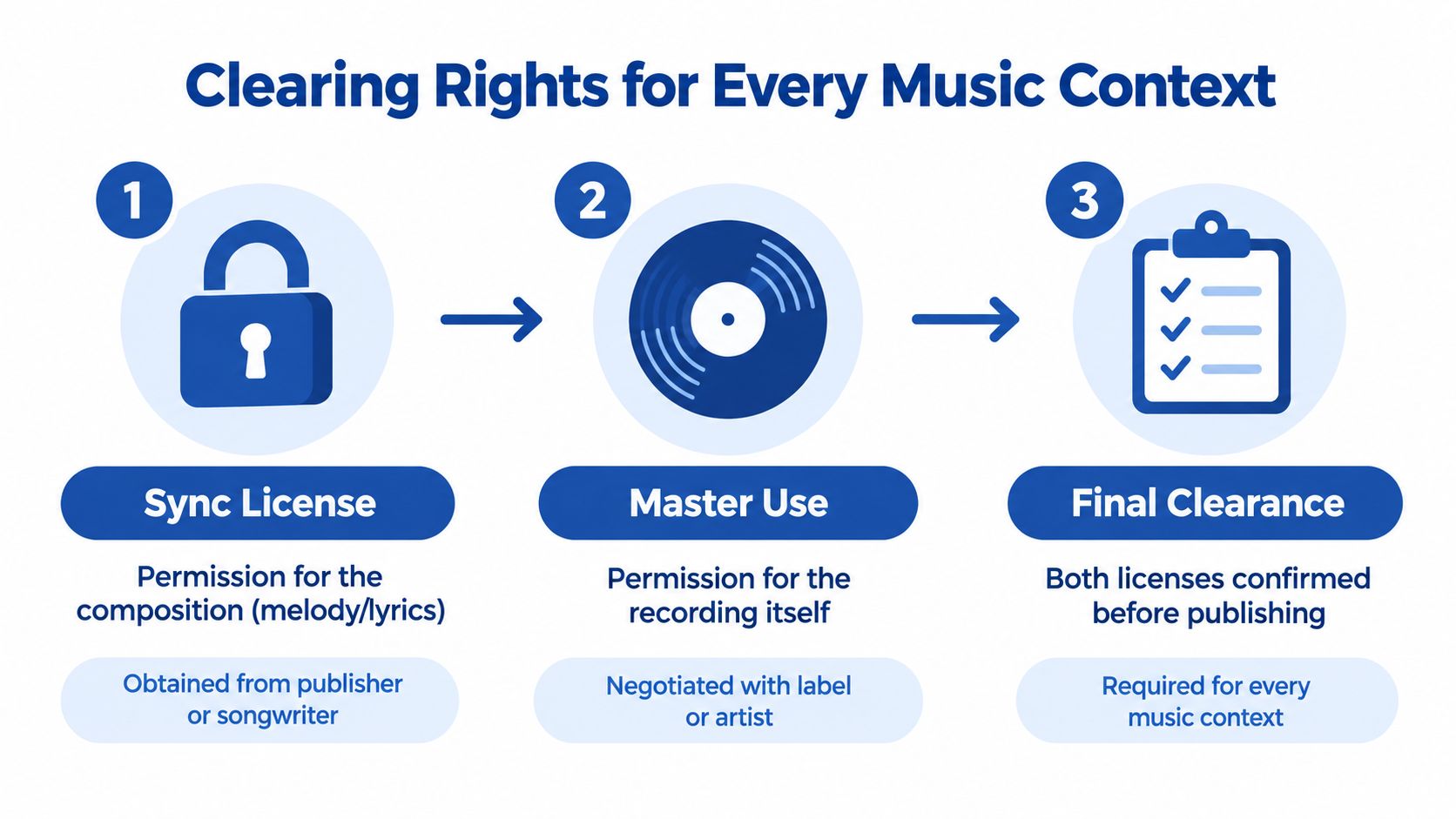
Commercial music generally requires two permissions:
- Sync license: Permission to pair the composition with spoken audio or video.
- Master-use license: Permission to use the specific sound recording.
The composition may come from a publisher or songwriter. The master may belong to a label or artist. Different owners can control each right, so one email or one subscription doesn't necessarily clear both.
Use a context-first decision tree
Classify the music before selecting a track. The context determines the questions that need answers.
| Music use | Clearance questions |
|---|---|
| Intro theme | Is the track licensed for an on-demand podcast and branded opening? |
| Background bed | Does the license cover speech, commercial use, and the planned territory? |
| Transition | Can the track appear repeatedly across episodes? |
| Social cutdown | Does the permission include video, LinkedIn, YouTube, and short clips? |
| Advertisement | Does the scope cover paid promotion and sponsor placement? |
A PRO license alone doesn't cover every on-demand podcast use. Legal guidance from the Broadcast Law Blog on music in podcasts explains that podcasts need reproduction and distribution rights, not only performance rights. The producer usually needs permission from the owners of both the composition and the recording.
The supposed 10-second rule isn't a safe harbor. Short duration, attribution, or a credit in the show notes doesn't replace permission. The Soundstripe guide to podcast music rights specifically addresses the risk of assuming that a short clip or intro avoids clearance.
Keep proof that survives staff changes
Written permission should identify the track, permitted contexts, platforms, territory, duration, monetization status, and any restrictions on editing. Save the license, invoice, email confirmation, and track identifier in the episode folder.
Fair use is also narrow. Podnews legal guidance on fair use for podcasters describes stronger arguments where music is used for criticism, comparison, or illustration. If listeners could treat the podcast segment as a substitute for the original music, licensing is the safer route.
Mixing Levels to Protect Speech Intelligibility
A cleared track can still damage the episode. The most common audio failure is background music that competes with the speaker, especially under dense explanations, technical terms, or fast conversation.
Published creator guidance commonly recommends placing music about 15 to 20 dB below the voice, with some guidance extending to roughly 20 to 30 dB below. The exact setting depends on the voice, arrangement, compression, and playback environment. The principle is consistent: speech leads, music supports.
Build the mix from the voice outward
Start with the dialogue. Clean the voice, balance the speakers, and establish a consistent speech reference before adding any bed. Then lower the music until it supports the mood without pulling attention from consonants.
A workable sequence looks like this:
- Edit and balance the spoken tracks.
- Set the intro and dialogue music on separate tracks.
- Lower the music beneath the speech.
- Automate the music level around changes in density.
- Check the result on headphones and small speakers.
- Review the video and social versions separately.
A static gain setting often fails. Music that sounds appropriate in a standalone intro can mask words under a quiet interview. A bed that works beneath one speaker may disappear beneath another. Automation lets the producer lower the track during explanations and raise it during pauses, segment breaks, or clean visual moments.
Mixing principle: If a listener notices the bed before understanding the sentence, the bed is too loud.
Protect every output, not just the master episode
A podcast may become a YouTube video, an audiogram, a vertical clip, and a social post. Each version can undergo different platform checks and loudness review paths. A mix that seems acceptable in a full-length audio file may sound crowded when compressed into a short video with captions and visual motion.
The same discipline applies to spoken content created from podcasts, interviews, keynotes, and sales calls. VoiceType's tone onboarding setup is relevant when repurposed copy must preserve the speaker's intended voice, but the audio still needs human review for clarity.
Producers should listen on the devices their audience uses. Headphones reveal masking and harshness. Small speakers expose whether the voice remains understandable without low-end support. A guide to audio enhancement tools for webinars can help teams understand the wider cleanup workflow, but no tool fixes an over-loud music bed.
Structuring Intros, Outros, and Transitions
Music works best when it gives the episode shape. It should signal the show's identity, separate major movements, and support the closing call to action. It shouldn't delay the useful content or become a repeated interruption.
A practical intro usually runs 15 to 30 seconds, a benchmark discussed in podcast music licensing guidance from Audiodrome. That window gives the listener enough sonic identity without making the opening feel like an advert for the show itself.
Give each music moment a job
The intro should establish the brand and move quickly into the host's promise. The outro should create a clean landing point for the next action. Transitions should tell the listener that the conversation has changed direction.
A simple arrangement might look like this:
- Opening: Music starts, then drops under the show name and episode promise.
- First segment: The bed fades completely unless it supports a deliberate atmosphere.
- Speaker change: A short transition separates the voices without covering the first sentence.
- Major section: A brief musical cue marks a new topic or chapter.
- Closing: Music returns under the final call to action, then fades after the last spoken word.
Chapter planning makes this easier. The podcast glossary entry for intro and outro gives teams common production language for these elements.
A transition should never feel like a volume jump. Automate the rise and fall, leave space around important words, and avoid placing a musical hit directly beneath a guest's first syllable. The listener should feel the structure without having to analyze it.
A video version adds another consideration. Music can support B-roll, title cards, or a quote graphic, but the dialogue mix must remain consistent when the visual changes. The audio should still work for someone who looks away from the screen.
The following example shows how music can support a founder interview without dominating it:
- Step 1: Open with a short licensed theme.
- Step 2: Fade it under the host's welcome.
- Step 3: Remove it before the guest answers.
- Step 4: Add a brief cue before the practical takeaway.
- Step 5: Bring the theme back under the final call to action.
The result feels designed, not decorated.
Repurposing One Recording into 30 Assets
A finished episode is only the first deliverable. The harder commercial problem is turning one recording into enough useful material for the channels where buyers already pay attention.
A 45-minute interview can contain a strong opinion, a practical process, a customer objection, a memorable phrase, and several short teaching moments. Finding those moments manually requires more than pressing export. Someone must review the recording, mark timestamps, cut clips, format captions, draft posts, design graphics, and check every asset against the brand.
A practical 30-asset workflow
The workflow below keeps the legal and editorial decisions connected.
- Record once. Capture the podcast, interview, keynote, livestream, sales call, or meeting with clean speech and documented music permissions.
- Review the source. Identify the strongest arguments, explanations, stories, objections, and calls to action.
- Select the clips. Create short video or audio moments that work without the full episode.
- Write the supporting copy. Turn the same ideas into LinkedIn posts, captions, email angles, and a search-focused article.
- Design the visual layer. Build quote graphics, carousels, audiograms, and branded video layouts.
- Quality-check the set. Confirm captions, names, claims, music use, aspect ratios, links, and brand voice.
- Publish from a schedule. Match each asset to its intended channel and audience stage.
A one-stop service can return 20 to 30 ready-to-publish assets within 72 hours, including video clips, LinkedIn posts, quote graphics, carousels, audiograms, and a blog post. The handoff can take about 15 minutes when the client supplies the recording, brand assets, and any rights information.
AI-powered content repurposing tips from Zemith can help teams think through format selection, but the editorial burden still sits somewhere. Someone must decide which moments deserve distribution and whether the final content sounds like the company.
Editorial test: Every clip should make sense to a viewer who never heard the original recording.
The content repurposing matrix helps map one source to multiple formats without posting the same message everywhere. The strongest system changes the angle by channel. A detailed LinkedIn post can explain the reasoning. A quote graphic can carry the central claim. A short clip can show the speaker's delivery. A blog post can answer the broader search question.
Music needs a final check during this stage. The license for the full episode must also cover any music that remains in the extracted clips. If it doesn't, the clip needs a cleared replacement bed or a clean edit.
The Done-For-You Alternative to Manual Editing
DIY production looks cheap until the full workload appears on the calendar. Rights research takes time. Track documentation takes time. Dialogue cleanup, music automation, clipping, captioning, graphic design, copywriting, reviews, exports, and scheduling all require different skills.
For a single 45-minute recording, a founder may spend several hours across those tasks. The work can stretch across a full day when the person is learning the process, fixing formatting errors, or revising assets that don't sound like the brand.
The choice is time or specialist support
| DIY production | Done-for-you production |
|---|---|
| Researches track permissions | Receives the music documentation and production brief |
| Learns editing and mixing workflows | Handles cleanup, pacing, and level automation |
| Finds clips and writes every post | Selects moments and drafts channel-specific content |
| Designs each visual asset | Produces branded graphics and carousels |
| Manages exports and revisions | Returns a reviewed delivery for approval |
| Carries the full coordination burden | Uses one recording and one structured handoff |
A done-for-you service can take one podcast, webinar, keynote, interview, or meeting recording and return 20 to 30 finished assets in 72 hours. The package can include video clips, LinkedIn posts, quote graphics, carousels, audiograms, and an SEO-ready blog post, written in the client's brand voice. The client's working time is about 15 minutes, mainly for sending the recording, brand materials, and production notes.
RepurposeYourContent is one service option that accepts a long-form recording and returns finished content across those formats. Its stated offer includes 20 to 30 assets, unlimited revisions, and a 72-hour turnaround guarantee, or the client doesn't pay. Pricing starts from $14 per finished asset, based on the supplied service details.
That arrangement doesn't remove the need for rights ownership. The client still needs permission for music used in the source recording, especially when clips are distributed on other platforms. It does remove the repetitive production burden and gives the team a clear place to document those permissions.
The practical workflow is simple:
- Send the recording.
- Provide the brand kit and music clearance details.
- Receive the finished asset set.
- Request revisions or approve publication.
A recurring podcast deserves a repeatable system, not a new scramble after every episode. To turn the next recording into publishable content without spending a week in post-production, request a sample or book a production call with RepurposeYourContent.
Tags:




