How to Repurpose Podcast Content for Instagram
Learn how to repurpose podcast content for Instagram with Reels, carousels, quote graphics, and Stories. Includes a weekly recipe and time-cost breakdown.

Most podcasters don't have a content problem. They have a format problem. One episode can turn into 2 to 3 video clips, 5 quote graphics, 1 blog post, and 3 carousel posts when it's repurposed properly, which is why repurpose podcast content for Instagram works best when you map moments to formats instead of just cutting random clips Influence Flow.
That matters because Instagram doesn't reward every asset the same way. Reels can reach non-followers, carousels can earn saves and shares, and Stories can create episode-day urgency with people who already care. If the same 45-minute conversation gets treated like one giant clip dump, the show leaves reach and engagement on the table.
Why Most Podcasters Get Instagram Repurposing Wrong
The default advice to “cut clips and post them” is lazy. It sounds practical, but it skips the part that matters on Instagram: choosing the right asset for the right job. A podcast episode is not one block of content. It is a source file with different moments that can serve different formats.
The highest-value work starts before any edit is made. The question is which moments should become a Reel, which should become a quote graphic, and which should become a carousel. That is the difference between posting content and building a distribution system.
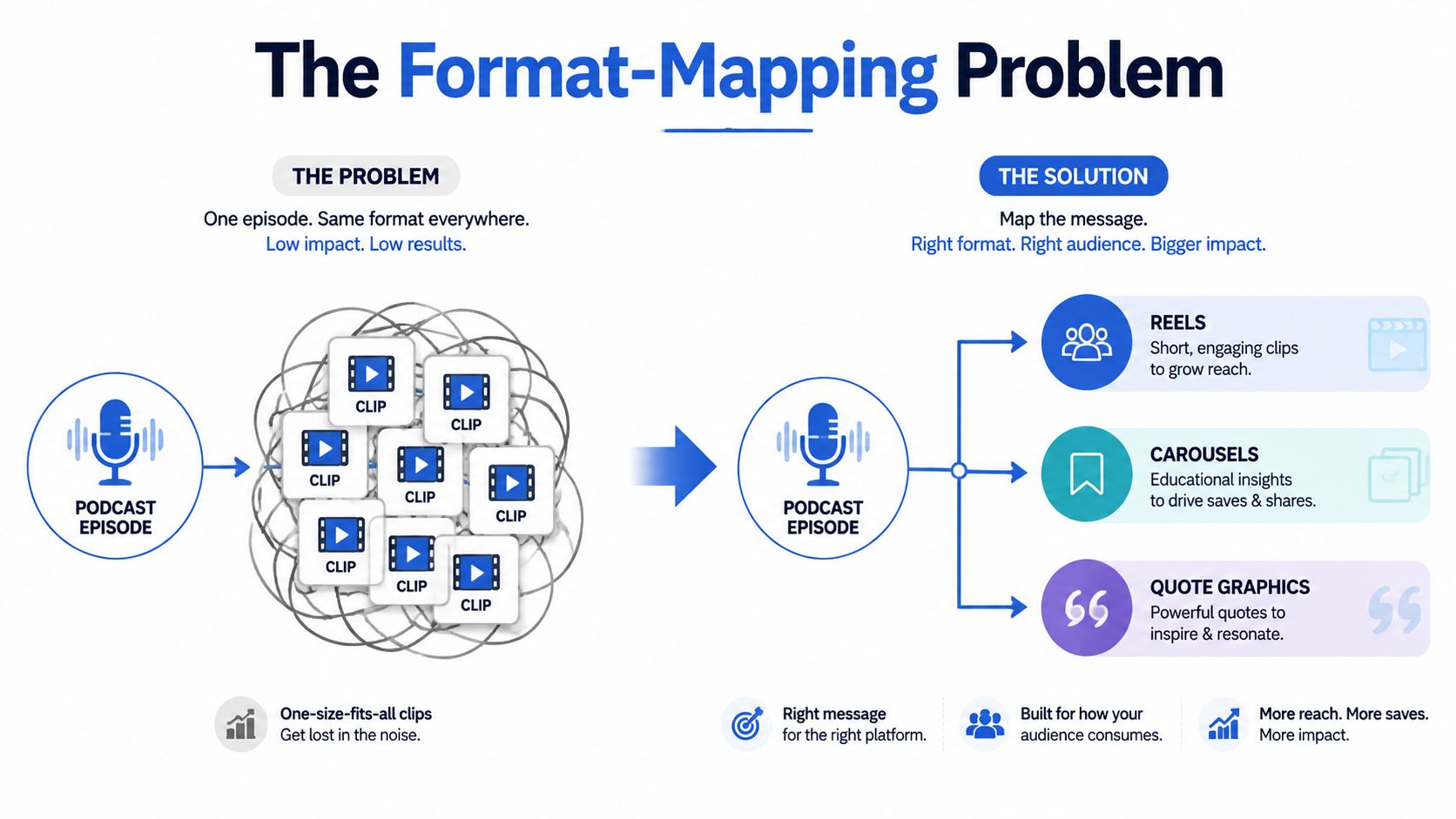
The format-mapping problem is the primary bottleneck
Instagram's product direction has made this harder to ignore. Reels are built for quick discovery, carousels are built for deeper attention, and the platform keeps giving more visibility to short vertical video See how native and repurposed content compare in practice. That means podcast repurposing can fit the platform well, but only if the asset matches the surface it is going onto.
A motion-heavy guest reaction belongs in a Reel. A sharp one-liner can live longer as a quote graphic. A three-step framework works better as a swipeable carousel. Treating everything as a clip produces weak assets that do not match how people consume on Instagram.
Practical rule: if the moment depends on voice and timing, make it motion. If the words land on their own, make it text.
That decision gets missed all the time because clipping is easier than thinking. But the thinking is where the results come from. A strong episode can yield several formats, while a poor workflow creates a pile of near-identical videos that all ask for attention in the same way.
If the content is going to be distributed across feeds, it needs to be built for that from the start. The difference shows up in the first two seconds, and it also shows up in whether people save, share, or scroll past.
See how native and repurposed content compare in practice.
Which Instagram Format Wins Which Objective
The choice is simpler than most guides make it. Reels are the format for reach and new eyes because they can travel beyond your followers. Carousels are the format for saves and shares because they reward people who want to study the idea. Stories are the format for episode-day urgency because they reach people who already know the show and need a quick nudge.
That hierarchy matters because each format should be judged on its own job. A Reel that reaches strangers can still be a weak asset if it does not pull profile visits. A Carousel can be the better post even if it gets less immediate visibility, because it gives your existing audience something worth keeping. Stories should be read for taps, replies, and the small actions that show warm attention, not for broad discovery.
Reels are for discovery
A strong Reel usually starts with motion, emotion, or a quick exchange that feels alive. A guest reaction, a blunt claim, or a sharp turn in the conversation can all work. The clip has to make sense fast, because new viewers will not spend time decoding context.
Use Reels when the job is to reach people who have never heard the show. That is where the first two seconds matter most. If the opening does not create interest immediately, the rest of the clip rarely gets a fair hearing. The edit has to carry the moment without depending on the listener already knowing the episode.
Carousels are for retention
Carousels work best when the episode contains a framework, a sequence, or a set of takeaways that can be broken into clean slides. They give a follower room to absorb the idea at a slower pace. They also fit content that would feel thin as video.
Use a Carousel when the value sits in the structure, not the delivery. A strong claim can open the post, then each slide should move the idea forward in order. That format tends to earn saves because people can return to it later when they want the steps, the list, or the reference points again.
Stories are for urgency
Stories are the cleanest place for launch-day energy. They work for behind-the-scenes moments, new episode drops, and quick reminders that do not need a polished finish. They are also the least demanding format visually, which makes them useful when the team needs to stay active without turning every post into a production project.
The goal of Stories is momentum. They keep the audience warm between bigger posts and give loyal listeners a direct path to the new episode. When you want immediate response from people who already trust the show, Stories do that job without asking much from the viewer.
This repurposing framework for podcast episodes makes the same point in a practical way. If the format does not match the objective, the post underperforms no matter how strong the episode was.
How to Pick the Right Moments From One Episode
Start with the transcript. That's the fastest way to stop guessing. Once the full conversation is in text, the strongest moments usually reveal themselves fast, especially when the host or guest makes a counterintuitive point, a sharp claim, or a visible emotional shift.
The practical filter is straightforward. If the delivery carries the impact, that moment becomes a Reel. If the words alone land hard, it becomes a quote graphic. If the episode breaks an idea into multiple steps, it becomes a carousel. The same recording should produce different asset types from different moments.

A simple workflow that doesn't waste your time
- Pull the transcript first. Without it, the process turns into re-listening and guesswork.
- Mark the five strongest moments. Look for tension, disagreement, specificity, or a line people would repeat.
- Sort each moment by format. Motion-heavy moments go to Reels. Strong one-liners go to quote graphics. Multi-step ideas go to carousels.
- Choose the episode-day anchor. The launch post should feel strongest. The rest can spread through the week.
- Write the caption once the format is decided. The CTA changes depending on whether the post is designed for reach, saves, or clicks.
The time sink here is decision-making. Rather than trying to make every good moment fit one format, focus on distinct angles. That creates bland output if you don't. Better episodes usually generate 8 to 12 short clips and 4 to 6 quote graphics from different parts of the conversation, not from the same section repeated five ways Content Allies.
Strong episodes don't just give you clips. They give you proof points, phrases, and takeaways that can be distributed differently.
For podcast content, that distinction matters. A visible guest reaction can stop a scroll. A clean quote can live longer in-feed. A framework can earn saves. The transcript tells you which one you're holding before editing starts.
Use this clip-selection framework for podcast social content when you need a tighter editorial pass.
Editing Reels That Stop the Scroll
A Reel has one job, earn the first two seconds. That is where most podcast clips fail. They open with context, introductions, or setup, and the viewer is gone before the actual point arrives.
Start on the strongest line, not the safest one. Vertical framing is required, and captions need to be on because viewers often watch social video without sound Create Motif. Captions are part of the edit, not decoration.
What the edit should do
Keep the clip tight enough to hold attention. A 2026 guide recommends clips in the 30 to 90 second range and vertical exports at 1080x1920 px for Reels Create Motif. That gives a thought enough room to land without drifting.
Cut dead air. Tighten the pace. Put the hook first. If the speaker spends 12 seconds getting to the point, the clip is already losing ground. Music and b-roll can help, but they should support the moment, not bury it. When the footage needs a lot of cleanup, the edit gets expensive fast, which is why this captions guide for video clips matters if you want a cleaner workflow.
Editing rule: if the clip needs a long setup, it probably is not the right clip.
Captions should read cleanly on a phone. Safe zones matter. Contrast matters. The goal is clarity, not style for its own sake. A podcast clip should feel native to Instagram, not like a trimmed archive file.
The caption should open with the episode's most specific claim. Then it should end with one clear CTA, usually pointing to the full episode in bio. One CTA per post is enough. Stacked asks kill action. If the edit is doing its job, the post earns reach first and gives people a reason to save or click after they stop scrolling.
A Per-Episode Instagram Recipe and Weekly Cadence
A weekly episode should feed the whole feed. Dumping everything on launch day is a mistake. It creates fatigue and leaves the rest of the week empty. A better rhythm spreads the same source recording across several touchpoints, so the episode keeps working after the first post goes live.
One episode can usually become 5 to 8 distinct content pieces spread over 2 to 3 weeks Monolit. That spacing gives each asset another chance to catch attention, which matters because different followers notice different formats on different days. A launch week is not the whole plan. It is the starting point.
A Weekly Rhythm That Works
Start with the post that creates the most immediate response, then stagger the rest so the account stays active without feeling repetitive. Launch day should get a Story with a clear episode mention. The first Reel can go the next day, while interest is still fresh. A quote graphic works well after that because it gives the audience a fast, readable takeaway. If the episode has another strong moment, use a second Reel later in the week instead of forcing it into the first one.
A carousel belongs a little later in the sequence, once the audience has already seen the episode in motion. That format gives you room to package takeaways or a simple framework without reusing the same hook. After that, another quote post or a behind-the-scenes Story keeps the feed moving. End the week with a recap Story that points people back to the episode and gives latecomers a second entry point.
The point is not to post for the sake of posting. It is to create several clean opportunities for the same episode to be seen, saved, or shared. A single recording can support a launch Story, staggered Reels, a carousel, and a quote post if the moments are chosen with restraint. Push too many similar clips, and the audience tunes out.
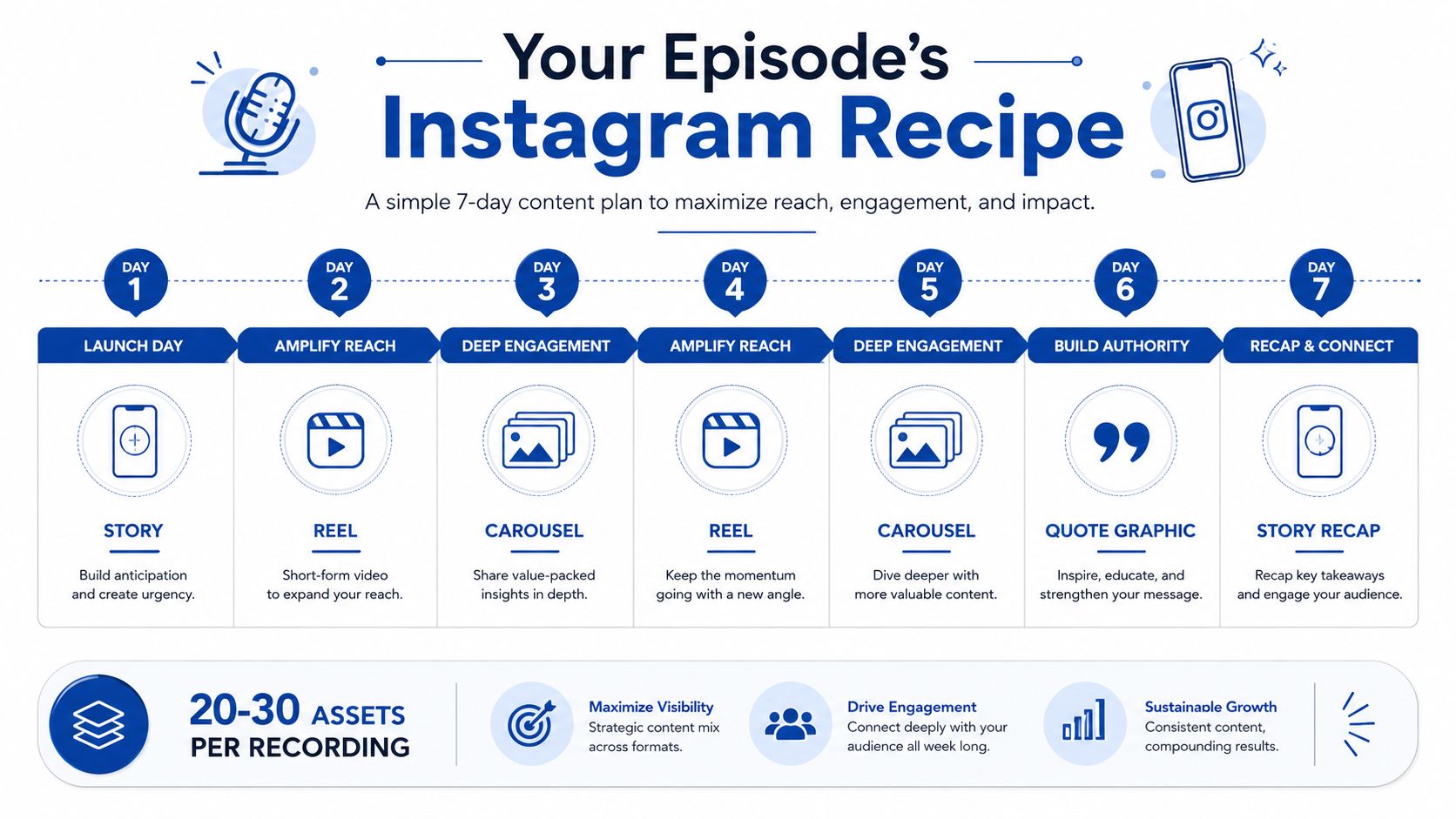
A useful rule is to alternate motion, text, and urgency through the week. That keeps the episode from showing up in the same shape every time. The feed feels active, but it does not feel noisy.
If the team wants a repeatable workflow, podcast-to-social media service support can take the posting pattern off the founder's plate and keep the cadence from slipping when the week gets busy.
The Real Time Cost of Doing This Yourself
DIY repurposing sounds cheap until the clock starts. One episode doesn't just need a clip. It needs a transcript, a review pass, moment selection, edit decisions, design work, copy, and scheduling. That's where the hours disappear.
Transcribing is the easy part. The cost is in human judgment. Someone still has to scan the episode, decide which moments matter, cut the clips, style the captions, design the graphics, and write platform-specific captions that don't sound recycled.
What a single episode usually demands
A realistic workflow looks like this:
- Transcript review: 20 to 40 minutes.
- Moment selection: 30 to 60 minutes.
- Clipping and trimming: 1 to 2 hours, depending on the source recording.
- Caption styling and formatting: 30 to 60 minutes.
- Quote graphics and carousel design: 1 to 2 hours.
- Caption writing and CTAs: 30 to 45 minutes.
- Scheduling across the week: 20 to 30 minutes.
That means one well-repurposed episode can easily take several focused hours. If the show wants consistency, that time repeats every week. For busy founders and marketers, that's usually where the process breaks.
The work is not hard because of one task. It's hard because every task depends on the last one being right.
DIY also compounds the hidden cost of indecision. If the team debates whether a moment belongs in a Reel or a carousel, the process slows again. If the captions are written after the clips are already cut, the messaging gets weaker. If posting is rushed, the week's cadence falls apart.
Consistency is what compounds on Instagram. But consistency is expensive when the team is also running the show, editing the show, and trying to market the show at the same time.
The Done-For-You Alternative for Weekly Instagram Content
RepurposeYourContent handles this as a service, not a tool. Clients send one recording and receive 20 to 30 ready-to-publish assets in 72 hours, including video clips, LinkedIn posts, quote graphics, carousels, audiograms, and a blog post, all written in brand voice with unlimited revisions. Total client time is about 15 minutes RepurposeYourContent.
That matters when the goal is weekly output, not occasional posting. A show that moves from no Instagram presence to daily repurposed content gives the algorithm repeated chances to surface it. Each Reel becomes a doorway for non-followers, and the growth effect compounds when the cadence stays steady.
The pricing is built for volume. Plans run from $999/month for one recording to $2,499/month for a weekly content engine, and that can work out to as little as $14 per finished asset. There's also a 72-hour turnaround guarantee, or you don't pay, which keeps the service tied to output instead of excuses.
See the service details for podcast-to-social repurposing if the current workflow can't keep up with the show's publishing pace.
If weekly podcast content is already being recorded, the next step is simple. Book a call or request a sample, and get a real view of what one episode could become before another week of clips gets lost to DIY bottlenecks.
Tags:


