YouTube Repurposing Service: The Complete 2026 Guide
YouTube repurposing service explained for creators. Learn what to expect, real pricing, Shorts strategy, and how to pick a partner that delivers.

A YouTube repurposing service turns one long-form recording into 8 to 12 clips and 20 to 30 total assets for Shorts, posts, carousels, quotes, and blog content. For teams that publish video weekly, that's the difference between one upload and a real distribution system.
YouTube now has 2.6 billion monthly active users, more than 200 billion daily Shorts views, and over $40 billion in 2025 ad revenue according to Hootsuite's 2026 YouTube statistics. That scale is why one podcast episode, keynote, interview, or sales call can become a discovery layer, not just a recording.
What a YouTube Repurposing Service Does
A YouTube repurposing service is a done-for-you team that takes one long-form video and returns publish-ready clips, Shorts, social posts, quote graphics, carousels, and a blog post. It is not editing software. It is a content production layer that turns one recording into multiple placements.
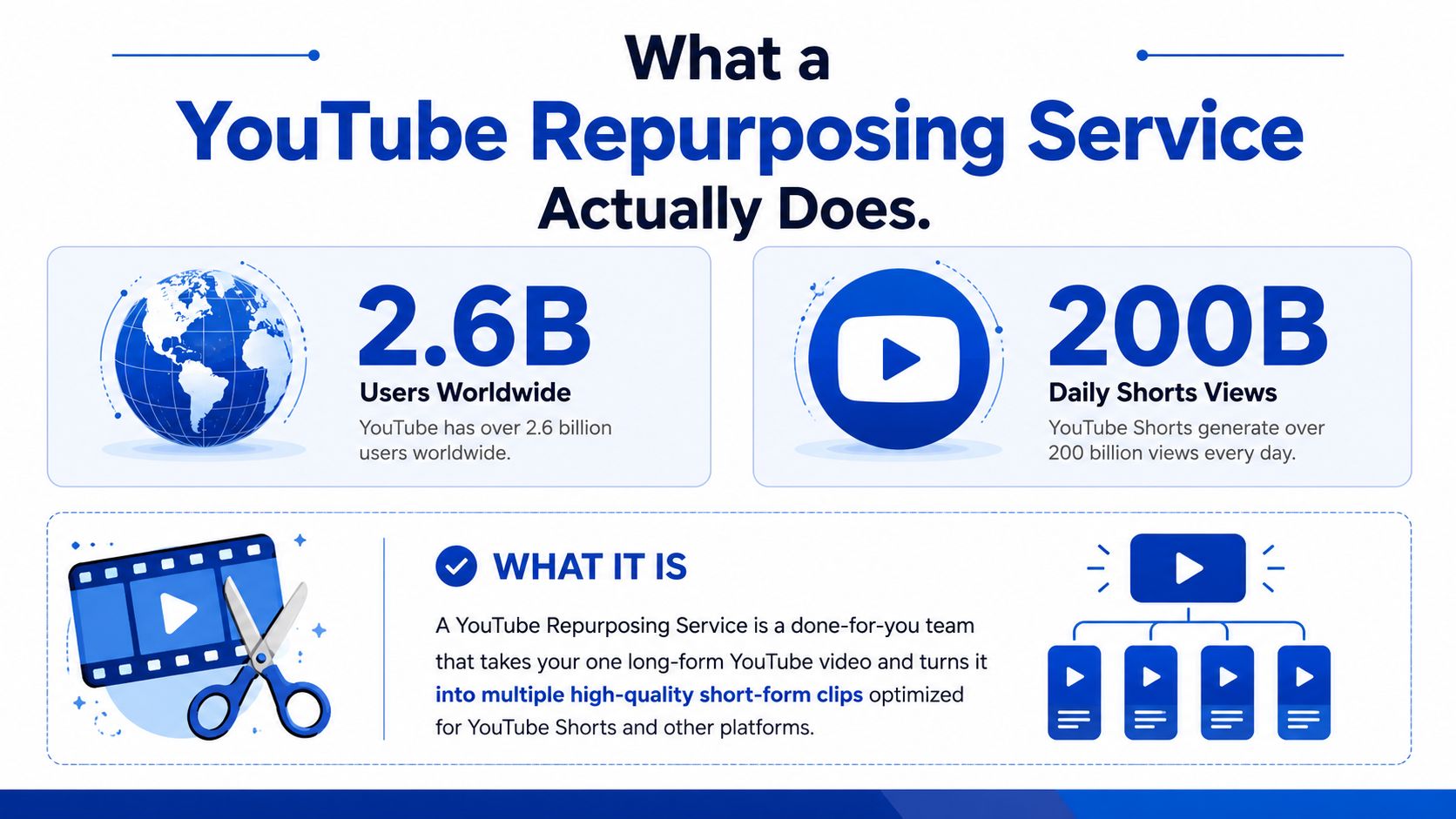
The work usually splits into four families. Short-form video covers Shorts and clips. Written social covers LinkedIn and X posts. Visual social includes quote graphics and carousels. Long-form written gives you a blog post, show notes, or article draft.
Practical rule: if the service still asks you to cut, caption, and design, you are buying labor, not a repurposing system.
A real YouTube repurposing desk is built for distribution, not just extraction. One recording needs different packaging for different feeds, because a clip that works on YouTube Shorts will usually need a different hook, caption style, and pace than a post on LinkedIn. That is the job.
The service layer should also keep you out of reused-content trouble before it becomes a problem. A serious provider checks whether the source material can be repackaged cleanly, whether the edits create enough original value, and whether the final asset set looks like a content program instead of a file dump. Competitors often skip that checkpoint, which is why the policy review matters as much as the edit itself.
For a quick comparison of service models and output types, see the practical breakdown of content repurposing services. A useful contrast point also exists in content repurposing by TransClipper, which shows how the market is being split between automated extraction and human-led packaging.
The four deliverable families
- Short-form video: vertical clips with hooks, captions, and speaker tracking.
- Written social: platform-native posts in the creator's voice.
- Visual assets: quote cards and carousels built from strong moments.
- SEO content: a blog post or article pulled from the same transcript.
That is the service in plain terms. Clients send a link. The team sends back finished assets in the brand voice, with no editing burden on the client side.
The True Cost of Doing It Yourself
DIY repurposing looks cheap until the hours stack up. The software may be inexpensive, but the labor isn't. A single long-form recording can swallow most of a workday before anything is even published.
A realistic workflow starts with rewatching the episode to find usable moments. That usually takes 45 to 90 minutes. Cutting clips in a timeline editor takes 2 to 3 hours per recording. Vertical reframing takes 1 to 2 hours. Captions and burn-ins add another 1 to 2 hours. Then come social posts, quote graphics, carousels, and a blog draft.
A useful internal benchmark is how much content repurposing costs, because the main line item is not the editor. It's the lost time from whoever owns the content engine.
Tools are cheap. Hours are not.
Add the pieces together and the total usually lands around 12 to 17 hours per long-form video before revisions. That's one recording. If the episode still needs rewrites, design cleanup, or approval rounds, the time cost climbs again. A founder doing this manually is trading away time that should go to sales, delivery, or audience growth.
Where the time actually goes
- Moment hunting: finding self-contained sections that make sense alone.
- Editing: trimming dead space and building clips that hold attention.
- Formatting: resizing and reframing for vertical feeds.
- Writing: turning the transcript into posts that sound like the creator.
- Design: building quote graphics and carousel slides that match the brand.
DIY also creates context switching. The producer has to think like an editor, writer, designer, and channel manager in the same session. That's why many teams stop after one upload. The effort to do it properly is real, and most channels don't have a spare half-day every week to spend on it.
How a Repurposing Service Works End to End
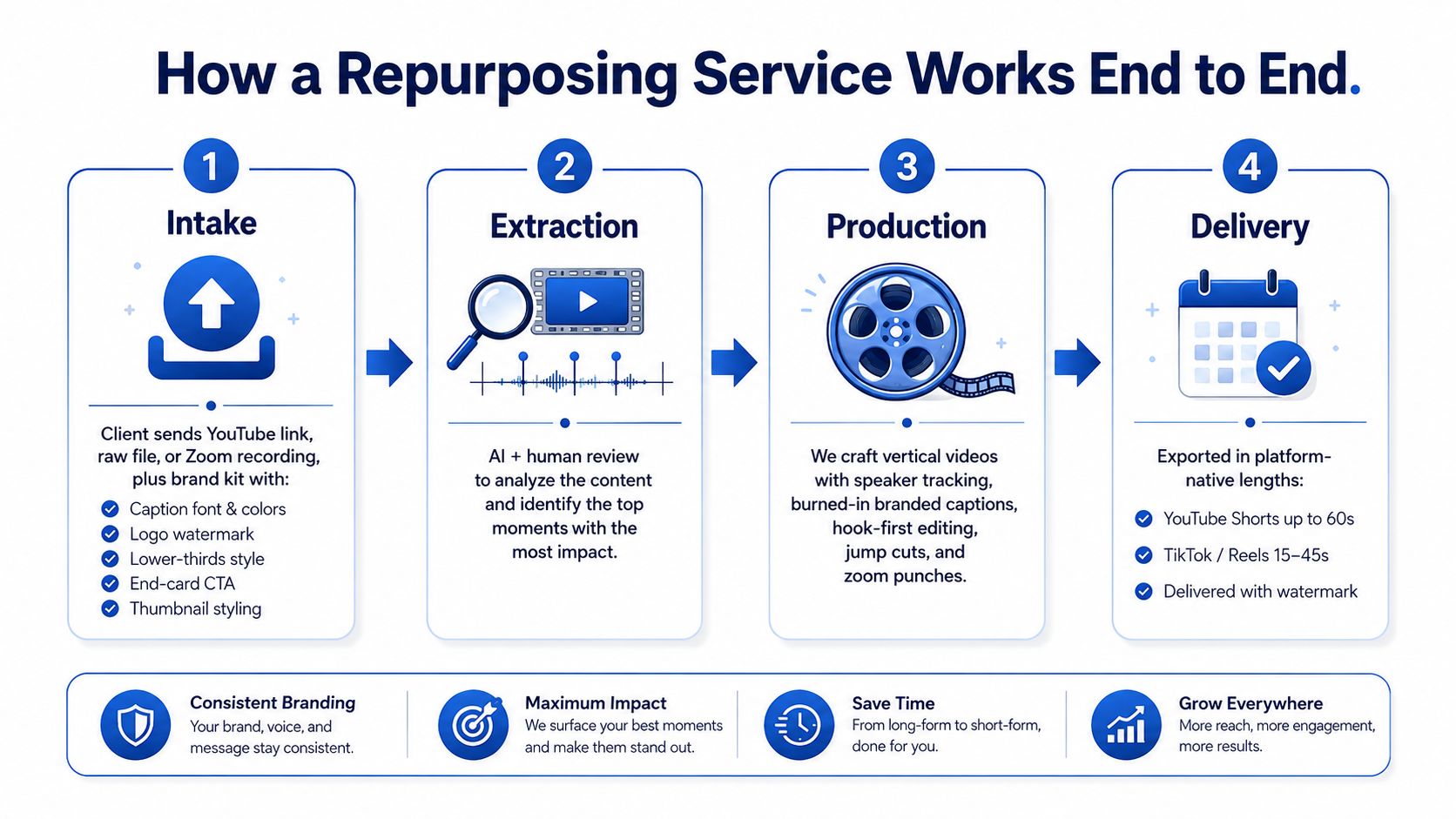
A good service runs like a production desk, not a clip farm. The sequence is usually intake, extraction, production, and delivery. Each stage reduces guesswork and keeps the output aligned to the original recording.
Intake and brand setup
The client sends a YouTube link, a raw file, or a Zoom recording. The brand kit usually includes caption font, colors, logo, handle watermark, lower-thirds style, end-card CTA, and thumbnail styling. That's what keeps every asset recognizable before the viewer even reads a word.
If the service has to guess the brand system each time, quality drops fast. Good onboarding happens once, then the same rules are applied to every output. For audio cleanup work inside the workflow, a practical reference is remove background noise from video, since poor source audio can slow the entire pipeline.
Extraction and selection
Strong teams use a transcript-first process. They read the full transcript, mark self-contained moments with hooks, then cut. They don't auto-slice on intervals and hope for the best.
That matters because a self-contained clip needs a beginning, middle, and end. It has to make sense without the full episode. That's also where vertical reframing, burned-in captions, and hook-first editing start to matter.
Production and QA
The writing layer should be human, or at least human-reviewed. Social posts, carousels, and blog drafts need the creator's voice, not generic filler. A good service also checks every asset against the brand kit before delivery. For a broader look at AI in the workflow, this guide to AI content repurposing is useful context.
Delivery and revision
Most production-grade teams deliver within 48 to 72 hours. The output usually lands in a dashboard or by email, with a review pass and unlimited revisions. In practice, that means the client spends minutes approving, not hours producing.
| Typical deliverable | Common format |
|---|---|
| Short-form clips | 8 to 12 vertical videos |
| Written social | LinkedIn and X posts |
| Visual content | Quote graphics and carousels |
| Long-form written | Blog post or article draft |
One implementation example is a workflow that uses transcript intake, LLM drafting, and human approval before publishing. That pattern works because it treats publishing as the last step, not the first.
Turning Long Videos Into Shorts That Get Watched
Shorts work when they act as a discovery layer, not a clip factory. A long video can feed that layer, but only if the opening earns attention fast. If the first couple of seconds do not create curiosity, the viewer scrolls.
The practical way to build that layer is to start from the full transcript, mark self-contained moments with hooks, then cut. A solid guide on how to repurpose long-form video into short clips goes through that selection process in more detail.
What the cut has to do
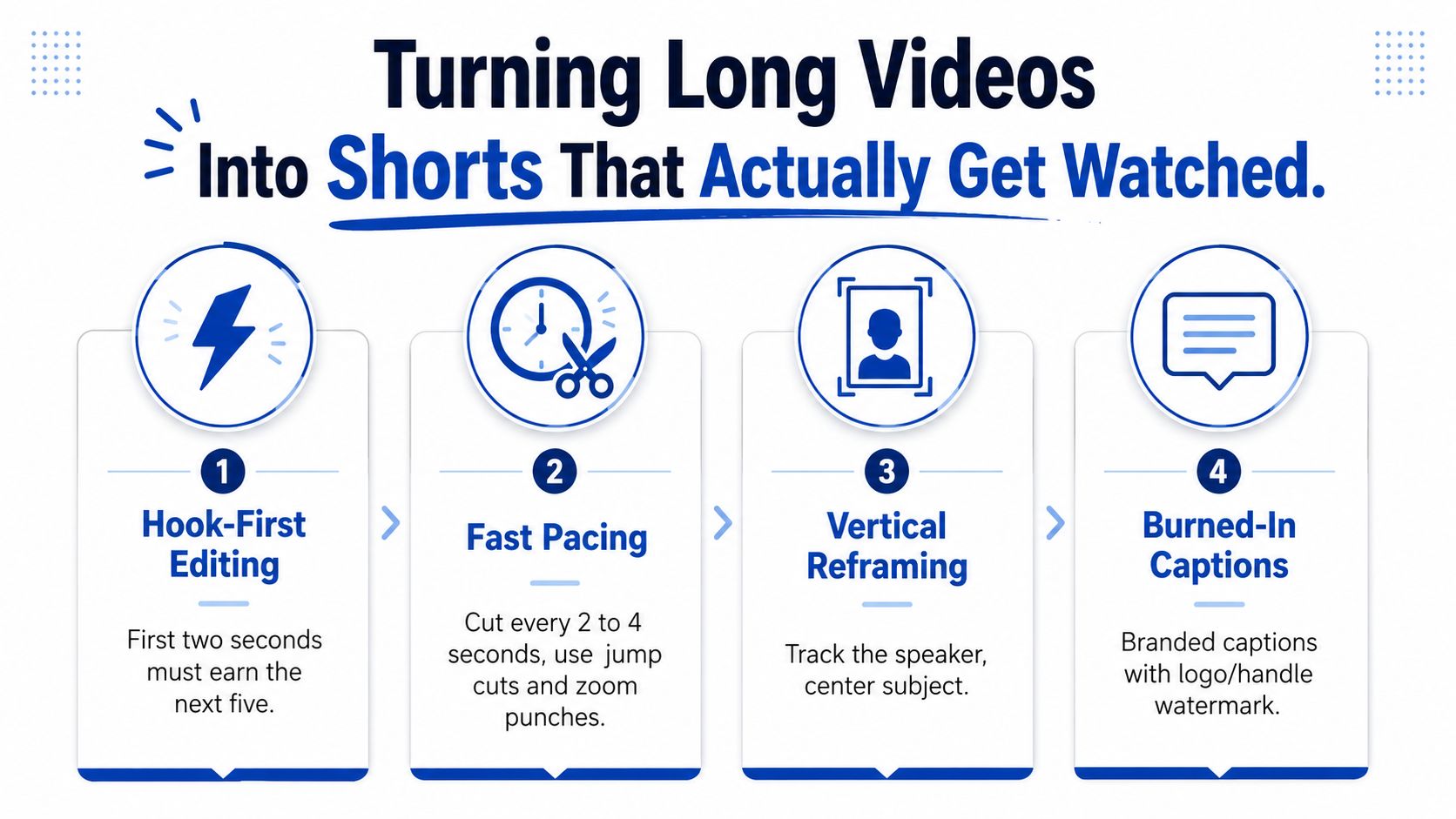
A clip needs a hook-first opening. Use a contrarian statement, a concrete claim, or a sharp question. The pace has to stay tight, with cuts every few seconds when the speaker slows down or repeats themselves. Jump cuts and zoom punches keep the frame active without turning it chaotic.
Platform length matters too. Shorts support up to 3 minutes on YouTube's repurposing-side platform constraints, while many repurposing workflows also classify much shorter outputs for TikTok and Reels to stay inside platform rules. Once a clip runs too long, retention usually drops before the point lands.
What captions and framing should look like
Captions should be burned in, not left to default auto-generation. The text has to match the brand font, color, and tone. Vertical reframing should follow the speaker, not leave them stranded in the corner.
For a developer-side look at how resizing gets automated, video resizing API for developers is a useful comparison point. It shows the technical side of what a repurposing desk usually handles by hand or with editing software.
How to think about performance
Shorts are the discovery layer. They reach people who would not sit through a full upload first. The value is that some viewers click through to the channel and become long-form watchers.
That means tracking the source in YouTube analytics matters. It is the cleanest way to see whether Shorts are feeding the main channel or just collecting views. Repurposed Shorts should stay a supplement. They are not a replacement for original uploads, and YouTube's reused-content guidance makes that distinction more than cosmetic when it reviews titles, descriptions, and substantive originality.
What You Should Expect to Pay
Pricing depends on how much human work sits behind the output. A cheap quote often means shallow clipping, weak writing, or no real QA. A serious service charges for judgment, brand alignment, and revision handling.
The three pricing models that show up most
Per-asset pricing is the simplest structure. It usually runs $10 to $40 per finished asset, depending on complexity. It's flexible, but it can reward shallow outputs because the provider is paid to produce volume, not depth.
Per-recording pricing fits how creators think. It usually lands around $500 to $1,500 per long-form video for 20 to 30 assets. That model is easier to manage because one recording maps to one package.
Monthly retainers work best for weekly publishers. They usually sit around $999 to $2,500 per month for recurring output. That structure fits channels that need a predictable content engine.
Pricing tells you the labor mix. If the quote is low, ask what got removed, human writing, QA, revisions, or brand setup.
A useful floor to benchmark against is about $14 per finished asset. Anything much lower needs careful inspection. The provider may be skipping the human layer that keeps content on-brand and usable.
| Model | Typical Range | Best For | Watch Out For |
|---|---|---|---|
| Per-asset | $10 to $40 each | Occasional batches | Shallow editing and weak consistency |
| Per-recording | $500 to $1,500 per video | Most creators and podcasts | Scope creep if deliverables aren't clear |
| Monthly retainer | $999 to $2,500 per month | Weekly publishing teams | Paying for capacity you won't use |
The important thing is what's included. Human writing, human QA, unlimited revisions, and brand kit onboarding all add real cost. If a quote seems too clean, it usually hides missing labor somewhere in the chain.
How to Vet Any YouTube Repurposing Service
A serious vetting call should take 10 minutes, not 10 days. The goal is to find out whether the service can ship content that looks like yours and holds up as a Shorts discovery layer, not a clip factory. The easiest way to do that is to ask direct questions.
The eight questions that expose the workflow
- Writer check: Is the copy written by a human or by AI only?
- Brand kit use: How are fonts, colors, logos, and lower-thirds applied?
- Revision policy: How many revision rounds are included?
- Turnaround: What's the promised turnaround in business hours?
- Ownership: Who owns the finished files and final assets?
- Samples: Can they show a real deliverable before you buy?
- Missed deadlines: What happens if the service slips?
- Confidentiality: How is private source content handled?
A good service answers these cleanly. A weak one answers with vague language and no proof. The service should also be able to show that it understands how content repurposing services work without hiding behind generic marketing language.
Red flags that usually mean trouble
- Vague turnaround times: If “fast” is the best answer, expect delays.
- No sample work: If there's nothing to show, there's nothing to inspect.
- Watermarks on drafts: Draft watermarks often signal an agency that doesn't trust its own process.
- Outsourced hand-offs: Too many middle layers usually lower quality.
- Generic templates: If the sample ignores the niche, your content will too.
- Locked-in annual contracts: A long lockup can hide poor delivery.
| Red flag | Question that exposes it |
|---|---|
| Vague turnaround | What's the turnaround in business hours? |
| No sample work | Can they show a real deliverable? |
| Watermarked drafts | Who owns the finished assets? |
| Outsourced hand-offs | Who writes and edits? |
| Generic templates | How is brand voice applied? |
| Annual lock-in | What are the exit terms? |
YouTube's reused-content policy also belongs in the hiring checklist. Reviewers look at the channel description, titles, and video descriptions, and they care whether the content has substantive changes and original value, not just cosmetic edits. That's a hiring issue, not just a publishing issue.
A Real Workflow From Upload to Published
A 45-minute video podcast episode is a clean example because it has enough depth to produce multiple assets. The creator uploads one YouTube link and the brand kit, then the service handles the rest. The creator's total time is small if the workflow is built properly.
Step 1 is intake. The creator sends the link, logo, fonts, colors, and caption style. That takes about 10 minutes if the brand kit already exists.
Step 2 is transcript review. The team scans the conversation and flags self-contained moments with hooks. The creator doesn't touch this part. A strong transcript-first workflow can surface a lot of usable material from one episode without interval-based slicing.
Step 3 is production. The service turns the episode into 8 to 12 vertical clips, 6 to 8 LinkedIn and X posts, 4 to 6 quote graphics, 1 to 3 LinkedIn carousels, and one blog post. The clips get burned-in captions and a hook in the first two seconds. The creator time here is zero.
Step 4 is approval. The creator reviews the batch and requests revisions or approves it in one click. That usually takes 5 minutes.
Step 5 is publishing. The creator spaces the assets across the next two weeks using the posting playbook. That part is distribution, not production, so the content keeps working after the original episode is live.
Total creator time is about 15 minutes. Total finished assets are 28. That's the practical difference between a recording and a content engine.
A strong repurposing desk makes one upload feel like a week of publishing, without turning the creator into an editor.
The Done-For-You Alternative
RepurposeYourContent handles the entire repurposing layer from each upload. Send one recording, a YouTube video, podcast, keynote, interview, livestream, or sales call, and the team returns 20 to 30 ready-to-publish assets in 72 hours. That includes Shorts and clips, LinkedIn posts, quote graphics, carousels, audiograms, and a blog post, all in the creator's voice, all built from the brand kit, all human-QA'd, with unlimited revisions.
The pricing floor starts at $14 per finished asset, which is the kind of benchmark that makes a quote easier to judge. The service also offers a 72-hour turnaround guarantee, or you don't pay. That matters because speed only counts when the output is usable.
This video repurposing services overview is useful context if the buyer wants the broader service model behind the YouTube-specific workflow. RepurposeYourContent also supports the practical YouTube intake path that starts from a YouTube link and ends with finished content, not another editing task.
The main value is simple. The creator records once, then gets back a full distribution set without touching captions, design, or transcript cleanup. That keeps the channel active without adding another production role to the team.
One recording becomes a week or more of publish-ready content, and the creator spends minutes, not afternoons.
Book a call with RepurposeYourContent or request a sample if the goal is to see how one recording would turn into finished Shorts, posts, and written content before making a commitment.
Tags:


